makes sense to me - I will look at how this looks on the prev version and implement
1 Like
I don’t have Windows to test with but I did ask AI to see what recent changes could have caused this and got the below response. Basically saying the likely culprit is a system tray library update and asked if you can check on these:
  - Logs: %USERPROFILE%\.hubitat-dashboard\logs\hubitat-dashboard.log — the file logger and LogManager.onAppStart() run after the crash
  handler installs, so any caught exception should be recorded there (or pushed to Supabase via LogManager.recordCrash).
  - Quick check: see if %LOCALAPPDATA%\composetray\native\win32-x86-64\WinTray.dll exists, and try deleting it to force re-extraction.
I’ll try installing Windows on a virtual machine and see if I can reproduce it too
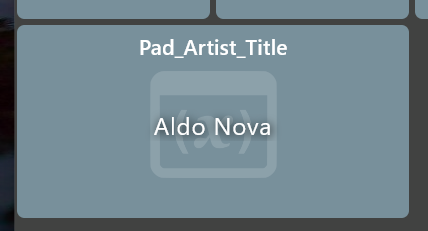
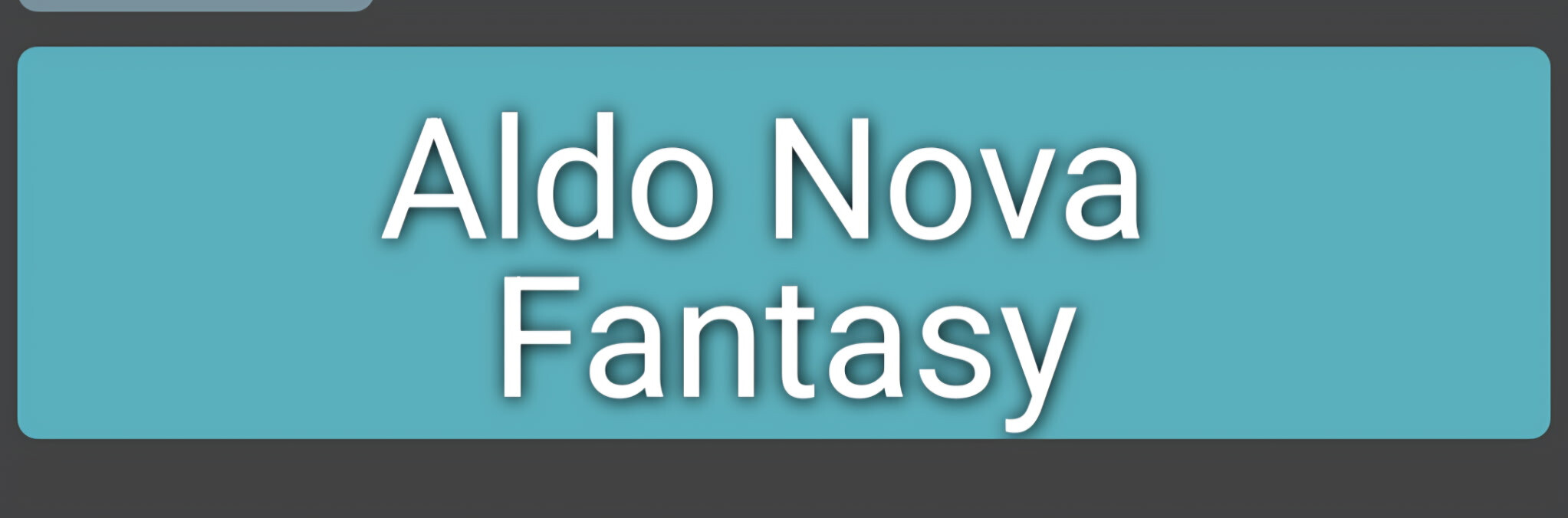
In the Windows version, I have noticed that the Variable Connector from Hubitat for a string is not handled correctly as it is in the Android version. Not sure what the problem is yet but I am working on it.
Windows version:
Android (Phone) version:
Looks like I found the culprit. I had a weather device and it was logging the following information in the log. When I removed it from Maker api, uninstalled/reinstalled, rediscovered my hub, it didn’t crash.
06-28-07:09:31 [I] 27 HD+LoginScreen: fetching devices..
06-28-07:09:32 [I] 29 HD+LoginScreen: logging in..
06-28-07:09:33 [E] UI HD+DeviceWeatherView: ForecastDayView: ERROR loading icon for Tue, url=, error: Unable to create a fetcher that supports:
06-28-07:09:33 [E] UI HD+DeviceWeatherView: ForecastDayView: ERROR loading icon for Today, url=, error: Unable to create a fetcher that supports:
06-28-07:09:33 [E] UI HD+DeviceWeatherView: ForecastDayView: ERROR loading icon for Mon, url=, error: Unable to create a fetcher that supports:
06-28-07:09:33 [E] UI HD+AppImage: ERROR: url=NA, error: Unable to create a fetcher that supports: NA
06-28-07:09:33 [E] UI HD+AppImage: ERROR: url=NA, error: Unable to create a fetcher that supports: NA
06-28-07:09:33 [E] UI HD+AppImage: ERROR: url=NA, error: Unable to create a fetcher that supports: NA
06-28-07:09:33 [E] UI HD+AppImage: ERROR: url=NA, error: Unable to create a fetcher that supports: NA
I’ll look into it. I don’t think I’ve done much testing with any of the Hubitat variable device types (number, string, date, boolean).
Let me know if there’s something I can try to reproduce this.. it’s just a regular string variable? Do you know if the device type is set to Custom or Variable String?

Awesome - thanks! Yeah that’ll help me fix it.
I did work on that weather tile.. I was trying to support another weather driver which just listed weather conditions (ie: “cloudy”) instead of giving a URL to a cloudy icon.
What weather app/device is this? The only one I’ve used is this one which works for me but maybe something’s missing.. I know there’s several options like forecast support.
Also, it should never crash regardless so I’ll make sure that’s fixed too
Sorry I haven’t replied to this one earlier.. I think it made my head hurt when I tried to think through it in too much detail 
How does Tile Builder work regarding css? I know Hubitat has very strict limits on attribute sizes - 1024 - so a lot of tiles just have the attribute point back to the hub. For example my Mets tile (GameTime) has a schedule attribute that looks like this:
"schedule": "\u003Cdiv style='height:100%;width:100%'\u003E\u003Ciframe src='https://cloud.hubitat.com/api/SNIP/apps/639/gametime/639?access_token=SNIP&version=2178' style='height:100%;width:100%;border:none'\u003E\u003C/iframe\u003E\u003C/div\u003E",
The resulting page can be much larger (there’s still a limit for cloud endpoints I believe).. but, I’m assuming any css can be included in that.
Sorry if you’ve explained this before – I’m back from vacation and again realizing why this one is complicated!
Also 2 high-level notes on this one..
-
HTML tile support is MUCH better on mobile (Android/iOS) than on desktop. The mobile platforms have a built-in ‘WebView’ widget which behaves like a mini browser. So even if the css was there I’m not sure it’ll look or work as well as mobile. If you had a Mac I’d ask you to take a look at the mobile version of the app in the Mac App Store to see if that looks better too.. I know there’s Android emulators for Windows but not sure how well they work.. probably not as well.
-
Back when I was trying to handle HTML on desktop I considered writing a simple HTML to native parser.. the logic being that many of the ‘HTML’ tiles that people display on a dashboard aren’t really complex HTML at all.. just simple tables with some formatting. That really seems to be the case from the HTML tiles I see in your examples. The benefit of doing this is I’d basically just display it natively - no WebView needed. This would actually be huge since a WebView is a mini Chrome (Safari) browser and takes a TON of memory since it has to handle every type of HTML out there. This is why I have so few HTML tiles on my dashboards too.. displaying them natively is just faster and looks better IMO.
Anyway, I ultimately abandoned this idea since I knew no matter what I wrote it wouldn’t work for every HTML snippet and I didn’t want to try to re-create a browser. But, it sure seems like the HTML tiles in your examples could be handled. If you’re willing to send me the HTML for these tiles I can see if they could be displayed better using native parsing. Basically, what I’m looking for is:
- what does the attribute look like? Is it a link like GameTime example above?
- what does the resulting HTML from the link look like?
- I’m not sure I can parse all of the css but the tables themselves look pretty simple.. is the css for text color, table background color, etc?
- What do images look like (if any)? I do see that thumb tack image.. is it an actual image or just an emoji/unicode symbol?
Let me know.. I’m not discounting the whole external css file idea but to me that sounds so much more complex and niche use where the idea of supporting Tile Builder natively I’m guessing would be useful to many others too
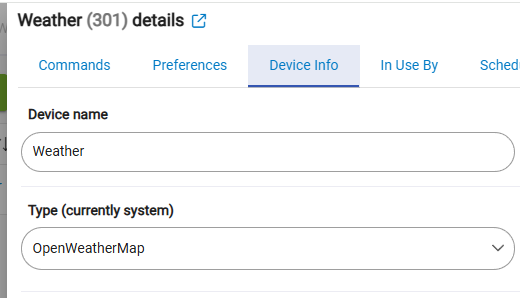
got it thanks – that’s the built-in one so I should make sure to handle it. I can’t remember – it doesn’t support any kind of weather forecast, right? So it’d just be displaying today’s highs & lows (if that’s there)
FWIW - the built-in OpenWeatherMap doesn’t seem to work anymore - I tried adding it and setting an API key but all I get is
OpenWeatherMap - getWeather() execption groovyx.net.http.HttpResponseException: status code: 401, reason phrase: Unauthorized
Best I could find is this

Device type : variable string.
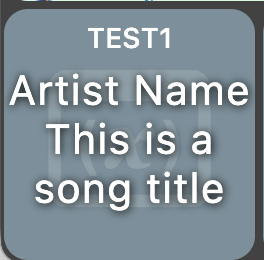
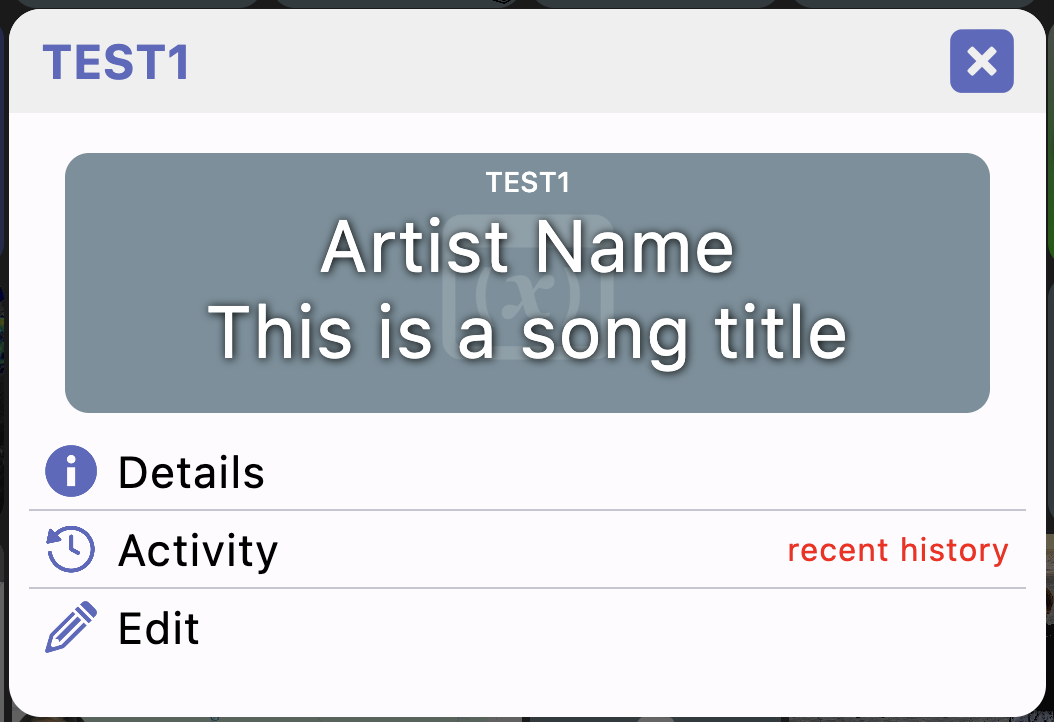
The problem seems to be in the formatting of the variable string. I have a carriage return in some of my text variables. In the Windows version, the string data after the CR is ignored. When the data is an Artist Title, the Artist and Title are separated by a CR and are never correctly displayed. The Title (of Artist CR Title) is ignored. Does this make sense?
hiya. In order to go from HD+ Android and check that HD+ Windows was an option, I moved all icons/folders etc to the front window so I could go through them one at a time to check size and functionality (this was before the great @jpage4500 made it portable). I’ve been patiently hoping he may take on the css issue and just left my HD+ Android in disarray.
Yes, I just rebuilt my Windows HD+ from scratch, before the port was made available. Very time consuming with multiple folders and thus multiple devices, etc.
@jpage4500 When you implemented it on HD+Android, it took some communication between the dev of TileBuilder and yourself. it seemed like you implemented in a very short time but I don’t want to mislead.
With M$ webview2 built into windows I was under the impression most html/css stuff just soft of works now - I’m not a dev, so I should really shut up since I’ve no idea what I’m talking about.
Repeating my hope, I need a place to push the tilebuilder CSS content into a file that HD+Windows will run. my TB CSS that you implemented on HD+Android looks like this
Tile Builder Standard Classes Start Here */
:root {--myUnderline-color:lime; --myGreen-color:lime; --myRed-color:red; --myOrange-color:orange}

/* Alignment Control goes here - Prefix a  */
.a0{transform:none !important}
.a1{text-align:center}
.a2{text-align:right;transform:translateX(-50%) !important}

/* Size Control goes here - Prefix S  */
.S0{font-size:33%}
.S1{font-size:50%}
.S2{font-size:75%}
.S3{font-size:125%}
.S4{font-size:150%}
.S5{font-size:200%}
.S6{font-size:300%}
.S7{font-size:400%}
.S8{font-size:500%}

/* Background colors go here - Prefix B. */
.B0{display:inline-block;background:black}
.B1{display:inline-block;background:black;border-radius:50%}
.B2{display:inline-block;background:white}
.B3{display:inline-block;background:white;border-radius:50%}
.B4{display:inline-block;background:var(--myGreen-color)}
.B5{display:inline-block;background:var(--myGreen-color);border-radius:50%}
.B6{display:inline-block;background:var(--myRed-color)}
.B7{display:inline-block;background:var(--myRed-color);border-radius:50%}
.B8{display:inline-block;background:var(--myOrange-color)}
.B9{display:inline-block;background:var(--myOrange-color);border-radius:50%}
.B10{display:inline-block;background:yellow}
.B11{display:inline-block;background:yellow;border-radius:50%}

/* Background Gradients go here /
.G0{background:linear-gradient(#56ab2f, #a8e063)}
.G1{background:linear-gradient(#56ab2f, #a8e063);border-radius:50%}
.G2{background:linear-gradient(#eb3349, #f45c43)}
.G3{background:linear-gradient(#eb3349, #f45c43);border-radius:50%}
.G4{background:linear-gradient(#E6C853 4%, #FCF48E 75%)}
.G5{background:linear-gradient(#E6C853 4%, #FCF48E 75%);border-radius:50%}
.G6{background:linear-gradient(#36d1dc, #5b86e5)}
.G7{background:linear-gradient(#36d1dc, #5b86e5);border-radius:50%}
.G8{background:linear-gradient(#bdc3c7, #2c3e50)}
.G9{background:linear-gradient(#bdc3c7, #2c3e50);border-radius:50%}
.G10{background:linear-gradient(limegreen,transparent),linear-gradient(90deg,skyblue,transparent), linear-gradient(-90deg,coral,transparent);background-blend-mode:screen;}
/ Background Warning (background image) - Prefix W */
.W0{background-image:repeating-linear-gradient(45deg, red 0px, red 5px, red 0px, yellow 5px, yellow 10px)}
.W1{background-image:repeating-linear-gradient(45deg, red 0px, red 5px, red 0px, yellow 5px, yellow 10px);border-radius:50%}

/* Animations go here - Prefix A */
.A0 {animation:blink1 2s ease 0s infinite normal forwards}
@keyframes blink1{0%,50%,100% {opacity:1}25%,75% {opacity:0.1}}

.A1 {animation:bounce1 2s ease 0s infinite normal forwards}@keyframes bounce1{0%{animation-timing-function:ease-in;opacity:1;transform: translate(-50%,-50%) translateY(-45px)} 24%{opacity:1} 40%{animation-timing-function:ease-in;transform: translate(-50%,-50%) translateY(-24px)}                 65% {animation-timing-function:ease-in;transform: translate(-50%,-50%) translateY(-12px)} 82%{animation-timing-function:ease-in;transform: translate(-50%,-50%) translateY(-6px)}                 93% {animation-timing-function:ease-in;transform: translate(-50%,-50%) translateY(-4px)} 25%,55%,75%,87% {animation-timing-function:ease-out;transform: translate(-50%,-50%) translateY(0px)}  100% {animation-timing-function: ease-out;opacity:1;transform: translate(-50%,-50%) translateY(0px)}}.A2 {animation:fade1 2s linear 0s infinite alternate forwards}
@keyframes fade1{0% {opacity:0.25}100% {opacity:1}}

.A3 {animation:glow1 2s ease-in-out infinite alternate}
@keyframes glow1{from{text-shadow:0 0 5px #e60073, 0 0 10px #e60073, 0 0 15px #e60073} to{text-shadow:0 0 10px #00FF00, 0 0 15px #00FF00}}

.A4 {animation:ping1 2s ease 0s infinite normal forwards}
@keyframes ping1{0% {opacity:0.8;transform: translate(-50%,-50%) scale(0.2)} 80%{opacity:0;transform: translate(-50%,-50%) scale(1.5)} 100%{opacity:0; translate(-50%,-50%) transform:scale(2.2)}}

.A5 {animation:pulse1 2s linear 0s infinite normal forwards}
@keyframes pulse1{0%{transform: translate(-50%,-50%) scale(.75)} 50%{transform: translate(-50%,-50%) scale(1.25)} 100%{transform: translate(-50%,-50%) scale(0.75)}}

.A6{animation:slide1 2s linear 0s infinite alternate-reverse}
@keyframes slide1{0%{transform: translate(-50%,-50%) translateX(-20px)} 100%{transform: translate(-50%,-50%) translateX(20px)}}

.A7{display:inline-block;animation:spin1 3s linear 0s infinite normal forwards}
.A8{display:inline-block;animation:spin1 2s linear 0s infinite normal forwards}
.A9{display:inline-block;animation:spin1 1s linear 0s infinite normal forwards}
@keyframes spin1 {0% {transform: translate(-50%,-50%) rotate(0deg); transform-origin: center center} 100% {transform: translate(-50%,-50%) rotate(360deg); transform-origin: center center} }

/* ***** Effects Start Here - Prefix Varies ***** /
/ Effects Rotations - Prefix R */
.R0{transform:translate(-50%,-50%) rotate(45deg) !important; transform-origin:center;display:inline-block}
.R1{transform:translate(-50%,-50%) rotate(315deg) !important;transform-origin:center;display:inline-block}
.R2{transform:translate(-50%,-50%) rotate(90deg) !important;transform-origin:center;display:inline-block}
.R3{transform:translate(-50%,-50%) rotate(270deg) !important;transform-origin:center;display:inline-block}
.R4{transform:translate(-50%,-50%) rotate(180deg) !important;transform-origin:center;display:inline-block}

/* Effects Opacity - Prefix O*/
.O0{opacity:0}
.O1{opacity:0.1}
.O2{opacity:0.2}
.O3{opacity:0.3}
.O4{opacity:0.4}
.O5{opacity:0.5}
.O6{opacity:0.6}
.O7{opacity:0.7}
.O8{opacity:0.8}
.O9{opacity:0.9}

/* Effects Color - Prefix C*/
.C0{color:var(--myRed-color)}
.C1{color:var(--myGreen-color)}
.C2{color:var(--myOrange-color)}
.C3{color:yellow}
.C4{color:blue}
.C5{color:black}
.C6{color:white}
.C7{color:gray}
.C8{color:#744735}
.C9{color:transparent}

/* Effects Underline - Prefix U */
.U0{text-decoration:underline solid var(--myUnderline-color)}
.U1{text-decoration:underline dotted var(--myUnderline-color)}
.U2{text-decoration:underline dashed var(--myUnderline-color)}
.U3{text-decoration:underline wavy var(--myUnderline-color)}

/* Effects Z-Index - Prefix Z */
.Z1{z-index:1}
.Z2{z-index:2}

/* Effects Outlines - Prefix o (Lower case is deliberate) */
.o0{outline:2px solid black;border-radius:50%}
.o1{outline:2px solid black}
.o2{outline:2px solid white;border-radius:50%}
.o3{outline:2px solid white}
.o4{outline:2px solid var(--myRed-color);border-radius:50%}
.o5{outline:2px solid var(--myRed-color)}
.o6{outline:2px solid var(--myGreen-color);border-radius:50%}
.o7{outline:2px solid var(--myGreen-color)}
.o8{outline:2px solid var(--myOrange-color);border-radius:50%}
.o9{outline:2px solid var(--myOrange-color)}
.o10{outline:2px solid yellow;border-radius:50%}
.o11{outline:2px solid yellow}

/* Effects Box Shadows */
.BS0{box-shadow:0px 0px 5px 5px var(--myRed-color)}
.BS1{box-shadow:0px 0px 5px 5px var(--myGreen-color)}
.BS2{box-shadow:0px 0px 5px 5px var(--myOrange-color)}
.BS3{box-shadow:0px 0px 5px 5px Yellow}
.BS4{box-shadow:0px 0px 5px 5px Blue}
.BS5{box-shadow:0px 0px 5px 5px Black}
.BS6{box-shadow:0px 0px 5px 5px White}
.BS7{box-shadow:0px 0px 5px 5px Gray}
.BS8{box-shadow:0px 0px 5px 5px #744735}

/* Effects Text Handling goes here */
.T0{white-space:nowrap}
.T1{padding:5px !important}
.T2{padding:10px !important}
.T3{padding:15px !important}
.T4{letter-spacing:2px}
.T5{letter-spacing:3px}
.T6{letter-spacing:5px}
.T7{text-shadow:5px 5px 10px #f00;}
.T8{text-shadow:5px 5px 10px #0f0;}
.T9{white-space:nowrap;word-spacing:10px;}

/* Tile Builder Classes End Here */
I really don’t mind rebuilding. its almost pleasant with @jpage4500 tools - I really need to get this emulator off my machine, I truly hate it and its ads and its resource hogging and its… yea. I’m excited to get onto HD+ Windows as soon as I can and it will support all the work I put into it. Right now its just a bit short of usable for my needs with the layouts of the tiles not readable due to my reliance on TileBuilder. I cut my Dashboard to 1/6th its original size once I began condensing with the custom tiles I could make - that really cleans up a dashboard - thank you @garyjmilne !!!
1 Like
Just not into css here. I do realize that my dashboards could look much better with css. But my wife prefers the simplicity of my boards. And, I just don’t want to learn another programming language. YMMV 
I am a “simpleton” when it comes to the dashboards around my house. I do not need or want my dashboards to look like a NASA spreadsheet. As my wife and I get older, we prefer simple, easy to see, easy to touch, always visible tiles. No scrolling through multiple menus to get to what we want. The approach that @jpage4500 has taken with HD+ has been just what I need. HD+ is simple, elegant, visually easy to navigate, robust, easy to build, easy to update/change. And it seems like many here like that. Yes, there are several HA people in the Hubitat world who prefer the more polished designs. And many seem to like using css. But, if I am going to foster a high WAF, then I need to stick with products like HD+. Thanks @jpage4500
kind of side-stepping this for the moment but I tried to setup a couple of Tile Builder tiles so I can test displaying them natively (not using a webview). I definitely need some help but I was able to replicate a pretty simple table with alternating rows for my first example
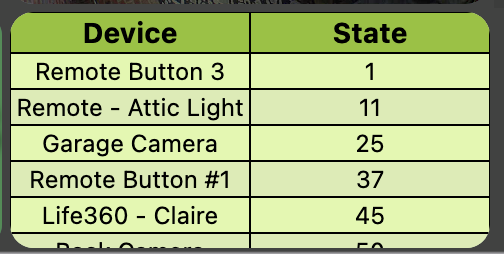
I’m not able to come up with much more complex tables than that though which is where I can use help.. what I can use is some better examples and I think the easiest would be to just send me some of the files from FileManager which look like TBSD1_Tile_1.html. I don’t think there’s any sensitive info in any of these files but you can look first.. I’m looking for some of the more advanced stuff like the icons and colors below
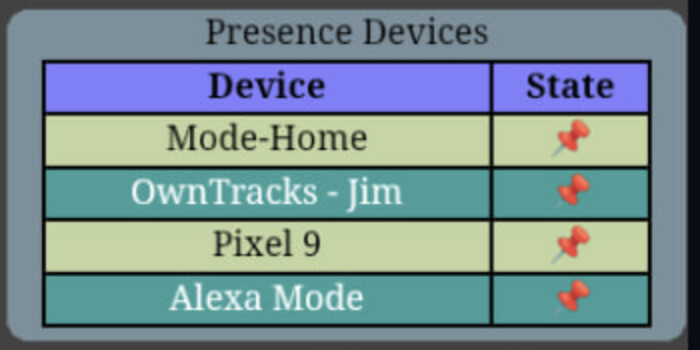
As for the custom css I see a lot of things like gradient backgrounds, animations, effects. How are these used by the Tile Builder html? Is it that you’re overriding the default css that Tile Builder uses? How does this work with another dashboard? Just trying to understand how they link together or how you reference a custom style from the Tile Builder interface
I noticed that I wasn’t allowing the text to take up multiple lines - my next build should fix this. It looks like newlines (CR) are also supported as well once that’s fixed
1 Like
Thanks, Joe. I also just noticed that the Temperature Sensor tiles don’t also show humidity like they do with the original app.