I have a virtual switch with auto off 0.5 sec.
It shows that it is on but really it is off.
Do I need to setup it differently?
I have a number of virtual switches on my dashboards and they all update their status correctly. However I have the auto off on mine set to a couple of seconds as 0.5 was too quick for me to see the icon change while my finger was hovering over the tile. Maybe try increasing the auto off a little if that won’t cause any problems for you.
1 Like
I am using it to open my gate and it needs a momentary ON, longer than 0.5 sec doesn't work.
Shouldn't the switch status come from activity history?
The reality of the Hubitat system is that system processes can be and often are slow to respond. Especially when you are taking about systems that are blended together, like wireless sensors, that have an inherent latency within the product design.
1 Like
Unusual. I used to install automatic gates and one second or even two wouldn't have been an issue regardless of the logic set on the controller (automatic, semi-automatic, dead man).
As @Pantheon has said, the tiny amount of latency might between the virtual switch activation/de-activation, the maker api commands being sent to HD+ and the response of the app updating the tile - it's possibly a bit too much to expect to see that tile go on/off in 0.5 seconds. I use virtual tiles for my heating modes and had to increase the time a touch exactly fro that reason - the mode would change but it was too fast for the tile to change and I wanted visual confirmation of my finger touch.
1 Like
Exactly. I see that often. Fortunately, my system does not require 0.5 sec responses.
@antti202 - A workaround might be a second virtual switch, with a 2 second auto off, and a rule that triggers the one you already have. You would use the second switch (lets call that vs2) on the dashboard rather than the existing (lets call that vs1)
You could just do a simple rule when vs2 turns on, turn on vs1. So the switch on the dashboard with the 2 second auto off triggers the one you use for your gate with the 0.5 second auto off.
I know that's a bit 'Heath Robinson' but at least it will give you the visual feedback you want on your dashboard.
@jpage4500 & everyone else... Am I the only one having an issue where HD+ constantly auto "refreshes" itself when I'm viewing tiles on the main screen, and after the screen/tiles refresh, it auto scrolls to the top, forcing me to scroll back down to whatever tiles I was viewing before it refreshed. It happens approximately every 6 seconds... It seems to happen constantly after I open the app and scroll down to the bottom; I also see it frequently when I'm trying to edit the tile positions. I'm using a Pixel 9 Pro XL with Android 16 -- I was seeing this behavior with Android 15 too.
Thanks!
1 Like
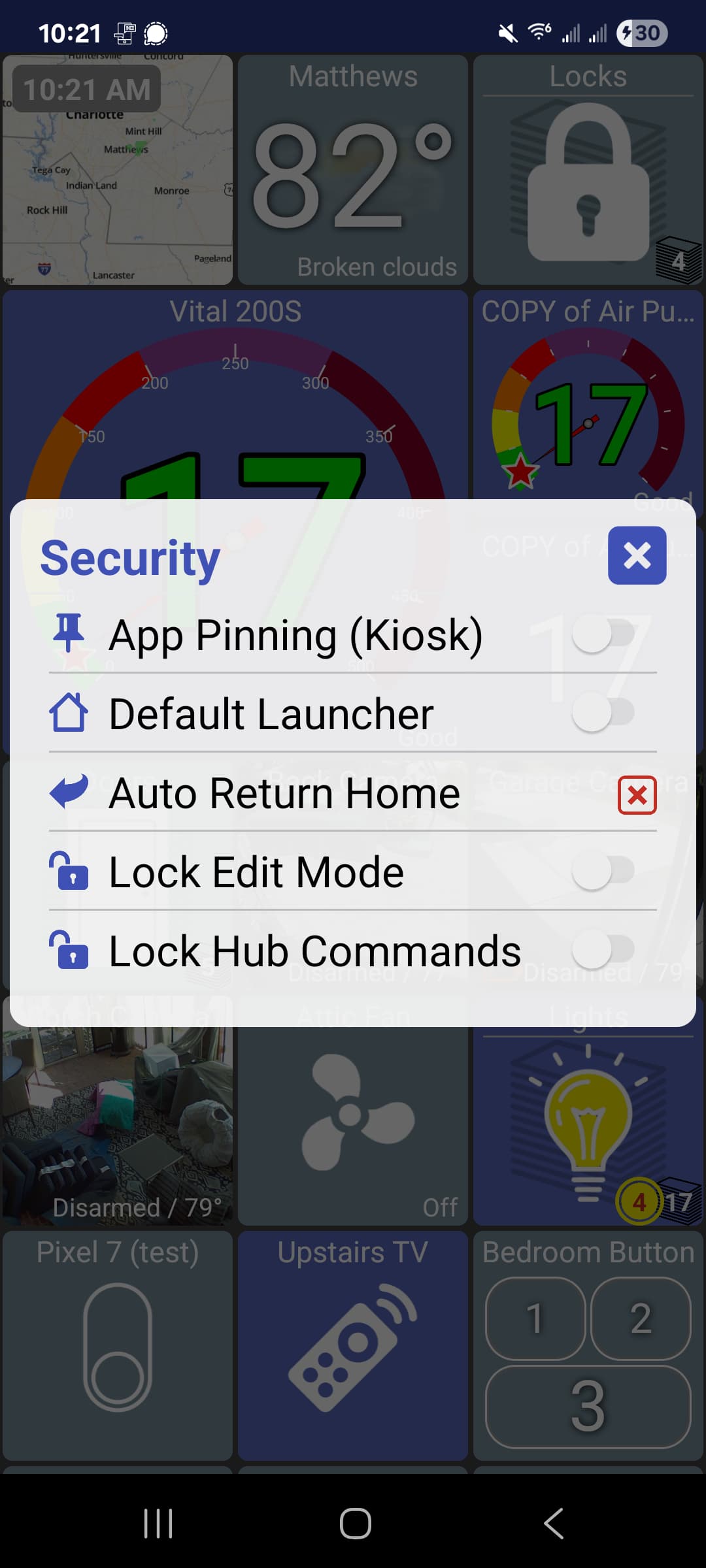
It sounds like the app and driver aren't installed. Maybe there's some way to force re-check HPM or clear cache?
Yes, my Auto Return Home is disabled (has a red box with an "X" in it) and looks just like yours in the screenshot you shared.
Are you turning the switch on/off via the app or just noticing the state doesn't match the actual switch state?
Shouldn't the switch status come from activity history?
HD+ gets state info via 2 ways:
- MakerAPI
- if local (not cloud), push notifications via a websocket (search for
eventsocket)
MakerAPI is the official way to get device state and HD+ polls this endpoint every X minutes (configurable). Push notifications are only used when local but will give instant device changes.
MakerAPI does have an 'Activity history' endpoint but it's slow and isn't used for displaying state on the dashboard. It's only used when you view the device and click on 'Activity'
If there's an issue somewhere I might be able to help debug it. See this post for steps to enable debug mode and send me device logs
I used UnMatch in HPM and that did the trick.
Via app.
I think this is the reason for this behaviour.
Tried it in local network - it works as it should.
In cloud - switch stays on.
Maybe there's a bug here.. so for example you're turning a switch ON and the app does turn it on, right? Then, very quickly Hubitat will toggle the virtual switch back OFF again but HD+ continues to show the switch as ON?
In cloud mode HD+ calls the MakerAPI endpoint every 5 seconds or so. I'd expect that to get the latest state to match the Hub. If it doesn't match and you're willing to send me a device log I might be able to figure out why.. If you do, can you do this first?
- enable debug mode (menu -> about)
- reproduce the issue
- long-press on the switch; this logs details about the switch
- send logs (menu -> about -> send feedback)
First of all, Thanks so much for this app. I use it ALL the time.
I've recently installed sensor-groups-resurrected to allow me to group
several outlets power use to display a total wattage.
This works quite well with Hubitat dashboards, but I'm not able to
get this app to show the results.
Just FYI. For the tiles (in Hubitat dashboards), to show the correct
values, the following must be selected.
Pick a device: Total Watts (what I named it)
Pick a template: Attribute
The app does show the information in the details and activity,
but when selected as a Device type: Power Meter, it just shows 0.0
(I can provide screenshots if needed)
Please let me know if you need further info.
Thanks!
Hi @jpage4500, question about the HSM (arm/disarm) tile. I've noticed recently that the tile icon will not update when the mode is changed elsewhere. If I change it from your app the mode changes and the tile changes to match but if I change the mode (via a hub app at bedtime or via a dashboard) the tile doesn't change. Is that normal and I just never realized it, or is there something I need to look at? Thx
HSM mode automatically updates for me when my device leaves/arrives home. I'm pretty sure the icon has been updating but I'll double-check it again next time I leave.
HD+ calls a maker API to get the HSM status.. something like this (replace IP, app id and access token)
http://192.168.0.200/apps/api/38/hsm?access_token=TOKEN
PowerMeter is a Hubitat capability which has an attribute called power. I'm guessing this driver doesn't have that attribute.
I don't have it to check but is there an html attribute you can display? If so, you can use the HTML tile and display that (long-click -> edit -> device type -> html). Then, pick the displayTable field or whatever the HTML attribute is called
Alternatively, if you're just looking for a single value - 'total watts' - you could select the Custom device type and select the attribute which has this value.
If that doesn't work just send me a screenshot of the device details from the Hub and maybe I can figure it out
1 Like
Thank you!
Both of your suggestions worked great.

