Wtf?
Thats amazing! Thanks man!
Wtf?
Thats amazing! Thanks man!
I installed BI Control awhile ago and just now started using it again. I saw that it is rolled into this Event Engine so I tried installing this to replace it and I cannot get the camera to move presets. From what I can tell I have everything setup the exact same as BI Control was. I have the server address and port configured in the parent app and am using the same user and password as BI Control. Any help is appreciated. Thanks!
Hi,
Help me help you. Please post a debug log. (see post #1).
Thanks
I apologize for not reading that. I actually realized after looking through both the BI control logs and the Event Engine logs that my password was in fact different. I forgot to update my password manager when I changed it last. It might as well be a Monday lol. I will post back with all information needed if I have any more issues. Thanks for responding so quickly and sorry for wasting your time!
@bptworld Bryan, I am sure there is a way to do this but I am not finding it. I am wondering if there is a way to set the volume of a speaker in the Actions to different levels for a given cog depending on what you are doing? A warning cog may have a higher volume than say the garage door has closed. Thanks
This can be confusing, too many parts. I've been wanting to redo this for a long time but have always put it off.
Anyways...
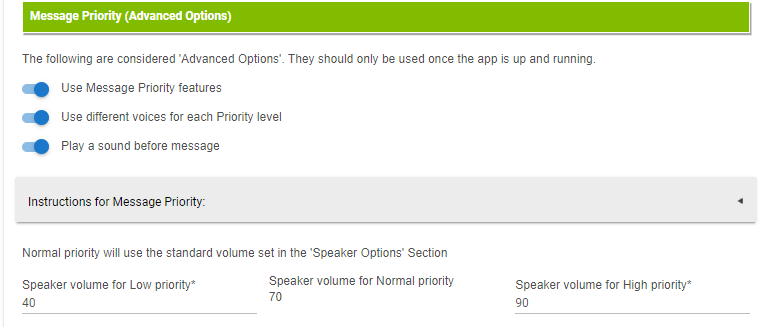
In Follow Me, you can set the volume per High, Normal, Low. This is in each child app.
Then in Event Engine, Actions-Notifications, click the 'Instructions for Message Priority' box. There you'll see how to send the different volumes.
Format: [priority:sound:speaker]
Note: Any option not needed, replace with a 0 (zero).
ie.
[L:0:0]Amy is home or [N:3:0]Window has been open too long or [H:0:0]Heat is on and window is open
@bptworld Ok, I found all of this and got it to work. So in your example N is for normal and 3 in your example is for the sound file you want? Also what is the last number for?
.
@bptworld Got it. One other question. Since the middle number is for a sound file and requires a number reference, where and how are these files stored that they would have a number to reference to?
In 'Follow Me'. Import them from where ever you want. Example: Github
@bptworld I found the sound options in Follow Me and see the place to input the url's but when I wanted to get out it won't let me unless I choose a speaker for testing.
Exactly. If you don't test it, how do you know it works? 
touche! Thanks.......It is supposed to read "too shey". Bad spelling.
@bptworld I tried following your example for a mp3. I downloaded a sound mp3 in settings with the file manager and then followed your example (except using my url) of the example. It just talks the url itself. If I click on the mp3 file in the file manager it plays fine. What am I doing wrong? Nothing in the logs.
@bptworld Anything on this? I have tried multiple ways to access the file but it still just reads the url out loud.
Sorry, been busy. What type of speaker are you using?
It is a google mini.
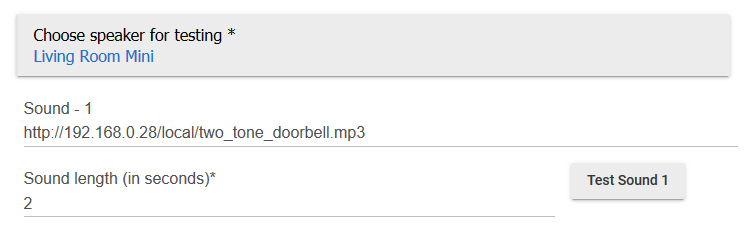
Screenshot of the url / test page? Also, turn on debug log and show what happens when you hit the test button.
Here is the url pic.
Here is the log of the mini. I hope this is what you wanted.
app:19472021-07-12 08:08:33.060 am debug********** Follow Me (2.3.4) - End Talking **********
app:19472021-07-12 08:08:33.057 am info--------------------------------------------------------------------------------------
app:19472021-07-12 08:08:33.054 am infoIn letsTalk - Ready for next message
app:19472021-07-12 08:08:33.020 am debugIn letsTalk - playTrack Received - speaker: Living Room speaker - http://192.168.0.28/local/two_tone_doorbell.mp3
app:19472021-07-12 08:08:33.013 am debugIn afterVolume - Setting volume to 75
app:19472021-07-12 08:08:32.752 am debugIn afterVolume (2.3.4) - it: Living Room speaker
app:19472021-07-12 08:08:11.895 am debugIn beforeVolume - Setting volume to 65
app:19472021-07-12 08:08:11.603 am debugIn beforeVolume (2.3.4) - it: Living Room speaker
app:19472021-07-12 08:08:11.598 am debugIn priorityVoicesHandler - Speaker: Living Room speaker - priorityVoice: X - Voice: null - Message: http://192.168.0.28/local/two_tone_doorbell.mp3 - uriMessage: http://192.168.0.28/tts/147f5ef024c1caf7a445a256b120176d.mp3
app:19472021-07-12 08:08:11.586 am debugIn priorityVoicesHandler - Received - speaker: Living Room speaker - priorityVoice: X - lastSpoken: http://192.168.0.28/local/two_tone_doorbell.mp3
app:19472021-07-12 08:08:11.581 am debugIn letsTalk - Sending to priorityVoicesHandler - speaker: Living Room speaker - priorityVoice: X - newMessage: http://192.168.0.28/local/two_tone_doorbell.mp3
app:19472021-07-12 08:08:11.576 am debugIn letsTalk - **** Last check **** - speakers: [Living Room speaker]
app:19472021-07-12 08:08:11.542 am debugIn letsTalk - continuing
app:19472021-07-12 08:08:11.529 am debugIn checkVol - NO Quite Time Specified - setting volume to 65
app:19472021-07-12 08:08:11.527 am debugIn checkVol (2.3.4)
app:19472021-07-12 08:08:11.524 am debugIn checkPriority - priorityValue: X, so skipping
app:19472021-07-12 08:08:11.521 am debugIn checkPriority (2.3.4)
app:19472021-07-12 08:08:11.519 am debugIn checkTime - timeBetween: true
app:19472021-07-12 08:08:11.516 am debugIn checkTime - NO Time Restriction Specified
app:19472021-07-12 08:08:11.500 am debugIn checkTime (2.3.4) - null - null
app:19472021-07-12 08:08:11.430 am debugIn alwaysOnHandler (2.3.4) - setting sZone to true
app:19472021-07-12 08:08:11.427 am debugIn letsTalk - state.speakers - speakers: [Living Room speaker]
app:19472021-07-12 08:08:11.423 am debugIn prioritySpeaker - priSpeaker: null
app:19472021-07-12 08:08:11.410 am debugIn prioritySpeaker - priorityValue: X - priorityVoice: X - prioritySpeaker: X
app:19472021-07-12 08:08:11.407 am debugIn prioritySpeaker - theValueCount: 2
app:19472021-07-12 08:08:11.404 am debugIn prioritySpeaker (2.3.4)
app:19472021-07-12 08:08:11.400 am debugIn letsTalk - msg: {"method":"playTrack","message":"http://192.168.0.28/local/two_tone_doorbell.mp3","priority":"X:X","speakLevel":null,"returnLevel":null,"title":""}
app:19472021-07-12 08:08:11.397 am debugIn letsTalkQueue (2.3.4) - Queue not activated, going to letsTalk
app:19472021-07-12 08:08:11.394 am debugIn startHandler (2.3.4)
app:19472021-07-12 08:08:11.390 am debug********** Follow Me (2.3.4) - Start Talking **********
app:19312021-07-12 08:08:06.056 am infoParent Installed OK
app:19472021-07-12 08:08:02.328 am debugIn initializeSpeaker (2.3.4) - Initializing [Living Room speaker]
app:19472021-07-12 08:07:58.148 am debugIn setDefaults...
app:19472021-07-12 08:07:58.110 am debugUpdated with settings: [messageSounds:false, defaultSpeak:false, volHigh:75, clearQueue:false, resetApp:false, priorityVoices:false, useQueue:false, useQuietTime:false, gInitialize:true, logOffTime:1 Hour, triggerMode:Always_On, volSpeech:65, pauseApp:false, messageDest:Speakers, messagePriority:true, speakerType:googleSpeaker, volLow:55, logQueue:false, gvDevice:Living Room Mini, gInitRepeat:4, speakerSS:[Living Room speaker], useExistingDevice:false, logEnable:true, useSpeechRestriction:false]
app:19472021-07-12 08:07:53.515 am debugIn getVoices (2.3.4)
app:19472021-07-12 08:07:41.054 am debugIn getVoices (2.3.4)
--- Live Log Started, waiting for events ---
@razorwing When capturing logs, do so w/a screen capture rather than text grab...the screen caps are much easier for the devs to read, and since they do this for free on their own time, we should do all we can to make things easier for them.
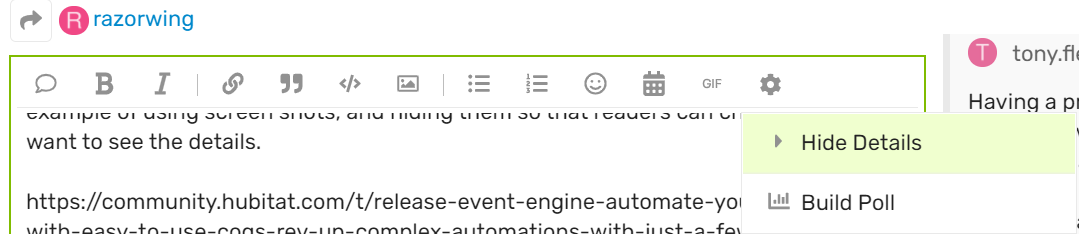
We also try to "hide" logs and other content so that it doesn't create long scrolling requrirements to read the thread, especially on mobile devices. Here's a great example of using screen shots, and hiding them so that readers can choose if they want to see the details.
To hide content highlight it and then use the gear icon and choose the "Hide Details" option.
Thanks!
Download the Hubitat app