That exactly matches my current states list.
1 Like
maybe try a factory reset and start over from the pairing process ... ?
I did that earlier.
1 Like
Did it make any difference completely removing the FP1 driver and now that your current state list matches mine? I ask because I have no issues changing preferences. The one big difference I think I have with most is I never had the FP1 driver ever installed on this hub.
Nope, none at all.
Back when I had the multi-driver installed, it did show the config changes.
That is crazy because I have changed settings multiple times dialing this thing in and had no issues period.
agreed, I might try again and see what happens.
@ogiewon the missing info in Current States is definitely a code issue - I fed the FP300 and FP1 drivers to Claude and it was able to fix it:
Current States — the live attribute panel on the device page, populated only by
sendEvent()calls in the driver code.Preferences / Settings — the configuration inputs the user sets, updated by
device.updateSetting().When the FP300 reported back a confirmed value (like
motionSensitivity = 2orabsenceDelayTimer = 10), the driver was callingdevice.updateSetting()to update the preference field, andstoreParamValue()to save it internally for change detection — but it was never callingsendEvent(). Without that call, Hubitat has no way to know it should display the value in Current States.Additionally, for an attribute to appear in Current States at all, it first has to be declared in the
metadatablock of the driver. Several of these settings weren't declared there either.So the two-part fix was:
- Declare the attributes — add lines like
attribute "motionSensitivity", "enum", ["low", "medium", "high"]to the metadata block so Hubitat knows these are valid attributes.- Fire
sendEvent()— add asendEvent(name: "motionSensitivity", value: "medium")call alongside the existingdevice.updateSetting()call wherever the device reports a confirmed value back.After a Refresh, the device sends back all its current parameter values, those now trigger
sendEvent(), and the values appear in Current States.
and the result:
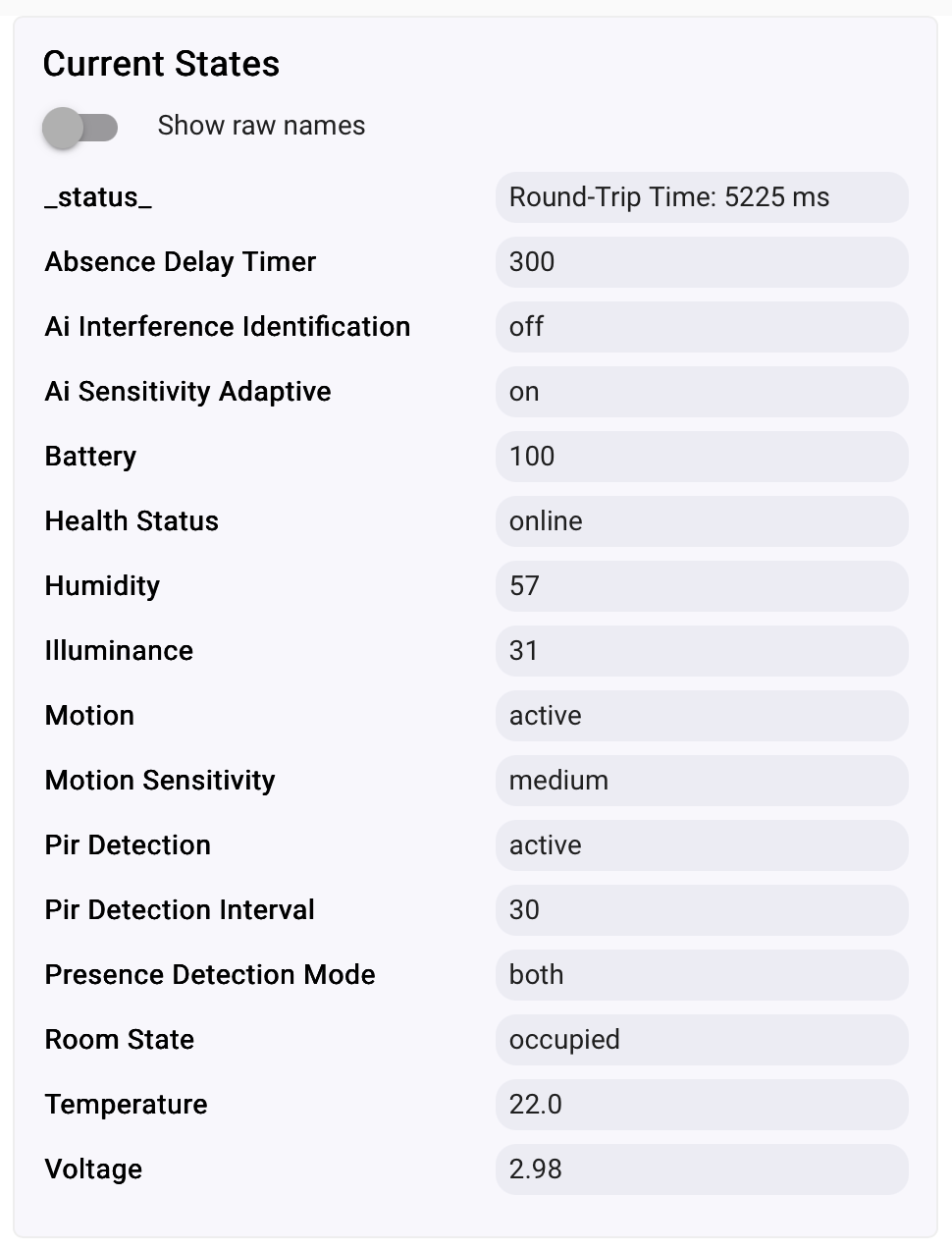
If you want the code, send me a PM and I'll UL it to GitHub. 
I see the confusion... What you're after is the old driver's whole bunch of custom attributes. Those never made any sense to me to be stored as custom attributes. Attributes generate hub events so that Apps on the hub can wake up and run some sort of automation. As such, I decided to remove all of those custom attributes from the driver to clean things up and to reduce load on the hub and the database.
In fact, I mentioned this in the first post of this thread.
I am not interested in bringing those back unless someone can explain the value of them?
Instead, I have been working on an update to this driver to hopefully streamline setting user preferences. I have it working pretty well, but I keep finding little things here and there that might explain some of the issues folks have faced with getting preferences to 'stick'. 
One thing I am doing is to update the HE Device's User Preferences when the sensor sends back the data after those are set, or during a refresh. This way, when the user goes back to the Preferences page (will require a manual browser refresh), the values of everything will reflect the current values from the FP300 sensor. This seems like a better approach to me than having a bunch of custom attributes that will never be used except as a visual aid. Thoughts?
4 Likes
You are right, most are useless, but my issue was I couldn’t tell when settings from the preferences screen had been successfully changed. Eg the AI and absence delay timer.
So we definitely need some of them to be exposed.
Right, you'll be able to see the actual values on the Preferences page. If you change one and click SAVE (after waking up the device), and then wait for the settings to be written to the FP300 (about 20s), and then simply refresh the browser on the Preferences page, you will see all of the actual values from the sensor (except Temp and Humidity offsets which are local to the hub only.) Also, if one has Debug Logging enabled, you can also see the values of all of the settings whenever they are updated.
This new version will be made available within the next day or so. I just want to run some additional tests on it.
Thank you for your patience!
2 Likes
Ah fair enough, I guess I’m just used to seeing current settings on the other page.
One day I might learn to RTFM.  although, in my defence, I was messing with Hubitat while half paying attention in a few boring meetings today while WFH.
2 Likes
Here is an example of the debug logging after a refresh() command is issued. You can see the values of all of the settings. I am also updating those settings on the Preferences page. Hoping this will help improve things and it will behave more like traditional Hubitat built-in drivers, but will all of the features still available.
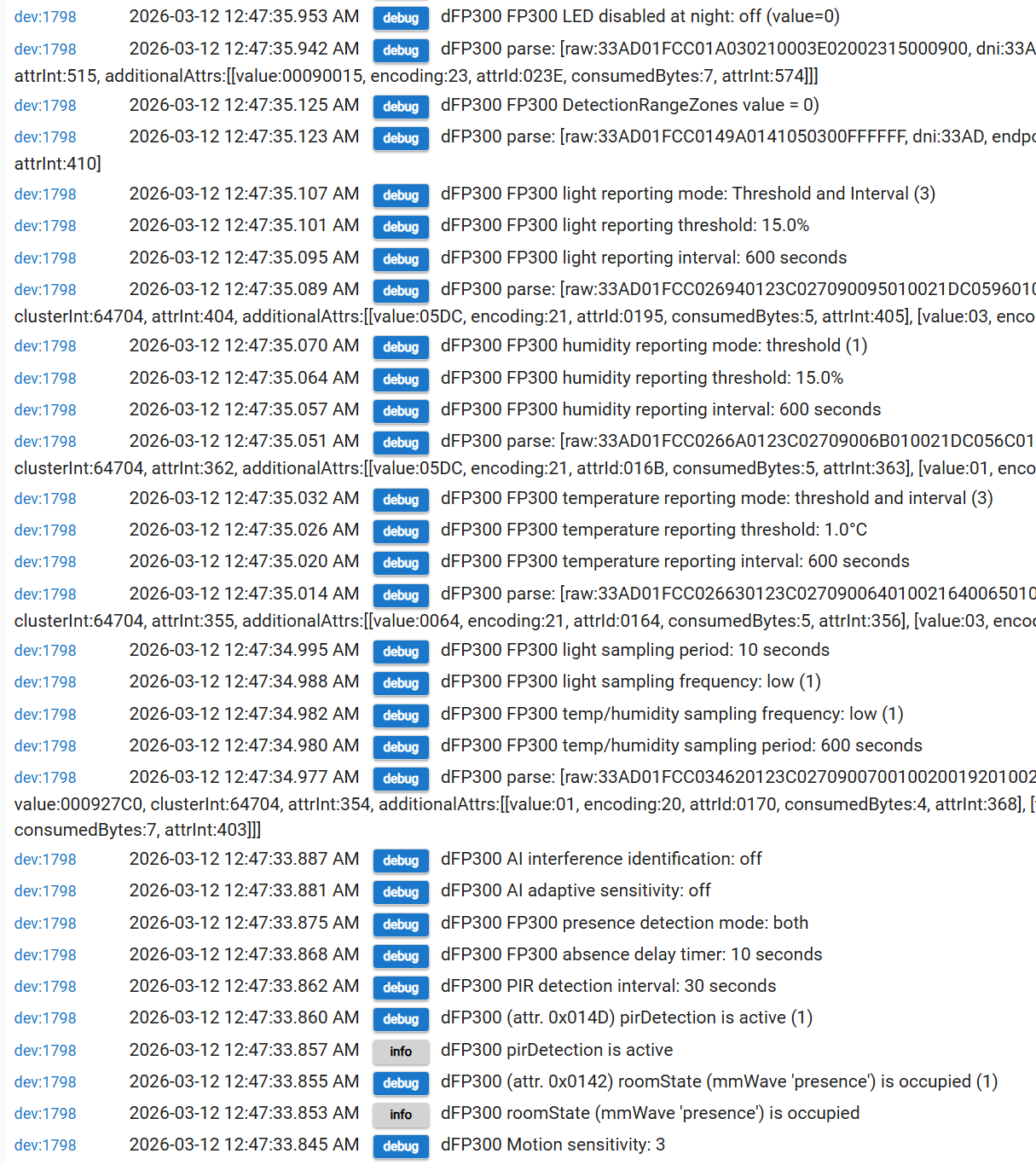
2 Likes
All,
I have just released v1.0.6 of this driver via HPM for your enjoyment (hopefully not your frustration!  )
)
The major change in this version is a complete overhaul of how User Preferences / Device Settings are managed internally to the driver.
- I have completely removed the state.params variable from the code. Thus, if you still have that state variable showing up on your main device page, please ignore it. Alternatively, you can REMOVE the FP300 from your hub and then re-pair it as a new device to get everything cleaned up. Just be aware, the state.params variable will no longer update if you decided to keep it.
- All active Preferences are transmitted to the FP300 every time you press SAVE. As always, it is best to wake up the FP300 via its physical button BEFORE pressing SAVE. Transmitting all of the Preferences/Settings to the device over Zigbee does take a little while, so please be patient. Storing all of the settings takes about 30 seconds. The earlier version of the driver tried to compare whether or not a user preference had been changed, so it could only send the ones with new values. This version removes that complexity in the hope of ensuring all settings are always sent to the device.
- As each of these settings are stored in the FP300 device, it responds back to the HE hub with its current value of each setting. These values are written back into each of the user Preferences. This allows you to easily see what how the device is configured. NOTE: You will need to refresh your web browser (after step #2 above completes) to update the Preferences page.
- I have added improved titles and descriptions to all of the user Preferences, to hopefully help with a better understanding of the purpose of each one.
I look forward to hearing everyone's feedback.
4 Likes
You can also change the driver to "device" and click clear all states, then switch it back. I did this, then ran "refresh" after a button press.

1 Like
I have just released v1.0.7 that includes the automatic removal of the state.params variable.
1 Like
WARNING
Please treat v1.0.6 and v1.0.7 as a work in progress. There may be an issue with writing all of the preferences every time, even if they have not changed. This might cause an issue with the mmWave sensor's AI learning functionality. I am investigating, but wanted to make you all aware before you ruin your WAF at home!
3 Likes
Can confirm issues occuring with the mmWave sensors going (almost) immediately to inactive on all of my devices. Was not occuring prior to 1.06 (currently on 1.07)
Running a new spatial learning on all devices now to see if that corrects.
Yep, thank you for the feedback. I am trying to figure out exactly which of the preferences are triggering the mmWave AI learning algorithm. I hope to have a fix later this evening.
Yes, this should resolve the issue as long as you do not SAVE Preferences again. If you need to save some preferences, just re-run the Spatial Learning a few minutes afterwards.
Sorry about this! I am still learning all sorts of things about this little sensor...
3 Likes
Was planning on coming back and stating that this did appear to work.
PuhLEASE!!..... you did a lot of heavy lifting to bring this here..... Don't apologize. Take a bow.
5 Likes