I solved my instability and false sense issues by returning the sensor to Amazon and waiting for “Generation 2” 

2 Likes
I finally got my 3rd sensor working after factory resetting AND pulling the battery.
All 3 have been fine for 5 days but yesterday was a bit odd.
All 3 started randomly creating motion events most of the afternoon and evening.
It was a warm day so the house was 21.5 during that time and cooling as night came.
I moved them to very isolated corners behind objects and the false events slowed to a trickle.
I'm wondering if the motion sensitivity was ever confirmed; low is low and high is high?
I have them all set to low. That Pref seems to go away after you commit to PIR Only so I can't test out the other setting choices without resetting a workingish sensor. 
The motion sensitivity only affects the mmWave sensor, not the PIR sensor, I believe. Thus, in PIR-only mode there is no need to display that setting. This is how the Aqara mobile app behaves as well, when the sensor is connected to an Aqara hub via Zigbee.
Ah ok, thanks.
I have had to bury the sensors more today, they are so active as it was 21.5 in the house today and the ghosts were very active.
The only thing I did yesterday was rebuild the ZB network and lower the power to 8 as the hub was taking over many of my repeater devices.
That should have noting to do with the false motion reporting.
I have a feeling that the MM is active even though they are set to PIR.
I placed one pointing directly at the ceiling 2 M off the ground and it still detected me sitting on the couch at 1M.
Tomorrow I bring out the masking tape. 
When you configured the sensor's Presence Detection Mode for PIR-Only, did you remember to first wake up the sensor by pressing the button on it, before clicking SAVE on the user Preferences page?
Before you change anything, try these steps to determine what the sensor's current active settings are:
- Open the Hubitat hub's detailed device page for your FP300 sensor in a web browser. Watch the
_status_attribute in real-time. - Press the button on the sensor one time (do not hold it). You should see the
_status_attribute change from "clear" to "Button was pressed – device awake for 15 min" - Once you see the "Button was pressed – device awake for 15 min" message appear, press the REFRESH command on the device details page. This will allow the hub to receive all of the current values for all of the sensor's settings. It takes a few seconds to complete, so give it a little bit of time.
- Now, in your Web Broswer's Address Bar - refresh/reload the Hubitat browser page for your FP300 device. This is necessary to properly update the web page with the latest data for the device.
- Change to the "Preferences" tab and view all of the active settings for your FP300. If the "Presence Detection Mode" is not set to "PIR only", then indeed your sensor is still using its mmWave sensor.
To successfully change the sensor's settings, always be sure to wake the device up first by pressing the button on the FP300, then click SAVE on the Preferences page to send the settings to the sensor. This will take a up to a little while to complete, so give it a minute or so before doing anything. Afterwards, refresh your web broswer page again, and then view the Prerefences page to see if your settings 'stuck' or not. Note: After saving the preferences to the device, the driver automatically performs a refresh to read everything back. No need to perform a manual device refresh (not to be confused with a web browser refresh/reload! ;))
1 Like
Thanks for the detailed reply. I know this must be frustrating for you to reply to, what seems like, an already answered issue many times.
Yes, I click, wait for the blue flashing LED and see the status change giving me the 15 min window warning.
I will reset my downstairs one today as it's really active, the other 2 are so hidden they are behaving.
One thin I noticed is that I have the timeout set to 30 seconds on all 3 and yet they waits exactly 60 seconds before a reset.
That makes me wonder if that Prefs doesn't take or it's a bigger issues - with me. 
So, I just performed some quick tests. I put the FP300 into PIR-Only presence detection mode, and then made sure the PIR timeout was set to 30 seconds. I also performed a Spatial Learning just for good measure, although I doubt it really did anything with the mmWave sensor being disabled.
I let things settle down a bit before performing any timing tests. I made sure the sensor successfully cycled through both the ACTIVE and INACTIVE pirDetection states. Once I felt things were behaving correctly, I walked into the room and was immediately detected properly. The pirDetction, roomState, and motion attributes all updated immediately, which is a sure sign that we are truly in PIR-only mode. (Note: If we were still in BOTH presence detection mode, the roomState attribute would update slightly slower than the pirDetection - demonstrating that the mmWave sensor is slower than the PIR sensor.)
I then performed a series of tests walking into the room and then leaving just a few seconds later. As you mentioned, the sensor did not go INACTIVE at the 30s timemark. It typically took about 45-55s for the sensor to change to INACTIVE.
I then woke the sensor up, changed the "PIR Detection Interval" preference from 30s to 2s, and then clicked SAVE. I waited about a minute for everything to settle down and then repeated my timing tests. This time, the sensor would change from ACTIVE to INACTIVE after about 15-20s.
Thus, I am left to conclude that the "PIR Detection Interval" preference does indeed affect the behavior of the FP300 sensor. It appears that there is always a 15-20s additional amount of time built into the sensor for this setting. Nothing I can really do about that, and I'd rather not change value displayed to the user to try to account for this, as that would definitely lead to more confusion if users were to switch drivers.
Hope that helps.
Oh, one more test that I ran. I have my FP300 in my office simply sitting on a shelf about 5 feet high, pointing directly at me when I am sitting at my desk. If I simply turn the sensor around, pointing at the wall instead of into the room, the PIR sensor changes to INACTIVE after the same amount of time mentioned above, and never changes back to ACTIVE again until I switch the sensor around. I have seen zero false positive detections.
1 Like
As PIR doesn't pass through glass I put the sensor in a water glass.
It triggers while enclosed in glass but not consistently.
I can point mine almost anywhere I get a trigger.
I have a spare so I'm playing with that today.
Sounds like a defective sensor to me.
See my post just above your most recent one for results of testing that I just performed.
1 Like
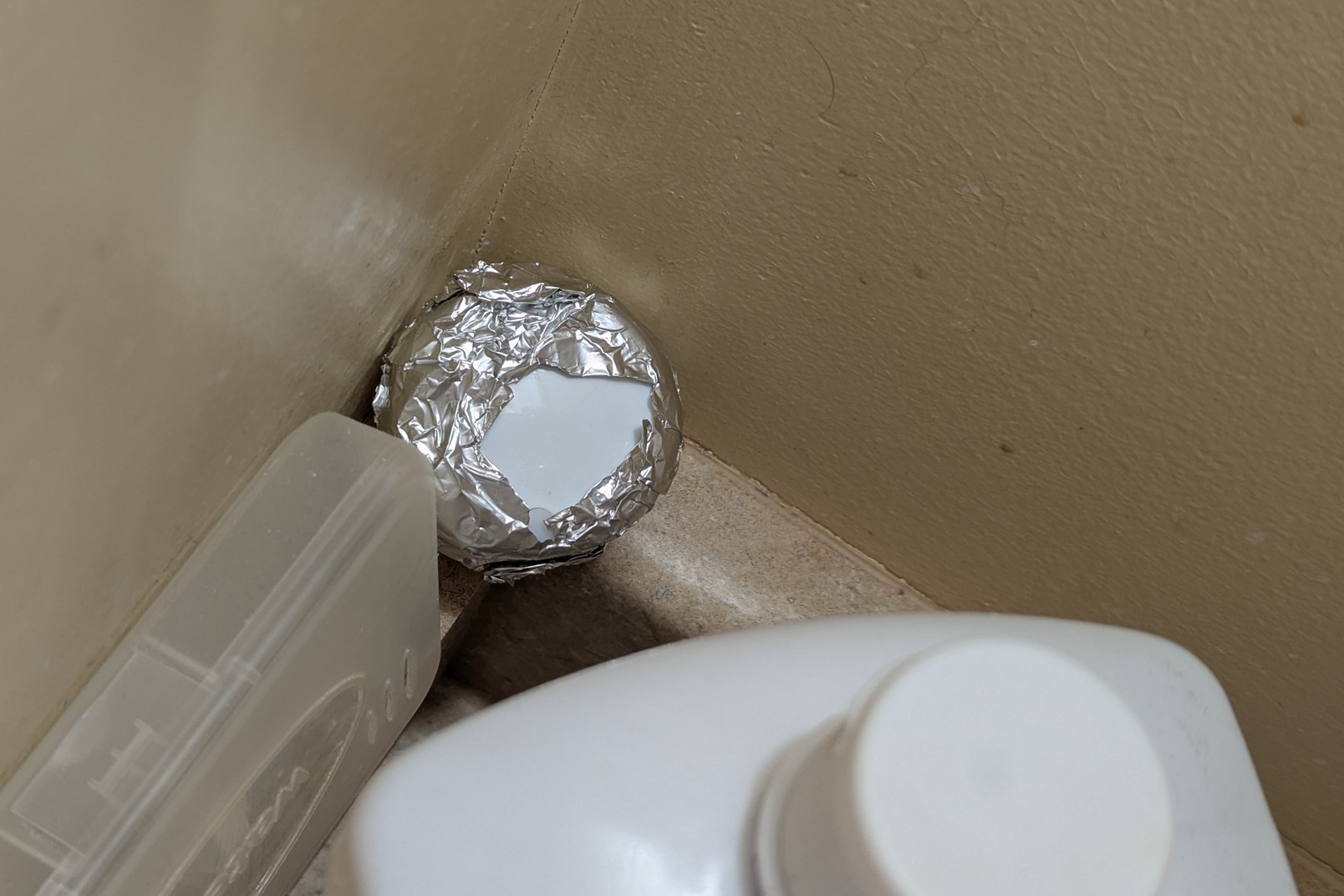
The test recommended by Aqara on one of their support forums is to cover the face of the sensor with aluminum foil. This should block BOTH mmWave and PIR. If it still reports active, then it is a bad sensor. Just wrap aluminum foil over the front face and a cm or so on the sides. (This is how I confirmed that mine was bad)
3 Likes
Well after a day of going crazy I have determined there is a minimum space you can place these sensors in PIR mode; a small ensuite is not one of them.
This has been the solution, a tin foil hat, keeps the aliens away and the false events.
Banished to the corner. 1.5 hours without an error and still works upon entry.
I had a similar issue to others with one of my FP300s, false PIR detections. I ended up pairing it directly with Aqara M3 hub and then using matter to pair with HE which solved the issue. Not sure why that would fix it?
1 Like
Hmmm.
Yea, I'm on my 30th attempt at getting it to work and solve the mystery.
Tried covering it in different places with different materials including foil, vinyl tape.
Put in a dark drawer etc. Still random motions occur.
I am really convinced these things do not like small rooms.
The main bathroom will trigger a few times a day but the ensuite is relentless without a covering every few minutes.
My rec room and garage also spit out random events but not too many.
If you are covering (completely) with foil and still getting false motion detection, the sensor is bad and you should warranty it. Neither PIR nor mmWave will penetrate foil. So there is 0% chance that it is seeing through it.
If you are only partially covering it, then you should test with it completely covered to rule it out.
Shower Curtains, towels, and other items will also trigger the mmWave when air currents hit them.
I only have the top and a bit of the sides covered.
I'll try the Full Monty.
I didn't do that as I was afraid of cutting off the RF completely.
Great question and good information. I just recently (yesterday) deployed a newly purchased FP300 sensor in one of our bathrooms. I first paired the sensor to my Aqara M3 hub to make sure it was updated with the latest firmware as well as to make sure it was operating normally. I then removed it from the M3 hub and paired it directly to my HE C8-Pro hub. Finally, I physically installed it in the bathroom, performed spatial learning, and switched my HE Room Lighting automation to use the FP300 instead of the old Iris v2 PIR motion sensor.
Interestingly enough, I too saw false PIR sensor detections overnight. 
This morning, I decided to swap two FP300 sensors - the new one with one that I used for development and testing of the HE driver. I have already seen one more false detection on the sensor that is installed in the bathroom, however no false detections on the 'new' sensor that I installed back in my office.
Seems like my issue is very location specific.
I have switched the Room Lighting automation back over to the Iris v3 PIR motion sensor for now. I will continue to monitor the FP300 sensors for false PIR detections and will try to find a combination of settings that impacts the false detections.
I'll let you know what I find over the next couple of days. If it continues to produce false detections, I will pair it to my Aqara M3 Hub and see if the behavior changes like it did for you.
Good stuff.
I just have a plain Aqara motion next to the FP300 for the automations; wife would go nuts with the way the FP300 is acting.
I have 2 pistons that compare their Active states and log the proper Active (both) and the random Active (only the FP300) so I can count all of those for testing different locations and masks.
I may end up getting an M3 hub if this is what clears up the issues.
What's one more power brick.
Not sure if the room size makes a difference. I have min in a large room and it seems to create a bunch of false pir events. Let us know if the M3 makes a difference. I am not sure if the FP300 will remain in my setup with this level of accuracy if we can't fix it.
You don't have to pair to a hub to get the firmware updates. All you have to do is connect to it in the app and switch it from zigbee to matter (or vice versa) and then back. Everytime it switches, it downloads the latest firmware.
1 Like
Yes, I am aware of that. Thanks though as others will find this information useful.
Using the M3 hub is a good way to verify the sensor behaves properly without involving Hubitat whatsoever. 
1 Like