[RELEASE] Advanced Climate Controller - A Commercial-Grade BMS for Hubitat

Tired of basic "if-then" thermostat rules that fight your physical hardware, get stuck in logic loops, or fail to protect your expensive HVAC equipment?

I originally set out to solve the classic "cool hallway, hot bedroom" problem, but the project quickly evolved. I am excited to share the Advanced Climate Controller—not just another scheduling app, but a full-fledged, commercial-grade Building Management System (BMS) logic engine built natively for Hubitat.

It handles everything from multi-zone averaging and predictive pre-cooling to live refrigerant Delta-T diagnostics and strict hardware deadband enforcement.

:star2: Core Philosophy: Bulletproof Logic

Most residential automation apps are purely reactive. This app is designed to be proactive and self-healing. It features a "Universal Deadband Enforcer" and "Buffer Shields" that constantly run math in the background to ensure the app never sends conflicting setpoints to your physical thermostat, gracefully handles manual human overrides, and actively prevents compressor short-cycling.


:bar_chart: Built-In Live HTML Dashboard

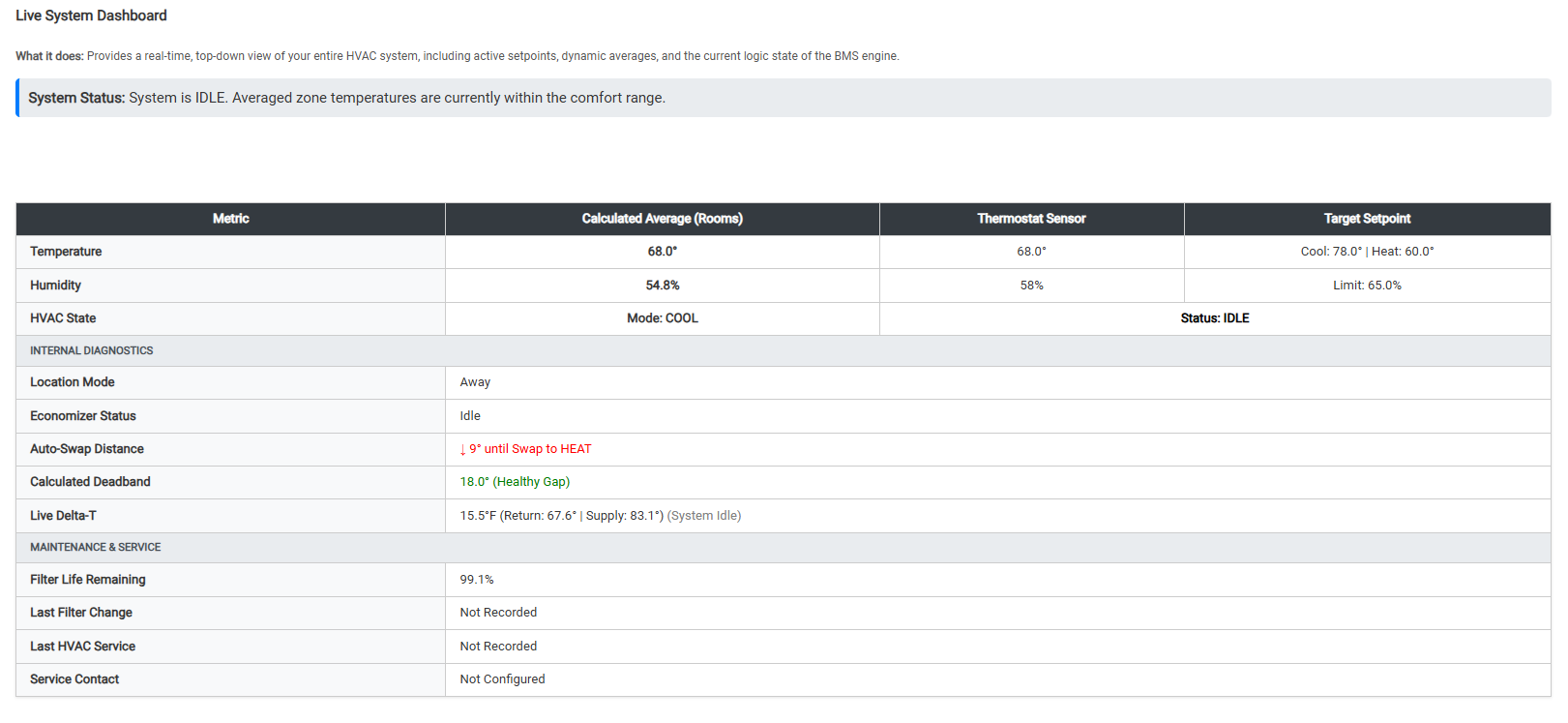
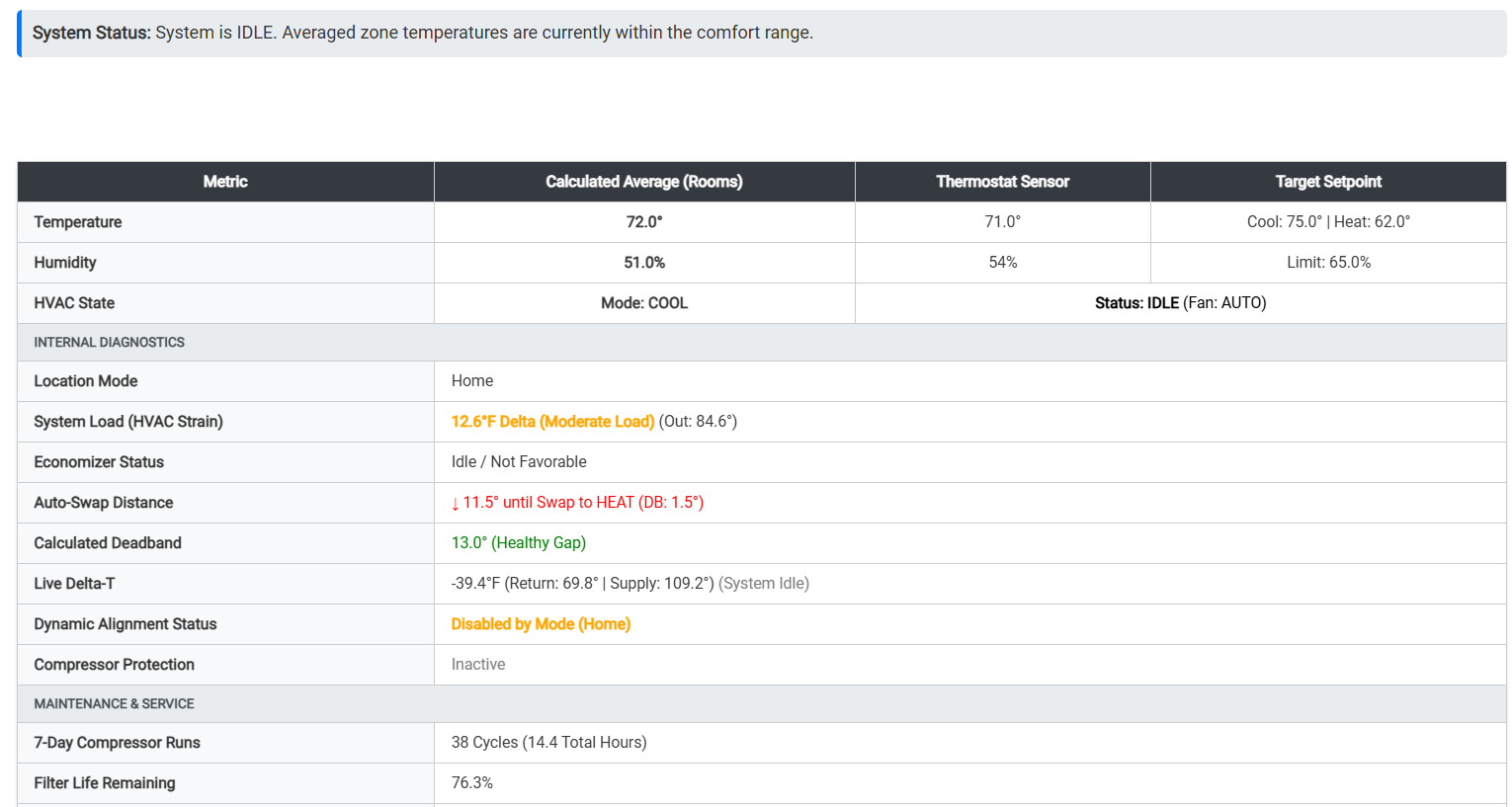
You don't need to build a complex SharpTools or Hubitat Dashboard to see what the app is doing. The app generates a live, color-coded HTML dashboard right in the settings menu.

  • Live System Metrics: View the true calculated house average vs. your physical thermostat sensor.
  • Internal Logic State: Instantly see exactly what the BMS engine is doing (e.g., Buffering, Free Cooling Pending, Peak Shaving Active, System Idle).
  • Calculated Deadband: Monitors the gap between your heating and cooling setpoints in real-time to ensure hardware stability.
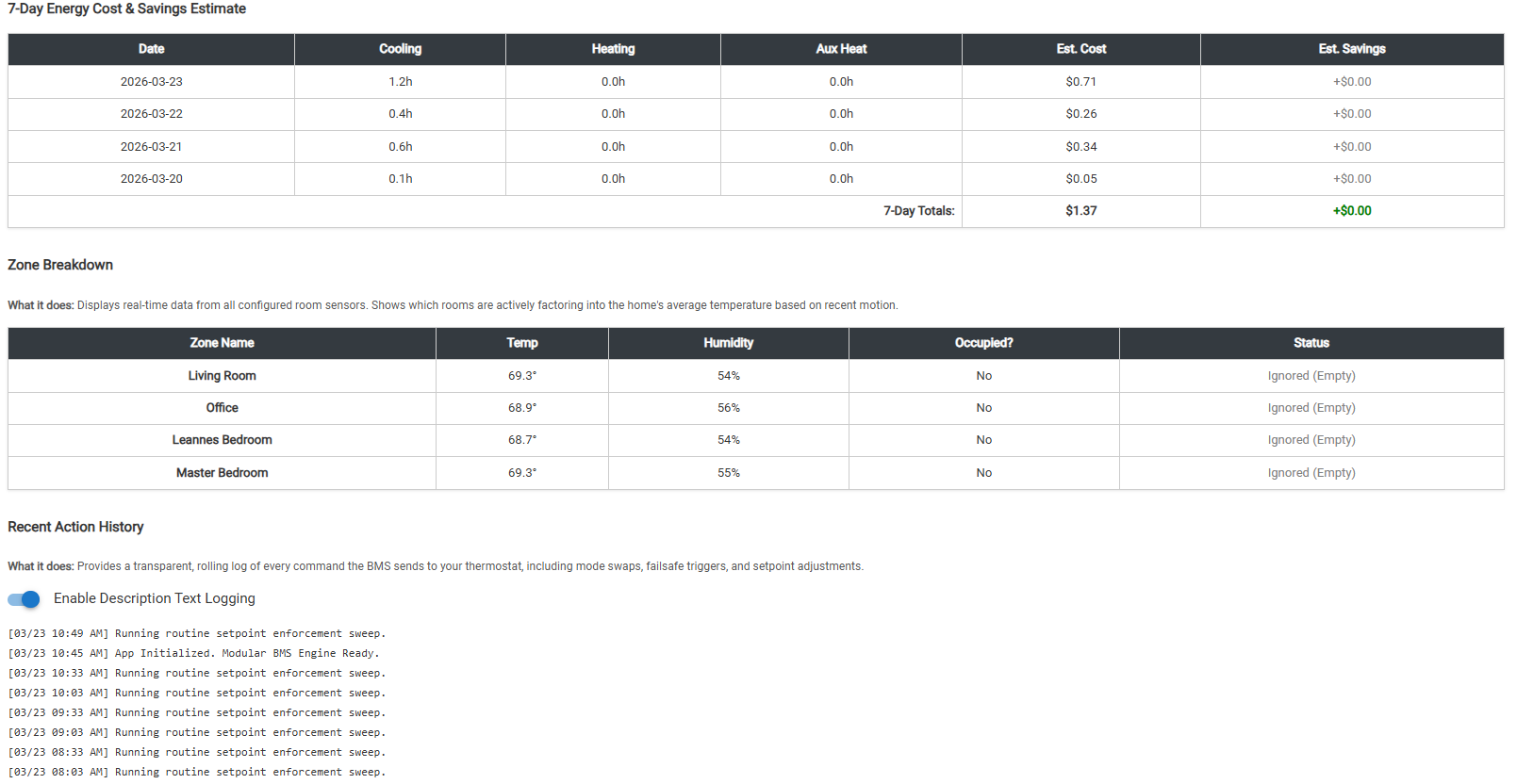
  • Recent Action History: A transparent, rolling log of the last 30 commands the BMS sent to your thermostat.

:thermometer: Comfort & Multi-Zone Logic

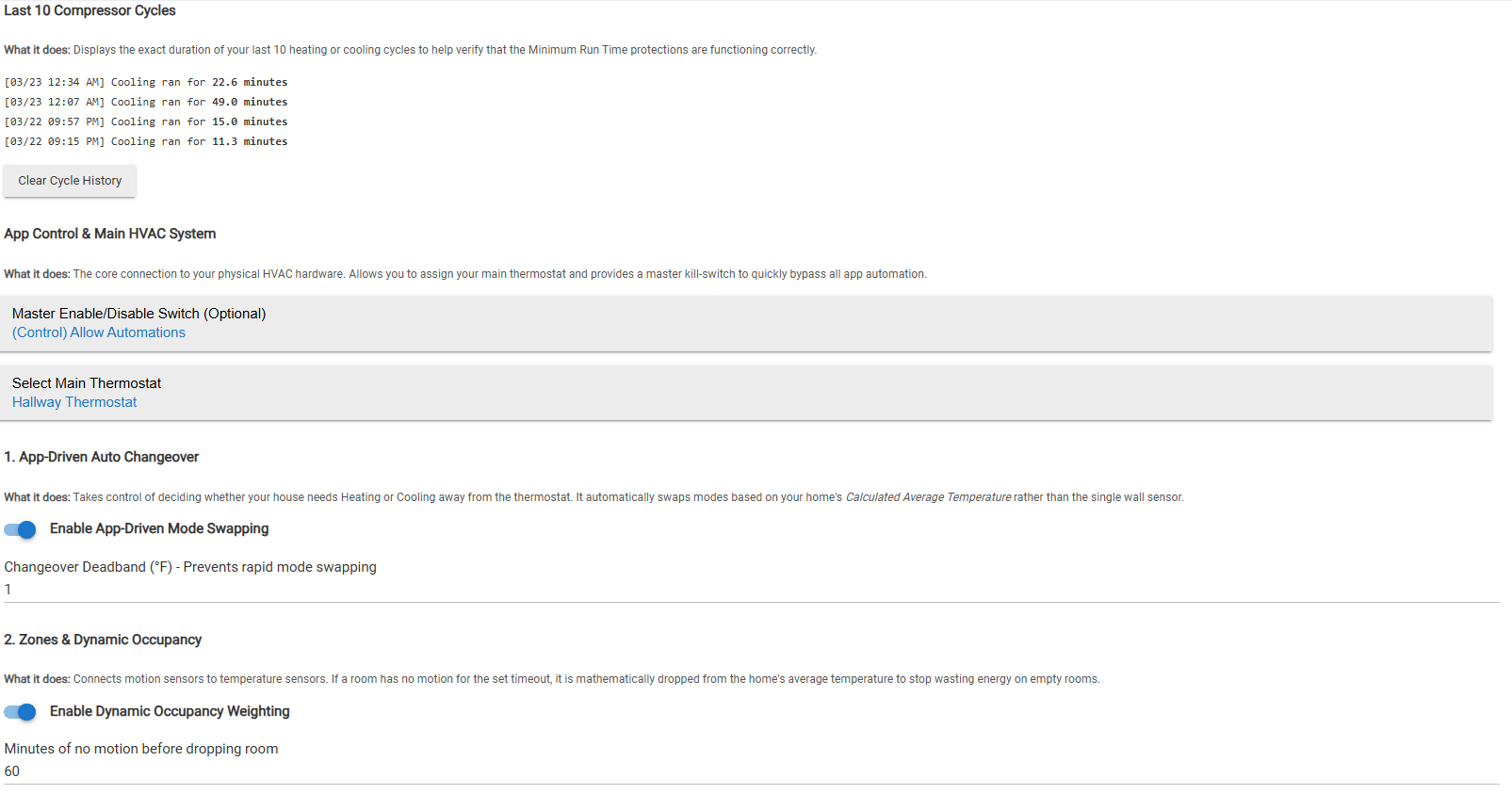
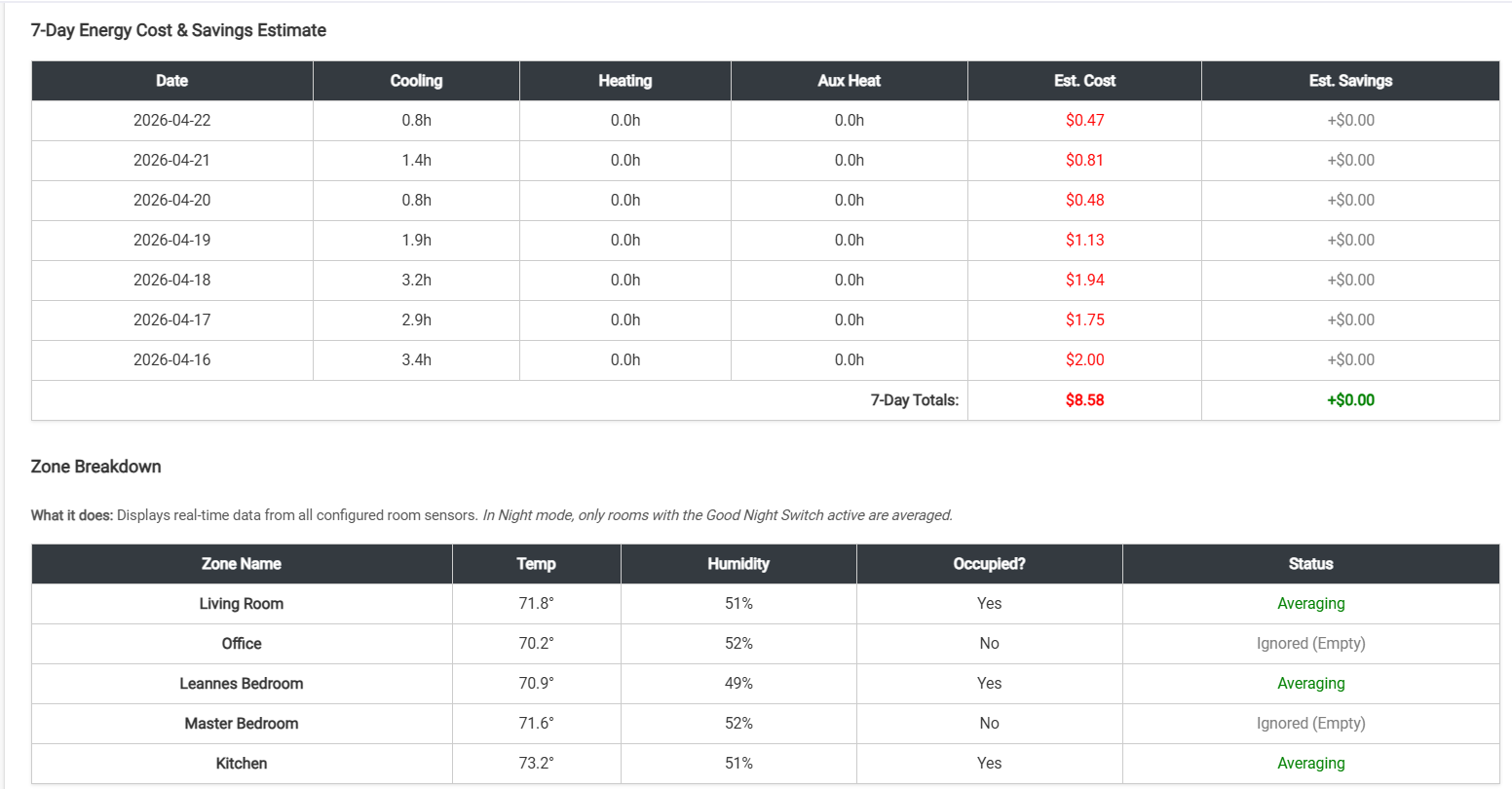
  • Dynamic Occupancy Weighting: Averages the temperature across up to 12 zones using temp/motion sensors. If a room has no motion for a set timeout, it is mathematically dropped from the home's average to stop wasting energy on empty rooms.
  • Dynamic Setpoint Alignment: Solves the "cool hallway" problem safely. Uses a proportional offset to temporarily shift the physical thermostat's setpoint to force it to keep running until the true house average reaches your target.
  • App-Driven Auto Changeover: Takes changeover control away from the wall stat. It automatically swaps between Heat and Cool modes based on your home's Calculated Average, preventing rapid bouncing with a customizable deadband.
  • Multi-Stage Dehumidification: Stage 1 triggers standalone smart-plug dehumidifiers. Stage 2 slightly overcools the house with the main AC to force the compressor to wring excess moisture out of the air.

:moneybag: Economy, ROI & Predictive Climate

  • The Economizer (Free Cooling): Suspends the AC and sends a push notification to open your windows if outdoor weather is favorable. Failsafe: If windows are not opened within the timeout period, it aborts Free Cooling and resumes normal AC.
  • Predictive Pre-Conditioning (Thermal Battery): Checks tomorrow's forecast. If a heatwave is predicted, it sub-cools your house during the early morning (when electricity is cheap) to coast through the hot afternoon.
  • Time-of-Use (Peak Shaving): Automatically drifts your target temperatures up or down during expensive utility Time-of-Use (TOU) hours to reduce peak demand charges.
  • Adaptive Recovery (Smart Start): Input the time you get home from work, and the app calculates exactly when to start the HVAC based on how fast your specific unit heats or cools (Glide Rate).
  • 7-Day Energy Cost & Savings Tracker: Tracks exact compressor and Aux heat runtimes to estimate your utility costs. It also calculates the runtime you avoided while using Free Cooling to prove your ROI.

:shield: Commercial-Grade Hardware Protection

  • Live Delta-T Efficiency Monitoring: Monitors system health by measuring the temperature drop across your return and supply vents. Triggers a warning or an Emergency Shutoff if efficiency drops (indicating a frozen coil or refrigerant leak).
  • Oversized Unit / Short-Cycle Protection: Protects oversized compressors from damaging short-cycles by tracking live temp-drop rates and artificially shifting the setpoint to force a minimum, safe runtime.
  • Universal Deadband Enforcer: A master logic gate that intercepts every command before it reaches your thermostat to ensure modifications (like Dehumidification or Buffering) never push Heat and Cool targets too close together, preventing hardware lockouts.
  • Open Window / Door Defeat: Automatically intercepts and shuts off the HVAC if a monitored perimeter contact sensor is left open past a threshold. Restores operation once closed.
  • Smart Filter Tracking: Calculates filter life not just by calendar days, but by multiplying actual blower fan run-hours against Indoor/Outdoor Air Quality (AQI) dust metrics.
  • Routine Setpoint Enforcement: Acts as a self-healing loop to re-transmit targets periodically in case a Z-Wave/Zigbee mesh command was dropped.

:handshake: Open Source & Free to Use

This project is completely free, open-source code. I know every smart home is unique, so please feel free to use it, tear it apart, edit the math, or adapt any part of the logic to perfectly fit your own setup. If you find a way to improve it, let me know!

Legal Disclaimer: ShaneAllen is not responsible for any damage or liability associated with the use of this application. This application directly controls high-voltage HVAC equipment. This is a user-created custom application; please use it at your own discretion and test thoroughly with your specific hardware.
4 Likes

Just a few screenshots of the application. This doesn't show everything but its a small snapshot of the basic application. Nothing fancy but I hope someone gets some use from it.


1 Like

Sounds very interesting and for sure something I would like to try in my cabin.

:hammer_and_wrench: Major Bug Fixes & Core Engine Updates

  • Fixed Short-Cycling Lockout: Resolved an issue where the Minimum Run Time Protection was accidentally paralyzing the Dynamic Setpoint Alignment. The app will no longer allow the physical thermostat to prematurely end a cycle before the safe minimum run time is met.
  • Real-Time Responsiveness: The app now subscribes directly to your physical thermostat's temperature, waking up the BMS engine to recalculate Dynamic Alignment offsets in real-time as the room cools down, rather than waiting for a motion sensor trip or a routine sweep.

:gear: Multi-Stage Cooling & Dynamic Setpoint Overhaul

  • 0.5° Satisfaction Threshold: The app will now aggressively push the setpoint down (up to your Maximum Allowed Shift) to cool hot rooms, but will instantly zero-out the shift and ease off the compressor the exact moment your home's average temperature gets within 0.5° of your true target.
  • The "One-Way" Run Time Clamp: To guarantee your compressor runs for the full safety duration, the app will now dynamically push the cooling setpoint down to keep the AC alive, while mathematically blocking it from pushing it up until the minimum run time is satisfied.
  • Auto-Swap Safety Floor & Ceiling: When the app forces the AC to keep running for hardware protection, it now calculates a "Hard Safety Floor." It will refuse to push the cooling setpoint within 1.5° of your heating threshold, completely eliminating the risk of the app overcooling the house into an accidental Auto-Swap to Heat.

:stopwatch: The 15-Minute Anti-Yo-Yo Cooldown

  • To prevent system "hunting," the app now enforces a strict 15-minute Anti-Yo-Yo Cooldown timer the moment a cooling cycle ends (or when the emergency buffer releases). This pauses Dynamic Alignment and stops a slight breeze or minor temperature fluctuation from rapidly triggering another aggressive cycle.

:bar_chart: Live Dashboard & UI Enhancements

  • Live Timers Added: You will now see live, minute-by-minute countdown timers for both Compressor Protection and the Dynamic Alignment (Yo-Yo) cooldown directly inside the "Internal Diagnostics" table on the main dashboard.
  • Explicit Status Banners: The blue human-readable status banner at the top of the app will now explicitly tell you exactly why the app is taking over, displaying "Compressor Protection Engaged" or "Anti-Yo-Yo Cooldown Active" when those safety states are overriding normal logic.
  • Enhanced Action Logs: The rolling Action History will now explicitly log exactly why the buffer was deployed (e.g., "Compressor Protection Engaged! Temperature dropping too fast." or "HVAC started within 1.0° of setpoint").

raw.githubusercontent.com/ShaneAllen334/Hubitat_Apps/refs/heads/main/Advanced-Climate-Controller /Advanced-Climate-Controller.groovy

:rotating_light: Major BMS Logic & Compressor Protections

  • Active Compressor Watchdog: The app no longer "sleeps" while the AC or heater is running. A new 60-second watchdog actively monitors the local room temperature during a cycle. If the physical thermostat is about to prematurely shut off before your "Minimum Run Timer" is met, the app actively drags the setpoint away to force the compressor to satisfy the timer.
  • Stage 1 Hysteresis (Floating Deadband): Eliminated micro-cycling. You can now set an allowed temperature "Drift" (e.g., 1.0°). While the house average floats within this deadband, the app actively puts the physical thermostat to "sleep" by temporarily pushing its setpoints 1.5° away. Once the drift limit is hit, it initiates an active recovery.
  • "Emergency Brake" Alignment Lockout: If the dynamic alignment is forced to push your setpoints to the absolute maximum safety buffer just to keep the unit running, the app now realizes it's fighting a losing battle. It triggers a "Critical Lockout," aborts the alignment to protect the compressor, and waits for the room to naturally recover.
  • Short-Cycle Push Notifications: Added active alerting. If a cycle is interrupted (manually or physically) and falls short of your Minimum Run Time, the app instantly sends a push notification with the exact runtime duration (e.g., "Compressor ran for 3.7 mins").

:control_knobs: Zone Averaging & Failsafes

  • Exclusive "Good Night" Averaging: Motion-based occupancy rules are great for the daytime but terrible for sleeping. Now, when your Hubitat enters a "Night" mode, the app only averages rooms that have their specific "Good Night Virtual Switch" turned ON. All other rooms are completely ignored until morning.
  • Stale / Erroneous Sensor Failsafe: Wireless sensors drop out or report garbage data. The app now checks the timestamp and value of every room sensor before adding it to the house average. If a sensor reads below 40°F, above 100°F, or hasn't updated in 24 hours, it is dynamically dropped and flagged in red on the dashboard.
  • Mode-Restricted Dynamic Alignment: You can now restrict the Dynamic Setpoint Alignment to specific modes (like "Good Night"). This allows the system to run on highly efficient base setpoints during the day, but switch to aggressive, highly-accurate room balancing while you sleep.

:bar_chart: Quality of Life & Diagnostics

  • System Load Score (HVAC Strain): The live dashboard now calculates the Delta between your calculated indoor average and your outdoor weather sensor. It grades your home's thermal load as Low, Moderate, or Extreme directly on the UI.
  • Active Fan Free Cooling: When the Economizer detects favorable outdoor weather, the dashboard explicitly announces it's ready. Once windows open, the app doesn't just suspend the AC—it automatically kicks your HVAC blower fan to ON to pull fresh air through the house, restoring it to AUTO when windows are closed.
  • Adjustable Anti-Yo-Yo Timer: The cooldown timer that prevents rapid re-triggering of the Dynamic Alignment is now fully adjustable in the UI (defaults to 15 minutes) to match the thermal mass of your specific home.

:bug: Crucial Bug Fixes

  • The "Echo Bounce" False Override Fix: Fixed a massive issue where the app would paralyze itself. When sending a command to the thermostat, some Z-Wave/Zigbee drivers bounce back an intermediate, incomplete temperature. The app now enforces a 15-second blindspot after sending a command, making it immune to false "Manual Overrides" caused by network echoes.
  • Auto-Swap vs. Hysteresis Conflict: Solved a logic race where the Auto-Swap deadband could fight the new Hysteresis drift. The app now auto-calculates the thresholds to ensure it always attempts a temperature recovery in the current mode before taking the drastic step of physically swapping the unit to Heat/Cool.
  • Dynamic Snap-Back: Fixed a sequencing delay where setpoints weren't snapping back to their base defaults immediately after a cooling cycle ended.

raw.githubusercontent.com/ShaneAllen334/Hubitat_Apps/refs/heads/main/Advanced-Climate-Controller /Advanced-Climate-Controller.groovy

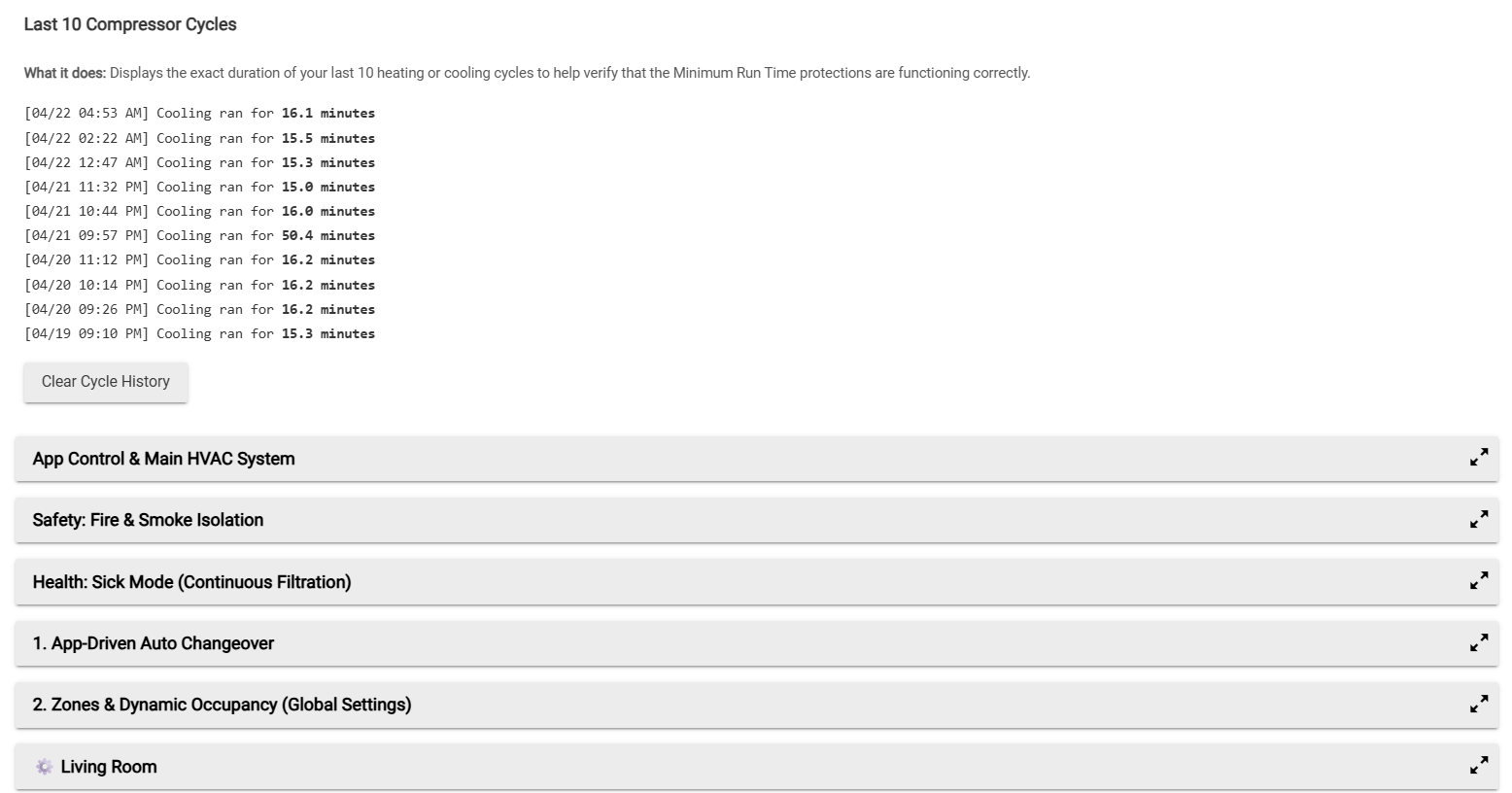
Just a small snap shot of our over sized HVAC unit running at our 15m compressor runtime setpoint for equipment protection.

Last 10 Compressor Cycles

What it does: Displays the exact duration of your last 10 heating or cooling cycles to help verify that the Minimum Run Time protections are functioning correctly.

[03/28 04:36 AM] Cooling ran for 18.9 minutes
[03/28 02:19 AM] Cooling ran for 17.0 minutes
[03/28 12:55 AM] Cooling ran for 18.0 minutes
[03/28 12:02 AM] Cooling ran for 22.0 minutes
[03/27 11:14 PM] Cooling ran for 70.9 minutes
[03/27 07:36 PM] Cooling ran for 15.0 minutes

:rotating_light: New Feature Update: Intelligent Compressor Protection During Mode Changes

The Problem: Previously, if your house mode changed (for example, switching from 'Home' to 'Away' when you leave for work) while the HVAC had only been running for a couple of minutes, the sudden shift in setpoint targets would immediately shut off the compressor. This effectively bypassed the Minimum Run Time safety limits, leaving oversized units vulnerable to damaging short-cycles.

The Solution: We’ve introduced a new, smarter state-management feature to close this loophole: Delayed Mode Changes.

When enabled, if a mode change occurs while the compressor is actively running, the BMS engine will intercept the new mode and "memorize" the original state. It forces the system to finish its safe Minimum Run Time block first. The exact second the safety timer expires, the app will automatically wake up, evaluate the new mode, and seamlessly push the updated setpoints.

What's New in the App:

  • New Setting: Added a toggle for "Delay Mode Changes until Min Run Time completes".
  • Where to find it: Located under section 11. Delta-T Efficiency Monitoring & Run Time Protection -> Oversized Unit Protection.
  • Transparent Logging: Includes dedicated logic to log exactly why a mode change is being temporarily held, so you are never left wondering why the AC is still running after you leave the house.

Update located in the original GitHub location.

Hello everyone,

I’m excited to share a massive new update for the Advanced Climate Controller. For those new to the app, it’s designed to act as a commercial-grade Building Management System (BMS) engine tailored specifically for residential smart homes.

With this latest update, we are moving beyond just comfort and energy efficiency, and stepping into the territory of life safety, environmental health, and advanced hardware manipulation.

Here is a breakdown of what has just been added to the logic engine:

:rotating_light: 1. Life Safety: Fire & Smoke Isolation

This is a brand new, top-level hard override. You can now link your smart Smoke and Carbon Monoxide detectors directly into the BMS.

  • How it works: If smoke or CO is detected, the app instantly sends an Off command to the thermostat and locks the blower fan to Auto. This prevents your HVAC system from accidentally circulating toxic smoke through your ductwork or feeding fresh oxygen to a fire. This failsafe overrides all other modes, holds, and schedules until the emergency is cleared.

:sneezing_face: 2. Environmental Health: Sick Mode

When flu season hits or allergies are acting up, air circulation is critical.

  • How it works: You can now map a virtual switch to "Sick Mode." When activated, the BMS forces your HVAC fan to run 24/7 to constantly scrub the indoor air through your system's filters. I’ve also built in cross-check logic so it plays perfectly with the Free Cooling module—they won't fight each other over fan control.

:zap: 3. Heat Pump Magic: Aux Heat Suppression (Setpoint Gliding)

If you run a heat pump with a smart thermostat (like a Honeywell T6 Pro, Ecobee, or Nest), you know the frustration of the thermostat prematurely kicking on the expensive Auxiliary Heat strips just because the setpoint jumped a few degrees (like during a morning schedule change).

  • How it works: Standard Z-Wave doesn't let us disable internal Aux staging, so this app now tricks the thermostat. Using "Setpoint Nudging," if you want to heat the house from 64°F to 70°F, the app intercepts that command. It sends a target of 65.5°F first. Once the room warms up, it nudges it to 67°F, and so on. The physical thermostat never sees a gap large enough to justify turning on the expensive heat strips, forcing it to rely purely on your highly efficient compressor.

:wind_face: 4. Economizer Upgrade: Wind-Direction Assisted Free Cooling

The Free Cooling module (which suspends your AC and tells you to open windows when it's nice out) just got a lot smarter.

  • How it works: You can now input your home's optimal wind directions (e.g., "N, NW, S") based on your window placement. The app pulls real-time wind direction data from your weather device. If the weather is favorable and the wind is hitting the right side of your house, the push notification will specifically advise you that there is a perfect cross-breeze available.

Where to get it: The updated code is ready to drop into your hub. If you are already running the app, simply overwrite your existing code—all your current settings and historical cycle data will remain intact, and the new features will appear as collapsible menus in the app UI.

Let me know what you guys think, how the Aux Suppression is working with your specific thermostat models, and if you run into any bugs!

Gemini said

:warning: Disclaimer: Please remember that this application directly controls highly expensive equipment (your HVAC system). While I run and test this code extensively in my own home, every smart home environment is unique. I am not liable for any physical damage, increased utility bills, or unexpected system behavior resulting from software bugs, hub lockups, or incorrect configuration/installation. Please monitor your system closely when first installing the app or enabling new features to ensure it behaves exactly as expected with your specific hardware. Use at your own risk!
APP:
raw.githubusercontent.com/ShaneAllen334/Hubitat_Apps/refs/heads/main/Advanced-Climate-Controller /Advanced-Climate-Controller.groovy