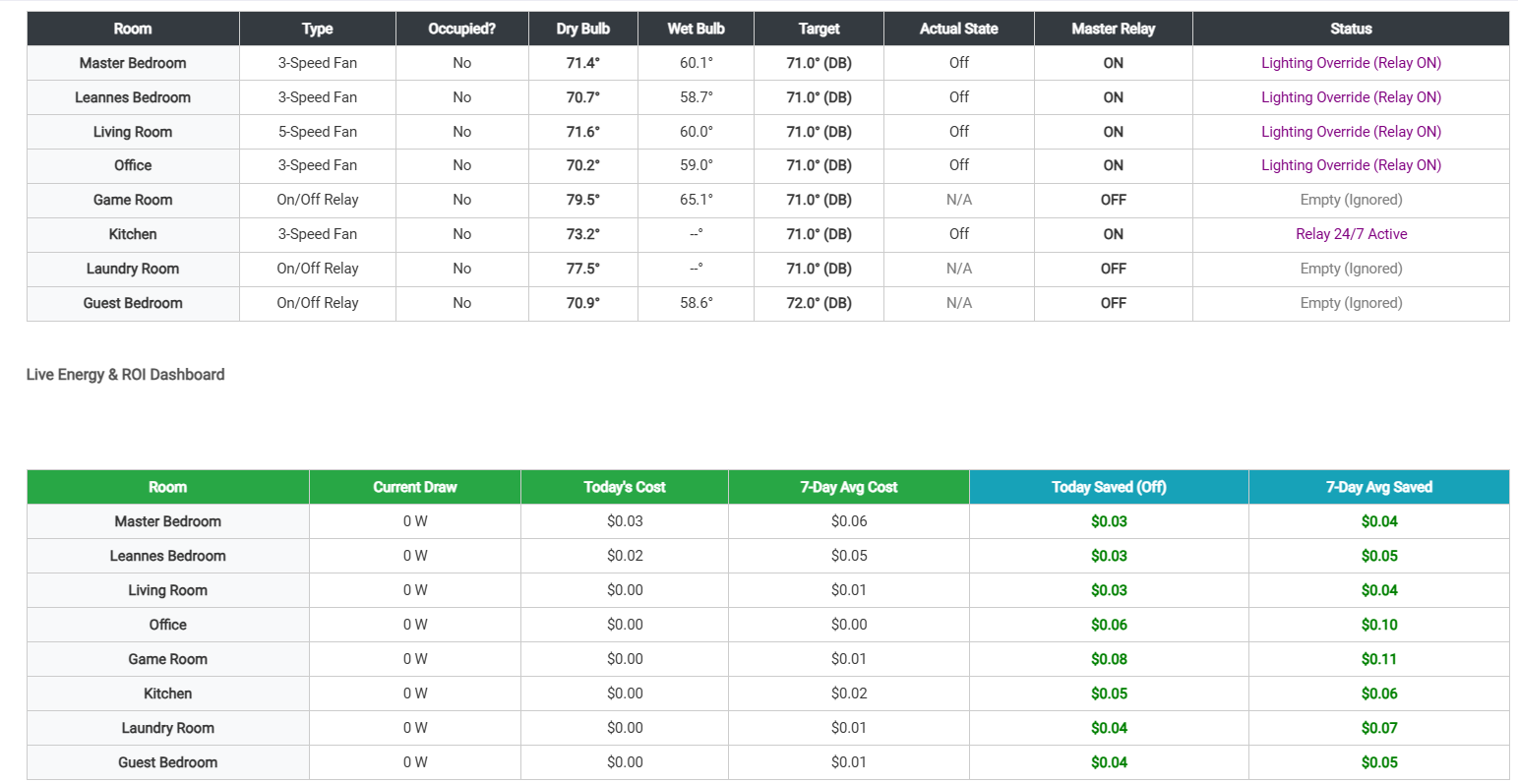
Hey everyone! I’m excited to share a project I’ve been working on to solve some of the common frustrations with automated ceiling fans—especially for those of us using RF/Bond controllers or fans with integrated light kits.
The Advanced Ceiling Fan Climate Control app is a multi-zone engine designed to manage comfort based on more than just "Dry Bulb" temperature. It’s built for reliability, climate accuracy, and "wife-approval factor."
Key Features
Multi-Speed & Simple Fan Support : Control 3-speed fans (Low, Medium, High) or basic On/Off relay-controlled fans with a single app.
Wet Bulb "Feels Like" Logic : Optionally use humidity data to calculate the Wet Bulb temperature, ensuring the fan only kicks in when it actually feels warm.
Dynamic Occupancy & Activity Overrides : Beyond standard motion timeouts, you can assign an "Activity Switch" (like a Roku TV). As long as that device is on, the room stays "Occupied" even if you're perfectly still on the couch.
Smart Lighting Relay Management : If your fan light is on the same power relay as the fan, this app proactively manages that relay. It ensures the power stays ON at sunset or when shades are closed so your lights always work, even if the fan blades are OFF .
RF / Bond Reliability Suite:
Sequential Stepping : Prevents RF fans from missing commands by stepping through speeds one at a time.
Hourly Wiggle : An optional "self-healing" routine that bumps the fan speed to verify it’s still in sync with the hub.
Spin-Down Delay : Waits for the blades to stop before killing the master power relay.
Customizable Comfort : Define your own global temperature deltas for when the fan should ramp up from Low to Medium or High.
Live Fan Dashboard : A built-in real-time table showing room occupancy, Dry/Wet bulb temps, target vs. actual states, and Smart Relay status.
How to Use
Configure Zones : Add up to 8 rooms, each with its own temperature/humidity sensors and motion detectors.
Set Comfort Thresholds : Define exactly how many degrees above the setpoint should trigger each fan speed.
Define Modes : Specify which Hubitat modes are "Away" (kill everything) or "Night" (Good Night isolation).
Monitor : Use the Live Dashboard in the app to see exactly why a fan is running (or why it isn't).
Licensing & Support
This application is completely free to use, edit, and "steal." I built this to solve a need in my own home, and I'm happy to share it with the community.
If you run into any issues, need a specific fix, or have an idea for a feature change, please feel free to ask! I’m happy to help out and keep the code updated as we find new ways to improve it.
I haven't installed/looked at, but just curious, why only 3 speeds for Bond? Why not take advantage of the 5 speeds that the hub supports. I have a feeling the answer will be "I don't have >3 speed fans" or "I didn't need that much variability".
I probably will check it out because I do have ceiling fans in pretty much every room, some Bond and some just on/off.
The newest version is available on Github with all the following fixes and features:
Core Thermodynamic Engine
Wet Bulb ("Feels Like") Targeting: Employs advanced psychrometric math (getWetBulbF) to calculate the exact Wet Bulb temperature using room temperature and humidity sensors. If a room is 74°F but highly humid, the system automatically ramps up fan speeds to compensate for the "feels like" condition.
Dry Bulb Fallback: If a room's humidity sensor drops offline, the engine seamlessly falls back to standard Dry Bulb (raw temperature) tracking to prevent automation failure.
Granular Fan Hardware Support: Natively orchestrates 3-Speed, 5-Speed, and 6-Speed fans, alongside Fixed-Speed (non-controllable) fans and Simple On/Off relays.
Universal Delta Thresholds: You define the exact mathematical delta (+°F) required to trigger every individual speed step. (e.g., +0.5° for Low, +1.5° for Medium, +2.5° for High).
Individual Room Setpoints: Every zone maintains its own independent target temperature.
Advanced Master Relay & Smart Lighting Decoupling
Because smart wall switches cut power to the fan's built-in light kit, this app completely decouples the "Master Power Relay" from the "Fan Blades."
Proactive Relay Engagement: If a room needs cooling, the app powers the wall relay ON, waits 5 seconds, and then commands the blades to spin.
Smart Lighting Requirements: The app evaluates your local Sunrise/Sunset times, physical Window Shade contact sensors, and a global "Virtual Overcast" switch. If the room is occupied and dark, it forces the wall relay ON (so humans can use the light switch) while commanding the blades to stay OFF.
"Keep Unoccupied" Relay Toggle: Option to keep the wall relay permanently powered even when the room is empty, purely for lighting availability.
24/7 Relay Lock: A hard override to keep the wall switch permanently powered (prevents older fan light kits from defaulting to 'ON' after a power cycle).
Kinetic Spin-Down Delay: When cooling finishes, the app commands the blades to stop but waits a user-defined period (e.g., 15s) for the physical blades to stop spinning before killing the master power relay.
Dynamic Occupancy & Mode Interlocks
Multi-Sensor Accumulation: Supports an unlimited array of motion sensors per room.
Independent Room Timeouts: Every zone has a dedicated occupancy timeout countdown (e.g., 30 minutes for the Living Room, 5 minutes for the Bathroom).
Activity Switch Failsafe: Link a virtual switch (like a Roku or Apple TV power state) to a room. If the TV is on, the room is hard-locked to "Occupied" regardless of motion timeouts.
Global Mode Tracking: Assign "Away" modes (instantly kills all fans) and "Good Night" modes (kills fans to save power while sleeping).
"Good Night" Isolation Switch: A dedicated virtual switch per room. If flipped, that specific room ignores the global Good Night shutdown command and continues to track its temperature setpoint while you sleep.
Behavioral Overrides & Button Controllers
The app is designed to never fight a human.
Smart Manual Overrides: If a user manually changes the fan speed via a wall switch or dashboard, the app detects the state-change, creates a "Blind Spot" to ignore incoming automations, and pauses the room for a user-defined time (e.g., 2 hours).
Transition Lockouts: If the app is actively stepping a fan to a target, it ignores incoming state reports to prevent false manual overrides caused by lag.
Physical Button Controller Integration: Map specific physical buttons (Pushed, Held, Double Tapped) to specific fan speeds.
Button Toggle Release Logic: If a room is currently in "Manual Override" and you press the button that matches the current speed, the app interprets it as a "Release" command and instantly returns the room to Auto-Tracking.
Mode-Restricted Buttons: Prevent button controllers from executing commands during specific modes (e.g., disable the bedroom button during Away mode).
Cloud integrations (like Bond) frequently miss commands if they are sent too quickly or if the mesh network is busy.
Sequential Stepping: Instead of jumping straight from OFF to HIGH, the app "steps" the fan through the gears (Off > Low > Med > High) with a user-defined delay (e.g., 3 seconds) between each transmission.
The Hourly "Wiggle": If a fan runs for an extended period, the app performs a silent hourly "Wiggle." It drops the fan down one speed and immediately bumps it back up. This forces a resync with the physical hardware in case an RF packet was dropped.
Wiggle Stability Skip: If the room's occupancy and target speed have been completely stable for over 2 hours, the app intelligently skips the Wiggle to avoid annoying the occupants.
Mesh Network Settle Delays: Upon a Hubitat reboot, the app pauses all evaluations for 60 seconds to let the Zigbee/Z-Wave mesh initialize.
Mode Transition Delays: When the house changes modes, the app enforces a 10-minute manual override lockout to prevent chaotic network flooding from triggering false overrides.
Live Telemetry & Financial ROI Auditor
Live System Matrix Dashboard: A beautiful HTML table showing every room's Dry Bulb, Wet Bulb, Occupancy State, Target Speed, Actual Speed, Relay State, and Automation Status.
Action History Ledger: A rolling onboard text log of the last 30 system actions, overriding events, and state changes with exact timestamps.
Interpolated Wattage Math: You input the fan's Minimum (Low) and Maximum (High) wattage. The app mathematically interpolates the power draw for every speed in between (Medium-Low, Medium, etc.).
Live Cost Tracking: Calculates exactly how much money the fan costs to run each day based on your real-world electricity rate ($/kWh).
"Saved" ROI Ledger: When a room goes empty and the app turns the fan off, the engine calculates exactly how much money it saved you by not leaving the fan running (configurable to calculate savings based on Max Watts or Average Watts).
7-Day Rollover: Automatically archives yesterday's financial data every midnight to provide a running 7-Day Average Cost and 7-Day Average Savings tracker.
@ShaneAllen I am using your app to control two of my fans, and like it...
My question is, is there a way to disable the automation for a room using a switch, either real or virtual.
My usage would be if I want to disable the automation so that I can manually set a fan speed rather than have automatic speed control temporarily.
Then when the "switch" is turned off, resume automation for that fan.
This would be on a per room basis.
It isn't really clear to me anyway, if this is possible. I have read your detailed description and cannot find a way to do this.
For instance, the fan is running in auto, I want to take a nap and want the fan to stay on very-low, then when I wake up, I can set the switch to "auto" (off) and the auto mode resumes.
I am using a button controller to command a Bond bridge that "talks" to the fan with RF. Your app talks directly with the Bond bridge too. This works great with your app!
So currently i dont have a way that would create a button to disable to fans BUT you could use a virtual switch, set the setpoint extremely low and setup the good night switch feature.
Or with your button controller setup the manual timed overrides. It defaults to 2 hours but this can be increased. If you press the button again it will release the override.
I have been playing around with the app, and it seems like using the fan's remote (a Zooz ZEN37 button controller), I have button4 set to OFF, so I "watch" that remote and button 4 to "trigger" the button override, and set the timeout to 6 hours.
I found (like you said here) that pushing the button again, clears the timeout and starts the automation again.. JUST what I wanted!
Thanks for your work and time on this app and the response!
Thats correct, this was added becouse i was running into issues with fan not receiving the command. So it forcing it to step allows for 3 chances to get to the correct speed on high and 2 on low. This can be changed in a future release.
Im not sure if your using my 2.0 version or the base version, but if you go to my github the 2.0 has the latest improvments and enhancements.
I see. My fans don't seem to have a problem changing speeds "directly" or from off to any speed, so I just set the timeout to 1 second to force a faster change.
I do notice on my fans (Casablanca 6 speed), that during a speed stepping, they seem to slowdown first, then go to the "new" speed.
If I manually go to a speed, they ramp up to the speed directly.
I will check the version that I am running.... I cannot find the version number. I will update anyway... can't hurt!
The inclusion of pressure sensor for bed sensing, the logic for presence sensing and walk through really helps minimize false triggering and excessive fan run times.
I am going to use the app in my shop for the fans in there also using motion and lighting as triggers....
The more I think about this, the more uses I come up with!

 Ok, I was going to say hold off until I investigate my own needs/wants...Thanks.
 Core Thermodynamic Engine
 Advanced Master Relay & Smart Lighting Decoupling
 Dynamic Occupancy & Mode Interlocks
 Behavioral Overrides & Button Controllers
 Self-Healing RF & Cloud-Sync Engine (Bond Bridge Protection)
 Live Telemetry & Financial ROI Auditor