I have discovered that commanding mixed groups of dimmers and switches using variable dimmer levels based on modes etc is fairly simple and can be handled quite elegantly as in a room that has dimmed lights along with a lamp that’s simply on/off via an outlet. When you control a mixed group, setting the dim level of the group to zero turns the dimmers AND the switches off. Visa-versa, setting the dim level to a non-zero value sets the dimmers in that group to that level and turns any switches on. Works great.
I have groups of lights that are only switches with no dimmers and wanted to use the same technique to control that group i.e. set group to max dim, mid dim, zero dim because instead a lot of if-then-else to control the group, I just set the group to a dim level. However, I found an interesting behavior. You can define a group of on/off switches to be commanded as a dimmer. HOWEVER, if there is no dimmer in the group, dimming from 0 to some value will not turn the switches on as it works in a mixed dimmer/switch group. Nor will dimming the group of switches to zero turn the group off as it does in a mixed dimmer/switch group. The solution I found is to create a virtual dimmer and add it to the group and then it works like a normal mixed group.
I'm confused. I've never used "groups".
This is posted under Rule Machine-I've never seen a "group" there.
Is this about the app, "groups and scenes", or maybe "room lighting"?
Zigbee? Z-Wave?
I didn't think "groups" worked well with Z-Wave.
Words like "multicast", and ZWJS and SDK implementation come to mind. You'd think with LR now commonplace groups could work better. But I haven't tried and I don't know details.
Groups and Scenes are controlled from other sources like Rule Machine and when commanding Groups from Rule Machine and an "ah-ha" happens, it fits under the Rule Machine category. Groups for me work great. I have groups of groups with some all zwave and some with zigbee mixed in. I do have an occasional (very occasional) issue where a light might not turn on but it's more of a nuisance than a show-stopper. I recently discovered that most of my groups were set up as a switch vs a dimmer. This has caused me grief for many months. In converting my groups with dimmers to dimmer control, I have found that setting the dim level of a group will also turn switches in that group on/off which is built into the operation of groups and scenes I am led to understand. With that in mind, re-read my original post and maybe you'll understand why I put it out there.
I’m starting to notice a problem. In RM , when I set the group dimmer level to zero, it does turn the group of dimmers and switches OFF. However, it does not change the dim level of the group to zero. Checking the group device shows the switch state of the group as OFF, all switches and dimmers in the group show a switch state of OFF including the virtual dimmer but the dim level of the group is as set before issuing the dim-to-zero. For example, if I dim the group to 95 the group turns on and shows a dimmer level of 95. When I dim to zero, the group turns off, the group switch is turned off, the virtual dimmer level is set to zero but the group dimmer level remains 95. If I set the dim level to any nonzero level, it sets the dim level of the group to the new nonzero value. Shouldn’t the group dimmer be set to the desired level regardless of value and turn the group off if the dim level is zero?
I’m not sure where to see the app code for this behavior. Is the author still in the community?
Thanks for that. I’m see some concerning behavior. I have verified that setting the group dimmer level does change the group dimmer level when the desired level is nonzero but setting the dimmer level to zero does not change the group dimmer level. It does change the dimmer level of the dimmers in the group to zero. That is a problem. The dimmer level of the group should be set to zero and the group turned off. I think this is a bug.
Level 0 is a special case. 0 = switch off. How the driver dimmer level changes or does not when the switch is set to off can be based on either the device driver or the device itself. You have to know how each device works to make any sense of expectations. None of my dimmers (Lutron and Z-Wave) change the driver level to 0 when setting the level to 0, they just turn the switch off. I do see that a vanilla Virtual Dimmer does change the driver level to 0.
Also, just a note. The Groups app you are using is generally fine, but it was superseded in 2022 by Room Lighting. There's not a ton of difference and it may not (or may) be worth changing. Here is some documentation on the group functionality in RL.
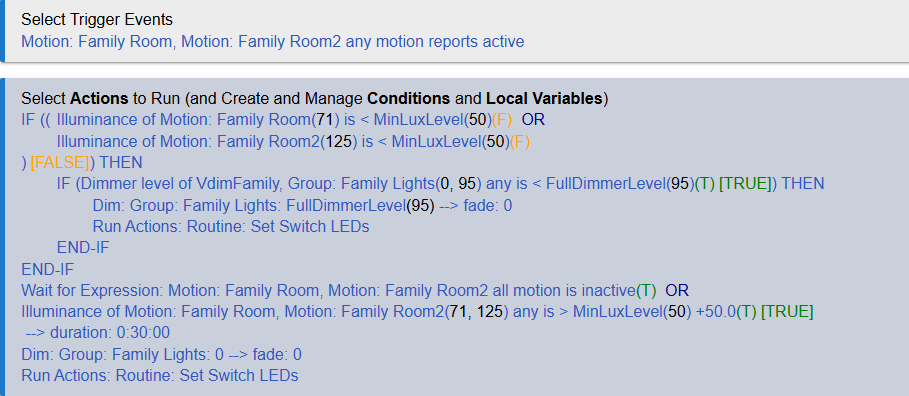
I appreciate the feedback and yes, how a dimmer behaves when it is set to zero varies as I have about 3 manufacturers devices. My Zen77's all remain at the current dim level when the dim level is set to 0, but turn off their associated switch. However, with a group, the dim level is really virtual is it not? Seems like it would act more like a virtual dimmer, but I understand why the choice was made. I am using the dim level of the group in a conditional to go from full level to a resume level where the resume level is either zero during the day or a variable level during night based on modes. It makes the rules rather simple and straight forward to just toggle between the different dim levels but I see that will be problematic for me to use the group level as a reliable condition to determine what to set the dim level to. I have since added the virtual dimmer to a group and I am using its dim level in my conditional and that seems to be a reliable workaround.
I have tried the Room Lighting app in the past, but (I can't remember why) didn't meet all my needs. I set scene LED's based on motion controlled room lighting and dim levels. The Room Lighting app is great, but I couldn't do all I wanted. That was some time ago.