been getting system message that is stating that ambient weather is too chatty. It appears that data is sent to hubitat every minute. Is there somewhere that I can change that down to around 5 minutes?
You can adjust how often Ambient sends data to Hubitat in several places:
- on your Ambient console in the same place you set up the IP address of the Hubitat hub
- you can do it in the awnet App
(select your station, then click through "next" until you get to the "Customized" page and look for "Upload Interval")
Alternately, you can also open the Ambient Weather Station device on your Hubitat and increase the "Too many events alert threshold".
2 Likes
I had it ever 60 seconds. the default "too many" was 500 and I increased but still getting the message... so, I think it is best to change in awnet to get it less chatty. I did 180 seconds and that should work. Sorry, I totally forgot about awnet.
2 Likes
We had another thunderstorm last night and I happened to notice that the lightning strike distance reported on the Ambient weather console differs from what the child lightning sensor device (AmbientEcowittWeather 0.7.13) is logging.
For example, for matching lightning strike distance timestamps, the Ambient weather console (WS5000/WS2000) shows a distance of 15 miles while HE's lightning sensor device reports 24 miles; when Ambient displays 25 milles, HE's event log shows 40 miles; Ambient displays 11 when HE logs 17.
HE's device seems to be displaying a distance approx. 1.6X that of what the Ambient console is showing.
The Is anyone else seeing something similar?
1 mile is approximately 1.6 km. The value reported by the API must be in km.
The API documentation is conflicting -
- Ambient's github Device Data Specs · ambient-weather/api-docs Wiki · GitHub says lightning_distance is in miles
- Ambient's AWNET FAQ https://ambientweather.com/faqs/question/view/id/1857/ says lightning_distance is in km
This might be something it reports differently for the local API (the 2nd link) vs. server API (the 1st link).
1 Like
Thanks; that would explain it.. @snell, any chance of providing a preferences switch to account for the possibility of local vs. server API differences?
Boy... Ambient hates developers with all the differences between the local and API. Anyways, it should be possible to just build it straight in based on what method you are connecting with. I will try to work on it this weekend.
2 Likes
@Tony, which API are you using? local or server?
Using the local API.
1 Like
Updated Version(s):
- AmbientEcowittWeather.groovy = 0.7.14
Change(s):
- Added conversion to lightning distance when in local mode.
- Made change to directions for Ecowitt/local mode to leave the default Path.
2 Likes
Excellent, thanks!
With the 0.7.14 driver, I'm seeing this when selecting 'Save Device' and (it appears) during every reporting interval:
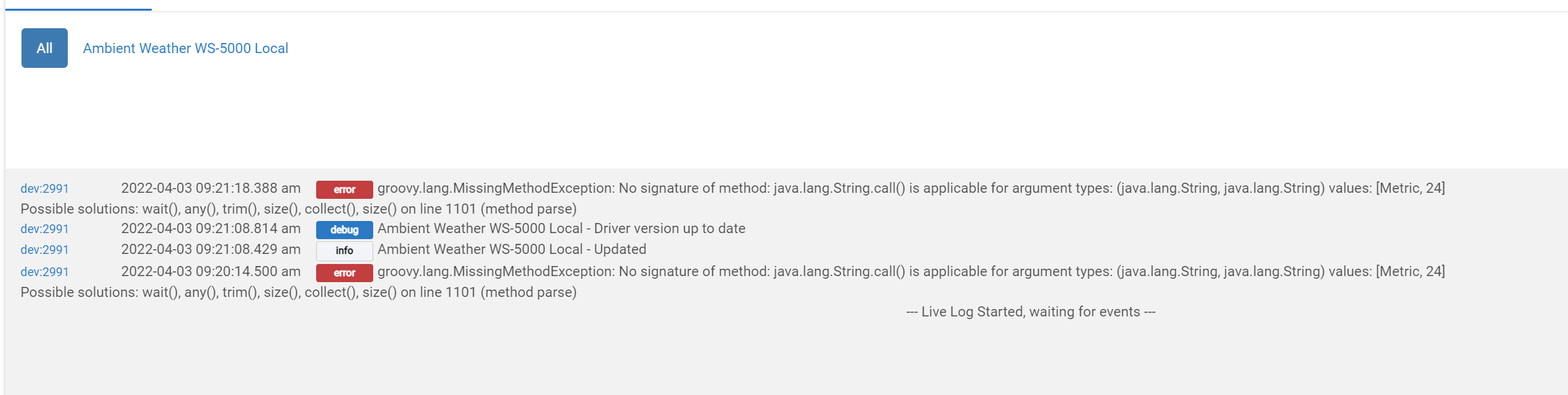
Looking into it... It looks like the distance value (the 24) it is receiving is counting as a string NOT as a number... and the ConvertMiles needs a number. Trying to replicate it on mine to see if the fix is as simple as making it (except I do NOT have an Ambient lightning sensor, so I have to fake it):
ProcessEvent( "Lightning Strike Distance", ConvertMiles( "Metric", ( it.value as int ) ), "miles" )Or if that will introduce bigger problems...
2 Likes
Updated Version(s):
- AmbientEcowittWeather.groovy = 0.7.15
Change(s):
- Correction to LightningDistance section to handle when the value is returned as a string not as the expected number. While I do not have one of these personally I threw a bunch of samples at the conversion and think I have a good solution (having it convert the value using "as float").
2 Likes
Just tried the updated driver and indeed the errors are gone. Also the proper converted value (14.91) now appears instead of 24 in the device details page.
Much appreciated!
2 Likes
I just added two of the soil moisture sensors (WH31SM) to my WS-2000. I thought these would appear as child devices. But it looks like the code isn't recognizing them correctly and putting the data into the temperature sensor N for soil moisture sensor N.
The local API only reports two items: the humidity the sensor detects and the battery state. E.g., this:
soilhum1:98, soilhum2:89, battsm1:1, battsm2:1,
2022-04-05 14:12:17.417 [trace] Ambient Weather Station - All data = [stationtype:AMBWeatherV4.3.3, PASSKEY:...hex..., dateutc:2022-04-05 18:12:10, tempinf:67.1, battin:1, humidityin:32, baromrelin:29.720, baromabsin:29.720, tempf:58.1, battout:1, humidity:32, winddir:180, winddir_avg10m:193, windspeedmph:3.6, windspdmph_avg10m:3.4, windgustmph:5.8, maxdailygust:14.8, hourlyrainin:0.000, eventrainin:0.000, dailyrainin:0.000, weeklyrainin:0.008, monthlyrainin:0.390, yearlyrainin:8.551, solarradiation:456.71, uv:4, soilhum1:98, soilhum2:89, battsm1:1, battsm2:1, temp1f:59.9, humidity1:33, temp2f:61.0, humidity2:31, temp3f:60.3, humidity3:33, temp4f:54.7, humidity4:52, batt1:1, batt2:1, batt3:1, batt4:1, batt_co2:1]
But I see in the code logic to support soiltempN, even those these devices don't report temperature.
Again, their API documentation doesn't quite match reality. Both suggest you can have up to 10 soil sensors, but the WS-2000 console only supports 8. Both docs list "soiltemp#" (or "soiltemp#f", since they don't agree), but the WH31SM doesn't have a temperature sensor (I'm sure you have it in the code because the API doc lists it). Both docs list battsm#, but the # only goes to 4 (not 10 or 8). Sheesh.
- battsm1...battsm4 - Soil Moisture Battery - 1=OK, 0=Low
Anyway, the code does seem to be attributing soilhum1 to soil moisture sensor 1, but instead to regular sensor 1. From the logs:
2022-04-05 14:12:18.522 trace Ambient Weather Station - Sensor1 HEX Event: humidity = 33%
2022-04-05 14:12:18.495 trace Ambient Weather Station - Event: humidity1 = 33%
2022-04-05 14:12:18.334 trace Ambient Weather Station - Sensor1 HEX Event: humidity = 98%
2022-04-05 14:12:18.297 trace Ambient Weather Station - Event: soilhum1 = 98%
Thankfully, the actual sensor 1 humidity data was processed afterwards, so that the device remains on the correct value. But the event is being sent to the device twice:
| Name | Value | Unit | Description Text | Source | Type | Date |
|---|---|---|---|---|---|---|
| humidity | 31 | % | DEVICE | 2022-04-05 14:29:33.037 EDT | ||
| humidity | 99 | % | DEVICE | 2022-04-05 14:29:32.946 EDT | ||
| humidity | 31 | % | DEVICE | 2022-04-05 14:27:25.413 EDT | ||
| humidity | 99 | % | DEVICE | 2022-04-05 14:27:25.327 EDT |
Looking at the code, I see this:
            case ~/soiltemp([1-8])f/:
                SensorNumber = java.util.regex.Matcher.lastMatcher.group( 1 );
                ProcessEvent( "${ it.key }", ConvertTemperature( "F", it.value as float ), "°${ location.getTemperatureScale() }" )
                PostEventToChild( "Sensor${ SensorNumber }", "temperature", ConvertTemperature( "F", it.value as float ), "°${ location.getTemperatureScale() }" )
                break
            case ~/soilhum([1-8])/:
            case ~/soilmoisture([1-8])/:
                SensorNumber = java.util.regex.Matcher.lastMatcher.group( 1 );
                ProcessEvent( "soilhum${ SensorNumber }", it.value as int, "%" )
                PostEventToChild( "Sensor${ SensorNumber }", "humidity", it.value as int, "%" )
                break
            case ~/soilbatt([1-8])/:
                SensorNumber = java.util.regex.Matcher.lastMatcher.group( 1 );
                ProcessEvent( "${ it.key }", it.value as float )
                ProcessEvent( "${ it.key }%", ( Math.round( ( ( it.value as float ) / 1.5 ) * 10000 ) / 100 ), "%" )
                PostStateToChild( "Sensor${ SensorNumber }", "soilbatt", it.value as float )
                PostEventToChild( "Sensor${ SensorNumber }", "battery", ( Math.round( ( ( it.value as float ) / 1.5 ) * 10000 ) / 100 ), "%" )
                break
            case ~/battsm([1-4])/:
                ProcessState( "${ it.key }", it.value as int )
                ProcessEvent( "${ it.key }%", BatteryValue( it.value as int ), "%" )
                PostStateToChild( "Sensor${ SensorNumber }", "batt", it.value as int )
                PostEventToChild( "Sensor${ SensorNumber }", "battery", BatteryValue( it.value as int ), "%" )
                break
Should all of those instances of Sensor${ SensorNumber } really be soilhum${ SensorNumber }?
@snell Yes, making this change fixed it and the code created the appropriate soilhum# devices.
Neither API doc lists the "soilbatt#" attribute, and I'm not sure what the special processing you are doing in that case. However, I updated the code to handle 1-8 and to include setting SensorNumber:
        case ~/battsm([1-8])/:
            SensorNumber = java.util.regex.Matcher.lastMatcher.group( 1 );
No, they really SHOULD NOT have been soilhum. The problem is they were messing with it again in a way that breaks past functions. The Sensors are supposed to be unique... So if you had 10 Sensors, but 5 of them were soil-based sensors, they were still part of that total number of sensors. That was how it was supposed to be getting the data from the system.
Ex: You add a temperature/humidity outdoor sensor to your system and it starts reporting as Sensor 1. You add a Soil sensor and it should have been reported (by the data) as the second sensor (2) so it would show up as Sensor 2.
So if they have "broken" how it was supposed to work, I will have to add separate soil sensors in now. So I will be changing the code (tonight) to make all soil-related data get reported back as a Soil Sensor #...
EDIT:
The "soilhum${ SensorNumber }" parts are for the ProcessEvents so that those that do not use children would still get the state/attribute listed in the parent device with soilhum# then the value. The reason it is called out that way (unlike soil temperature, which is just "${ it.key}" is because there was already two data points that could be returned for the same thing. Soil humidity and soil moisture. So rather than have both potentially show up I had it name them specifically.
EDIT 2:
Updated Version(s):
- AmbientEcowittWeather.groovy = 0.7.16
Change(s):
- Soil Sensor data is now distinctly going to a Soil Sensor # child rather than the previous Sensor #. Hopefully this does not break too many people that were relying on the previous method. If it does... sorry. You should be able to change your Rules or such to point to the new child devices that should be created as a result.
1 Like
Does this work differently in past devices, or with the Ecowitt gateway?
That's not how I see my WS-2000 reporting in the API and on the console!
The WS-2000/5000 It can have 8 temp humidity sensors, and those are separate from the 8 soil moisture sensors. working.
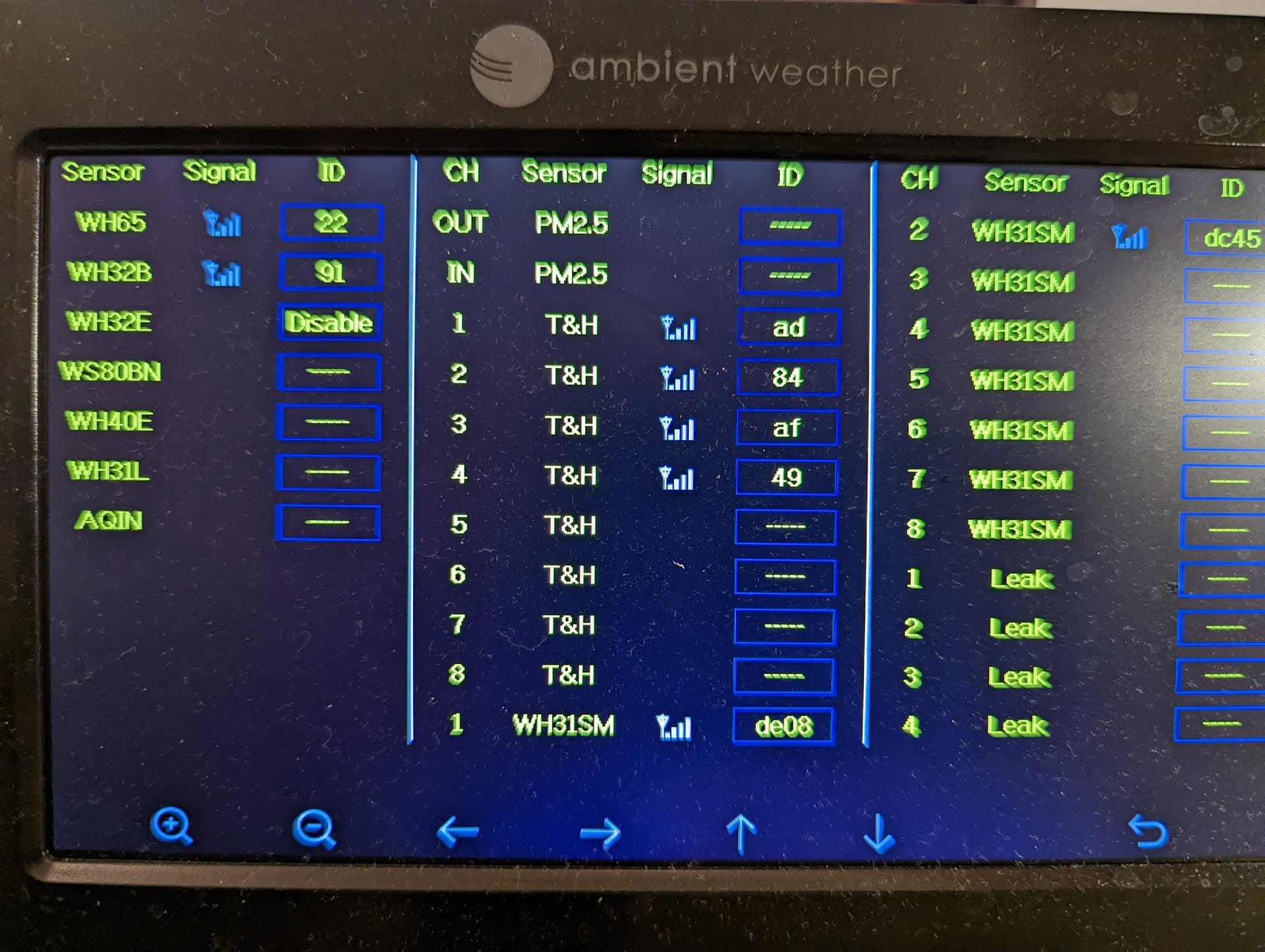
You can see the 4 T&H sensors in the output I included in the previous post - temp1f ... temp4f, and those are separate from the soilhum1 , soilhum2.
Thank you!
The setting of SensorNumber is still needed here, and these should also go to the "Soil Sensor" device.
        case ~/battsm([1-8])/:
            SensorNumber = java.util.regex.Matcher.lastMatcher.group( 1 );
            ProcessState( "${ it.key }", it.value as int )
            ProcessEvent( "${ it.key }%", BatteryValue( it.value as int ), "%" )
            PostStateToChild( "Soil Sensor${ SensorNumber }", "batt", it.value as int )
            PostEventToChild( "Soil Sensor${ SensorNumber }", "battery", BatteryValue( it.value as int ), "%" )
            break

