Posting here is fine. I have no worries about getting corrections for mistakes I make. Better people know about it and know a fix is coming than "huh... wonder if it is just me..." and living with a problem.
EDIT Updated Version(s):
AmbientEcowittWeather.groovy = 0.7.13
Change(s):
Corrected error when checking for a child device but not including the parent DNI.
Corrected reported battery values for state variables... these were always meant to just return the value provided NOT convert it. The Events are the ones that have the conversion, as well as the state variables that are % values. These may have seemed like duplicates in some places but they actually were meant to be different.
Added method @jlv recommended to reduce the checks a bit. It did not work out quite the same because of the previous state variables item.
Corrected two places where SensorNumber handling was missing, battsm and batleak.
curious if anyone has been seeing an api problem lately with ambient? Noticed this morning that what I am seeing on my panel does not match what is being reported in the hubitat. Also, is there a place to find out if AmbientWeather.net is having issues instead of posting here? edit: Think I found my own answer by turning on debug logging...
dev:14982022-02-12 08:04:42.304 am errorDeerchase Weather - Error connecting to AmbientWeather: 401
dev:14982022-02-12 08:04:37.102 am debugDeerchase Weather - Driver version up to date
dev:14982022-02-12 08:04:36.831 am infoDeerchase Weather - Updated
dev:14982022-02-12 08:04:36.817 am debugDeerchase Weather - Refresh rate: 5 minutes
dev:14982022-02-12 08:02:11.639 am errorDeerchase Weather - Error connecting to AmbientWeather: 401
dev:14982022-02-12 08:02:04.285 am debugDeerchase Weather - Driver version up to date
dev:14982022-02-12 08:02:03.821 am infoDeerchase Weather - Updated
dev:14982022-02-12 08:02:03.803 am debugDeerchase Weather - Refresh rate: 5 minutes
dev:14982022-02-12 07:57:53.386 am errorDeerchase Weather - Error connecting to AmbientWeather: 401
dev:14982022-02-12 07:52:53.381 am errorDeerchase Weather - Error connecting to AmbientWeather: 401
dev:14982022-02-12 07:48:37.412 am errorDeerchase Weather - Error connecting to AmbientWeather: 401
Looks like they are having a server issue or maintenance. I did a test and while it connected I got a null response. They have had this happen in the past and usually fixed within 24hrs.
Another reason to be glad they added the local method and that people showed me how to get it working for the driver. Or to get an Ecowitt Gateway.
@snell could you direct me on how to get the local method going? I am a bit confused on what to do. Appreciated if you have time. If not, I will just patiently wait for the ambient api to get fixed.
The first and foremost thing is to use the Ambient app (or the Ecowitt one which does the job also) to check that your weather station has the latest firmware. I am not sure what all models work for the local method but it appears to be on the WS-2902s, and the WS-5000.
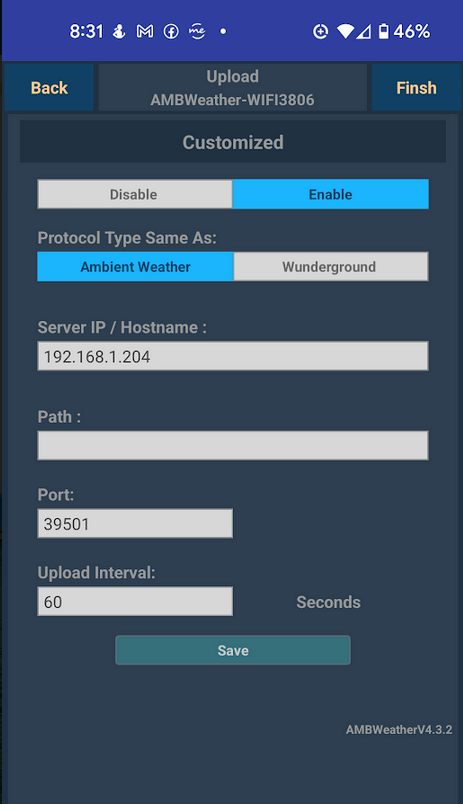
After that you need to set the app to tell it to send the data to a local destination. It can depend a bit on which app you are using to do this, but basically boils down to:
Select the station from the Live Devices
Select More
Select Weather Services
Select Next until Customized is shown
Set the Server IP/Hostname to match your Hubitat
Set the Port to be 39501
Set the Upload Interval as desired
Save
On your Hubitat you need to:
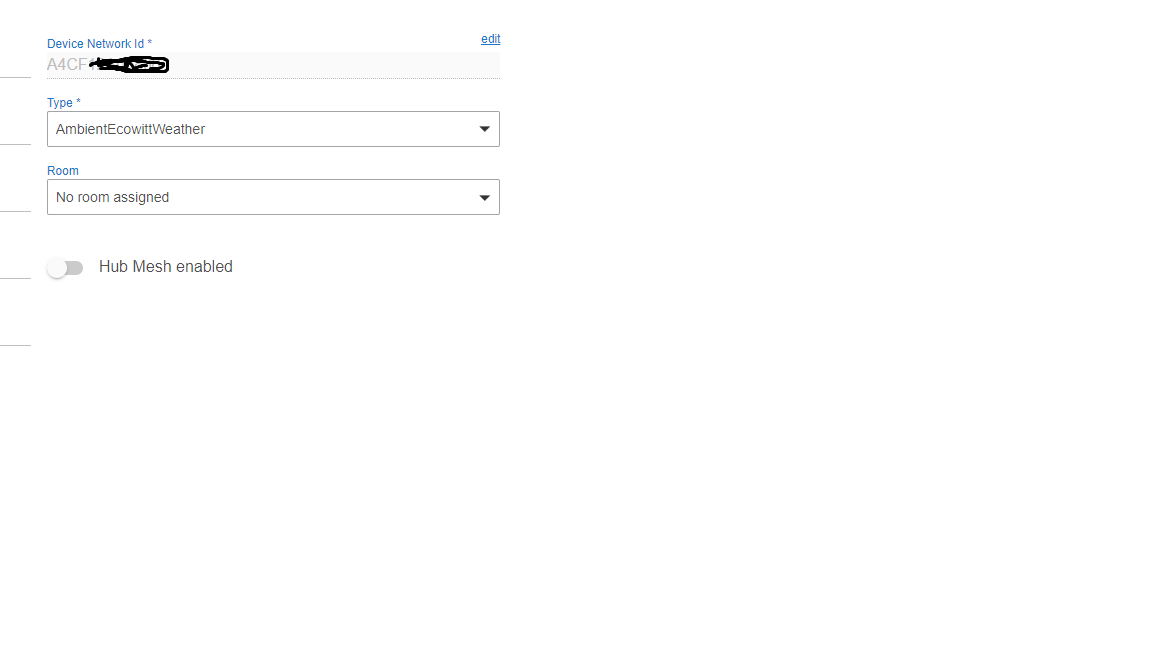
Setup a new virtual device
Type = AmbientEcowittWeather
Device Network ID = MAC Address of your Ambient, all uppercase, no : or spaces in it (ex: ABCDEF012345)
Save Device
Set method of obtaining weather to Ambient Local in Preferences, as well as any other desired preferences
Save Preferences
You should see the data start to populate once the station sends the next batch.
Nope, a WS-2902A should work just fine. I have one of those. I heard it works on the WS-2902C also... I do not know if there are other 2902 models. I mention the Ecowitt app because I happen to use that more frequently (having an Ecowitt Gateway also) but I definitely have the Ambient Local running.
I also noticed this issue this morning. It looks like I have not connected to the API for a couple of days now. Just as a point of information, I was able to use the local connection method on a WS-2902B. Its working great and faster too. I did notice that I lost the ability to display the battery attribute on the dashboard and Feels Like. Thanks snell for all your work and the excellent information.
so, I am really confused. Do you set this up in AWNET app and if so, on that last screen, Customized, you enable, click on Ambient weather, then put in the IP of the Hubitat, but what is the path? Or am I just completely lost and I need to do something outside of AWNET app.
You put the IP of the Hubitat but so far as I know the path should not matter. If I recall I just left mine at whatever the default is. Sorry, not home to check mine at the moment...
Yes, in the AWNET app, select your device under the device list. Make sure you have the current firmware. The AWNET will tell you if you need to update.
Press next until you get to the CUSTOMIZED screen. Press enable, select the protocol (I chose Ambient Weather), enter the IP address of your Hubitat. Leave the path alone, enter the port of 39501 and change the upload interval in you want. Press save and then finish.
Once that is done you will need to update your existing device in Hubitat. I changed the Weather Method from Ambient API to Ambient local, then save preferences.
Next change the Device Network ID (in the device info section) to the MAC address of the weather station- No spaces or :
Then click on save device.
Once this was done, I started receiving data in about a minute.
Hope this helps.
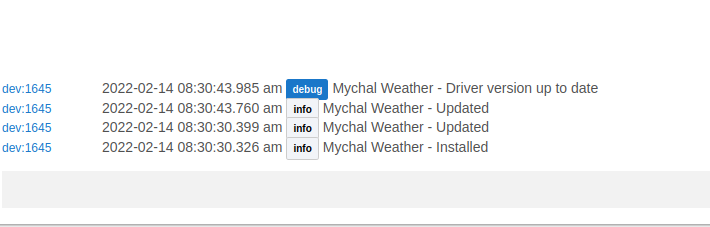
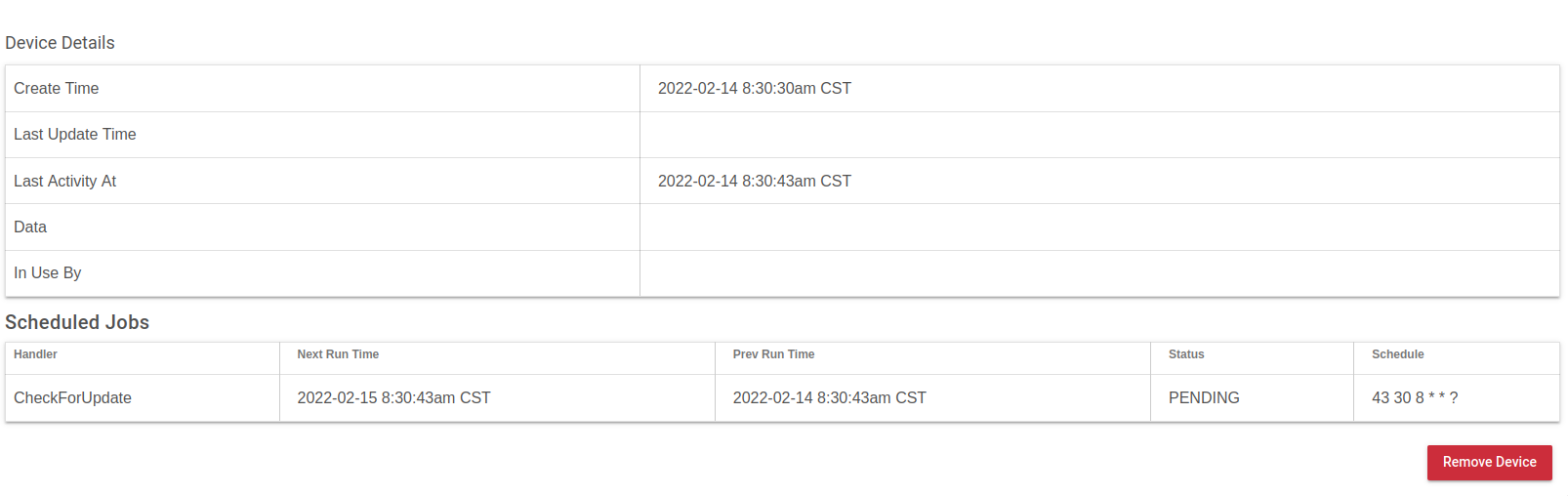
thanks for the step-by-step. Still not getting any data coming back. I have uninstalled the device, driver, and reinstalled, etc. On local, logs are saying the weather has been updated, but no data is coming back, and getting this on the pending schedule... which does not seem right in some way.
I will make a change to the instructions to make sure people leave the path at the default. Good to know something is required there AND that you got it working.
As for the Scheduled Jobs, that is all you can expect when using Ambient Local (or Ecowitt). The station (or gateway) itself sends the data to the Hubitat so there is no reason to schedule a poll of it (like is needed when using the API method). So the only thing that gets scheduled is the daily check to see if there is an updated version of the driver available.
thank you sir. Appreciate the help and sorry it was taking up all this time in the thread. Just so you know, I did not have anything in the path area on AWNET, and did not remove anything, so, when the instructions said "leave it alone", as you can see in my screenshot above, I left it blank. No worries though, I am extremely happy to not have to rely on outside forces to update this info. It messes with home automation as I use the illumination sensor to turn on lights when it gets dark. and this is not the first time that the API has been messed up, but I think it is the longest outage that I can remember.