Thanks for the work on this, stoked to get a local integration working!
Got the Ambient Local option up and running on my dev Hubitat this afternoon.
Anyone else seeing a problem with wind direction using the Ambient Local device? The wind is blowing strong from the ENE but the Ambient Local device is displaying ESE. My Ecowitt Device using the same driver is correctly displaying ENE.
Cancel that - I found the problem - had the wind set in wrong format.
TL/DR: I was getting the 408 error because I somehow messed up pasting my API key
I just set my WS-2000 yesterday and when I added it to the driver (using the Ambient API method), I started getting 408 errors. It happened all night. I was just about to ask about this when I went to the API portal (Ambient Weather REST API · Apiary) to attempt to try this manually. When I plugged in my API key (from my device settings) and using the application key (from the driver source), I got an error that said invalid API key. I had cut-n-pasted it from the ambientweather.net to the driver setting, and it still looked the same. When I went and copied it from ab.net again, both the API portal and the driver started to work.
Now I'll switch to the local server.
And I switched to the local server; appears to be working great. Thank you!
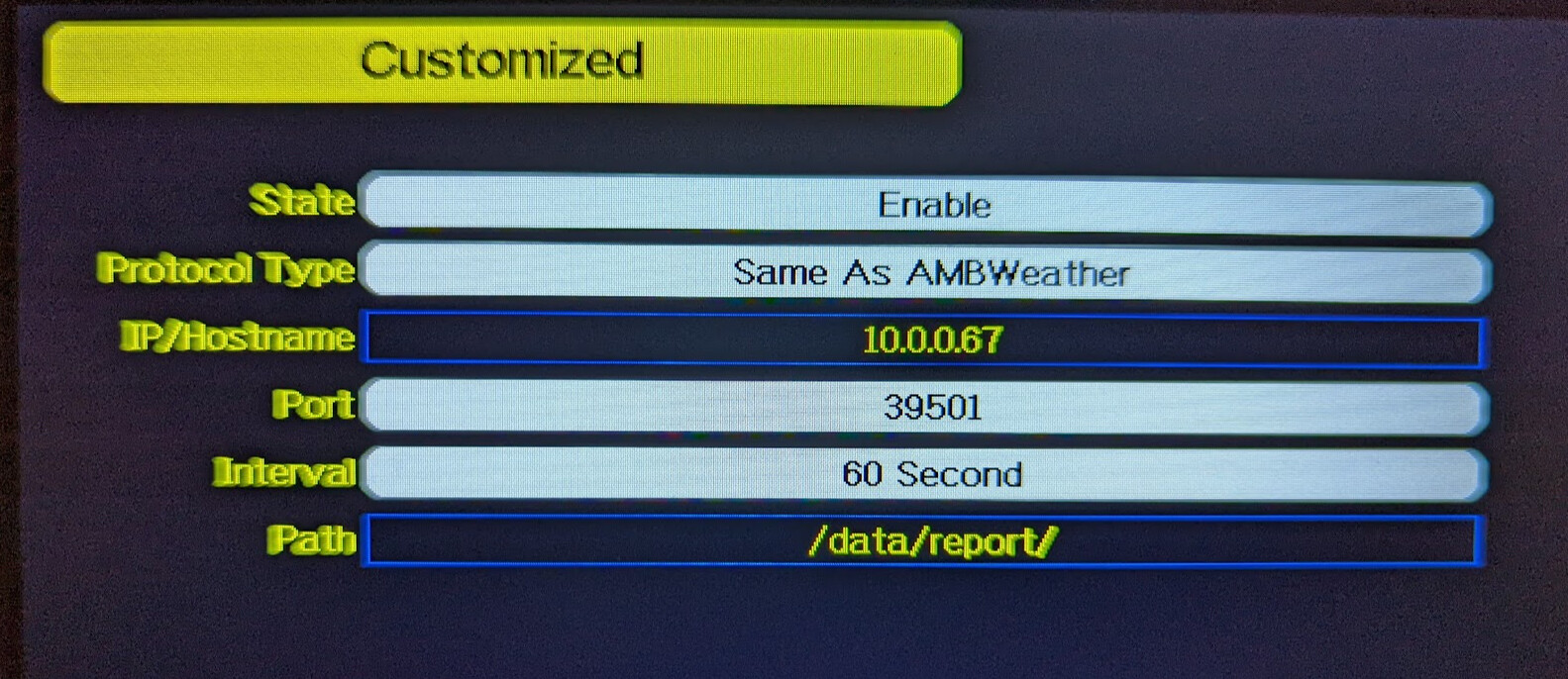
It required me to set this on the WS-2000 console (the IP address is that of my hub).
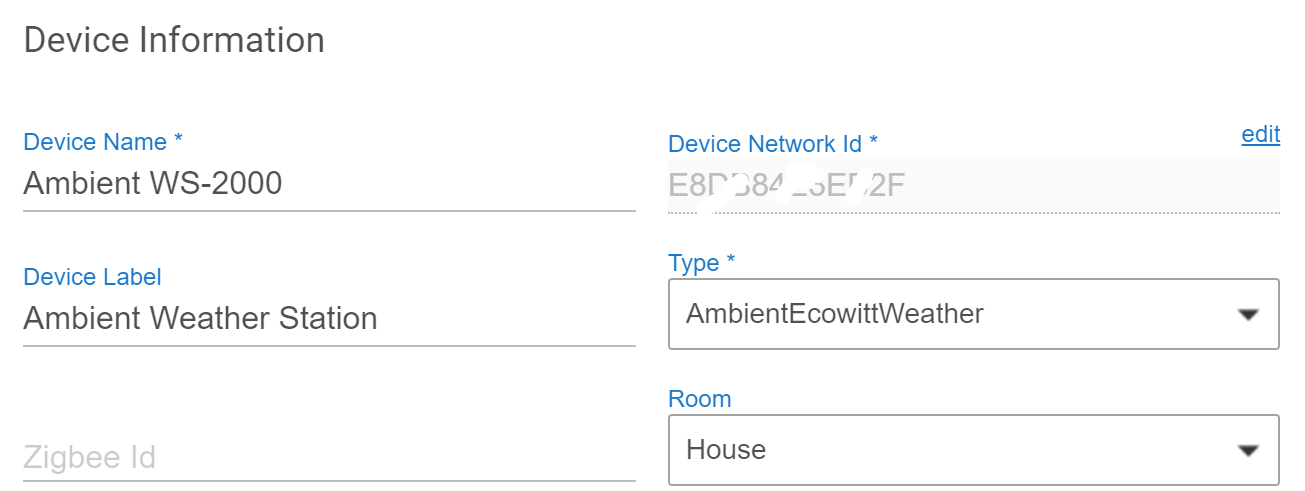
And it started to work when I set the DNI to the MAC address:
1 Like
Always good to hear that things are working. Whenever there are possible API problems I worry that companies have made changes to their API.
1 Like
I have a question about the battery values. I have a new WS-2000 and am using the local server now. It has the indoor sensor and 4 additional in/outdoor sensors. All new batteries.
When I enable child devices, they show up with "battery: 0". This is how all the additional sensors look:
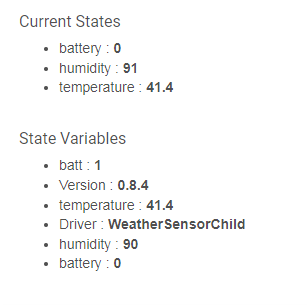
As far as I can tell, Ambient's reporting only gives a 1 ('good') or 0 ('dead'?) for the battery value. I suspect that's the "batt: 1" in the state variable.
What's off is my indoor sensor shows no "batt" value:
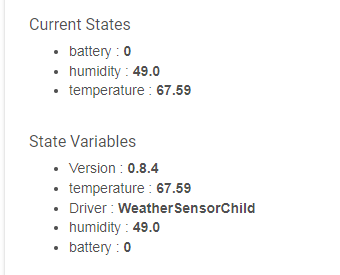
On the station device itself, I see these. "battin" would in the indoor sensor, but it shows 0. I do not know what the batt_co2 is - I don't have any additional sensors.
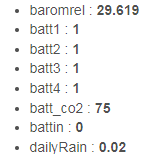
Looking at the code, I see this comment in the batt processing:
// Normal sensors only report 0 = Good or 1 = Bad. I am putting 0 = 75% because they will never be full for long
I think that's backwards for the values: 0=bad and 1=good, at least for the data direct from the device (e.g., maybe it the other way for data from the API).
When I turned on full logging, I see this coming from my device, and it certainly has "battin: 1" in there.

So somehow the "battin: 1" is getting changed to "battin: 0" when going into the states. The other battN values are getting through. Ah, I see "battout: 0" also, so it's being treated like battin.
(and I do see it reporting batt_co2, but I don't know what that is!)
The note about the battery values is per Ambient's API documentation. Tough to tell if they do it otherwise when reporting differently (which would make things more complicated). I do not hav additional sensors Ambient recognizes, just ones the Ecowitt does, so I cannot check readily. If you have new batteries, can you swap them in one and see if it reports differently? If this is something the local method does I can try to correct for it.
The batt_co2 is new and gets reported on mine also, despite not having one. I have no idea why they are reporting it, but they are, so I am popping it as a state just in case.
I will have to check the battin one, maybe I made an error and it is not getting posted to the child correctly.
Just to check, I added another instance using the Ambient API, and I also see "1" for good battery values. My station is brand new, and everything has brand new batteries (except the indoor, which has freshly recharged Enerloops).

I found this, defining the response values for the Ambient Weather Protocol:
https://help.ambientweather.net/help/advanced/
Low Battery = 0
Normal Battery = 1
This is what I had been referencing:
Looks like these have similar battery listings to what they mention for meteobridge... So I guess I will be doing some rework on that in the next couple days.
Thanks for bringing it to my attention.
1 Like
Updated Version(s):
- AmbientEcowittWeather.groovy = 0.7.11
Change(s):
- Updated battery-related data fields to correspond to the correct 0/1 method when using Ambient Local mode. Users should now see 75% if it is "OK" and 0% if it is low when using Ambient Local (since it only reports normal/low).
- Added additional battery-related fields. Some were duplications of existing fields with different names and a couple were new entirely. Guess we will have to see if they ever allow for or add those devices in.
Note(s):
- I do not have any additional sensors that my Ambient system can recognize, so the only field I have reported for battery is the strange CO2 sensor that it reports. If anyone notices anything weird with this please let me know. I did not see any issues with my Ambient API or Ecowitt device samples (the Ecowitt DOES have additional sensors), but I could miss something or make a typo somewhere so please let me know if something looks strange (as always).
1 Like
Updated Version(s):
- AmbientEcowittWeather.groovy = 0.7.12
Change(s):
- Fix for users that have any sensors with a number higher than 1. I appear to have broken that in 0.7.10 when I added support for Ambient Local, because it mentions a sensor 10 as a possibility... but when I changed the sensors to handle that I did the regex incorrectly. Sorry. I have tested it successfully by faking the data and saw that it correctly created multiple sensors including #10 now. Sorry for any inconvenience this made for anyone, I know it hit @jack4 so thanks for bringing up that there was an issue!
thank you! That fixed it for me.
I was wondering why my battery values are still a little off. A trace shows this this data from the station (all battery values good):
Ambient Weather Station - All data = [..., battin:1, battout:1, ... batt1:1, batt2:1, batt3:1, batt4:1, batt_co2:1]
But then it does this:
Ambient Weather Station - State: battout = 0
Which means it is failing the "if" at line 971:
    case "battout":
        if( getChildDevice( "Outdoor Station" ) != null ){
I changed that line to this to fix it:
if( getChildDevice( "Outdoor Station ${ device.deviceNetworkId }" ) != null ){
and now I see the correct result:
Ambient Weather Station - ProcessEvent: battout = 75%The other values are also being processed wrong, but I'm not sure why yet (still looking). E.g., this is still setting it to 0 and not 75.
Ambient Weather Station - Sensor1 DEADBEEF Event: battery = 0%
Ambient Weather Station - Sensor1 DEADBEEF State: batt = 0
Ambient Weather Station - Event: batt1% = 0
Ambient Weather Station - State: batt1 = 0
Ambient Weather Station - Sensor1 DEADBEEF State: batt = 1
Ambient Weather Station - Event: batt1 = 1
UPDATE: Found it.
Line 946 (which is repeated many times) wasn't returning true, even though the value was 1:
if( it.value == 1 ){
I changed it to this and it worked (copying what you had on line 929). There's probably a better way:
if( it.value as int == 1 ){
With this, my 4 sensors now all report a battery value of 75.
As I said, this line is duplicated many times. It might make sense move the battery translation to it's on routine, so it can only be written once.
I think the two lines at 929 and 930 are superfluous. They'll get repeated in one of the 4 branches of the if statement. (you can see the results are doubled in the logs above).
You are also missing the setting of SensorNumber right after the battsm case on line 1077.
I added this (placed it above ConvertTemperature):
// Normal sensors only report 0 = Good or 1 = Bad.
// However, Ambient Local mode reverses the meaning
// Translating Good to 75% because they will never be full for long
def ConvertBattery( Number Value ){
    if( DataMethod != "Ambient Local" ){
        if( Value == 1 ){
            return 0
        } else {
            return 75
        }
    } else {
        if( Value == 1 ){
            return 75
        } else {
            return 0
        }
    }
}
This let me change the case for battN to this, eliminating the nested if statement:
        case ~/batt([1-9]|10)/:
            SensorNumber = java.util.regex.Matcher.lastMatcher.group( 1 );
            battery = ConvertBattery(it.value as int)
            ProcessState( "${ it.key }", battery )
            ProcessEvent( "${ it.key }%", battery, "%" )
            PostStateToChild( "Sensor${ SensorNumber }", "batt", battery )
            PostEventToChild( "Sensor${ SensorNumber }", "battery", battery, "%" )
            break
This can be repeated everywhere you are converting the battery value, simplifying the logic. E.g,.
        case "battrain":
            battery = ConvertBattery(it.value as int)
            ProcessEvent( "${ it.key }", battery, "%" )
            PostEventToChild( "Rain Sensor", "battery", battery, "%" )
            break
(if you had a github repo, I'd send a pull request)
Thank you for all the feedback and code work... I am not sure whether I will put in the ConvertBattery method or not, but I will certainly make the other corrections to fix the errors you noticed, hopefully tonight.
These will never be on github though... so contacting me on here or emailing me are the only two ways for people to get me to make changes to my drivers directly, but I do try to be as responsive as possible.
2 Likes
Thanks - I can send email next time if you'd prefer.
That's up to you, but it does eliminate lots of duplicate code.
Also, the comments in the handling of the battery values for batt_co2 and batt_cellgateway are backwards from the comments everywhere else, but it implements the same code. Using ConvertBattery would just remove all that.

