I found one thing that you might find amusing as an alternative. I think it would be possible to use the maker API to get the event history, parse it to find out if the doubletap is new or historic.
I thought you might find it funny because I found it while looking at the Maker API URLs, but when I went to see if anyone had done anything with this, I came across this earlier post from guess who?
Not sure it is worth doing versus the solution we already discussed, but it is an option anyone running into a similar situation could consider.
I think the issue with that though is it's resource intensive so not recommended to be used all that often. The "better" solution is listed in the next post...
I completely agree for the situation of your original post was discussing. I can't imagine hitting this repeatedly would be better than using the events that come from a device node. In my particular case where I am trying to figure out if an event out of a device node is new or not, during an initialization, it wouldn't be awful.
The device node is wonderful that we can have it get the current status and also new events for our flows, but because there is no time stamp for an event, you can't differentiate between historical or current.
By querying the event history and looking at the time stamp on that event you can tell the difference. If I or anyone implements such a step, it should only be for flows where the historical versus new matters. This or the Boolean flag approach both solve the problem that I trigger a reinitialization for dev purposes and then a light pops on beside my wife triggering great annoyance.
In this case, the doubletap is a very low frequency event (1-2/day actual, 2-3/day historic during intense development) that it will put no particular strain on the hub. As you discussed back in June for something intensive like logging, the output from the Device (with send event checked) or Events node is vastly superior.
Well, just keep in mind that if the node-red node has a value - any value, even a stale/old one - it doesn't actually reach out to the hub to get the "current" value. It just reports the cached value it already has.
Probably not an important distinction in your example, but there are scenarios where it is very important to understand that the node DOES NOT (normally - Hub or Node-RED system restart is one exception) reach out to the hub unless it does not have any value. After it has been initialized, it only updates as events come in from the hub.
This is a great reminder. I am just trying to figure out an example of the rare scenario where the cache in the NR node would be out of synch with the Hub. The only one I came up with was if the network connection from NR to HE was down, a change happened in HE, then the network connection came back up.
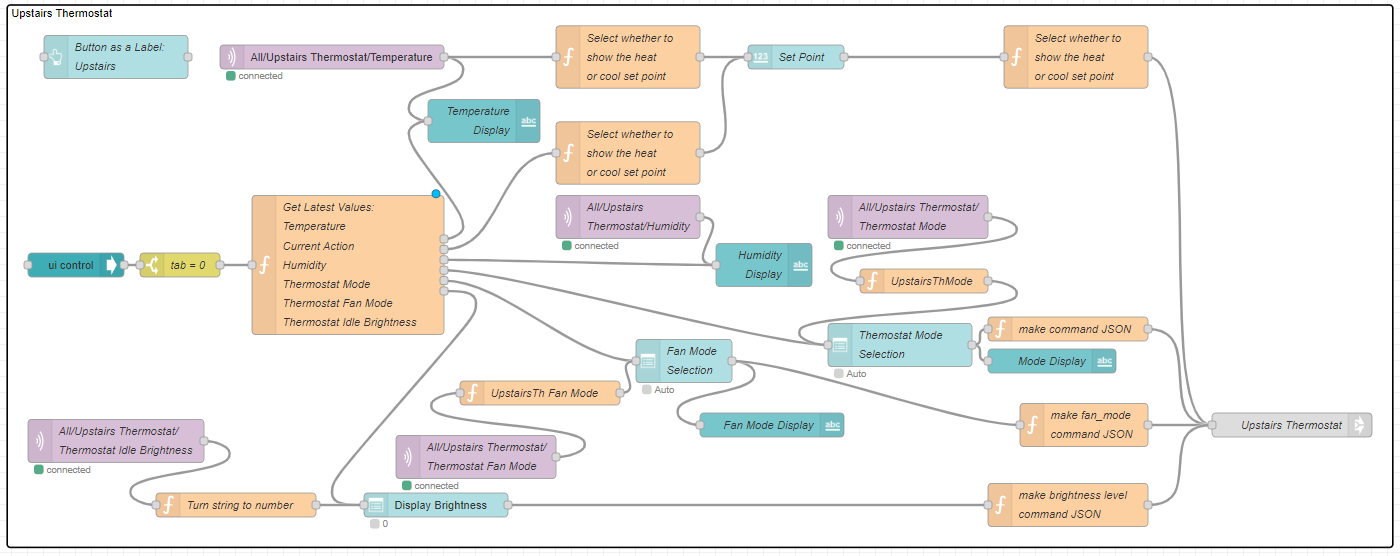
Just wanted to share something I just learned about something that can be done with a Node-Red Node's Name field. You can insert newline characters that will be reflected in the nodes display. Here is an example of my Node-Red Thermostat Dashboard where I was able to make my nodes much clearer to understand:
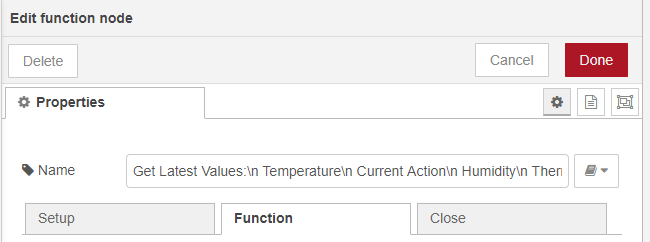
Here is the name field in the big switch-like function node in the middle:
As you can see to get a line break in the name shown for the node you add "\n " . Apparently for reasons discussed on the NR board, you must enter a space after the \n or else it will be treated as normal text.
As far as I can tell because it is in NR's implementation, it works for any node with a name field.
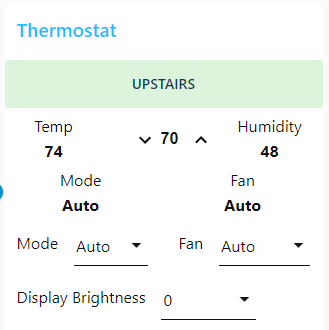
This flow plus some off flow data handling gives me this thermostat layout in NR, passes inputs back to Hubitat and updates automatically whenever updated at the thermostat or via Hubitat Device/Dashboard:
Is anyone else experiencing the nodes not responding to hub?
At least once a week, I'll notice lights not working and need to open the config node and hit update to start working again
Maybe - I have noticed a few glitches in NR here and there but chalked it up to the current Z-Wave mesh woes with possible "network storms" / "network busy" issues causing delays and unresponsiveness. I wonder if it's possible for the HE Nodes to "think" that a device is missing and stop responding (or lose configuration) due to these issues.
My Hubitat/Node Red integration is virtually seamless. Only occassionlly have issues, and it's on the Node Red end, not the Hubitat end, since other rooms based on the same trigger/condition worked OK.
It like NR just stops working.
I can watch NR as walk pas a sensor and it doesn't update. As soon as I press 'update' all the statuses change and lights come on...
That is super strange. I have never had to do anything like that. I've had some devices that weren't responding or maybe lost their settings but never had to refresh the config. Sadly I have to admit that most of these kinds of issues have been my fault for one reason or another.
Yep really strange, if the only thing you do is clicking on Configure webhook to fix your issue, then is maybe a network issue. This button only trigger a HTTP call to configure the postURL inside maker API
In retrospect, I think this should have been mathematically obvious, but I wanted to give a heads up about brightness scaling when building a Node-Red dashboard.
I have bulbs in one are that have 2 separate controllers. Some are controlled via hubitat that uses a 0-100 scale. The others are controlled via Zigbee2mqtt that use a 0-255 scale.
I have a Node-RED dashboard with an individual slider for each bulb and a common slider that changes them all to the same setting. In addition to sending the input to the appropriate controller, I also have my flow set up so that a change made by other means, updates the position of the slider for that bulb. For example using the Hubitat device page or a Hubitat dashboard.
My original implementation used the 0-255 scale for all of them and then scaled to 0-100 scale before sending to to the Hubitat bulbs. What I found is that by doing the scaling this way and then scaling back when I received info from Hubitat, I found that 2 math operations with either rounding or truncating the non integer portion would get feedback for some inputs that was either 1 more or 1 less than what was on the slider. This then fed back as a second unnecessary change of brightness.
Using a 0-100 scale for the sliders and then scaling the input to 0-255 for the Zigbee2mqtt bulbs never has this problem.
Lesson learned. When down scaling and then reupscaling you lose precision, but Up and then downscaling means that there are certain upscaled setting you will never reach, but you will non have the loss of precision in the slider.