Yup. Memory says that Hubitat command nodes accept HSL values as msg.arguments - so you don't need to convert back to hex for Hubitat-paired bulbs (someone correct me if I'm wrong).
During Mardi Gras, I made a sequence that would cycle between purple, green and gold. That required changing all three values. It worked ok.
Edit: Sorry I'm slow - just realizing you are doing this with zigbee2mqtt. So yes, you will have to convert it back to hex!
Have you had any experience with easing color on how small the changes in hue must be to look smooth?
Also, since each change is being sent to Hubitat (for some bulbs) and Zigbee2MQTT for another, do you have any experience on how many milliseconds per change Hubitat handles well or will I have to experiment?
Edit: Z2M has its own color easing built in so I will just try that one both ways to compare.
Thanks as always. Interesting to have this conversion today after the other thread about Groovy vs. NR as this is the type of challenge that would probably be hard to find someone to help with if one was trying to do it in a custom Groovy app.
I hope I am missing something or that organizing my thoughts to ask the question will spark an answer, but I have run into a bit of a conundrum on using a Hubitat device to control another Hubitat device with logic in NR.
Here is what I have in place:
I have a flow that says when a certain switch is doubleTapped, a light in another room comes on at brightness 4 and ramps up to 100 over 10 minutes. (The double-click is currently used for no other purpose)
This flow is rarely used outside of a specific time window, but I prefer not to filter based on time as it is occasionally handy at other times.
I have a flow gathers the current state of my hubitat devices that runs at NR startup.
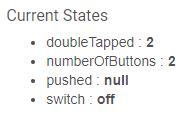
I have found that as a result of this combination, when I startup, the current state of the switch shows in hubitat as follows:
When that flows through, the change level flow sees this a doubleTap event and switches to level 4.
So far here are the possible solutions I have come up with:
Restrict the rule to certain times (eliminates use at other times)
Check if light is on. If so ignore/short out the flow (requires querying the status of the light or storing it in NR) (doesn't eliminate problem of triggering when light off and it is undesired)
Use separate node instances for prepopulation and event triggers
Writing this out makes me think that the last bullet point is really the right solution. My challenge is that I feed to MQTT as I have non-Hubitat devices and all of my logic uses MQTT in and MQTT out so that once I built the translation, I can ignore which native system a given device is in.
If anyone has alternative suggestions, I would welcome them.
Are you using the HE Nodes or MQTT or both? What does this flow look like? Also why do you need to do this?
One of the things I do is have a global variable called "initNodeRed". At startup I set it to "true" then after my initialization routines set it to "false". Then for certain sequences that need it I test for the global and ignore if "true".
Note: I also add a small timed delay before setting initNodeRed back to "false" in order to make sure certain async initializations have completed.
I use the Hubitat nodes for NR to HE communication. I sure mqtt for for data moving within my logic. (For example Hubitat bulb state becomes All/hbulb/state which I can use in the same way as an zigbee2mqtt bulb All/zbulb/state sending both a /set {state:on}.
Away from computer so hard to get a picture of the flow.
I like your global variable idea. How do you determine when initialization is done? Or do you just assume it will take so long and live with a short period during initialization where inputs are ignored?
Seems like a vanishingly small price to pay to solve the problem I ran into. Am I correct in thinking that this makes your trigger based flows blind to events from Hubitat during that second or two?
No that's why you use the global and test it where issues could occur. My understanding is NR is async by default nowadays. Delay just holds the global at true a little longer. Hope this makes sense.
Note: I am assuming your doubleTap gets triggered during your initialization routine so setting a global beforehand and testing it during the command sequence should do the trick.
I think we are saying the same thing. Using the global variable during initialization would ensure that my flow ignores the double tap that it gets from the initialization. The obscure corner case that I was imagining is if a real double tap was done during the small window when the initialization Variable is set true, then the double tap would be invisible to the double tap flow.
Probably a dumb question, but assuming you have that motion lighting sub-flow, and call it multiple times like maybe this one, then have it being called a few other times for different motion & different lights.
Does each flow's call of a sub-flow generate its own instance of the stoptimer? Or do they all use the same timer (i.e. they'd step on each other if you have overlapping motions and use that sub-flow multiple times)?
Each subflow has its own timer, as each instance of the subflow is a separate node/chunk of code.
Should be easy to prove to yourself, though, as when the timer is active it shows the time remaining under the subflow node (in the status text below the subflow node picture). If it was all one timer, they would all show the same countdown timer.
If that is a dumb question I have a really dumb question. Where do I get the sub-flow node? I have been using link in/out nodes but sub-flows an interesting approach. I did a search but cannot find it.
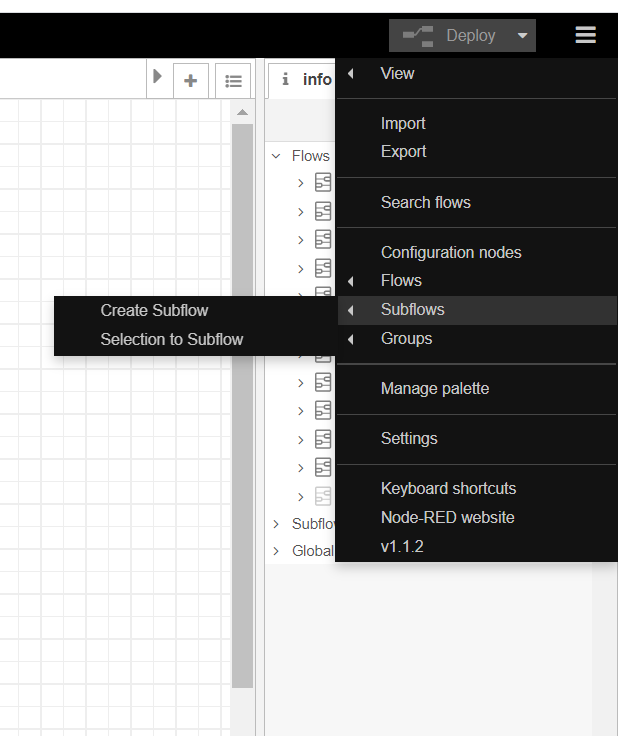
So you can create it from the "hamburger" menu located on the upper right of the UI "/subflows/create subflow" OR even more fun is select a group of nodes / sequence you want to use and from that same subflow submenu use "/subflows/selection to subflow"
Related to subflows check out "environment variables" and "status node".
"Environment Variables" act as static properties for the subflow that you can define when using the subflow in a sequence.
"Status Nodes" are display outputs that appear underneath the subflow node itself. very useful for displaying state.
Also with respect to "Link Nodes" one thing I do is use MQTT (using the local NR AEDES nodes/server) for things like managing my "mode" object in NR instead of HE. Use it to trigger events instead of the Link Node.
 {takes another sip of coffee}