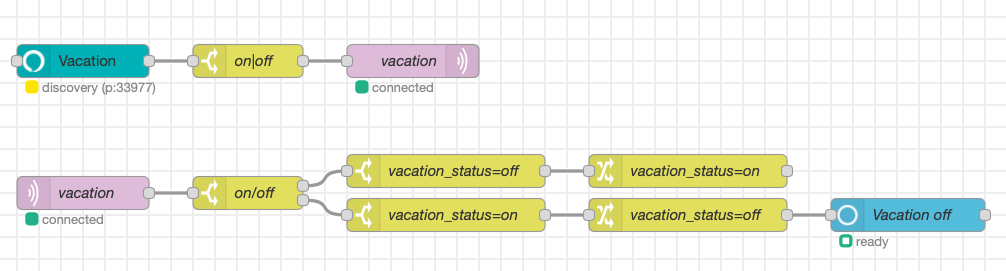
I replaced most of my Hubitat virtual switches with mqtt nodes and flow variables. I'm using two Alexa integrations. The one indicated by @morningz and also this one (to trigger sequences or set flow variables):
I have both of those installed in NR already. Just did not know if there was any benefit to moving the switches, or not. Will start moving them now. Thanks
Everyone's setup and situation is going to be different... i wouldn't delete them just for the sake for deleting them, especially if they work for you!
Just moved a bunch of virtual switches over to NR + MQTT (I'm using the Aedes Node for this). Working really well - use MQTT for detecting switch "events". Have replaced most of my HE virtual switches but still have a few for Alexa.. The alexa-remote2 works well use it to prevent my daughter from playing her dot too late..
Will have to try the alexa-local node though..
.
I've been seriously eying Home-Assistant as something else to play with.
I've got their Raspberry Pi image loaded on an SD card ready to go.
Anyone see any flaw in my logic of:
- NR and Mosquito up and running on my RP 4
- Backup my existing flows
- Take screenshots of all the palettes i have installed
- Shut down the RP 4
- Change out SD cards
- Get HA up and running (which is dead easy with the image provided), install the NR add on
- Install Mosquito via SSH
- Add palettes I was using
- Import my flows
That sound solid?
You can install MQTT Aedes node in NR instead of Mosquitto... might save you an additional step.
Can you install Hubitat as a client or bridge and which is better if your using a PI with Mosquito? I'm don't know much about MQTT but want do set it up. Thanks what is the best way to do it?
Check out this video, he does a fantastic job explaining it

@fblackburn has been busy coding away on the nodes.... I've seen a bunch of commits this week. Wonder if a new version is coming for the weekend....

You will see 
If someone want to review/clarify documentation about systemStart feature: PR 35
Done.


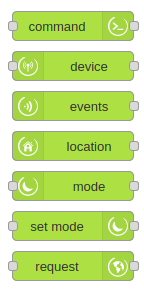
New version 1.0.0 
changes
-
WARNING: Maker API token is now saved as credential by Node-RED and must be
re-enter after the upgrade. It will be not exported anymore and will be saved in a special file
flow_cred.json - improve nodes color and add new icons (thank you to my friend to help me to choose nice color, clean icons and make beautiful svg)

- rebuild cache on Hubitat systemStart event (enabled by default) (thank you to @JasonJoel for idea and review)
- support VECTOR3 dataType for range values (e.i.
[12.0,11.2]) (thank you @wve for report)
I bump major version only because I was tired of 0.0.x version and new icons/color it's so cool that it deserves a major bump 
I will try to follow semver standard for new release 
I like the new color. When I read the commit I was skeptical, but it is nice.
It has not yet flowed through to the Node Red servers. Maybe the same issue as last time.
Stil showing 0.0.32 for me.
Hasn't shown up for me yet either.
EDIT 1: Just showed up for me.
EDIT 2: Installed, updated config nodes, seems to be working as expected. Will continue testing.
EDIT 3: Enabled the systemStart rebuild feature. Will reboot a hub and test later.
EDIT 4: systemStart rebuild seems to work based on limited testing. I could see the cache being refreshed/rebuilt in the node-red logs after the systemStart event came in.
Now I have to go fix my sequence that changes the color of each of the node types.... 
I kept the green color for my Command Nodes outta respect. 
How you do deal with Lux sensors inside in the various room you have? I have something I have not figured out yet.
I have a outside lux sensor that sets a global - dark or light. I also have some rooms with lux sensors that I've calibrated on a per room basis (either light or dark). When both the room and outside lux is bright, then the lights are automatically turned off. I found an issue where the lights were turning off, because it was bright outside, but since the lights were on inside, the lux was bright. So, the lights turn off, and then 60 seconds later turn back on again. Then off again, then on again.
So what I did was add in a third condition to the lux logic. If a specific TV light is on, then it wont turn off the lights (due to lux). It will still turn off due to motion/mode/etc.
But now I'm discovering that it wont turn off even though it's bright outside and inside. It is bright enough that if the lights turned off, they would stay off, but I dont know how to work it with the logic. Once the light is on, it will not turn off until there is 20 minutes of inactivity in the TV Room, which is a high activity room in our house. (That part of the logic is not shown in the flow below).
The lux logic is centered around the 2 red nodes in the middle (dark and bright). They send a message to the State machine. The 3 inputs are lux outside, lux in TV room, and the aforementioned light. Presently, that particular light is turned off and the State Machine is in the right state, because I manually turned it off via the Hue app, and the logic worked. But I'm wondering how to do it automagically.

So am curious why would you need to use HE as a broker bridge to Mosquitto? Is that even possible with the HE MQTT App? I haven't looked in a little while so don't know. The HE-Nodes connect to NR and then you use NR MQTT client to connect to your broker and do stuff from there.. you could have the MQTT App in HE connect as a client I guess but what would that gain you that the Nodes do not provide already? If bypassing NR completely then I would say use HE as a client to connect.
One simple way I am using MQTT in NR (am using Aedes broker node instead of mosquitto) is for storing variables that I once used in HE as virtual switches. MQTT allows me to trigger and trap messages whenever I change a variable's value which is very handy.
edit: So for "bridging" you would only need one broker to be the bridge.. I did not know this. Also was reading @jeubanks thread about "bridging" HE, ST and HA - not in the broker bridge sense but in the linking HE/ST to HA I think. The advantage to having HE as an MQTT client would be all your hubs/devices are handled in a more consistent way making control a whole lot more straightforward.
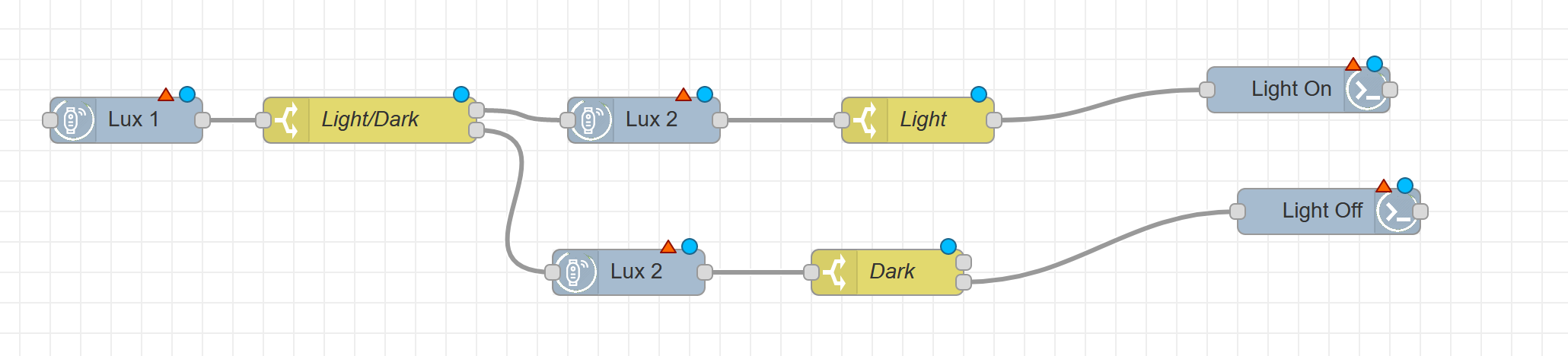
You would also need a duplicate flow with the Lux sensors reversed so the flow will trigger when either sensor changes. remember to set the lux sensors to NOT send events (unless its the first sensor in the flow) or you will have some very interesting behaviors
This is the basic method i use for my motion sensors as well to ensure the lights dont cut out because 1 of the 2 in a room goes inactive.
Not sure how well this method can be worked into your flow, we do things quite differently in general based on your screenshot.
Here is one of my full flows that incorporates mode, lux, contact and motion sensors in a dance to control multiple lights both in a room inside and multiple locations outside of my house.
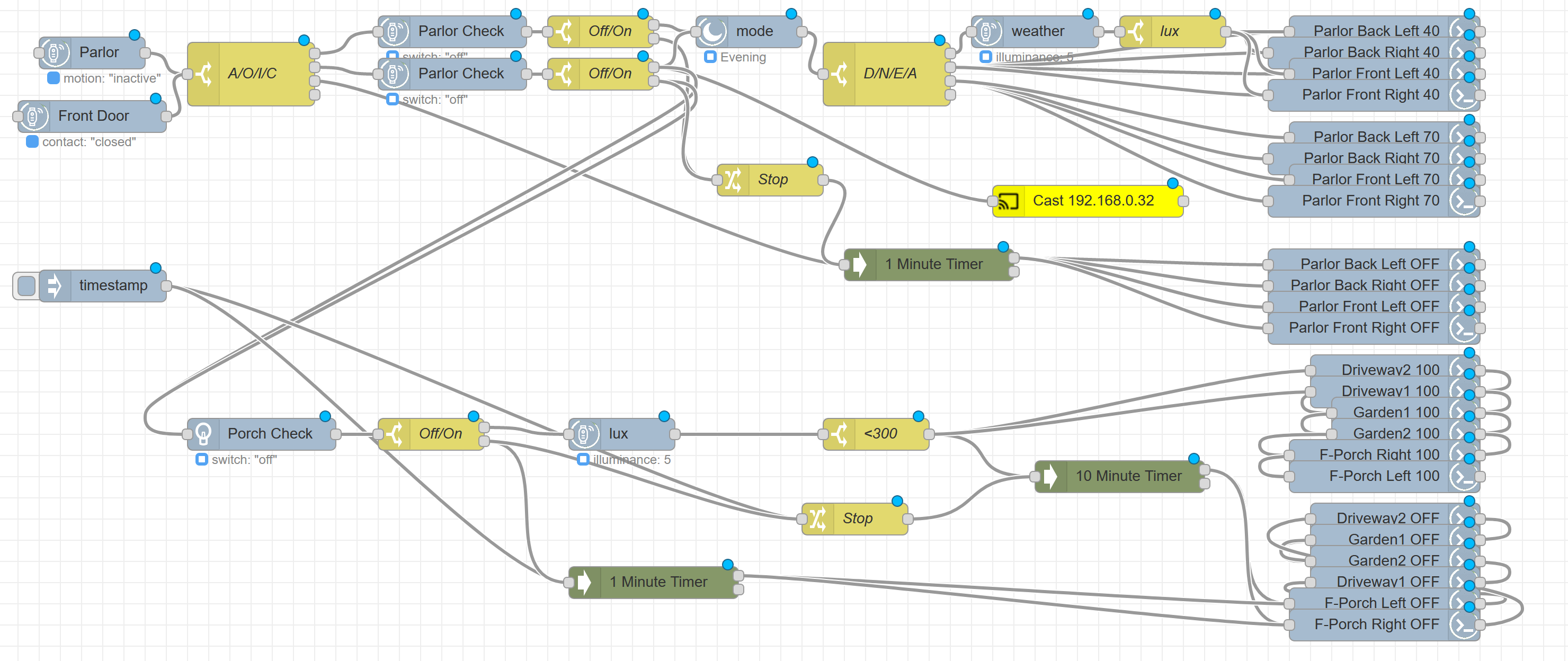
I'm sure this can be made much simpler but hey it works reliably and fast and thats all that really matters 