Sorry mate, that thread was a live one, and several updates coming out etc. 
1 Like
I now have conflicts between Hue Magic and Harmony. If I install one, I fail on the other.
2021-02-03T22:32:25.767Z Install : node-red-contrib-harmony-websocket 2.2.6
2021-02-03T22:32:26.366Z npm install --no-audit --no-update-notifier --no-fund --save --save-prefix="~" --production node-red-contrib-harmony-websocket@2.2.6
2021-02-03T22:32:28.350Z [err] npm
2021-02-03T22:32:28.352Z [err]
2021-02-03T22:32:28.352Z [err] ERR! code EINVALIDTAGNAME
2021-02-03T22:32:28.366Z [err] npm
2021-02-03T22:32:28.366Z [err] ERR! Invalid tag name ""~"3.0.0": Tags may not have any characters that encodeURIComponent encodes.
2021-02-03T22:32:28.960Z [err]
2021-02-03T22:32:28.961Z [err] npm
2021-02-03T22:32:28.961Z [err] ERR! A complete log of this run can be found in:
2021-02-03T22:32:28.961Z [err] npm ERR! /home/royski/.npm/_logs/2021-02-03T22_32_28_368Z-debug.log
2021-02-03T22:32:28.973Z rc=1
The "3.0.0": it refers to is Hue Magic, but I really cant understand why its doing this 
I'm going to run with CB for a bit just to see if that continues to work.
1 Like
That's why I don't like messing around with the node_modules dir. Maybe your flow file got messed up somehow.
Yeah, it has somewhere. That was also after restoring a backup.
Maybe check out your package.json see what stuff is in there then do an npm update.
1 Like
Bingo!! Thanks for the pointer man.
For some reason I had this
"node-red-contrib-huemagic": "\"~\"3.0.0",
But in my backup
"node-red-contrib-huemagic": "~3.0.0",
Setting it back has allowed me to get what I need installed!
And my routines are all firing again. So I would go for that last gitbhub post. This has solved it for me. 
1 Like
I was having issues (au account) with cookie not being generated.
Then I tried the CLI to update the dependancies which worked for me. So I haven't had to use the cake baked version -yet!
Tho I haven't checked it in the last day or so, so who knows.
I thought the new forked version - cakebaked - was just updated dependancies taken from the original code from apollon77..... But not 100% sure!
Will have to check my flows when I'm home from work and double check now!
This is the guide I followed with alexa.remote2 installed still
2 Likes
A moderator may want to segment all of these Remote2 posts into a linked thread so we don't clutter up the flow samples thread.
3 Likes
Yeah apologies for that.
@bobbyD, would it be possible to split the above from the main topic please?
3 Likes
I have a flow that turns on lights when motion is detected and turns them off after 5 minutes. If within that time, there is motion again, the original delay is reset and the lights the delay is extended by 5 minutes. I was having trouble with the reset and restart of the delay (msg.delay would not restart the timer) and then I found the following solution:
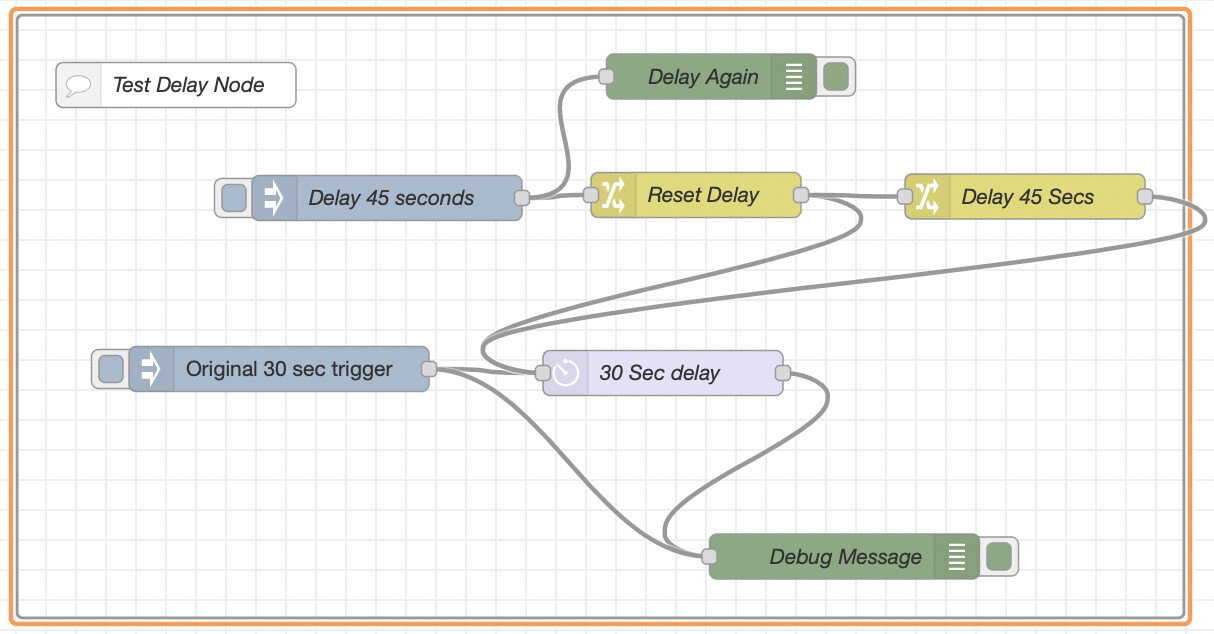
The first change node sends a msg.reset to the delay node and the second change node sends a msg.delay (with the delay time in milliseconds) and also deletes the msg.reset attribute. In case it helps anyone, the flow is below:
[{"id":"1bd463ba.e98174","type":"group","z":"9eca1378.6f9de8","style":{"stroke":"#999999","stroke-opacity":"1","fill":"none","fill-opacity":"1","label":true,"label-position":"nw","color":"#a4a4a4"},"nodes":["c93f2953.618f8","ef9fec05.c39388","cebe1f21.b302f8","619f8fb9.baa968","4fb293b1.8a9f1c","66ac105c.2f0258","3b765e9d.a3ee52","bb6a18d9.28d348"],"x":20.6666259765625,"y":4550,"w":777.9999694824219,"h":402},{"id":"c93f2953.618f8","type":"inject","z":"9eca1378.6f9de8","g":"1bd463ba.e98174","name":"","props":[{"p":"payload"},{"p":"topic","vt":"str"}],"repeat":"","crontab":"","once":false,"onceDelay":0.1,"topic":"","payload":"Original 30 sec trigger","payloadType":"str","x":195.33334350585938,"y":4786,"wires":[["ef9fec05.c39388","cebe1f21.b302f8"]]},{"id":"ef9fec05.c39388","type":"delay","z":"9eca1378.6f9de8","g":"1bd463ba.e98174","name":"30 Sec delay","pauseType":"delayv","timeout":"30","timeoutUnits":"seconds","rate":"1","nbRateUnits":"1","rateUnits":"second","randomFirst":"1","randomLast":"5","randomUnits":"seconds","drop":false,"x":451.3333435058594,"y":4788.66650390625,"wires":[["cebe1f21.b302f8"]]},{"id":"cebe1f21.b302f8","type":"debug","z":"9eca1378.6f9de8","g":"1bd463ba.e98174","name":"Debug Message","active":true,"tosidebar":true,"console":false,"tostatus":false,"complete":"true","targetType":"full","statusVal":"","statusType":"auto","x":572.3333435058594,"y":4911,"wires":[]},{"id":"619f8fb9.baa968","type":"change","z":"9eca1378.6f9de8","g":"1bd463ba.e98174","name":"Reset Delay","rules":[{"t":"set","p":"reset","pt":"msg","to":"1","tot":"num"}],"action":"","property":"","from":"","to":"","reg":false,"x":473.33331298828125,"y":4670,"wires":[["ef9fec05.c39388","4fb293b1.8a9f1c"]]},{"id":"4fb293b1.8a9f1c","type":"change","z":"9eca1378.6f9de8","g":"1bd463ba.e98174","name":"Delay 45 Secs","rules":[{"t":"set","p":"delay","pt":"msg","to":"45000","tot":"num"},{"t":"delete","p":"reset","pt":"msg"},{"t":"set","p":"payload","pt":"msg","to":"New 45 sec trigger","tot":"str"}],"action":"","property":"","from":"","to":"","reg":false,"x":692.6665954589844,"y":4671,"wires":[["ef9fec05.c39388"]]},{"id":"66ac105c.2f0258","type":"inject","z":"9eca1378.6f9de8","g":"1bd463ba.e98174","name":"Delay 45 seconds","props":[{"p":"payload"}],"repeat":"","crontab":"","once":false,"onceDelay":0.1,"topic":"","payload":"Reset 45 sec trigger","payloadType":"str","x":267.3333435058594,"y":4672.000038146973,"wires":[["619f8fb9.baa968","3b765e9d.a3ee52"]]},{"id":"3b765e9d.a3ee52","type":"debug","z":"9eca1378.6f9de8","g":"1bd463ba.e98174","name":"Delay Again","active":true,"tosidebar":true,"console":false,"tostatus":false,"complete":"true","targetType":"full","statusVal":"","statusType":"auto","x":483.6666564941406,"y":4591,"wires":[]},{"id":"bb6a18d9.28d348","type":"comment","z":"9eca1378.6f9de8","g":"1bd463ba.e98174","name":"Test Delay Node","info":"","x":126.6666259765625,"y":4596.6669921875,"wires":[]}]
1 Like
I used to have a similar setup for my motion lighting but I have now switched to creating Motion Zones on Hubitat itself (even if it's for only one sensor) and putting the delay in there instead of doing it in NR. I figure I might as well let HE monitor the sensors and sort out the delay - all NR needs to know is when the zone device goes active or inactive. The false alarm logic option in the Motion Zone is quite useful too. I have no RM rules at all in Hubitat, my logic is all on NR, but Motion Zones are one thing I have found useful.
1 Like
What do you mean by motion zones? Is that a built in app I have overlooked or is it community created? I currently combine motion sensors with boolean operators in NR lol.
Yes, It's a built in app. I only relatively recently discovered it but I think it's been around for a while.
2 Likes
The motion detector in this case is a Ring Video Doorbell that is in Homebridge.
What is the benefit of setting up a zone motion with one sensor? I have it with multiple sensors and it works great.
???
Not sure what's going on here. But those posts between you and @erktrek were solidly useful. At least to me.
1 Like
Yup. Just want to point out a motion aggregration zone motion controller is very easily recreated in NR using any of the Boolean nodes. And almost all of my zmc were of the motion aggregation type.
Yes, it definitely can be done in NR, I just find it much simpler with Motion Zones. Easier if you need to add or remove a sensor in a zone too. Nothing has to change in NR.
2 Likes
Very true!