Success w/the new code to get the device, excellent & thank you.
Things looked good but the power buttons (On/Off) aren't working. Logs say:

Tried futzing w/a couple of things but couldn't get it to work. I'll have to leave it to you...
Success w/the new code to get the device, excellent & thank you.
Things looked good but the power buttons (On/Off) aren't working. Logs say:
Tried futzing w/a couple of things but couldn't get it to work. I'll have to leave it to you...
Simplified the call in the driver and its working for me now. Should only require an update to the driver code.
Just popping up to say thank you for the work you are doing on this. +1 for the interest in keeping this going.
On/Off now work perfectly, thanks very much (again!).
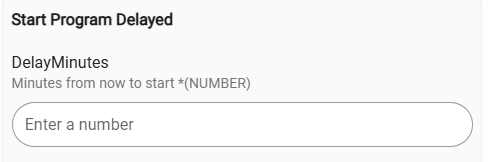
I ran my first "remote" dishwasher run last night from my bed using the Start Program Delayed option. Woke up to clean dishes (everyone's dream, right?).  Very nice!
The other feature I'd like to confirm is how to set a cycle to start at a specific time using the Set Time preference...I want to accomplish my "Button Dream" of being able to tell my wife "Just put in the soap pod, close the dishwasher, and press that button and it will start at 9:01pm." 
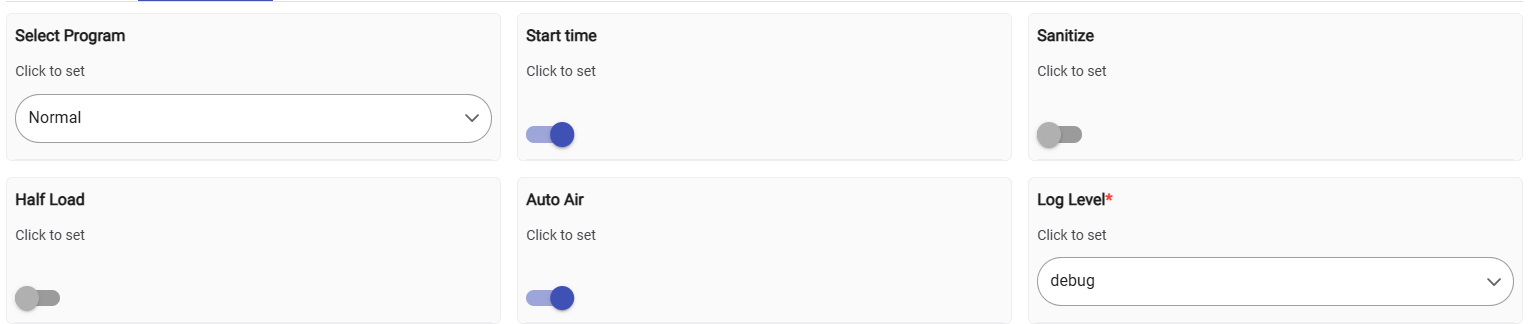
Related to that, are the options in Preferences all now fully supported? As noted the "Start Time" option is particularly interesting to me. Implies that setting a delayed start for a specific time is currently supported, but not sure if that's just left over/non-funct stuff in the driver. So are the Preferneces all working at this point, and how/where can I set the Start Time if it is enabled?
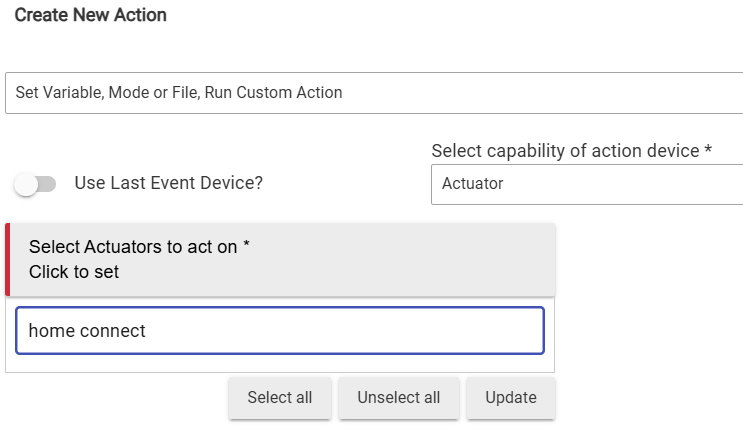
I looked in Rule Machine and there isn't a "Start Time" actuator (if I choose Actuator as the option in RM the dishwasher doesn't appear in the list of available devices).
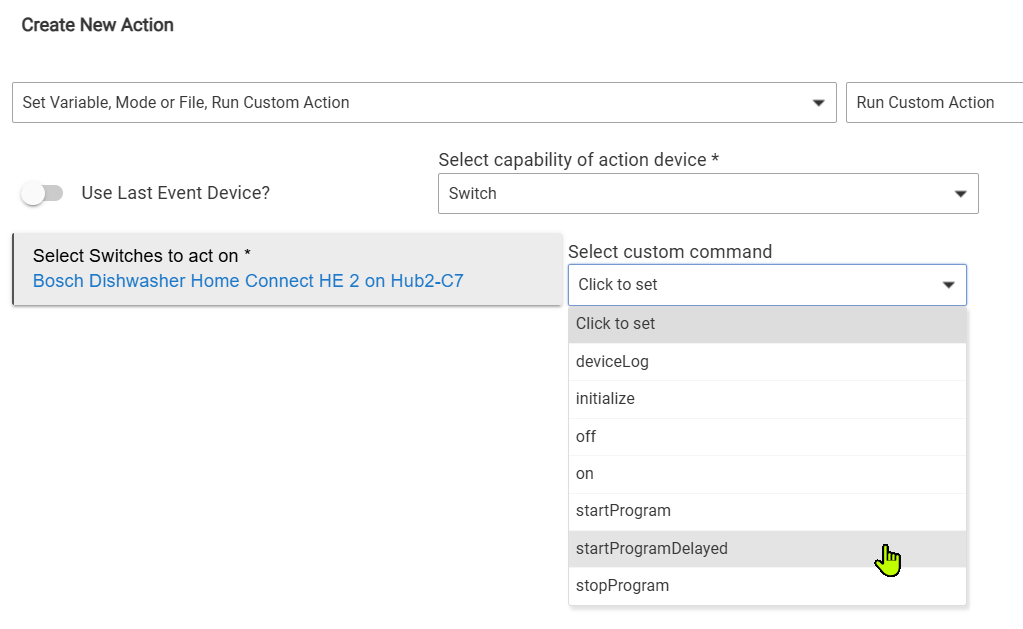
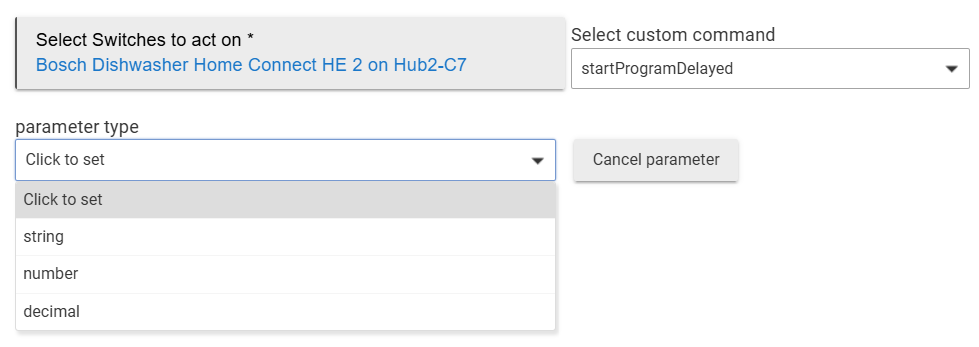
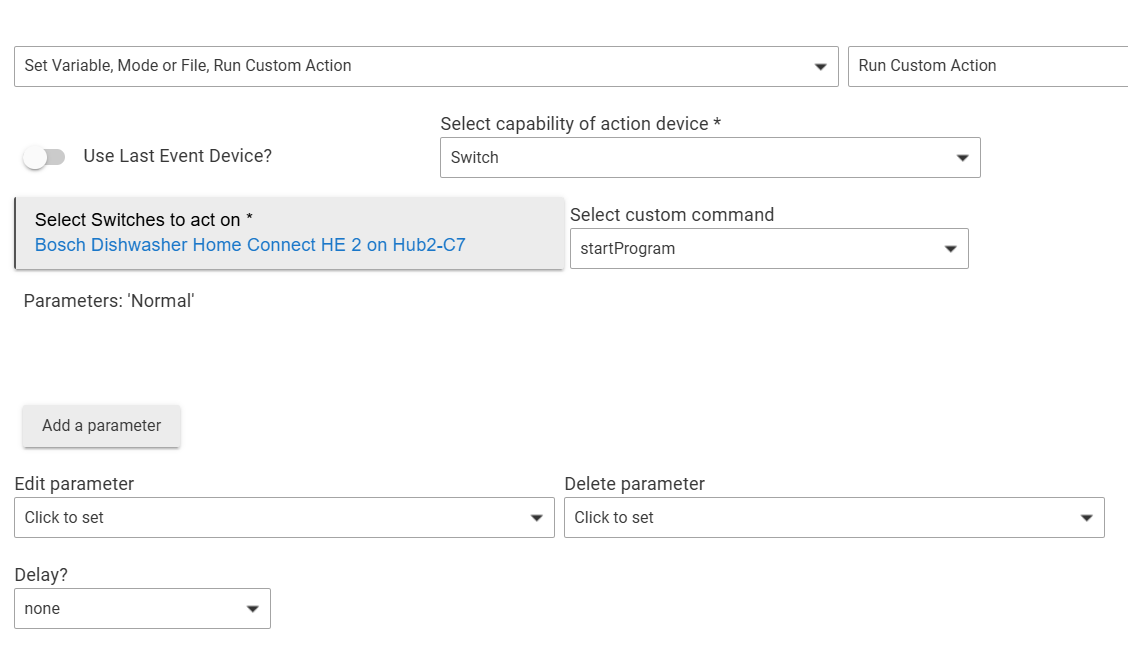
If I choose Switch as the custom action type there is a startProgramDelayed option, but that only seems to allow delaying by some set amount of time, you can't set a time of day for the cycle to start.
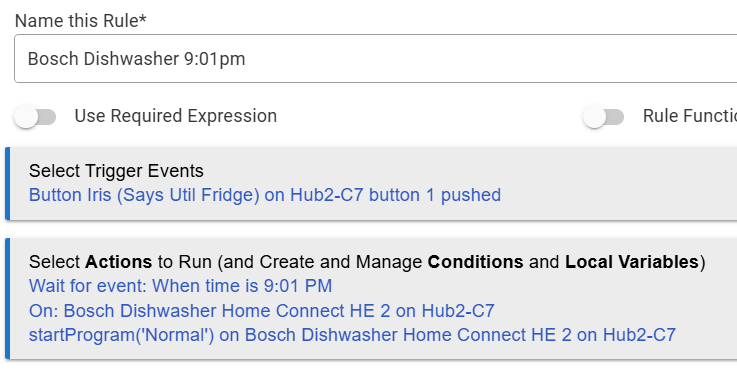
There are simple work-arounds, like setting startProgram to initiate the "Normal" cycle:
...and then adding a "Wait > Certain Time" delay in the rule as below, but since the "Start Time" option is listed on Preferences thought I would ask if it is (or will be) available in RM and Button Controller as an Actuator/Custom Action...
Don't mean to bomb you with requests (but I did, I guess). Thanks!
I have not really looked through all the old preferences code yet. It was a heavy lift to redo all the Oauth stuff in the main app. I only have the dishwasher so that’s all I can test on the device side. I will definitely go through that one and clean it up and make sure everything exposed works correctly. I’m out of town now until dec 22 so can’t test anything until then. Will do it over the Xmas break and also add it to HPM.
Thanks, and hopefully I'm not coming across demanding stuff quickly (or even demanding stuff slowly), not my intent. I realize you have a real life and are fitting in stuff when you want to and have time/energy.
Lucky for me, that's all I have as well! Kismet.
@danabw have you had to set up the deviced in home connect again or could you just update app and driver in HE? Am interested in the new versions but afraid to set it up again and to have issues with that.
Thanks
I did a secondary setup on my C7, left the existing setup on my C8-Pro.
Creating a new setup was easy...
Overall feeling was "it's easy."
As noted, I don't think you have to do the separate browser thing any more, I believe Craig's changes fixed that. I did confirm you have to wait 30m after creating/registering the app on the Home Connect site...I tried sooner and had a fail.
In the "just for fun" category trying to do a quicker update you could download a local hub backup (for easy recovery), and then try updating your existing Home Connect Integration app/driver code from Craig's GitHub, and see if anything blows up. It seems like there would be inconsistencies you'd have to manage between the original integration/Home Connect app you created and the new stuff from Craig's code:
Maybe just change the redirect URL of your newly created app on the Home Connect site to match the redirect URL of the original Home Connect Integration app on your hub?
What could go wrong? (Don't cross the streams!!! That would be bad.)
have you noticed that the parse function in dishwasher driver is never invoked, and
the processData function in the parent handle all events. so all you did to add remainingTime etc for Node-RED does not work at all.
It works for me? I’ve had to modify a little to get the rinse aid state to function correctly. But the remainingtime works fine.
how did you fix the rinse aid /salt level ?
I used ChatGPT, and to be honest I was being bit lazy with the “vibe coding” as I am far from a dev, when I read the summary of what it did there are a few parts where it may have gone a bit over the top. However it works, and I’m not that fussed if it’s a bit bloated. Summary below.
Here’s what we changed to make RinseAidNearlyEmpty a reliable, rule-usable attribute in the Dishwasher driver, even when Home Connect reports it in different formats.
We added a driver attribute that is always a simple, predictable value:
// Consumable we want events for
attribute "RinseAidNearlyEmpty", "string" // "On" | "Off"
Using "On"/"Off" makes it easy to consume in Rule Machine (and avoids enum weirdness across different payload shapes).
⸻
This helper normalises the value to "On" or "Off" and sends an event only when it actually changes:
private void setRinseAidNearlyEmpty(boolean nearlyEmpty) {
String newVal = nearlyEmpty ? "On" : "Off"
String oldVal = (device.currentValue("RinseAidNearlyEmpty") ?: "Off") as String
if (oldVal != newVal) {
    Utils.toLogger("info", "RinseAidNearlyEmpty -> ${newVal}")
}

sendEvent(
    name: "RinseAidNearlyEmpty",
    value: newVal,
    descriptionText: "Rinse Aid Nearly Empty is ${newVal}",
    isStateChange: (oldVal != newVal)
)
}
⸻
Home Connect may report rinse-aid as:
• an enum-like string (e.g. ...Empty, ...NearlyEmpty, ...Ok, ...Full)
• a boolean
• a percentage/number (remaining %)
This function converts whatever arrives into a single boolean nearlyEmpty:
private boolean isNearlyEmpty(def valObj, String valStr) {
try {
String s = (valStr ?: "").toLowerCase()
    // Enum/string forms
    if (s) {
        if (s.endsWith(".empty") || s.contains("empty")) return true
        if (s.endsWith(".nearlyempty") || s.contains("nearly")) return true
        if (s.endsWith(".low") || s == "low") return true
        if (s.endsWith(".ok") || s == "ok" || s.endsWith(".full") || s == "full") return false
    }

    // Boolean form
    if (valObj instanceof Boolean) return (valObj as Boolean)

    // Numeric/percent form (<= 10% = nearly empty)
    if (valObj instanceof Number) return ((valObj as Number).intValue() <= 10)
    if (s.isInteger()) return s.toInteger() <= 10
} catch (ignored) {}

return false
}
⸻
Inside parse(String text), we “sniff” event stream payloads and look for rinse-aid keys, then emit the attribute event.
Key addition: cases that match known key names and fallback matching for variants Bosch may use.
case 'BSH.Common.Status.Consumable.RinseAid':
case 'BSH.Common.Status.RinseAid':
case 'BSH.Common.Status.Consumable.RinseAidLevel':
case { key?.toLowerCase()?.contains('rinse') && key?.toLowerCase()?.contains('aid') }:
case { key?.toLowerCase()?.contains('consumable') && key?.toLowerCase()?.contains('rinse') }:
boolean ne = isNearlyEmpty(valObj, valStr)
setRinseAidNearlyEmpty(ne)
break
This is what makes it functional: it no longer depends on just one exact event key or one event type. It works whether the dishwasher reports it as an event, a status, a consumable level, etc.
⸻
In the v1.8 driver we removed the salt attribute/event handling (since your dishwasher doesn’t have it and it was creating confusion / dead code).
⸻
Result
After these changes, you get a stable attribute:
• RinseAidNearlyEmpty = On when the dishwasher indicates low/empty (or <=10% remaining)
• RinseAidNearlyEmpty = Off otherwise
…and it updates via event stream when the API actually sends that data.
If you want, I can also show a simple Rule Machine pattern to trigger on changed + filter for "On" so it only notifies once per transition.
The comment on the fact that the parse() event is never called had me go back and relook at this in detail. I had really only rewritten the oauth component and hacked a couple of things directly into the diswahser driver without going through it all in detail. I have started on a major rewrite based on this. I think it will lead to a more scalable approach where it is easier to evolve individual drivers. The first beta is live here - GitHub - craigde/hubitat-homeconnect-v3 and is working for my dishwasher. I will add additional devices and round it out over the next couple of weeks. If you have feature requests let me know. Its pretty easy to add things now.
Thanks for the work!
Is it currently working such that I should be able to kick off a wash cycle from a rule?
Away from home until late tonight, hoping to try this tomorrow. 
As you note, big changes in v3 ... Seems like we need to start over on app and device? Would upgrading over existing app and driver code work?
I set it up to be able to run side by side. I went through the normal install and then added a second app in my Home Connect Developer account. Waited 10 minutes. Then finished install. I would suggest doing that. In theory it should do all the things the last driver did as well as a few new things so yes it should work great with rules. I have not tested a ton of scenarios yet so let me know if it works or doesn't. I don't have the other devices but I have set up a development harness for the simulator and will add those over the next few weeks. Once the full list is ready I will integrate it with HPM as a new app, start a new community thread etc. I don't really want to try and take on upgrade from the previous one.
Finally had a little time to install, and getting an error when I try to create the driver.
Line 53 looks unremarkable...
Maybe a misplaced { } or somewhere?
Error seems to be talking about this:
Issue resolved by your updates to the driver, thanks very much. New app and drivers installed and should have some time later today to play a bit. Thanks for the quick response!
Just throwing this out there, would it make sense to start a new thread with this rewritten integration when it's ready? It might be easier for someone else to find since it will be at the top of the new thread instead of buried in the old one.
I'm preparing to install it tonight from github but won't be able to do much testing for a couple of weeks.
Yes. Just validating a few things. I will start a new thread over the weekend. I have added it to HPM to make it easier but am just tidying up a few errors so wait for me to post the new thread.
Download the Hubitat app