Sorry--it was the same problem but with a rule controlling multiple lights rather than one. When it's just one, specifying "select switches that determine all lights are off" takes care of the issue, but this approach doesn't address the multiple-lights-with-some-turned-off instance.
In my multiple light example (the second), I do have "activate even if already partially activated," specified, but it doesn't work--the lights don't turn back on. My guess is that that option applies to an inactive rule that is activated, but not one still seen as active.
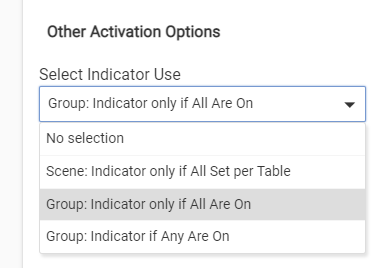
@eelton I would set one of the indicator options. I have had success with this. This will force the "Active" status on the app on or off, based on your selection. I like this better than the "Select Switches that Determine all Lights are Off" option.
There is a bug associated with the option I showed above (Activate even if already partially Activated). That will be fixed in the next release. When that comes out, I recommend this option over the indicator approach simply due to efficiency. This option is passive, easily tested for (the bug was one place missed doing this test where it should have), whereas the indicator approach pushes the app through testing every device event and device current state to determine if the indicator should be on or off. This extra testing doesn't affect the performance for Activating or Turning Off, as the extra work happens after that has happened, and has built-in delays before it takes effect to give devices time to report.
The default behavior of Room Lights is to only Activate if not already Active, and to only Turn Off if already Active. This works for most scenarios. Where it doesn't work are situations where the lights are being independently turned on or off outside of the app. For these situations there are matched options to force Room Lights to Activate, or force it to Turn Off, irrespective of what it thinks its Active or Turned Off state is.
To force Activation, the option shown above is the one, and to force Turning Off, there is this one:
Sorry to keep posting, but I'm having a couple of related issues with per-mode settings that I think may be bugs.
I have a motion rule that turns on 6 lights in the evening and 3 during sleep mode (I do have all 6 specified to turn off with inactivity to make sure everything is off). However, it is turning on all 6 in sleep mode--and with somewhat random levels for the "extra" 3 lights:
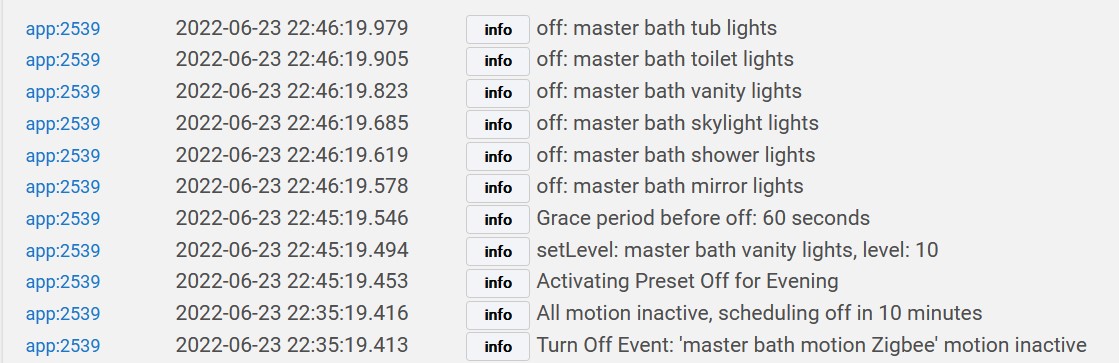
In the same rule, I'm using preset off with all 6 lights in the evening and 3 in sleep mode (since only 3 are supposed to be on). However, while in evening mode, although the log says "activating preset off for evening," it's actually implementing the sleep preset (it does correctly turn off all 6 lights after the grace period expires):
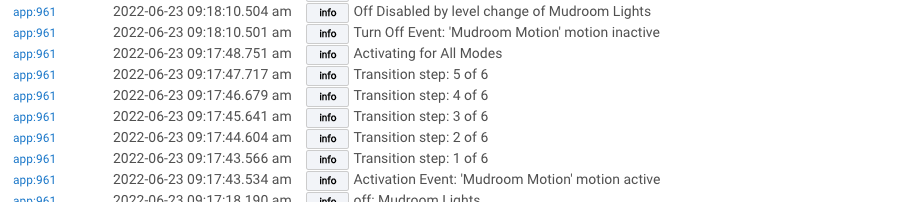
@bravenel, I thought I'd try the transition for activation and found it doesn't seem to work if I also prevent motion inactive from turning off the lights after a level change. Here's what the logs show:
This might be related to my experience with presets. I would uncheck set which hides the settings. The hidden settings fire anyways. I explained in a previous post.
Regarding my per-mode/preset off issue above, I recreated the rule from scratch and it works properly. It may or may not be relevant, but the original rule was imported from a Motion Lighting rule, and then modified.
Pause that new one you created, and do another import from ML. See if the fresh import has the same problem as above. If so, see if you can identify for me what is different between the imported one and the one you created.
I re-imported the rule, although I can't retrace all my steps--I had made various changes while trying to get "activate even if already partially activated" working, trying indicator use, etc.
The imported rule produces some incorrect behavior. However, I spoke too soon about the fresh rule, which is not handling preset off correctly. So, importing vs. making a fresh rule isn't the answer.
Here is the fresh rule's behavior. It is dimming only one of the six lights during the preset off period:
I should add that both the imported rule and the fresh rule turn on the correct 3 out of 6 lights in sleep mode (as opposed to my originally-imported rule that incorrectly turned on all 6).
As your apps get more complex it is actually getting harder to decide which one to use or which ones can all be replaced by a single one. Items that took several rules before can be all done at once. One thing I actually do a lot is automates lights, based upon parameters or triggers. Typical stuff like outdoor lights on when dark but also of the front door opens, then turn on certain lights depends on the hour as well as it being dark out. At 8 PM I am probably getting stuff out of the car or filling the curb yard waste so those two light need to come on and then shut off again after a few minutes. If I open the back door at night I want certain lights on. If it is below freezing I have other light come on because I have to protect certain plants, etc. I also have vocal alerts telling me what is wrong for some events.