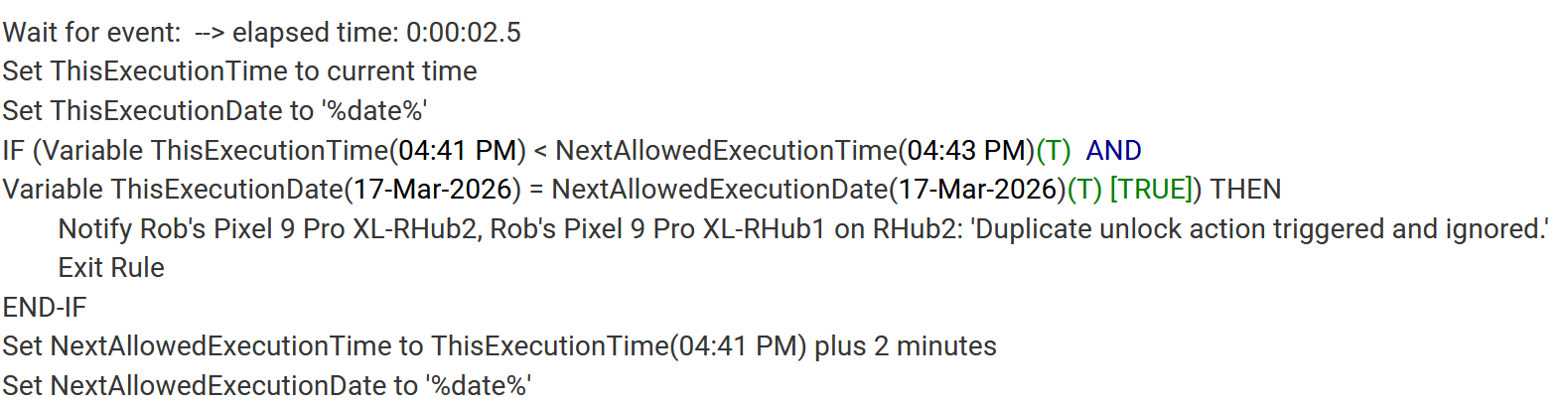
Any better ideas (the Private Boolean for this rule has another purpose, btw)?
Note: prior to putting in the "Wait for Event", it triggered twice within a second and both triggers ran the rule because it didn't have time to set the "time check" values.
This is a legacy RM 4.4.1 rule, which I know is deprecated--but it's tied up with other RM4 things, so moving it isn't necessarily straight forward.
The lock is an older Schlage lock that shows as S2_AccessControl (it was supported when I bought all of them--rekeying and changing all the locks is about a thousand dollars I don't need to burn).
Seems to be a Schlage thing to send multiple events
If you are already using the private boolean for something else, maybe create a hub variable boolean (Call it bnLockWaitOutsideDoor or similar) and use that as the required expression?
First step, set it to false
wait for event elapsed time 2.5 seconds
Rest of rule
Last step, set it to true
Heck, I couldn't even set a date-time variable--only time. So, I have to use a string set to the date--and "assume" I won't be unlocking right at midnight.
if the problem is coming from the device as @tray_e indicates, then the best way forward would be to "debounce" the lock. If it isn't straightforward to modify the driver code to flter extra events there, you could write a rule in RM 5.1 or a custom app, to set a virtual ("debounced") lock from the true lock.
Without seeing debug logs from your device, it's impossible to say, but if one of your duplicate events from the device (that's probably where it's coming from; without at least descriptionText logging from the device or a look at its Events history, it's also impossible to say -- but the Rule logs suggest it's not really a Rule problem) is a Door Operation Report, there is an option in the Schalge driver to ignore those. I bring that up since you mentioned it's what you're using. May or may not be it, would take some digging into what's really happening for you when to say for sure, but worth looking into if you don't want to try some other approach!
From looking around, however, it appears that enabling that option prevents the hub from recognizing lock/unlock state changes when they are digital (from the hub).
Btw, I noticed that the RM documentation covered 5.1, 5.0, and 3--but nothing about 4. Thoughts on why?
Did you try this on your specific device or at least enable debug logging to see what Z-Wave reports come in when? There are many hardware and firmware revisions of these devices floating around, and they problaby behave differently. (I'm sure this happens for someone/some combinations of these, but I believe it was added to address cases where things like yours happen. Debug logs would be the best clue beyond just trying.)
In general, you can expect the documentation to focus on the most recent version of built-in apps and relatively recent platform versions. In the case of Rule 3.0, those docs are still around because Rule 4.x substantially changed the basic building blocks of Rules, but there will probably come a time when they won't be (as a dwindling number of users who already know what they're doing will be all that remain, possibly already true ). Rule 4.x to 5.0/5.1 work substantially similarly (the biggest change between 4.x and 5.0 was just the removal of RM global variables coinciding with the release of Hubitat hub variables). The Rule 5.0 docs can really probably be removed but may be helpful from users upgrading from 3.0 or earlier versions, as they are basically minor updates to the 4.x docs that make the most sense assuming this prior knowledge, where as the 5.1 docs are entirely rewritten and focused on helping new or current Rule users simply learn how it works today, and it's the most prominent in the docs since it's probably what most users are looking for.
FWIW I bailed on the Schlage Z-Wave locks. The company is great and stands behind their products. BUT, multiple failures led to abysmal WAF issues. So, I switched to Kwikset 914s. They have been rock solid performance wise. Unfortunately the motor is super loud when operating the lock. But, we've learned to live with them. And the noise doesn't bother the wife as long as it works when she taps in her code. And it does.