I got it to migrate from my c7 to a new c8 pro. What a nightmare. Not for the faint of heart. 73 zigbee devices with about 25 that do not work. The first ones I notice are my Innr light bulbs. On the c7 I had them stay off when the power failed. On the c8, I can't get them to come on at all. When I restore power with the switch, they do not come one. How can I reset them if I can't get them to power on? Any idea?
Too bad you're having trouble. I moved from C7 to C8 Pro with no issues at all. "Not for the faint of heart" isn't a fair statement. I don't hear about a lot of issues migrating Zigbee devices.
From Google AI (probably accurate, but you might want to double-check the Innr documentation if it doesn't work)...
"To reset Innr smart light bulbs, turn the light switch off and on 5 to 6 times, pausing for about 1-2 seconds between each cycle, until the bulb flashes"
Obviously, don't delete the bulbs from the hub. Just pair them again.
And you shouldn't have both the old hub and new hub with the same database running at the same time. Once you migrate, shut down the old hub.
2 Likes
Have you tried doing a configure on them, also what driver are you using?
Can you describe in more detail what steps you took to migrate from C7 to C8 Pro?
2 Likes
Were the INNR bulbs powered when you performed the migration? If they had no power whatsoever (e.g. they were turned off via a light switch) when the hub migration was initiated, perhaps that could cause them to fail to migrate to the new hub? Just a hypothesis…
Generally speaking, power should never be removed from Zigbee devices that act as Zigbee network repeaters. Doing so will disrupt the Zigbee mesh network. The only bulbs that I know of where it is safe to do so at the Sengled Zigbee bulbs. Sengled bulbs are designed to not be Zigbee repeaters.
3 Likes
when you did the transfer, did you make sure the old hub was off? Conversely if you turn off the c8 and bring the other hub online does everything work again?
Yeah, I know what you mean about not having any problems at all. I did a migration at my other house in November of 25 without much problem. I did have to reset about 10 zigbee devices at that one. This one is much worse. I did not expect so many devices not to be working.
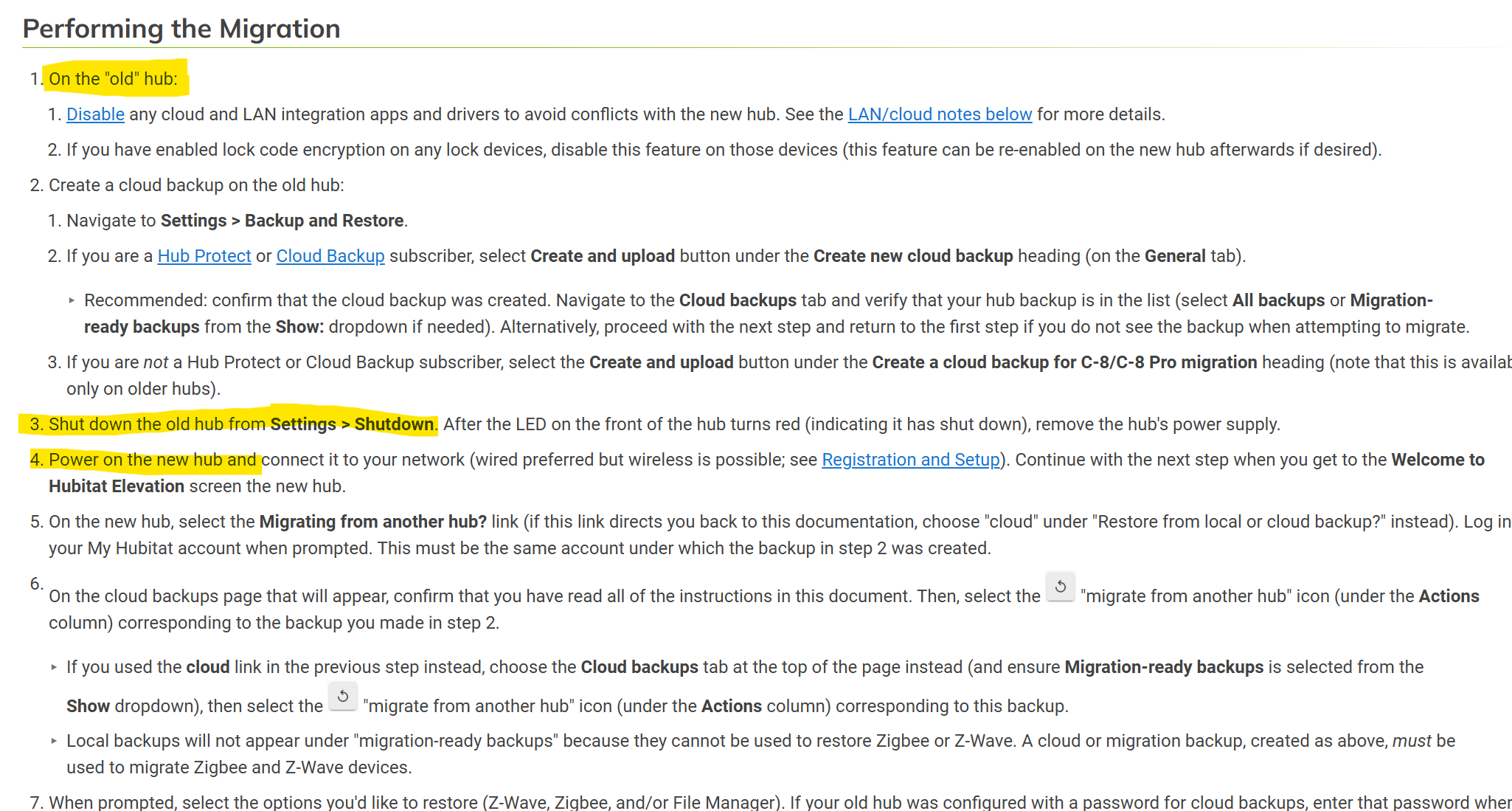
I did a cloud backup of the c7. I hooked up the c8. I restored the backup to the c8. I updated the c8 firmware. I removed the c7. I changed the IP of the c8 to be the same IP as the now removed c7. Booted the c8 a couple of times to see if that would help. That's it. I did have one problem with the registering the c8 but I got that one resolved.
1 Like
As a rule, I don't remove power from any of my zigbee devices except the mini switches that are installed inside the switch box along side the standard paddle switch. So the power was on during the migration.
1 Like
Sounds like the C7 was left powered on at the same time as the C8 after migration restore was completed? If so, that would definitely lead to some confusion amongst your Zigbee devices as there were two active Zigbee controllers with the same Zigbee unique identifiers powered on at the same time.
4 Likes
Guys, thank you for the suggestions. At this point I am resolved to pairing each device over again. I will say that my bond devices do not work at this time and most of my Alexa interfaces are inactive. My zigbee locks don't even work. The migration is still better than starting with nothing. At least my devices and all my rules are intact, but it looks like I have some work to do.
Yes, that is correct. I did have the c7 still on line when I hooked up the c8. I may have caused my own problems but I am more concerned with how to resolve the problem than I am with how it was caused. Just in case, on future migrations, I will be sure and remove the c7 before I install the c8. I have one more migration to go. I will say that on my Nov 25 migration, I did it the same way with very few problems.
1 Like
Have you tried reseting the C-8, turning off the C-7, and redoing the migration from the backup?
4 Likes
I'd go that way...low cost in terms of time/effort to give it another try. Do a full reset on the C8, available via the diagnostic tool: [hubIPaddress]:8081. Then re-do the migration, turn off and unplug C7 before starting the migration on the C8-Pro.
3 Likes
This! I would also make sure that both hubs are updated to the latest firmware before hand. Also shut down the c8 after restore, unplug for 30 seconds then power back up.
2 Likes
Maybe I should have gone that route but I'm too many hours into the process to go back now. I have almost everything working again on the Hubitat side. Still problems with Alexa and the Bond hubs. I'll get there.
4 Likes
One of the main things I did wrong was not update the c8pro before doing the download of my c7 backup. I think this might have helped me out. I bought the c8pro from Amazon and the firmware was a bit old.
2 Likes
I believe the docs say to also disable all cloud and lan integrations before upgrading. If you didn't do that it might explain why the bond and Alexa are having issues.
1 Like
Guessing you have smart switches which are setup in a "Smart Bulb Mode" so the bulbs always stay powered?
You either need to turn that setting off temporarily, or take them out of the fixture and put them in one connected to a live switch.
1 Like
Yes, I believe you are correct. Another mistake I made.

