Hi bobbles, I tried to running this on my QNAP without success.
im stucked at mi connector configuration as well. cant get pass the web settings. not sure what is the ip address
finally got it running. switched to rpi instead of linux server.
2 Likes
Hi, I have docker installed on a Pi and have added the mi-connector.groovy to 'Apps Code' in Hubitat and the device type 'Xiaomi-motion'' to 'drivers code' in Hubitat. I see the gateway in the Mi Connector web page devices list and I also see my Aqara motion sensor but when I go to register either of them (not sure if I should be doing 1 or both or none), I get "Failed to request to add device to ST" error. In the logs it says the following:
2020-08-15 07:39:31 [] info: Register Device to ST >> id(158d00023e373d) type(lumi.motion.aq2)
2020-08-15 07:39:31 [] error: Failed to register device ID(158d00023e373d), TYPE(lumi.motion.aq2)
SyntaxError: Unexpected token u in JSON at position 0
Error
at /usr/src/app/routes/registerST.js:53:110
at deviceMap.(anonymous function).target.state.then.state (/usr/src/app/miio/miio.js:1505:9)
at
at process._tickCallback (internal/process/next_tick.js:182:7)
The path mentioned in the error doesnt seem to exist after /usr.src/ so maybe thats a step that I have missed?
So not sure what I have missed. I'm a little unsure of whether I need any of the SmartThings bits of these intructions (adding device handlers and smart app etc to ST)?
Also unsure how the Mi Connector knows about my Hubitat hub (I gather its meant to auto create virtual devices in Hubitat).
Also tried registering the gateway and get a similar error message.
Would appreciate some help as it feels like I am getting close here 
Seems registration failed due to token... try to open mi-connector websettings page(http://X.X.X.X:30000/settings), under settings/logs to check the log... this is the first step to make sure mi-connector has all devices connected, before you go to Hubitat Apps.
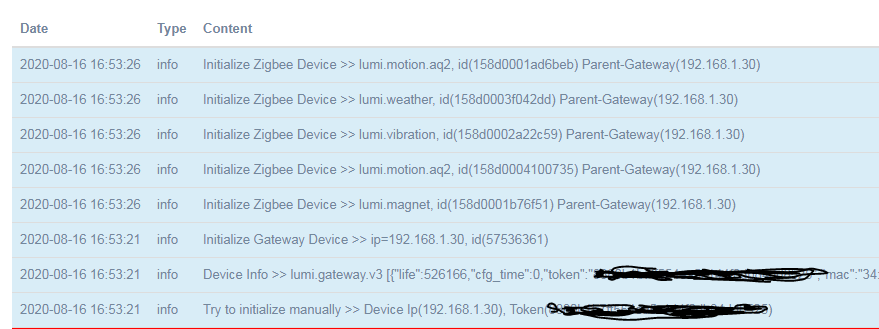
I added devices manually through token. When all devices added successfully, you should see following snapshot..
Hope it helps..
Hi. checked the logs and looks like your right. There are 2 errors:
"Mi-Connector find new device (192.168.87.249), lumi.gateway.v3) at Auto Mode. But can't get token from this!!!" and also
"DB is disconnected >> Error: connect ECONNREFUSED 127.0.0.1:33006"
I Added the gateway manually with the IP address and token that I got from the Mi Home app. I presumed that as the Mi-Connector found the motion sensor that it was connecting to the Gateway successfully?
Not sure what to do from here. Any help would be much appreciated. thanks
Try rebooting the docker, then see if it’s added the motion sensor to HE.
Thanks but tried rebooting a few times already. Also tried deleting and re adding the docker containers.
How does the mi connector know where my hubitat hub is? Does it just search the local network?
Ah. This could be your issue. You need to add that to the settings in the Mi Connector. Check through the github instructions here
Make sure you also enable OAuth on the HE app.
Thanks but those instructions refer to ST. I dont see anything that mentions adding anything to Hubitat. I made the assumption that I should add the device handler and app code to hubitat but that's all the hubitat configuration that I did. What do I need to add to the mi connector settings please? Appreciate your help.
Just noticed that I had added the HE app code but didnt then add the user app. I have done that now but I notice that there are some settings in the app that its asking for like "Server address". Is that the address of the mi-connector? Is it just the IP address or more to it?
thanks
1 Like
I know they’re ST. But follow them as closely as you can for HE.
That’s the IP of the Mi Connector. So yeah, you need to set that up.
Ok thanks. So I now have added the config url and app ID etc from hubitat to the mi connector settings. The motion sensor now appears in hubitat.
It doesnt seem to be detecting any motion though.
Should the gateway appear as a device in HE too?
Sorry for the spam btw.
It’s no problem. Yeah the gateway needs to be added as a device, there’s a driver for that. I always used the 2 one.
Ok so added the driver for the gateway. Tried the "2" one but that didnt work so used the other one and the gateway is now added to HE.
Still no events being projected to HE for my motion sensor though.
Do I need to fill out the external address setting in the HE mi connector settings? Wasn't sure what to put in there.
Also, in the mi connector dashboard my gateway shows as "off" not sure why that is. On completely new to the xiaomi gateway so could be something obvious
Ok so it’s not seeing your gateway for some reason. I’m kind of doing this from memory as I don’t have it any more.
Did you get the gateway token ok?
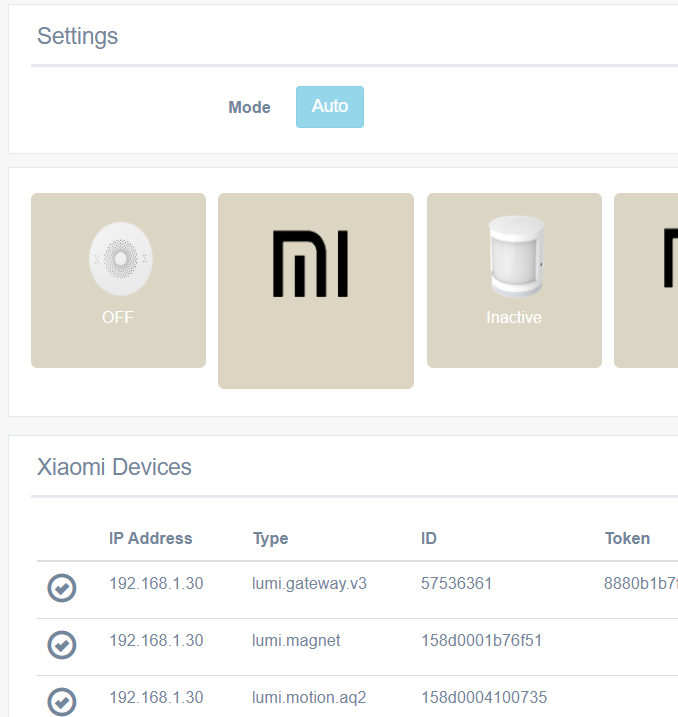
it is fine that Gateway is off on the mi connector dashboard page (see below mine), Can you see all your devices listed below? The first line should be gatwway with token displayed. Better show yours then we can start from there...
Hi yes I got the gateway token from an old version of.mi home that I installed on my android.
Not sure if the problem is that I have now added the gateway after adding the devixe.
Will try removing and re adding later.
Once you have the token, can you install a newer version of the mi home app?
1 Like
Also as mentioned, I dont have an external address set in the mi connector config within the HE app. Not sure I'd that's necessary?
I can control the gateway (change color on light etc) from HE. Not sure if that tells us anything about the connectivity. Also the url that I added to HE is an http not https one. Again not sure if that matters.

