HA and Homekit had support for the non-matter switchbot hub. There was an app and drivers for Hubitat that talk to the switchbot cloud and locally to the non-matter hub. They all had delay. My ThirdReality zigbee shades have a delay too, come to think of it.
Oh ok. I didn't realize there was an integration before matter. It really isn't a big deal with the delay it just isn't instantaneous like everything else.
Have any of you guys added the Switchbot devices to the notifier app or a rule to alert you of a low battery? The app will let me select the devices but the device info does not show a battery percentage or status so I didn't know if it would work or not.
Yesterday there was a 24h internet outage in my neighborhood (an utility post went up in flame). All day I could not activate my Switchbot Matter blinds/tilt from either HE nor HA. All my other Matter devices worked fine though. When the internet finally came back on, the blinds started working again.
What gives? Shouldn't Matter supposed to be local?
And it is, BUT Matter talks to their bridge. It sounds like the bridge requires cloud connectivity to operate the blinds, and that's not a Matter matter... pun intended.
1 Like
You are correct. The Switch Bot hub uses the cloud to activate the switch bot devices. Even though HE is communicating locally with the hub it still won't work if the Internet is out because the hub uses the cloud.
1 Like
So I take back what I said in the post above. That is how the Switchbot system used to work. However, now my internet is currently out but my SwitchBot devices via the Switchbot Hub 2 using matter to come into HE and rules created inside HE are still working as normal.
Not sure why or how the change but there has been some change. At least for me.
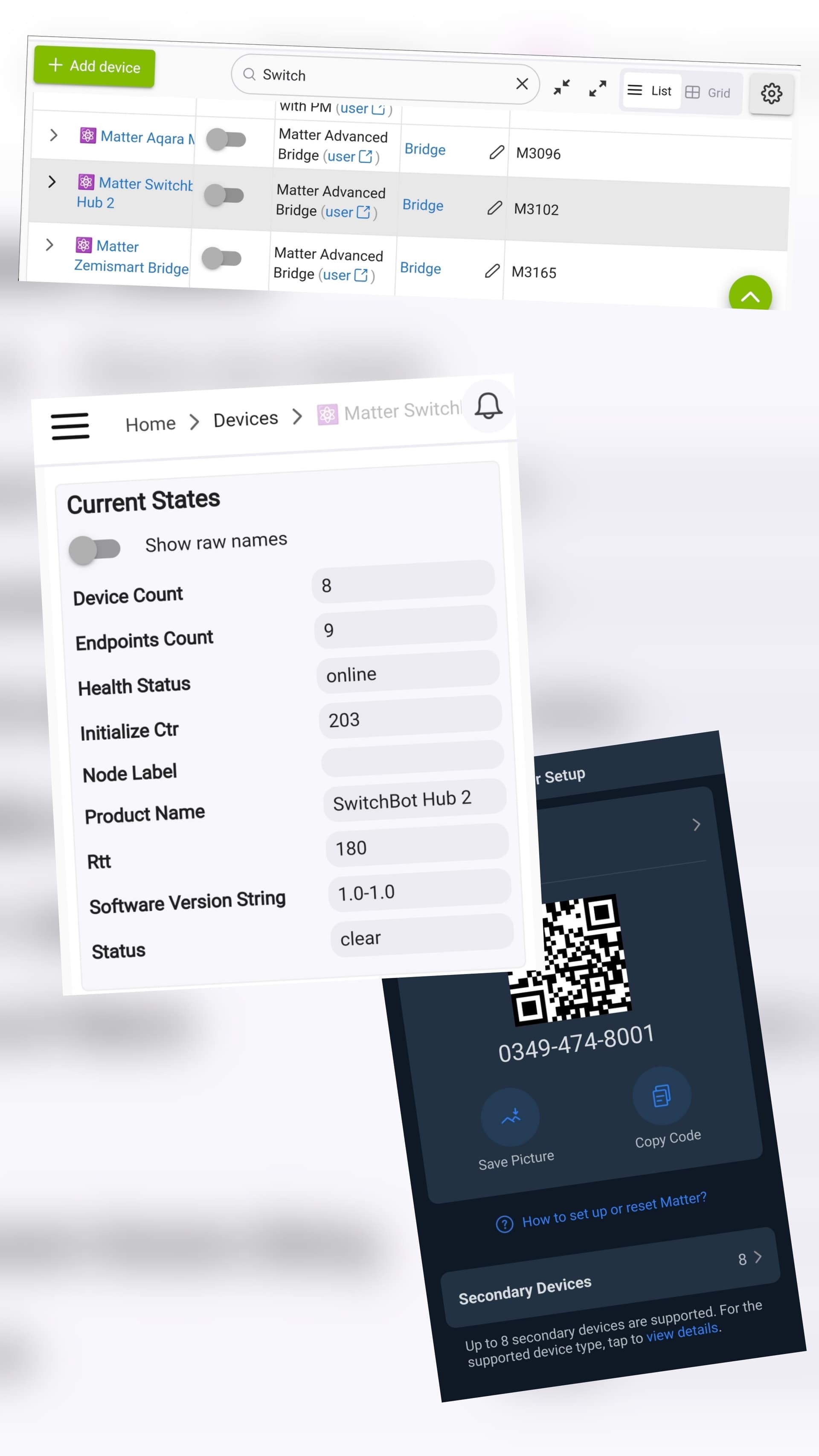
I’m trying to figure out how to expose my Hub 2 sensors to Hubitat… seems like others have been successful. I believe I already did the Secondary Devices stuff in the SwitchBot app.

I received my switchbot hub 3 today. At least it is working as advertised (not like their crappy universal remote).
The Matter Integration is fine with @kkossev bridge.
The knob feels cheap though. It's wobbly.
4 Likes
I recently paired my Hub2 via Matter with my HE 8 Pro. The lock works great. But the curtain controls are backwards Open=Closed and Closed=Open. Also set position doesn't work. Is there a trick to this?
I paired my Switchbot hub 3 with HomeKit doing something like the following, once you have the Hub seen in HomeKit;
Select the Hub in their app rather than the device.
Select the cog in the top RH corner
Select Matter setup
Select the secondary devices under the matter QR code.
then add from the available devices to see those devices in HomeKit
I made the hub sensors visible and also their new presence sensor.
IIRC only sensors and devices stated as working with matter can be seen in HomeKit, it is not good enough that they pair with the hub.
I am still navigating an issue as my latest sensor, whilst it gets into etc app it then fails to add from the secondary device screen. I don't know if this is a numbers thing (I have around 7 devices) or a failure in the sensor.
I have a switchbot hub mini and the switchbot presence sensor attached to the switchbot app. I have been able to add the hub to HE but i have not been able to get the presence sensor to be imported as a child device. Any advice?
On the Switchbot App Go to the Switchbot hub device, then select Matter and then Secondary devices. Add the secondary devices and they then show up.
thanks for the response. I do not have the matter enabled hub mini. So i had to use the community integration. I followed these steps:
Step-by-Step Integration
- Setup SwitchBot App: Ensure your Hub Mini is set up and working within the SwitchBot app.
- Get API Credentials:
- Open the SwitchBot App -> Profile -> Settings -> Click "App Version" 10 times.
- "Developer Options" will appear.
- Click "Developer Options" to find your Token and Client Secret.
- Install Community Driver on Hubitat:
- Navigate to your Hubitat web interface -> Drivers Code -> New Driver.
- Copy/paste the code from the GitHub repository.
- Save and repeat for all necessary child drivers.
- Add SwitchBot System Device:
- Go to Devices -> Add Device -> Virtual.
- Select "Local SwitchBot System" (or "SwitchBot System" from the community driver) as the device type.
- Enter your Token and Client Secret in the device preferences and Save.
- Create Devices:
- Click the "Create Child Devices" button within the device page.
- Your SwitchBot devices (buttons, sensors) should now appear in Hubitat.
The problem I am encountering is that i am trying to add the Presence Sensor as a child device, but it seems as though the community driver is not setup to include presence sensors.
I too have the switchbot mwwave presence sensor. The community (also cloud) driver hasn't been updated for several years so the presence sensor is very likely to not be in there. Rumor is that Hubitat will support Switchbot Bluetooth devices shortly so you could wait for that if you have a C8-Pro.
Until then, sometimes Home Assistant will see it but not now, for me. I have made it work with Alexa, of all things. You can create an Alexa routine to turn on a Hubitat virtual switch and another Alexa routine to turn it off.