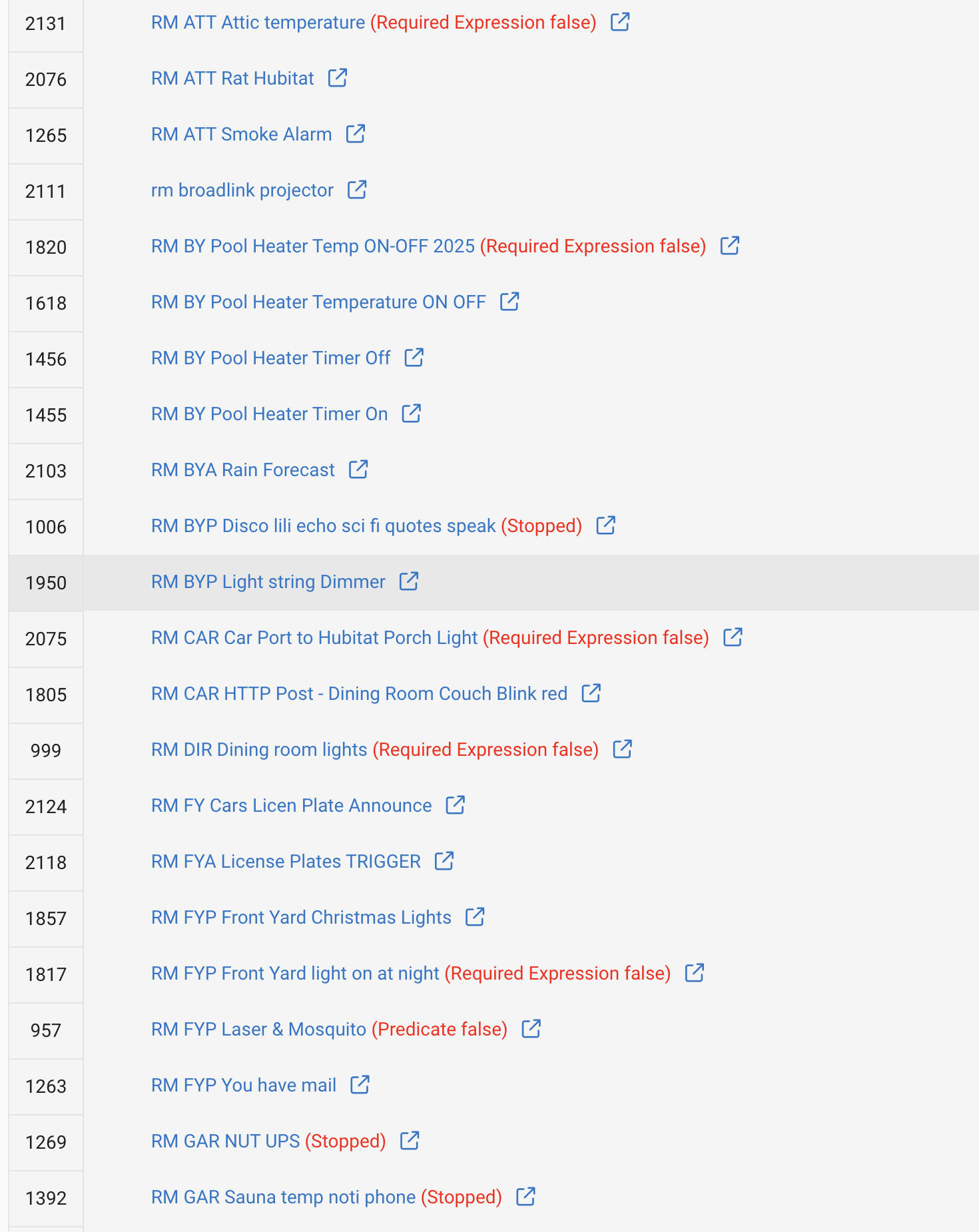
hi lately, I’ve started to use local end points quite a bit and I have about a dozen now. I really like the possibility it opens.
It’s really hard to remember which ID goes to which rule.
Would it make sense to make local end points a device maybe a parent - child device where the child devices are the different endpoints so I can look up where the local end points are actually in use and maybe even reuse an end point in multiple rules?
If you're trying to work backwards from an app ID, I'd just navigate to:
http://<hubIP>/installedapp/configure/<appID>
where <hubIP> and <appID> are replaced with the appropriate values. This will take you to the app's default/main page, whatever that may be, the same as clicking on the app (the Rule in this case) in the Apps list.
This sounds like it might be a different way of also easily getting what you're after, if I understand the problem.
That being said, you could also create a virtual device and trigger the rule using that (e.g., a virtual switch turning on/off or a virtual button being pushed). But then you'd need some way to change the state of the virtual device, and the easiest built-in option for that is Maker API. You'd trade device IDs, which Maker API uses, for app IDs, which you must be using now (I guess you'd still have an app ID, but it would be constant for all invocations of that Maker API instance). Whether that's easier for you, I don't know.
[EDIT: The below option is also an interesting alternative, unusual as it is to call a local endpoint trigger URL from driver code on the hub when you could just trigger the rule via more typical means, but it should work...]
Create devices using this driver; populate each device with the local endpoint URL of your choice, and you pretty much have what I believe you are seeking. Just make sure that you use port 8080 for your URLs.
A virtual driver could be made, with a command for each endpoint, that runs the endpoint with your parameters to the command. Then you can use that driver in any automation to just run the command with your parameters, with the commands named how you want them to remember them.
If you don't have any Groovy device coding experience, maybe try having AI write you a driver to do this.
That is not what I suggested. The driver would have commands named for each endpoint.
I don't know what endpoints are being used, though.
Driver would have a command called "Reboot", and it would call the endpoint to reboot:
Pressing the button for the command would call http://IP/hub/reboot
The driver could have a whole list of commands for various endpoints, including ones with parameters.
This already exists for generic hub endpoints... Hub Information Driver has a host of curated commands like the ones you're describing.
If the OP is instead asking for a way of cataloging in-use local endpoints, sounds like a job for Rule Machine (which permits Comments) where you could keep an updated list for yourself, and trigger various endpoints via GET requests using IF-THEN logic.
I'm going to take the unusual position of not arguing with the OP and instead say that's a good idea!
We can already make connectors for hub variables, why not a similar concept for endpoints? Yes, there's already existing community code for that does similar, but there's been lots of good community ideas that were later baked into the hub platform.
I have a list of ~300 endpoints that I have used but many of them are only useful/meaningful when building an app or driver. I started down the road you're asking for at one point but didn't like the result (it became a long list without context) and threw away the code.
I guess I wasn't clear what OP was asking. I'm still not clear what this below means, exactly.
"What local endpoints do?" Isn't it pretty much in the name of the enpoint?
"Which rules in the apps do each of them connect?" I have no idea what that means
Right now I do not remember in which of these I used a local end point trigger and to get the APP ID (2118) for a local end point (http://192.168.1.147/apps/api/2118/trigger?access_token=) I need to click 3 times. Is there a better way to do this?
The app ID is in the left column of the list in your screenshot, which should be helpful since that's part of the endpoint URL. For the other part of what you're asking, maybe you could just add something to the end (or start or whatever you want) of the rule name, like "[EP]", to easily note when you're actually using an endpoint trigger with the rule, assuming that's the remaining concern?
That being said, you should just need to click once, at least after the above -- click the app (rule) name in the list, and you'll see its triggers on the main rule page.