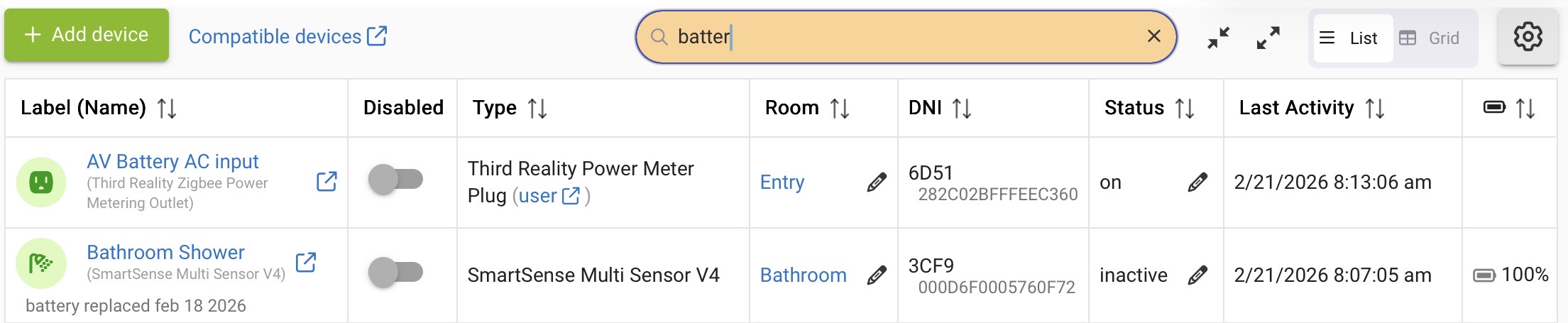
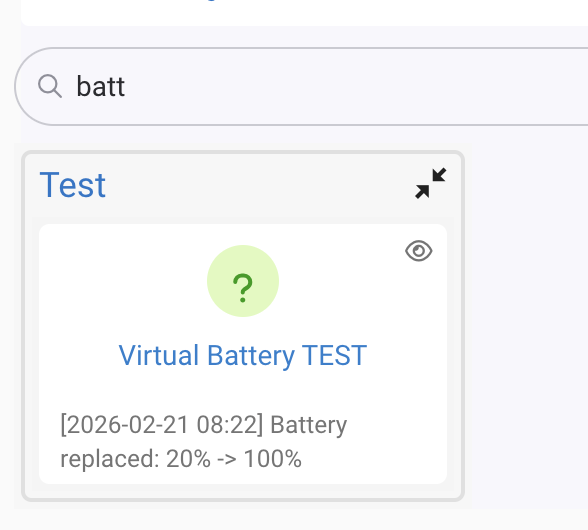
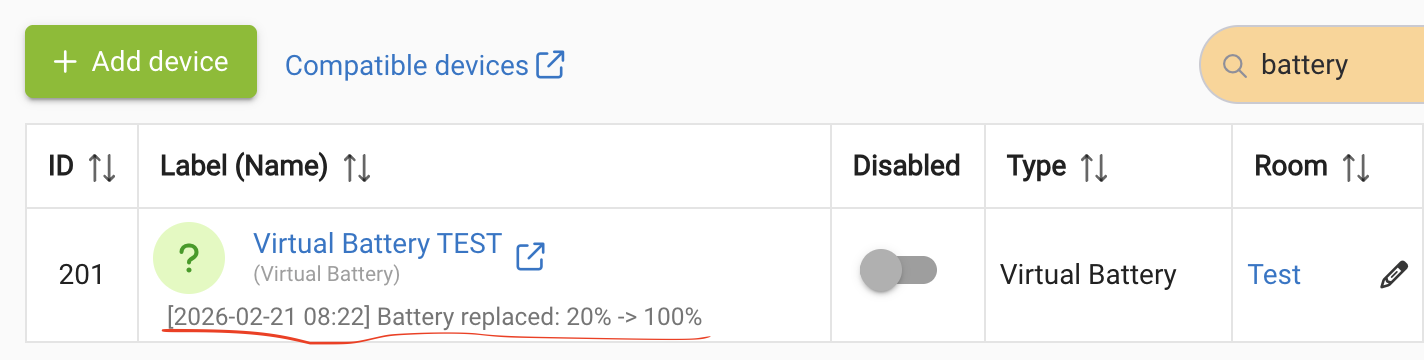
I dropped some tokens on Claude
Use at own risk (hopefully contributes to motivate @gopher.ny to expose proper endpoints/APIs for this  )
)
EDIT: note that it is the device note that gets updated, not the tags. The same approach applies to tags, I suppose.
import groovy.transform.Field
// Maximum replacement entries retained per device in state.replacementHistory
@Field static final int HISTORY_LIMIT = 20
// Fields that must be present in the /device/fullJson response before we attempt
// the /device/update POST. If any are missing it likely means a firmware change
// broke the field mapping; we skip the notes update and warn rather than send
// a malformed request.
@Field static final List<String> REQUIRED_DEVICE_FIELDS = [
"id", "version", "name", "label", "deviceNetworkId", "deviceTypeId", "locationId", "hubId"
]
definition(
name: "Battery Change Logger",
namespace: "dragons",
author: "slayer",
description: "Monitors battery levels and appends a timestamped note to device notes when a replacement is detected",
category: "Utility",
iconUrl: "",
iconX2Url: ""
)
preferences {
page(name: "mainPage")
}
Map mainPage() {
dynamicPage(name: "mainPage", title: "Battery Change Logger", install: true, uninstall: true) {
section("Devices") {
input "batteryDevices", "capability.battery",
title: "Devices to monitor",
required: true, multiple: true
}
section("Settings") {
input "threshold", "number",
title: "Battery increase threshold (%)",
description: "Treat a battery level increase of at least this amount as a replacement",
required: true, defaultValue: 20, range: "1..99"
paragraph "<span style='color:red'>EXPERIMENTAL</span>"
input "updateDeviceNotes", "bool",
title: "Update device notes on replacement",
description: "Append a timestamped entry to the device's Notes field when a replacement is detected",
defaultValue: true, required: false
}
section("Notifications") {
input "notifyDevice", "capability.notification",
title: "Notification device (optional)",
required: false, multiple: false
if (notifyDevice) {
input "notifyIntervalDays", "number",
title: "Notify if battery lasted fewer than (days) - 0 to always notify",
description: "Send a notification when the interval since the previous replacement is shorter than this many days. Use 0 to always notify (useful for testing).",
required: false, range: "0..3650"
}
}
Map history = state.replacementHistory
if (history) {
// Sort device groups by most recent entry date, newest first
List<String> deviceIds = history.keySet().toList()
deviceIds.sort { String a, String b ->
String dateA = ((history[a] as List).max { it.date })?.date ?: ""
String dateB = ((history[b] as List).max { it.date })?.date ?: ""
dateB <=> dateA
}
section("Replacement History") {
String td = "style='border:1px solid #999;padding:4px 8px'"
String tdC = "style='border:1px solid #999;padding:4px 8px;text-align:center'"
String table = "<table style='border-collapse:collapse;width:100%'>" +
"<thead><tr style='background:#ddd'>" +
"<th ${td}>Date</th><th ${td}>Device</th>" +
"<th ${tdC}>Prev</th><th ${tdC}>New</th><th ${tdC}>Notes</th>" +
"</tr></thead><tbody>"
deviceIds.each { String deviceId ->
List entries = ((history[deviceId] ?: []) as List).sort { a, b -> b.date <=> a.date }
if (!entries) return
String deviceLabel = (entries[0].label ?: deviceId) as String
entries.each { entry ->
String notesCell = ""
if ((entry as Map).containsKey("notesUpdated")) {
notesCell = entry.notesUpdated ? "✓" : "✗"
}
table += "<tr>" +
"<td ${td}>${entry.date}</td>" +
"<td ${td}>${deviceLabel}</td>" +
"<td ${tdC}>${entry.oldLevel}%</td>" +
"<td ${tdC}>${entry.newLevel}%</td>" +
"<td ${tdC}>${notesCell}</td>" +
"</tr>"
}
}
table += "</tbody></table>"
paragraph table
}
}
section("Logging") {
input "logLevel", "enum",
title: "Log level",
options: ["warn", "info", "debug"],
defaultValue: "info", required: true
}
}
}
void installed() {
logDebug "installed()"
initialize()
}
void updated() {
logDebug "updated()"
unsubscribe()
initialize()
}
void uninstalled() {
logDebug "uninstalled()"
}
void initialize() {
logDebug "initialize()"
if (state.batteryLevels == null) {
state.batteryLevels = [:]
}
if (state.replacementHistory == null) {
state.replacementHistory = [:]
}
subscribe(batteryDevices, "battery", "batteryHandler")
seedInitialLevels()
}
// Seed current battery level for any device not yet tracked.
// Called on every initialize() so newly-added devices are picked up
// without resetting levels for devices already being tracked.
void seedInitialLevels() {
Map levels = state.batteryLevels ?: [:]
boolean changed = false
batteryDevices.each { device ->
String deviceId = device.id.toString()
if (!levels.containsKey(deviceId)) {
String currentVal = device.currentValue("battery")?.toString()
if (currentVal != null) {
levels[deviceId] = currentVal.toInteger()
changed = true
logDebug "Seeded ${device.displayName} at ${currentVal}%"
}
}
}
if (changed) {
state.batteryLevels = levels
}
}
void batteryHandler(evt) {
String deviceId = evt.deviceId.toString()
String deviceLabel = evt.displayName
int newLevel = evt.value.toInteger()
Map levels = state.batteryLevels ?: [:]
Integer lastLevel = levels[deviceId] != null ? (levels[deviceId] as Integer) : null
if (lastLevel != null) {
int delta = newLevel - lastLevel
logDebug "${deviceLabel}: ${lastLevel}% -> ${newLevel}% (delta: ${delta}%)"
if (delta >= (settings.threshold as Integer)) {
logInfo "Battery replacement detected on ${deviceLabel}: ${lastLevel}% -> ${newLevel}%"
// Use now() as a unique entry ID so the async callback can find and update
// this exact entry when the notes POST result comes back.
long entryId = now()
String timestamp = new Date().format("yyyy-MM-dd HH:mm", location.timeZone)
// Persist to history immediately — authoritative record, no API dependency.
// Check interval against the previous entry before the new one is appended
if (notifyDevice && settings.notifyIntervalDays != null) {
checkIntervalAndNotify(deviceId, deviceLabel, lastLevel, newLevel, settings.notifyIntervalDays as int)
}
addToHistory(deviceId, deviceLabel, lastLevel, newLevel, entryId, timestamp)
// Best-effort: also append the entry to device notes via the internal API.
if (updateDeviceNotes != false) {
fetchDeviceAndLog(deviceId, deviceLabel, lastLevel, newLevel, entryId, timestamp)
}
}
} else {
logDebug "${deviceLabel}: first reading, seeding at ${newLevel}%"
}
// Always update stored level so the next event has an accurate baseline
levels[deviceId] = newLevel
state.batteryLevels = levels
}
// Compare the current replacement against the previous one for this device and notify if
// the interval is shorter than thresholdDays. Called before addToHistory so the last
// entry in the list is still the previous replacement, not the current one.
// Uses entry.id (epoch ms from now()) for the interval — no timezone-sensitive parsing needed.
private void checkIntervalAndNotify(String deviceId, String deviceLabel, int oldLevel, int newLevel, int thresholdDays) {
List entries = (state.replacementHistory?.get(deviceId) ?: []) as List
boolean hasHistory = !entries.isEmpty()
if (!hasHistory && thresholdDays != 0) {
logDebug "${deviceLabel}: no previous replacement on record, skipping interval check"
return
}
int elapsedDays = 0
if (hasHistory) {
Map lastEntry = entries.last() as Map
long elapsedMs = now() - (lastEntry.id as long)
elapsedDays = (elapsedMs / (1000L * 60 * 60 * 24)) as int
}
logDebug "${deviceLabel}: ${hasHistory ? "${elapsedDays}d since last replacement" : "no prior history"} (notify threshold: ${thresholdDays}d)"
if (thresholdDays == 0 || elapsedDays < thresholdDays) {
String msg = thresholdDays == 0
? "Battery changed: ${deviceLabel} ${oldLevel}% -> ${newLevel}%"
: "Short battery life: ${deviceLabel} replaced after only ${elapsedDays} day${elapsedDays == 1 ? '' : 's'} " +
"(threshold: ${thresholdDays}d). ${oldLevel}% -> ${newLevel}%"
notifyDevice.deviceNotification(msg)
logInfo "Interval notification sent for ${deviceLabel}: ${elapsedDays}d since last replacement"
}
}
// Write a new entry to state.replacementHistory with no notesUpdated key (outcome pending).
// notesUpdated is set to true/false by updateNotesStatus() once the async POST completes.
// When updateDeviceNotes is false the key is never added, so the history display omits
// the notes status for that entry.
private void addToHistory(String deviceId, String deviceLabel, int oldLevel, int newLevel, long entryId, String timestamp) {
Map history = state.replacementHistory ?: [:]
List entries = (history[deviceId] ?: []) as List
entries << [id: entryId, date: timestamp, label: deviceLabel, oldLevel: oldLevel, newLevel: newLevel]
if (entries.size() > HISTORY_LIMIT) {
entries = entries.drop(entries.size() - HISTORY_LIMIT)
}
history[deviceId] = entries
state.replacementHistory = history
}
// Find the history entry by ID and stamp the notes outcome.
// Called from every success and failure path in the async chain.
private void updateNotesStatus(String deviceId, long entryId, boolean success) {
Map history = state.replacementHistory ?: [:]
List entries = (history[deviceId] ?: []) as List
int idx = entries.findIndexOf { (it.id as long) == entryId }
if (idx >= 0) {
// Map + Map merges entries, right side wins on duplicate keys
entries[idx] = entries[idx] + [notesUpdated: success]
history[deviceId] = entries
state.replacementHistory = history
}
}
// Step 1: fetch the current device JSON so we can echo all fields back in the POST
void fetchDeviceAndLog(String deviceId, String deviceLabel, int oldLevel, int newLevel, long entryId, String timestamp) {
Map params = [
uri : "http://127.0.0.1:8080",
path : "/device/fullJson/${deviceId}",
contentType: "application/json"
]
Map callbackData = [
deviceId : deviceId,
deviceLabel: deviceLabel,
oldLevel : oldLevel,
newLevel : newLevel,
entryId : entryId,
timestamp : timestamp
]
try {
asynchttpGet("handleFullJsonResponse", params, callbackData)
} catch (Exception e) {
logError "(notes) Error fetching device data for ${deviceLabel}: ${e.message}"
updateNotesStatus(deviceId, entryId, false)
}
}
// Step 2: validate the response, append the note entry, and POST all device fields back
void handleFullJsonResponse(resp, data) {
String deviceId = data.deviceId
long entryId = data.entryId as long
if (resp.hasError()) {
logWarn "(notes) Error fetching device data for ${data.deviceLabel}: ${resp.getErrorMessage()} — replacement recorded in app history"
updateNotesStatus(deviceId, entryId, false)
return
}
if (resp.status != 200) {
logWarn "(notes) HTTP ${resp.status} fetching device data for ${data.deviceLabel} — replacement recorded in app history"
updateNotesStatus(deviceId, entryId, false)
return
}
try {
Map json = resp.json
Map device = json.device
// Guard: if required fields are missing the /device/fullJson contract has changed.
// Skip the POST rather than send a malformed request.
List<String> missing = REQUIRED_DEVICE_FIELDS.findAll { device[it] == null }
if (!missing.isEmpty()) {
logWarn "(notes) /device/fullJson missing expected fields: ${missing.join(', ')} — Hubitat firmware may have changed the API. Notes update skipped; replacement is recorded in app history."
updateNotesStatus(deviceId, entryId, false)
return
}
// Use the timestamp generated in batteryHandler so the note entry matches what's
// stored in state.replacementHistory exactly.
String newEntry = "[${data.timestamp}] Battery replaced: ${data.oldLevel}% -> ${data.newLevel}%"
String existingNotes = ((device.notes ?: "") as String).trim()
String updatedNotes = existingNotes ? "${newEntry}\n${existingNotes}" : newEntry
// /device/update expects selected dashboard IDs as a comma-separated string
List dashboards = (json.dashboards ?: []) as List
String dashboardIds = dashboards.findAll { it.selected }.collect { it.id.toString() }.join(",")
// Echo all device fields back; only notes changes.
// Booleans must be "on" (true) or "false" (false) — standard HTML checkbox encoding.
Map postFields = [
id : device.id.toString(),
version : device.version.toString(),
name : (device.name ?: "") as String,
label : (device.label ?: "") as String,
zigbeeId : (device.zigbeeId ?: "") as String,
maxEvents : device.maxEvents.toString(),
maxStates : device.maxStates.toString(),
spammyThreshold : device.spammyThreshold.toString(),
deviceNetworkId : (device.deviceNetworkId ?: "") as String,
deviceTypeId : device.deviceTypeId.toString(),
deviceTypeReadableType: (device.deviceTypeReadableType ?: "") as String,
roomId : (device.roomId ?: 0).toString(),
meshEnabled : device.meshEnabled ? "on" : "false",
retryEnabled : device.retryEnabled ? "on" : "false",
meshFullSync : device.meshFullSync ? "on" : "false",
homeKitEnabled : (json.homeKitEnabled ?: false) ? "on" : "false",
locationId : device.locationId.toString(),
hubId : device.hubId.toString(),
groupId : (device.groupId ?: 0).toString(),
dashboardIds : dashboardIds,
defaultIcon : (device.defaultIcon ?: "") as String,
tags : (device.tags ?: "") as String,
notes : updatedNotes,
controllerType : (device.controllerType ?: "") as String
]
// Manually URL-encode the body so special characters (%, newlines, brackets, etc.)
// in field values (especially notes) are safely transmitted.
// requestContentType registers the correct encoder so the string is passed through as-is.
String body = postFields.collect { k, v ->
URLEncoder.encode(k as String, "UTF-8") + "=" + URLEncoder.encode(v as String, "UTF-8")
}.join("&")
Map postParams = [
uri : "http://127.0.0.1:8080",
path : "/device/update",
requestContentType: "application/x-www-form-urlencoded",
body : body,
textParser : true // don't try to JSON-parse the redirect response
]
asynchttpPost("handleUpdateResponse", postParams, [
deviceId : deviceId,
deviceLabel: data.deviceLabel,
entryId : entryId,
notes : updatedNotes
])
} catch (Exception e) {
logError "(notes) Error processing device data for ${data.deviceLabel}: ${e.message}"
updateNotesStatus(deviceId, entryId, false)
}
}
// Step 3: confirm the update succeeded and stamp the history entry.
// POST /device/update returns 302 (redirect to device edit page) on success;
// the async HTTP client may follow it and deliver 200, so accept both.
void handleUpdateResponse(resp, data) {
int status = resp.status
boolean success = (status == 200 || status == 302)
updateNotesStatus(data.deviceId, data.entryId as long, success)
if (success) {
logInfo "Battery replacement logged to device notes for ${data.deviceLabel}"
logDebug "Notes: ${data.notes}"
} else {
logWarn "(notes) Failed to update device notes for ${data.deviceLabel}: HTTP ${status} — replacement is recorded in app history"
if (resp.hasError()) logWarn "(notes) ${resp.getErrorMessage()}"
// Log response body at debug level to aid diagnosis of future API changes
String responseBody = resp.data?.toString()
if (responseBody) logDebug "(notes) Response body: ${responseBody}"
}
}
// ---- Logging helpers ----
private void logDebug(String msg) {
if (logLevel == "debug") log.debug "${app.getLabel()}: ${msg}"
}
private void logInfo(String msg) {
if (logLevel in ["info", "debug"]) log.info "${app.getLabel()}: ${msg}"
}
private void logWarn(String msg) {
log.warn "${app.getLabel()}: ${msg}"
}
private void logError(String msg) {
log.error "${app.getLabel()}: ${msg}"
}