There's no device driver involved; this refers to hub variables, selected under "Variables To Monitor" at the bottom of the InfluxDB Logger's configuration page. While various apps do change the value of the variables in question, I tested by manually changing them in the "Settings / Hub Variables" section of the Hubitat UI.
No existing debugging info from (the original code of) InfluxDB logger helped me find this; in order to track the problem down, I added lots of my own debugging, but what finally did it was:
logger("TMPDEBUG boolean has been translated from evt.value XX${evt.value}XX (class XX" + evt.value.class + "XX) to XX${value}XX", logWarn)
inserted in encodeVariableEvent under case 'boolean' right after the value is set. (The "XX" are because I was at one point suspecting whitespace to be the culprit in preventing the match - it wasn't.)
You should be able to replicate the problem by:
Adding the above debugging line to your code
Creating a boolean hub variable
Monitoring the variable via the InfluxDB Logger configuration page
Making sure that there's a keepalive set in the configuration page
Changing the value of the variable back and forth manually via Hubitat Settings / Hub Variables
Watching for the new debug statement, as well as the existing keepalive debug statement, to come around in the logs
I would expect you to find that changing the variable to true manually works as expected (value is translated to "T"), but then if you wait for the keepalive to kick in, it will translate it to "F", even though the variable stays true in the Hubitat interface.
Thank you for working on InfluxDB Logger, BTW - super useful!
I have 2 hubs installed at 2 different houses and I have one influxDB installed on a server at house 1.
InfluxDB logger is installed on both hubs and they send data to 2 different influxDB tables on the same server.
But sometimes the access from house 2 to house 1 is down and obviously influxDB logger on house 2 hub can not write to the influxDB on house 1.
When this happens , influx overloads the hub on house 2 and all events (zigbee, zwave anything) start to fail or delay.
Is there a parameter on influxDB logger that would stop trying to send data to the DB server when it can not reach the server ?
Also, I might consider installing a new server on house 2 but even in that case, I prefer to use the main server on house 1. Ability to define a secondary server on the influxDB logger would be nice.
It's in the the InfluxDB Settings section of the InfluxDB app you created. look for Backlog size limit - maximum number of queued events before dropping failed posts
default is 5000
is that 5000 events to be posted to influxDB ?
isn't this a little high as a default ?
I mean to have a queue of 5000 events not posted, the logger must not reach the server maybe more than 5 minutes.
I would accept loss if the server is not reachable for 10 seconds.
So what should I set here ? 100 maybe ?
I'm asking because I might be making wrong assumptions.
The number is how many events can be sitting in the backlog on the hub waiting for (successful) transmission to InfluxDB. Yes, in retrospect, the default of 5000 number is high.
I cannot advise you on how you should set the backlog. I don't know enough about your situation. Data rates and data criticality in particular.
In my own case, I use multiple instances of InfluxDB-Logger. Some instances service data that is critical, and have a larger allowed backlog, others service less critical data and have a smaller a shorter backlog. Most have different Event Handling options as well.
Suggestions:
Think about your data requirements. Think really hard. Eliminate devices or attributes that are being logged just because the capability is available.
Turn off Post Hub information unless it is absolutely necessary.
Turn off Include Hub Name as tag for events -- you certainly don't need this because you are posting to two different InfluxDB tables.
Turn on Only post device events to InfluxDB when the data value changes.
Unless it is absolutely critical, turn off Post keep alive events (softpoll). If you need keep alive events, make the interval as high as possible.
Break up your InfluxDB activity across multiple InfluxDB-Logger instances. Separate things based on criticality and needed options mentioned in previous bullets.
Hi, i have some amount of queued up events and for the past few hours cannot figure out why.
I did set the events to send to 1, so here are the logs from the InfluxDB Logger:
app:5542025-10-25 11:29:28.462error
Failed record was: power,deviceName=Power\ Meter,deviceId=311,hubName=TiBo value="unknown" 1761342691614000000
app:5542025-10-25 11:29:28.460warn
Post of 1 events failed - elapsed time 0.357 seconds - Status: 422, Error: Unprocessable Entity, Headers: [X-Influxdb-Build:OSS, X-Platform-Error-Code:unprocessable entity, X-Influxdb-Version:v2.7.12, Content-Length:217, Date:Sat, 25 Oct 2025 09:29:24 GMT, Content-Type:application/json; charset=utf-8], Data: null
I did update the HUB at that time, but i also did a lot of changes around it, none to do with this one device though.
How can i debug this further? I am using InfluxDB for under a week, so i am a noob when it comes to debugging why.
The retention policy mismatch comes up a lot for google searches, but mine is set to never delete data.
Is it possible to add a special case when the event batch is set to 1 to skip failed events but do push the rest? The way i see it now, i caused an issue with renaming something or a type of a variable changed, but it will cause all my events to be dropped instead of the bad ones.
Or, if i can identify what exactly changed, can i use some filters? Either in this app or on the InfluxDB itself?
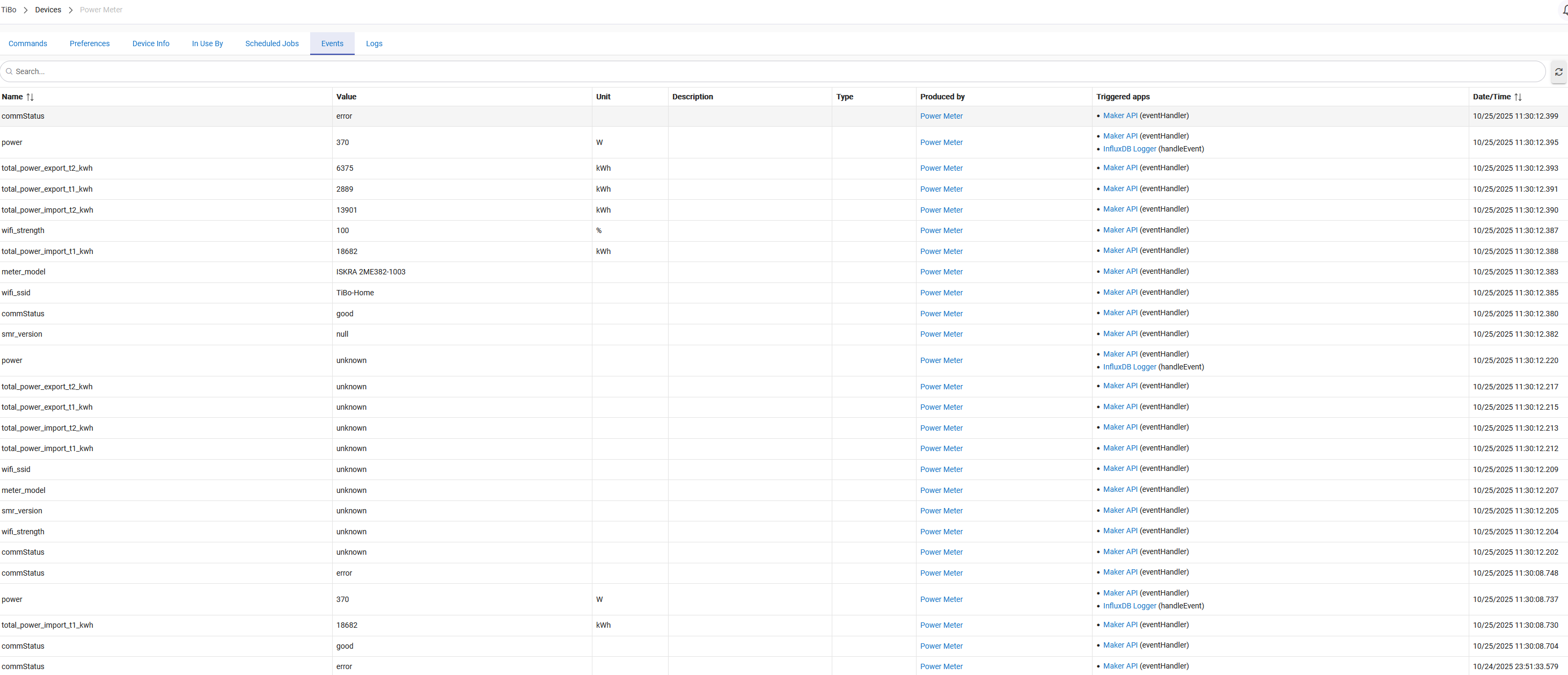
i found the culprit, the device driver for the power meter is not friendly to influx db schemas, so it does send an event with a string instead of a float.
sendEvent(name: "power", value: "unknown")
How should i try to fix this? I can for sure let the owner of the Home Wizard Power Meter know, but i am still stuck with the events not sent out of the queue.
Ignore my post on GItHub then, but i don't understand the solution you linked?
I did exactly that and the "bad" record did stay in the queue. I did not want to loose all the "good" records from the device just because of a single bad one.
The record was created on purpose by the device code programmer, ignoring their own set type of number and posting a string to the field. So i did patch their code to not do that. If you don't accept my code it is completely fine, i now know how to remove only bad records. I learned a lot from inspecting the code of the apps/ devices.
The setting of batch size 1, with a max backlog of 1 has exactly the same effect as what you proposed. I.E. Post a single record, and then delete it from the queue regardless of success or failure.