Inside my condo (built 1986 lot of concrete) I want to get my zwave outside past the front door that is made of steel covering?
Have you tried? It might work. Traditional Z-Wave makes a mesh, so with enough repeaters the right locations, it can probably work. Z-Wave LR doesn't use repeaters but might be able to work as-is. Metal might be a problem, but if it's just a door, the walls or windows will probably be enough to make it work.
2 Likes
Install a zwave module / switch in the wall alongside the door, e.g. for lighting, and then the signal will propagate through wall to the outside of your house from there (Mains zwave modules / switches are repeaters).
What sort of distances are your talking about from hub -> door -> endpoint device? - What is the endpoint device, battery powered, will you need FLIRs to wake it up?
Finally, is ZWave a requirement? - Zwave LR, or a Zware repeater (in a mesh) in wall to "go around the door" all sound like good ideas. If you dealing with with really long ranges, or devices enclosed in metal boxes (mailbox, etc.), then YoLink is likely worth a look (it has it's own problems in terms of lack of local control, but LoRaWAN radio's (YoLink) definitely go further and thru more obstructions that Zwave.
So trying things out with a ZWave LR endpoint, is likely the easiest starting point, and work your way down from there. - But details about the ranges and endpoint device would be helpful
1 Like
If this is just a single sensor input needed, and you don't mind a bit of a hack, you can get fully local YoLink input by using their D2D (Device to Device) pairing. No internet or Hub needed.
We have a Canada Post community mailbox halfway up the street, and found a YoLink contact sensor works from inside the metal community mailbox. Our box is in the middle, so there's a lot of metal and distance between the sensor and my house. The D2D connection is to a YoLink relay mounted on the wall next to my garage door, relatively far back from the street.
I configured the D2D pairing so that when the YoLink contact sensor opens, the relay turns ON and when it closes the relay turns OFF. Attached to the relay is an IKEA Shortcut button I wasn't using for anything, but you can use almost any Zigbee or Z-Wave contact sensor as well. When the YoLink relay turns OFF, that is transmitted to the hub via the Zigbee Shortcut button as a released event. The event triggers a rule to send me a message that there is activity at the mailbox.
If you're primarily or strictly a Z-Wave user, then there are many Z-Wave contact sensors with built in terminals that make wiring this pretty straight forward. If you need to reverse which events occur, you can either reverse the Z-Wave or Zigbee relay state, or it's also simple to change the order of the YoLink D2D pairing to each state of the relay (ON/OFF).
One note of caution for anyone using YoLink devices or experimenting with them. I have learned that they will go offline if there are too many events, too close together. You need at least 6 seconds between events. If you keep exceeding that frequency, the D2D connection will eventually go offline. The only way I have found to re-establish the connection is to unplug the relay for 10 minutes.
I don't own a Yolink hub, so I don't know if this is something that only occurs with their D2D connections, if it's a LoRa limitation, or if it's been solved in a firmware update in which I'll never be able to do without a hub. This is documented in their relay FAQ, so it may be something they cannot solve.
Why does the YoLink Relay disconnect frequently?
Insufficient interval time between device operations. If the device is operated too quickly or repeatedly, it may not fully respond, leading to connectivity issues. Ensure that the interval time between operations is more than 6 seconds to avoid this problem.
I soldered and used a 5v to 3.3v buck converter so I never need to worry about batteries for the IKEA Shortcut button I used, but that is optional of course.
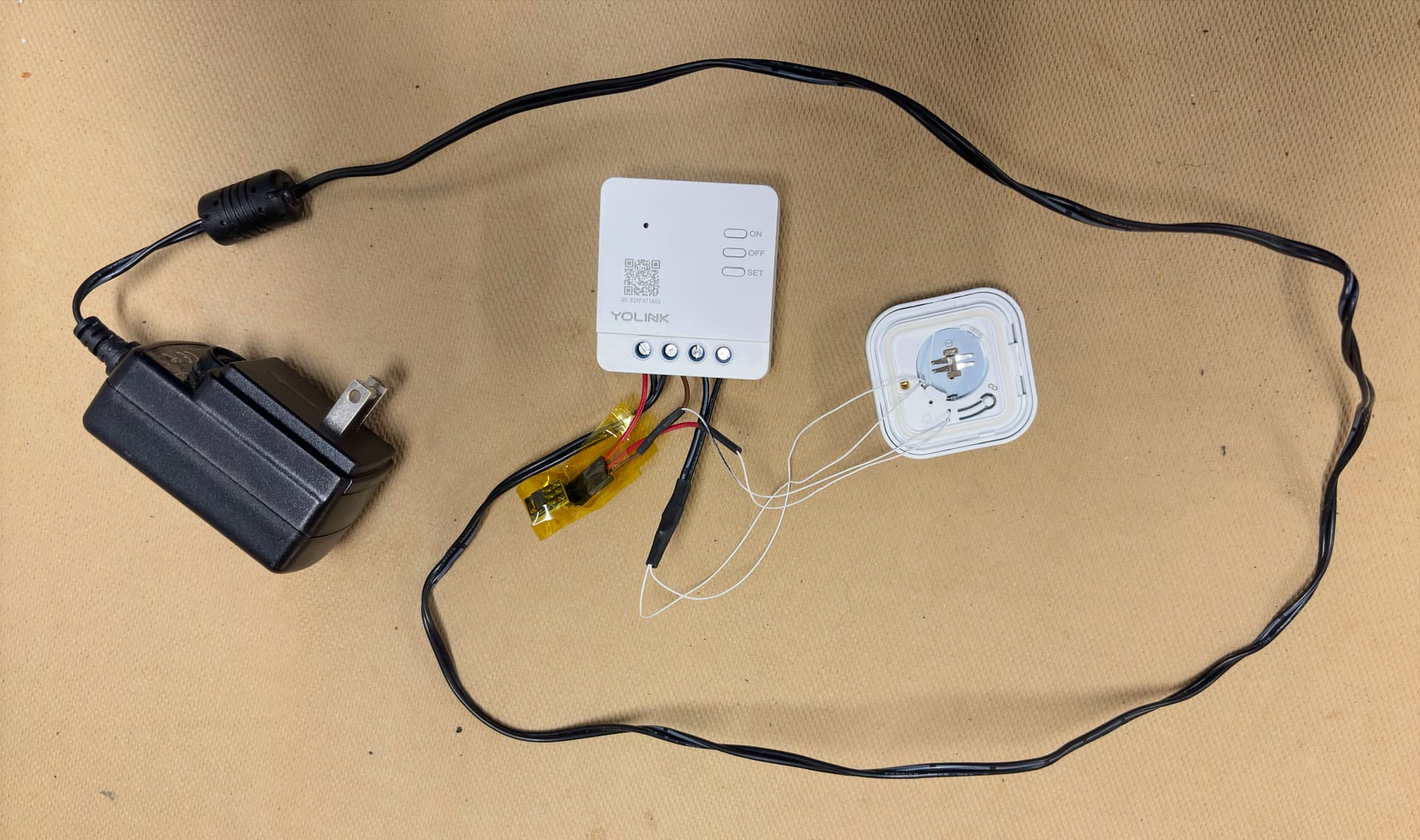
1 Like
So a manager from Canada Post knocks on my door the other day and asks about the monitoring device I had in my community box. I explained that it's just a motion sensor to know when the mail is delivered, not a camera. Showed him the device and he said he also googled Yolink and acknowledged that it was just a motion sensor.
Comes back an hour later after speaking with his manager and says "not allowed, please remove it". Boo!
1 Like
That’s crazy! 
2 Likes
I don't know about Zwave, but I have 2 Aqara contact sensors in an all-steel heavy-duty safe (one for door open/close status, one for bolt open/close status) and have no problem with receiving Zigbee signals. Radio waves are actually pretty hard to contain.
Put a sensor in a small box. Mail it to yourself. Now don't remove it from the mailbox. Just take out the letters. Now that box gets moved when the mail arrives. Post person might ask you about it, but they put it there.
3 Likes
Nah, just hide the sensor better.
If they open the frame, which they often do, all boxes are exposed at once and then it’s just a bare metal box. Nowhere to hide.
Ah right, that does make things difficult.

