Hestia™ A New Smart Home Dashboard for Hubitat

OK, I can connect with the Hubitat via both methods now.

Now I just have to figure out how to setup and run it.

Do you have instructions? I’m trying with an iPad Pro but can’t seen to do anything other than turning things on and off with the “slider switch”.

Once you have added all of your devices to the Maker API, Installed the Dashboard and connected to the hub, the onboarding wizard should take you through all of the next steps.

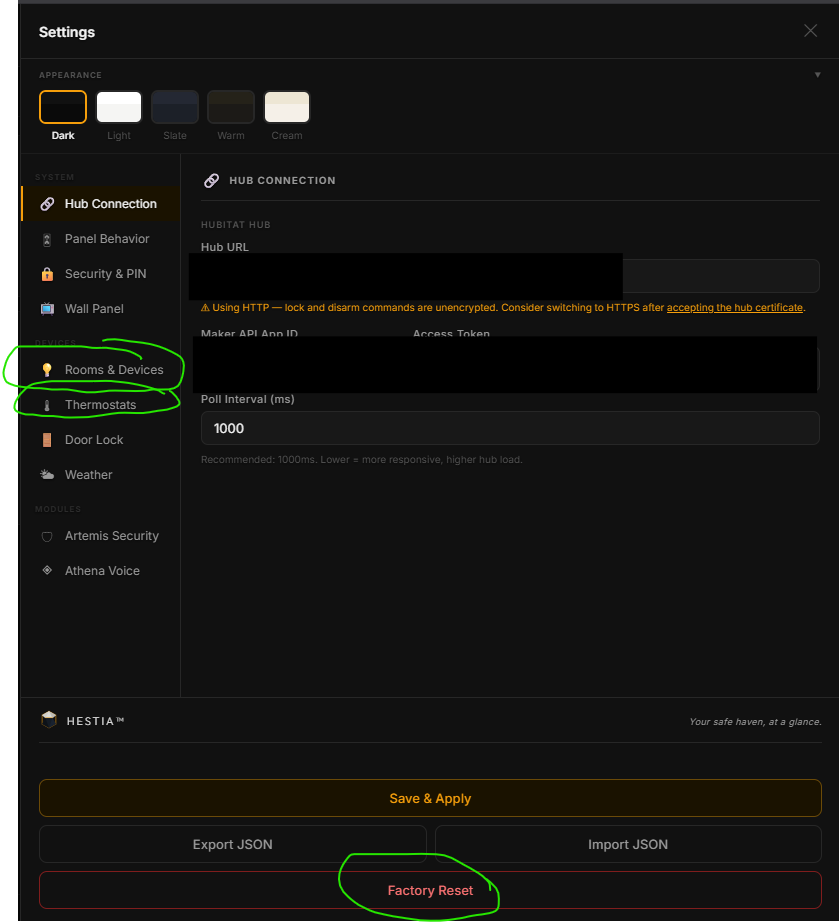
If you failed to add the devices during the wizard, you an go to the gear icon at settings and then add rooms and devices and change device types if needed.

If you have security devices you need to activate Artemis and add them on there as well.

Once you're done with all of that you should have control of your devices such as Lights, Dimmers, Fans, Thermostats, and Shades/Blinds.

If you want to use the experimental feature of Athena you'd have to go through the setup and create an API key under Claude and then Google Voice (if you're interested in better voice), then she'd activate and you can give her commands by text or voice. I'm still fine-tuning the wakeword capabilities so it's still pretty rough since this is the most challenging part.

Never saw a “wizard”beyond ‘step 1 of 4”.

I will clear out everything and start again tomorrow.

You can factory reset right on the dash or you can go to rooms and devices and setup from there.

Let me know if that works.

Quick update for those following along:

Spent the last sprint reworking the voice pipeline and wake word detection. Athena is significantly more responsive now. The wake-to-response cycle is smoother, false triggers from background noise are way down, and the overall hands-free experience is much closer to what you'd expect from a dedicated assistant.

Also trained wake words for all three modules, so "Hestia," "Athena," and "Artemis" are all recognized. This means you can choose between three options to wake the assistant.

Still in soft testing but the results are promising. If you're running the dashboard and want to try it out, make sure you're on the latest version and have your Google Cloud keys configured under Settings > Athena Voice.

More updates coming soon. As always, feedback and bug reports are welcome.

Hubitat Community Post — Hestia v1.5.0

Hey everyone — two releases worth of updates to share today. Hestia v1.5.0 is now live on hestari.com and GitHub.


Catching Up — What Shipped in v1.4.1

A few things landed since the last update here that I never formally announced:

Timers — Athena can set, track, and cancel countdown timers by voice. "Set a pasta timer for 12 minutes." Live countdowns appear as floating pills above the Athena button on desktop, and inside the panel on mobile. Multiple timers run concurrently. Cancel by voice or tap the X.

Conversation Mode — After Athena responds, she keeps listening for follow-ups instead of immediately closing. You can have a multi-turn conversation without saying the wake word again each time. The follow-up window is 8 seconds. Say "thanks" or "goodbye" to dismiss. Toggle in Settings.

Personality Presets — Choose how Athena sounds: Balanced (default), Professional, Playful, or Concise. Device confirmations are always brief regardless of preset. Settings > Athena > Personality & Behavior.

Full Device Control — Athena can now control every device type: thermostats (mode, setpoints, fan), color bulbs (setColor), and shades (setPosition) — not just on/off and brightness.

Artemis Polish — All security sensor icons redesigned with a filled design language. New gem inner shields for the security states. Garage door icon added.


What's New in v1.5.0

Reminders

Athena can now set persistent, recurring reminders by voice.

"Athena, remind me to take my medicine every day at 8 AM."
"Remind me every Tuesday at 7 PM to take out the trash."
"Remind me on the 1st of every month to pay rent."

When a reminder fires, you hear a TTS announcement and see a notification toast on screen. Six schedule types are supported:

Type Example
Once "Remind me to check the dryer at 3pm"
Daily "Remind me every morning at 8 to take medicine"
Weekdays "Remind me on weekdays at 7 AM"
Weekly "Remind me every Tuesday and Thursday at 6 PM"
Monthly "Remind me on the 15th of every month"
Yearly "Remind me every March 15th about taxes"

The recurrence engine is timezone-aware — a daily 8 AM reminder fires at 8 AM local time year-round, even across daylight saving changes. Monthly reminders handle short months gracefully (the 31st fires on the 28th in February).

You can also manage reminders in Settings > Reminders — each reminder shows a status dot (amber pulsing = fires today, green = active, gray = disabled), the schedule summary, and the next fire time. Toggle on/off or delete from there. Or just ask: "What reminders do I have?" / "Cancel the medicine reminder."

Reminders sync to your hub via the companion app, so they survive browser cache wipes and work across devices.


Routines

This one I'm particularly excited about. Athena can create and run multi-step automations entirely by voice — no Rule Machine, no visual rule builder, no need to open Hubitat at all.

"Athena, create a movie mode routine that dims the living room lights to 20%, closes the shades, and sets the fan to low."

That's it. Three steps, saved as "Movie Mode." Next time:

"Run movie mode."

All commands execute in sequence. You can create routines for anything the dashboard controls — lights, fans, shades, thermostats, locks, color bulbs. Some ideas:

  • Good Night — turn off all lights, lock the front door, set thermostat to 68
  • Movie Mode — dim lights, close shades, fan to low
  • Good Morning — open shades, lights to 80%, thermostat to 72
  • Away Mode — turn off everything, lock up, arm security

Routines store device references by name and room rather than device ID, so they're portable if you ever switch hub platforms.

You can also build routines manually in Settings > Routines — pick a room, type a device name, choose a command, add a value. Hit Test to run it live before saving.

Like reminders, routines sync to your hub and survive cache wipes.


Quick Reference

Command What Happens
"Remind me to X at [time]" Creates a one-time reminder
"Remind me every [day/week/month] to X" Creates a recurring reminder
"What reminders do I have?" Lists all active reminders
"Cancel the X reminder" Deletes a reminder
"Create a X routine that steps here" Saves a new routine
"Run X" Executes a saved routine
"What routines do I have?" Lists all saved routines

These work alongside everything Athena already does — device control, timers, thermostat adjustments, general conversation, etc.


Upgrading

If you're on hestari.com, just refresh — you already have v1.5.0. Self-hosting? Grab index.html from the v1.5.0 release. No configuration changes needed, fully backwards compatible.

Full release notes: v1.4.1 | v1.5.0


Feedback and bug reports always welcome — drop a message here or open an issue on GitHub.
1 Like

Quick update — v1.5.2 is live on hestari.com and GitHub.


Built-in Calendar

Hestia now has a calendar card on the home screen that shows all your reminders and scheduled routines in one place — no external service, no API keys, no setup.

Desktop — a full-width card with a mini-month navigator on the left, today's events in the center, and the next 7 days of upcoming events on the right. Click any day in the mini-month to see what's scheduled.

Mobile — a swipeable week strip at the top. Swipe left/right to browse forward and back. Today's events show below the strip, same as desktop.

Past one-time reminders now show as completed (faded, struck through) instead of disappearing — so you have a history of what's fired. Recurring reminders and routines project onto future dates automatically.

Click any event on the calendar to jump straight into Settings where you can edit or delete it.


Add Reminder from the Home Screen

The calendar card has a + Add Reminder button that opens an inline form — type a label, pick a time, set the repeat pattern, and optionally set an end date. No need to open Settings for quick reminders anymore.


Adaptive Silence Detection

Athena's silence detection now calibrates to your ambient noise floor. In a quiet room, she detects silence quickly. In a noisy environment (kitchen fan, TV in the background), she raises her threshold so she doesn't cut you off mid-sentence. This runs automatically — no configuration needed.


Other Improvements

  • Gem badge — the Athena button badge now shows active timers only, since reminders have their own calendar card
  • Calendar refresh on Settings close — edit a reminder or routine in Settings and the calendar updates immediately when you close the panel
  • Echo cancellation — improved mic handling to reduce Athena hearing her own TTS responses

Updating

If you're on hestari.com, just refresh — you already have v1.5.2. Self-hosting? Grab index.html from the v1.5.2 release. No configuration changes needed, fully backwards compatible.

Full release notes: v1.5.2


Feedback and bug reports always welcome — drop a message here or open an issue on GitHub.
1 Like

Came here to say "yay!". I was dreading moving from my C7 to C8-pro because I was using Smartly to do my dashboards, and while I knew the upgrade wouldn't kill that, I didn't want to depend on that if I was going to touch something that wasn't broken. I was prepared to just give my dashboard to claude and build something for me but looks like someone beat me to it. This is really solid. I will spend some time configuring it to see how far I can get. One thing that I can't figure out how to display the Hubitat Virtual Image device type (i.e. like image that reloads an image). I have images displaying all of my cameras, as well as all my locks and garage doors on a single page. If I assign all of these to a single room, I assume they can't be seen in other rooms? Thx for your contributions on this! Hubitat dashboards are a nightmare.

Also, if we wanted to host the Hestia.com backend using my own Cloudflare setup, is that straightforward to do? No offense, just paranoid of relying on something outside of my control for long-term use (i.e. smartly :))

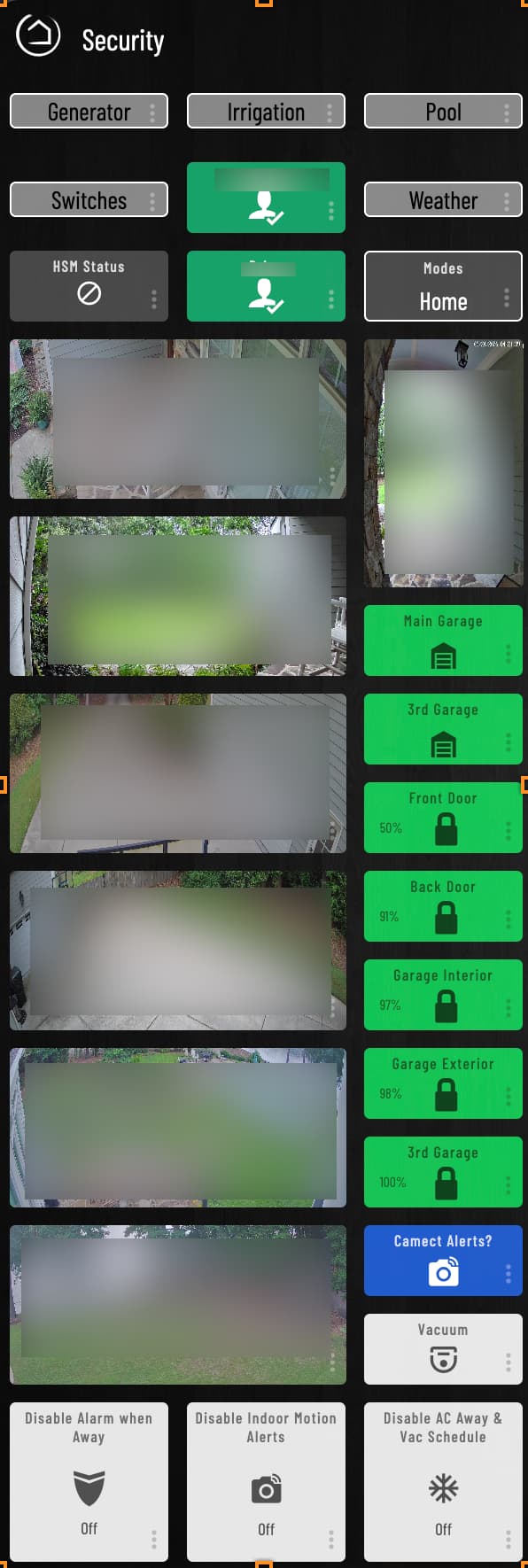
This is the page I use the most and here is what I've got with Smartly that I'm essentially trying to replicate.

1 Like

Hey Brian,

Glad you're excited!

Honestly I was just tired of wrestling with custom CSS just to get Hubitat's native dashboards looking right on a single screen, and EZ Dashboard wasn't cutting it either. Hestia handles desktop, tablet and mobile all in one, so I built it for myself and figured I'd share it with the community to see how it grows.

The vision is pretty simple: one place to manage your lights, alarm, fans, climate, rules, routines, timers and voice commands. No jumping into a rule builder, no installing extra apps, it's all stored in your local config and managed right from the dashboard. We're not trying to cover every niche use case out there, but for the everyday smart home stuff most people actually rely on, it's all there and it just works.

Cameras are coming in a later release! We're finishing up wake word refinement and a few other roadmap items first but it's on our roadmap. There are just nuances around cameras depending on how they're hosted.

On rooms, Hestia is intentionally built around single-room device assignments to keep setup clean and approachable. A dedicated Security room with all your locks, garage doors and cameras grouped together is exactly the right move for what you're describing.

On self-hosting, totally get the instinct after Smartly. Worth knowing though that Hestia is built as the primary interface for the Athena voice module, and that mic pipeline needs a consistent hosted environment to work properly. Your hub data stays local so privacy wise you're covered. There is a Hubitat local hosting option if you prefer fully local, though it does disable mic features. For the full experience Hestari is the way to go.

Would love to see how your setup comes together, share some screenshots when you get there!

2 Likes

Awesome. Good to hear on cameras. Does that also include Virtual Image devices?

Hello.
I've just started to test this out.
A quick question:
I believe that the Hubitat "room" that each device is in, is available from the maker app.
Could your program automatically use that room info?

@brianwilson - yeah that'll include virtual image devices as well! It'll require a bit of re-thinking the current layout so that cameras fit naturally, but we'll get there eventually.

@jtmpush18 - it was an intentional design feature to have Hestia's rooms be independent from Hubitat because some users may have different groups set up in Hubitat than what they'd want to show up in Hestia.

Just a bit of pre-setup but once you create the rooms you're good to go and modify as needed.

I'm really interested in getting feedback from the voice controls and rules so if you get a chance to test those out feel free to let me know how they work for you.

I'm getting to the rules. First I'm setting up the devices.
I started on my PC (running Linux Mint, with Firefox), no issue whatsoever in setup.
(It's a beautiful, simple, sleek dashboard).
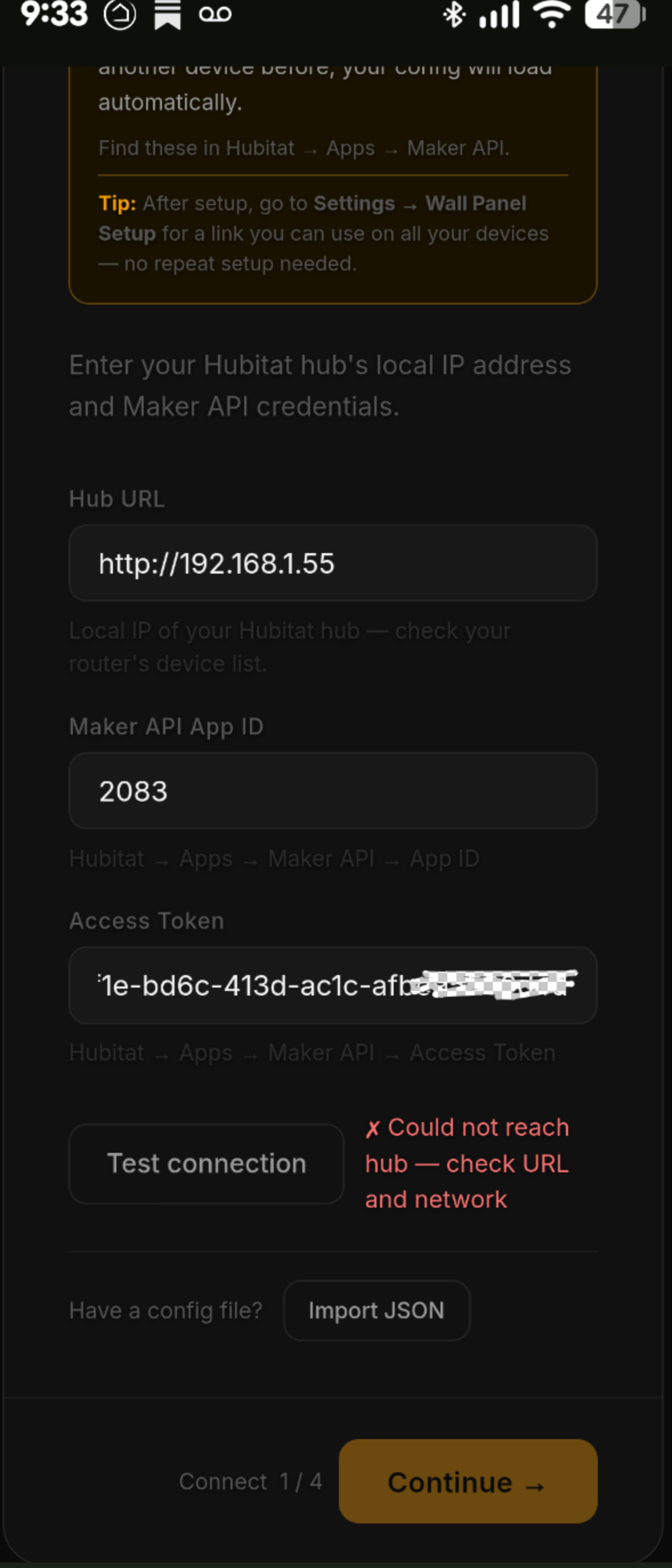
However, when I tried to set it up on my phone (Android, Pixel 9A), I keep on getting the message: "Could not reach hub - check URL and network".
I even sent to my phone, the URL from the PC version. still no connection.

I may need to look into that, there's a bit of an issue with polling because Hestari routes it to Hubitat as HTTPS, but hubitat itself is HTTP. So polling creates a bit of a conflict at times that we're trying to correct.

However, devices should still work in mobile even if you get that false trigger.

The network should also store your main config after you set it up once and be available in each device you setup afterwards with some minor device specific settings like announcements being specific to a device itself.

Let me know if you run into a hard-wall with mobile and I'll take a look. If you can send screenshots of your error messages that'd be perfect. Also, please be mindful of your IP address when sharing please.

Thank you for testing!

  1. As I described above, on my SmartPhone I tried at first to do a complete manual setup. Same Error.
  2. So, after I had done some work on my PC, I sent to my phone the config file, and I got the same error.
  3. Same network. All variables (maker id, access token, url, etc.) the same.

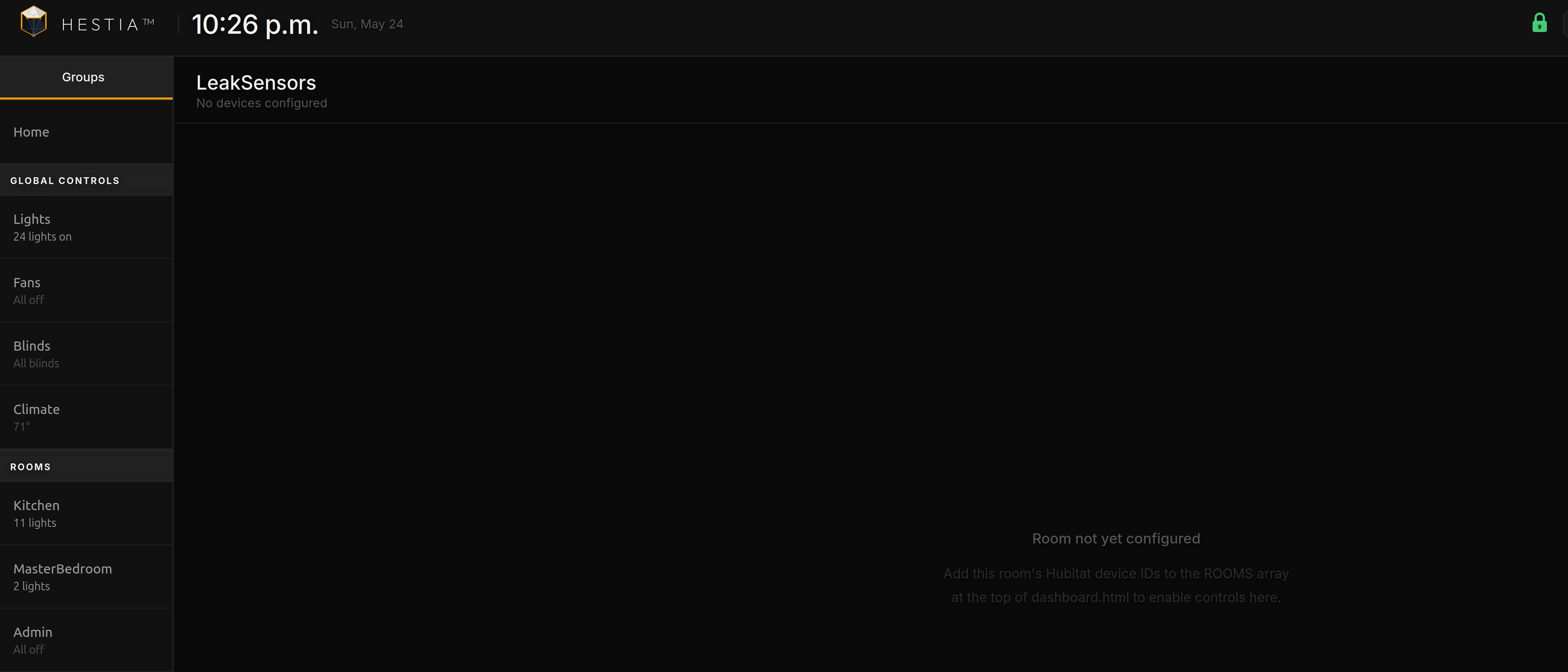
Also, another issue. I created a room called Leak Sensors, and I added a number of leak sensors to it. However, they don't show up:

What brand sensors are you using?

Is your phone on the same network as your hub? Or is it on an IoT network?

Also please redact your IP from the Screenshot to protect your privacy.

Thank you!

Sensors: Leak sensors: Zigbee (Tuya) and Zwave (Zooz).
My phone is on the same network as my Hub.

I got the Mobile issue working!
My apologies - I forgot to put the website on the CORS line in my Maker App.
Thanks.

No need to apologize, thank you for the feedback. How are you liking the mobile version?

Looking into support for your sensors now.

Both your Tuya Zigbee and Zooz Z-Wave leak sensors are supported. They report the standard WaterSensor capability which Hestia detects automatically.

Leak sensors (and all security-type sensors) live in Artemis rather than in room tiles. Rooms are designed for controllable devices: lights, switches, fans, dimmers, bulbs, etc. Things you interact with.

Sensors are monitoring devices, so they belong in the security layer where Hestia can track their state continuously and alert you when something changes.

To get them showing:

  1. Go to Settings → Security
  2. Tap "Scan for new devices" → your leak sensors should appear in the Water/Freeze category
  3. Toggle them on

Once added, they'll show in the Artemis security panel and trigger sidebar callouts when wet. If you have announcements enabled, you'll also get "Water detected in [room]" spoken aloud.

The room assignment you gave them is still useful, it provides location context for announcements and sidebar callouts (e.g., "Water detected in the Basement") but it won't create a tile since there's nothing to control.

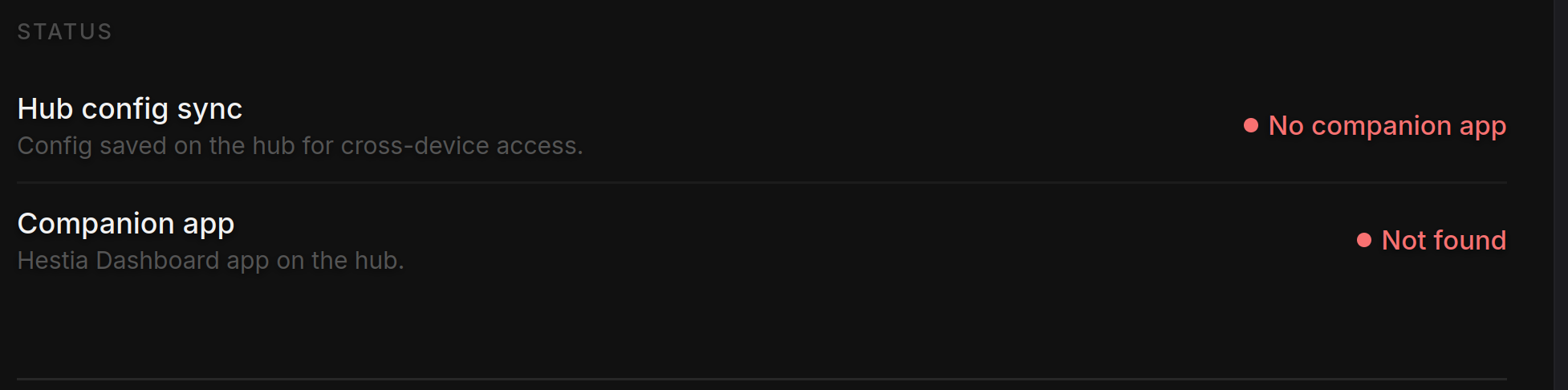
Question:

The following is a screen shot from my dashboard:

Why is this not showing up the companion app in Hubitat?