Ok i had a reading comprehension issue when i first read your above post? Lets try this again.
We don't actually bring in "Tap to Run's" into Hubitat. "Tap To Run's" are essentially just rules and should be easy to recreate in Hubitat.
There is a function in the integration that will use that information, but it is strictly for pulling in Govee Scene/Light Effect data? Govee did change somethings and there are occasions it doesn't work.
I am trying to use anything in hubitat (i.e. a current switch) to activate a music sync box with lights in a room. Currently, I have a tap-to-run setup that turns the music sync on and loads a snapshot. It works fine from govee. I thought maybe using the govee integration in hubitat I could bring in that tap to run and activate it through a different means. If I can't bring in the tap to run, is there any other way to do this? In the "music dreamview" device, there is no way to make a scene as far as I can tell.
The music Sync box is a Bluetooth device and as such is not supported. What Govee devices do you have as there are allot of devices that support dreamview with music that are supported.
I can use these in hubitat. Also per my previous post, I do have a group for these in govee and the group is exposed in hubitat, but the group in hubitat can only do three commands: on/off/initalize. Any way to get more commands for the group? Like make the group all one color?
That is a limitation of what Govee allows to be controlled for Group devices. It is very limited
You could create a virtual RGBW device and then have it pass all of the same values to each of the devices you want controlled together. a app like Miroor me or switch bind can do that.
Yeah I have a workaround on that, it's just when you apply it, it does the lights one by one with a slight delay in between them. When it's controlled as a group in govee, there is no delay. When you shut the lights on/off in hubitat using the govee group, there is no delay. Was thinking there was a way to access more functions in the group since it is possible in the govee app (can set all the group colors at once, and they are all applied instantly).
Really trying to get the music stuff working but will tinker more in the next day or two. Can you point me in a direction you think may help? Thanks
Well the problem with the music sync box is that it is bluetooth only. That mean it has no way to work or communicate with Hubitat or really anything for that mater.
What may help would be something else that supports music dream view that you can put in the same room. For an example with things I have Gove Hexa Glide or several of the Lamps support Music Dreamview. You could use one of those device as a music Dream View sync controller. Then the Hubitat would be able to turn music dreamview on and off.
Interesting. May try the govee table lamp 2. With a device like that, can you still control other govee devices (aka my recessed lighting)? If the table lamp 2 is wifi, I should be able to control some of it's settings in hubitat? May give it a try instead of the music sync box.
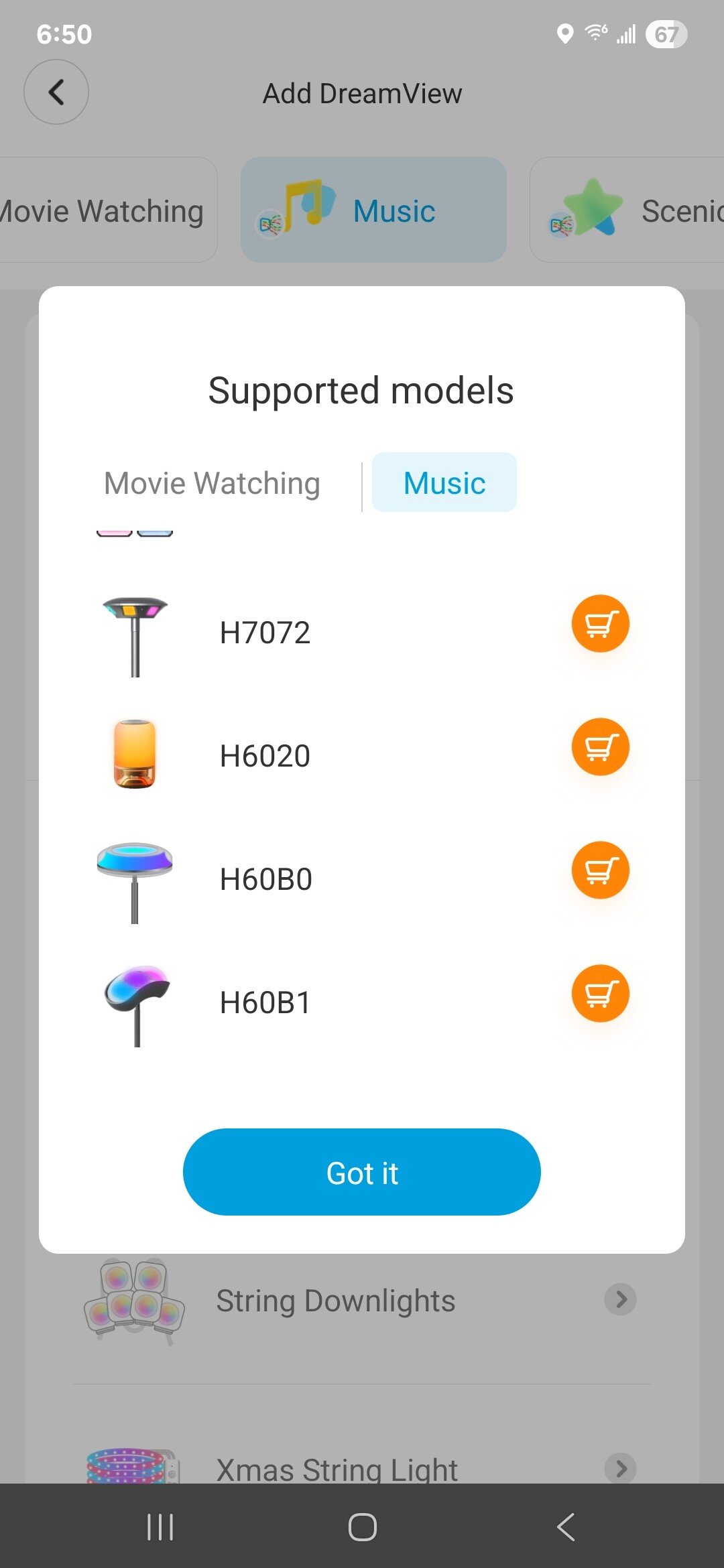
Before ordering something i would suggest going into the app and start to setup a music dreamview and then click on the Supported devices link tk make sure the device is supported. Sometimes it doesn't make sense what devices are supported or not for special functions like dreamview
The H6020 with JBL Audio supports music dreamview the H6022 doesn't.
I don't see any of the table lamps in there. So confusing. The H6020 is not on any of the lists of supported devices, but the description on the websites says it supports music dreamview. The H6022 like you said, doesn't mention anything. Where are seeing the H6020 supports it?
Hi @mavrrick58, great work on the app, thanks! I have a question for ya. I have the permanent lights pro which are using the Govee v2 Color Lights Dreamview Sync driver which works fine. But when I add the device to a dashboard as a 'color bulb' the color temp options are not available. All my other color bulbs show ok, only the Govee device doesn't have the temp slider. What can I do to get that feature in the tile? Thanks.
EDIT: I found what the issue is, the color temp was at 0 so I'm surmising the tile interpreted that as not having a temp feature. When I set it to a valid number the slider showed up.
When I look in the logs, the error says "Unble to get the app ID of the package manager".
My HE hub is a C7 on FW version 2.4.2.159. I was originally on 2.4.2.158 when I first got the error so I updated but I get the same error on both versions.
I will take a look at a tweak that should take care of that. Perhaps I have a bad value setup for the default value to be entered when intialized.
Through HPM right. Can you confirm you are running the most recent version of HPM. I show my hub is currrently running version 1.9.3. There have been some install problems were the HPM install got corrupted and had issues loading data. The error about "app ID of the package manager" makes me think the issue is in HPM somehow.
You are correct and apparently I am not. I must have followed a link near the beginning of this thread as I had V1.8.3 installed.
I removed it and installed V1.9.3 and it allowed me to install Govee Integration V2 without any errors.
You were right. I saw your post a few minutes after ordering and couldn't cancel. I figured I would get it and try but no luck. The "Table Lamp 2" (H6022) can't be used a music dreamview controller. According to the "supported models" list buried in the govee app (thanks for the screenshot), the H6020 with JBL Audio would work. But it's pricey, $160 vs $65. Anyway, I will probably circle back on this if I can get that lamp at a lower price. Or maybe they will add support for the H6022. Thanks again for your help.
It is unfortunate that the H6022 won't meet your needs. It is a nice lamp i have one actually. It is hard to say what logic they are using to determine if it should support dreamview as there are also plenty of devices that support music mode, but not music dreamview. Sorry about that. I wish there was a way to make this easier to do.
Trying to figure out how this was set to 0 and atleast looking at the code i don't see anything obvious. Can you help me by clarifing if your device is using the Cloud API or LAN API. This may help me identify where the update came from that got it in that value.
Hi @mavrrick58, I'm using the cloud API and I did some more testing. Sadly, there is no rhyme or reason. I've been watching and everything seems to work normal and then the color goes to 0. I looked at the logs and it appears that the API is returning a 0. I saw this in the reply from the refresh command... [instance:colorTemperatureK, state:[value:0]. Now, I don't know if that's just coming from the API or that a '0' is accidentally being sent.
yea.. it looks like the value of 0 for the color temp is being returned from the Cloud API once the mode of the device is doing something other then a Color Temp. I am litteraly just taking the returned data and posting it to the device if it has changed. I will need to do some testing around it to ensure we keeep things functional for the value if i do something different.