I have the same response from Govee support also. I opened a ticket yesterday after my TV lights took over a minute to turn on.
Incase anyone is interested I have updated the Govee Cloud Response time Dashboard with a few new metrics. As well as a new visualization. It now also shows the Min/Max/Avg of 5 min intervals of data.
We have also had a new person donate their Call response times to the data so that allows it to be a bit more relevant. Thank you @DiverRich for the api call performance data. I was only generating about 2400k calls He generates a bit more then that so now the graphs don't have the gaps i had because of lack of calls.
The response you all are getting doesn't suprise me. Sometimes this performance issues can be tough to nail down. I haven't heard anything since i shared with them my api response time graphs.
2 Likes
I am definitely interested. Can you point me in the right direction?
It looks like Govee has added a fair amount to the API recently. After taking a closer look at what @dpburek provided above it was clear some new control options that use the Toggle method were added. When i went and reviewed it that list has exploded.
If you have the option to test your devices on a secondary hub and reinstall them you may find that some new functions are now available. On top of working on the fan driver i am also working on a new driver for the Govee Lamp devices with multiple light sources like the Floor Lamp Pro i have or the Floor Lamp 3. I also see some new commands for controling HDMI devices so if you have such a device there may be a possibility for a enhanced driver. If you have a secondary hub and want to check just install of your devices and then compare the "Device Data" on the Device info tab of each device. It is specifically the capTypes and the commands that may have changed.
On top of new commands it also appears they are cleaning up some of the device info that may not have been correct. The same floor lamp pro use to have a ctMax and ctMin value of 9000 and 2000 respectively. Now it is showing 6500 and 2200 respectively. I will see if i can create a process to check and update that device data for devices already created. That info wasn't expected to change, and is used in validation of some driver functions. If it isn't valid that may cause other issues.
Here is my Floor Lamp Pro device data as example from my prod hub Hubitat says the device was built in 2024
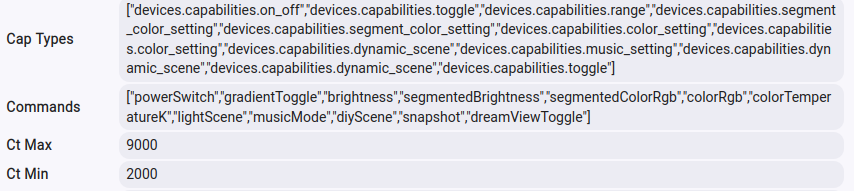
Here is my Floor Lamp Pro device data as example from my prod hub Hubitat says the device was built a short while ago.

The documentation shows it was updated 25 days ago, So the API performance issues may be related to the changes they made.
2 Likes
You may see a update for the Govee integration v2 today.
For most users as of right now what you will be able to download will be the new Ceiling Fan and Multi Light Floor Lamp drivers.
At this time the Ceiling fan driver should still be considered a beta driver though. I expect there to be additional improvements in the near future for it.
Beta will see significant changes. To what was already done I have added the code to validate the devices commands and capTypes shown on the "Device info" tab in the "Device Data" section. This update can be triggered by clicking on initialize in the device page. The new routine should update those values if they are different from the API Data. This will also be validated upon reboot since the initialize routine will be run at that time. This update impacts every driver so you see all devices update.
To date new updates in beta yet to be released are as follows.
- Update method to set color and brightness separately
- To support item 1 a new attribute built to display device brightness when is color set
- Fixed bug with Govee Device manager driver preventing it from leaving debug logging after 30 min.
- Added new attribute in Govee Device manager for Cloud API Call response times
- Updated warn message in logging about response time to include proper method identifier for better tracking
- Added calls in Cloud API Library code to update Govee Device manager for Device Cloud API response times.
- Updated main Govee Integration app to install H1310
- Updated main Govee Integration App to add Multi Light Floor lamp driver properly.
- For new drivers added handling for additional commands to Govee Cloud API Library code
- Enhanced MQTT Message handling for additional events
Assuming no issues are found I will move beta to prod soon as this is to much stuff to not have deployed for all to use.
Blind as a bat, no surprise.
Where is the visualisation located?
Poked around the install looking far a link to Govee Cloud Response time Dashboard.
It isn't part of the integration, but a dashboard built on the Grafana cloud with a influxdb cloud for the backend. It can viewed at the below URL.
https://mavrrick58.grafana.net/public-dashboards/d1ea294188e8418aaccf2cbd0be6db58
Thanks. I was wondering if you were referring to the one you had set up.
Sure looks like my case. 10-25 all day long.
Govee did email me after their api and LAN (which I have none) suggestions and asked me to comment on my satisfaction.
I'll get to that since nothing has changed.
Yea i did that because then i could grant others the ability to upload their govee cloud API response data if they wanted to with InfluxDB Logger. The data collected is very minimal if someone has concerns about giving their data up.
That said if you wanted a local way to graph this stuff yourself there are a few ways to do it. i could point you to some resources tthat discuss pro/cons of each. The best option depened on what you are trying to do.
Thanks.
I think I'm good being reminded constantly that the issue still exists via your logging.
I'll have to ply with my lighting piston tomorrow as it now throws the hub into 2K of overload logs. I turned off device optimisation so we'll see if forcing every command, whether the state is correct or not, helps.

On a different topic, I'm starting to play around with "scenes" and trying to sort out the commands and options for my device.
I created some DIY scenes using the mobile app. I had to disable the "LAN Control" then I was able to do a "Load Scenes" and it populated the values on the device page. But those vanished as soon as I switched back to 'LAN Control".
I'm trying to figure out how to get the scenes I created in the app/cloud to work locally.
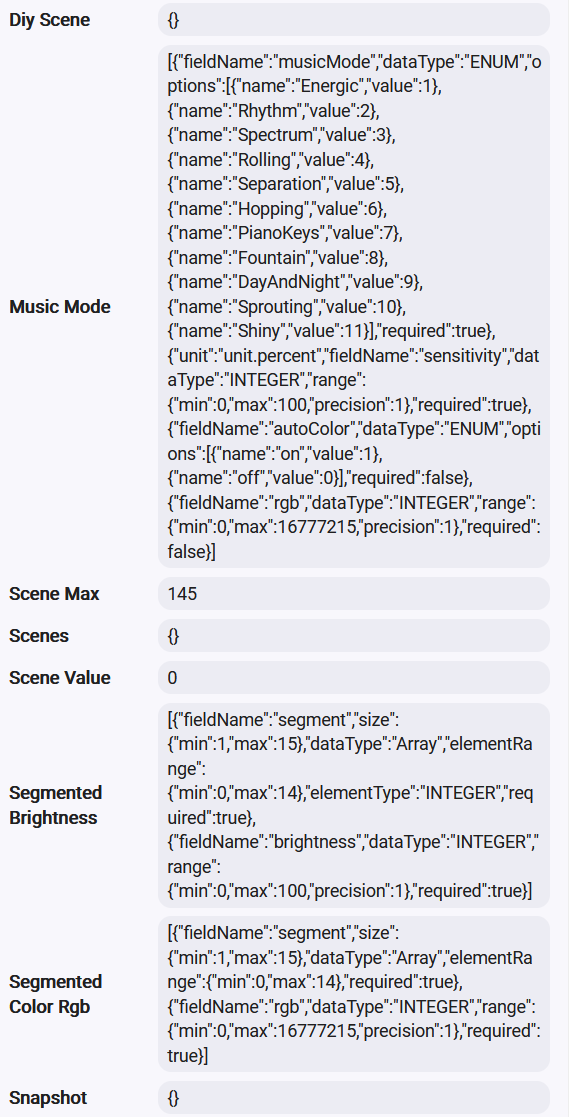
And, notice that the prompt for the "AutoColor" under Music Mode indicates it should be a numeric segment--but it's a "Drop Down" with on/off.
Similarly, the "Gradient" indicates it is a number but has an on/off DropDown.

Scenes function differently depending on two cofiguration option on each device. The Local Lan Control Option is one of them. The other is the value for Local Scene Control. I think by default when you enable Lan Control you also enable Local Scene Control unless you go back in and change it.
The reason the Local Scene Control exists is because some devices don't do scenes well locally like Curtain lights.
When those two options are enabled the scenes are loaded from json files on the Hub. These files are populated from the Govee Integration app by either extracting the data from the Tap-To-Run's you create, or by runnin the process to extract standard scenes. If you want it all to be fully local ensure you populate those files with those methods.
That is cosmetic but i understand it can be confusing. I will look at the information and see if i can update it to be clearer. It is proably something created by cut/paste and i just missed editing it.
1 Like
Yeah, def cosmetic--but it means there's not a good explanation what those do. 
I'll see if I can figure out how to create those local JSON files.
Is there a way to locally kick off scenes that are defined by Govee? (e.g., Christmas-B, Lightning-A, etc.?)
Where can I read how to do this?
Govee doesn't make it easy to sort through all this. smh
This is discussed in the Govee Integration documentation i created and linked in the very first post. Osome thing may be slightly different now though as time has passed since it was originally created
If you open the Govee Integration app and then open the Lan API Scene Management menu. You can find all the options for generating the files.
Easiest thing at this point would be to simply click on the button to "Retrieve all default Govee scenes for all installed devices". Just be patient when you do. It can be a long running process depending on how many devices you have. Once that is done just go to the device and click on scene load button or just slicknon the save button on the preferences page.
Just below that option is the older option to "Extract scene from Tap to Run. That is what you will want to use to build your list of DIY's. To use this method though you do need to load your Govee Home creds in the integration.
1 Like
Don't trust AI but it says my H6008 bulbs are LAN controllable but Govee and the lack of discovery tells me no.
To escape all the delay operational issues can I just buy LAN bulbs instead?
Obviously not H6008.
Web says H1401 but the Interwebs answer is 'supports it". Not confidence inspiring.
- Smart Bulbs : The Govee A19 Smart LED Bulb (H6008) and the Govee Smart RGBWW Light Bulbs 1200 Lumens (H600A) are confirmed to support LAN control.
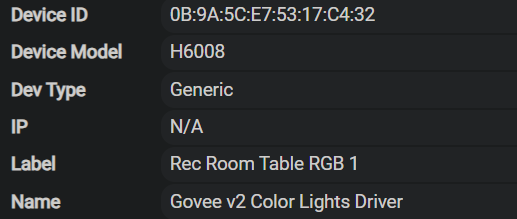
My 4 bulbs:
Bulbs with Lan API support is a little bit of a mess. For a very long time they didn't support it but last year at some point, Govee updated the controlller their bulbs used. Then gradually rolled out that controller to all of their bulbs.
Last year around Christmass i bought some H6006 bulbs thay support LAN API. I first bought a package of them from amazon that didn't include the feature and had to return them. Then bought directlu from Govee.
The main thing is look at all the images to verify it supports Matter. If the bulbs support Matter they wil also suppport the LAN API.
Here is the linknfor thr H6008 bulbs on Govees site. They support matter and LAN API

That is certainly one way to help for light type devices. I use LAN API for pretty much everything if possible.
Just remember LAN API doesn't do everything. Even if you have it turned on the driver will fall back to the cloud if the function requested isn't supported by the LAN API.
Thanks for all that info, really helps.
I might transition if all this mess doesn't clear up soon.
I have put 15s delays in every WC piston command I use for my bulbs.
Hopefully this will stop the runaway hub load logs for now.
I replied to their satisfaction survey with more logs and examples of poor performance.
Sorry I clearly didn't look closely enough for that.
But, thanks! I believe I got things loaded and working now! Super slick!
1 Like
@mavrrick58
Well dang. I put in 15s delays and tell them a sad story yesterday and no delays today.
