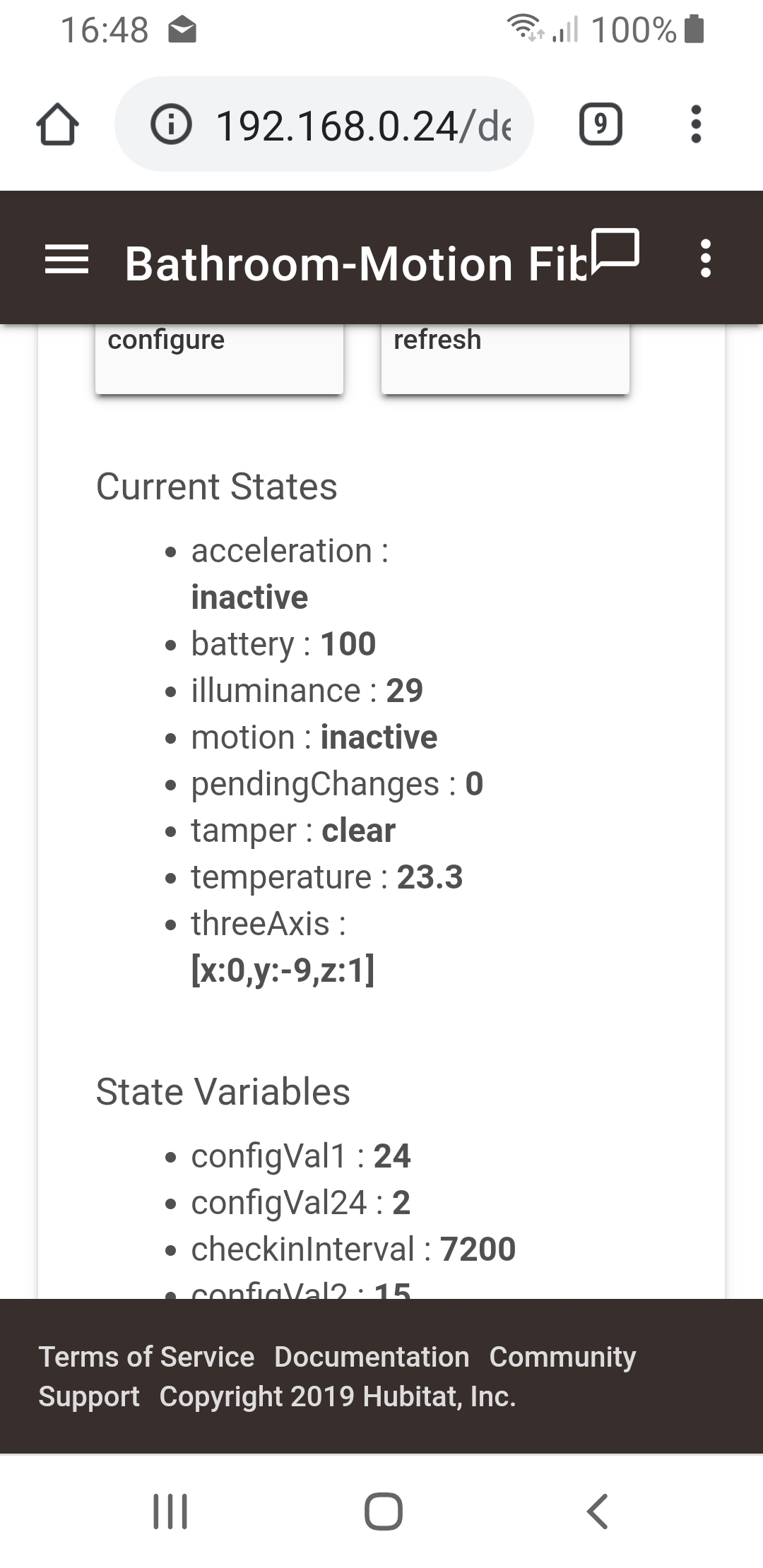
Would you mind sharing the driver you connected with as I'm having similar issues as highlighted with the other folks in this chat. Motion is reporting fine, just the others are not.
Thanks in advance!
Would you mind sharing the driver you connected with as I'm having similar issues as highlighted with the other folks in this chat. Motion is reporting fine, just the others are not.
Thanks in advance!
I think I have realised why I'm struggling with my "newer" motion sensors in comparison to the ones moved from ST...I compared the ApplicationVerion across the two and found the following:
Working devices on the Default HE driver which are working as expected:
The new motion sensors I have recently bought:
Does anyone know the best way to update the firmware on these devices? I see there is work being done on another thread but doesn't look like HE supports OTA updates for ZWave yet...
After thought: I wonder if I can update on ST and then bring them back into HE...hmmmm...tonights plan 
I think 2.6 are z-wave where 3.67 is z-wave plus.
I'm not sure you can update the firmware to change them from z-wave to z-wave plus.
I think this driver is for the older version but the in-built driver is supposed to be compatible with both types of z-wave, I believe.
I should look into this more I suppose but all I'm after with mine is lux and motion and that is being reported OK.
/**
 *  Device Type Definition File
 *
 *  Device Type:			RRG Enhanced - Fibaro Motion Sensor
 *  File Name:				FGMS-001.groovy
 *  Initial Release:			2014-12-10
 *  Ported by:				Ronald Gouldner
 *
 ***************************************************************************************
 *
 * Change Log:
 *
 */

 preferences {

    input ("Help", "text", title: "Instructions", description: "When changing these values make sure you triple click the sensor b-button (inside) to wake the device (blue light displays) and then select the \"configure\" tile after clicking done on this page.   Note: Param Settings indicated in parentheses (p-80 p1)=Parameter 80 part 1, this helps you lookup possible values in manual.",
	      displayDuringSetup: false, type: "paragraph", element: "paragraph")
	input("sensitivity", "number", title: "Sensitivity (p-1) 8-255, 10=(default)", defaultValue:10)
	input("blindTime", "number", title: "Blind Time (p-2) 0-15, 15=(default)", defaultValue:15)
	input("pirOperatingMode", "enum", title: "PIR Operating Mode (p-8)?", default: "Both", options: ["Both","Day","Night"])
	input("nightDayThreshold", "number", title: "Night/Day Threshold (p-9) 1-65535 (default=200)", defaultValue:200)
	input("illumReportThresh", "number", title: "Illum Report Threshold in Lux (p-40) 0-65535 0=no reports sent, 200=(default)",
		description: "Illumination reports when lux changes by this amount", defaultValue:200)
	input("illumReportInt", "number",
		title: "Illum Report Interval in Seconds (p-42) 0-65535 0=none (default), <5 may block temp readings, too low will waste battery",
		description: "Time interval in seconds to report illum regardless of change", defaultValue:0)
	input("ledOnOff", "enum", title: "LED On/Off (p-80 p1)?", default:"On", options: ["On","Off"])
	input("ledModeFrequency", "enum", title: "LED Frequency (p-80 p2)?", default: "Once", options: ["Once","Long-Short","Long-Two Short"])
	input("ledModeColor", "enum", title: "LED Color ? (p-80 p3)", default:"Temp", options: ["Temp","Flashlight","White","Red","Green","Blue","Yellow","Cyan","Magenta"])
	input("ledBrightness", "number",
		title: "LED Brightness 1-100% 0=ambient ? (p-81)",
		description: "LED Brightness Level Percent (1-100) 0=ambient based", defaultValue:50)
	input("tamperLedOnOff", "enum", title: "Tamper LED ? (p-89)", default:"On", options: ["On","Off"])


 }

 /**
 * Sets up metadata, simulator info and tile definition.
 *
 * @param none
 *
 * @return none
 */
 metadata {
	definition (name: "Fibaro Motion Sensor", namespace: "gouldner", author: "Ronald Gouldner") {
		capability 	"Motion Sensor"
		capability 	"Temperature Measurement"
		capability 	"Acceleration Sensor"
		capability 	"Configuration"
		capability 	"Illuminance Measurement"
		capability 	"Sensor"
		capability 	"Battery"

		command		"resetParams2StDefaults"
		command		"listCurrentParams"
		command		"updateZwaveParam"
		command		"test"
		command		"configure"

		fingerprint deviceId: "0x2001", inClusters: "0x30,0x84,0x85,0x80,0x8F,0x56,0x72,0x86,0x70,0x8E,0x31,0x9C,0xEF,0x30,0x31,0x9C"
	}

	tiles {
		standardTile("motion", "device.motion", width: 2, height: 2) {
			state "active", label:'motion', icon:"st.motion.motion.active", backgroundColor:"#53a7c0"
			state "inactive", label:'no motion', icon:"st.motion.motion.inactive", backgroundColor:"#ffffff"
		}
		valueTile("temperature", "device.temperature", inactiveLabel: false) {
			state "temperature", label:'${currentValue}#',
			backgroundColors:[
				[value: 31, color: "#153591"],
				[value: 44, color: "#1e9cbb"],
				[value: 59, color: "#90d2a7"],
				[value: 74, color: "#44b621"],
				[value: 84, color: "#f1d801"],
				[value: 95, color: "#d04e00"],
				[value: 96, color: "#bc2323"]
			]
		}
		valueTile("illuminance", "device.illuminance", inactiveLabel: false) {
			state "luminosity", label:'${currentValue} ${unit}', unit:"lux"
		}
		valueTile("battery", "device.battery", inactiveLabel: false, decoration: "flat") {
			state "battery", label:'${currentValue}% battery', unit:""
		}
		standardTile("configure", "device.configure", inactiveLabel: false, decoration: "flat") {
			state "configure", label:'', action:"configuration.configure", icon:"st.secondary.configure"
		}
        standardTile("listCurrentParams", "listCurrentParams", inactiveLabel: false, decoration: "flat") {
			state "listCurrentParams", label:'', action:"listCurrentParams", icon:"st.quirky.egg-minder.quirky-egg-report"
		}
        standardTile("acceleration", "device.acceleration") {
			state("active", label:'vibration', icon:"st.motion.acceleration.active", backgroundColor:"#53a7c0")
			state("inactive", label:'still', icon:"st.motion.acceleration.inactive", backgroundColor:"#ffffff")
		}


		main(["temperature", "motion", "acceleration", "illuminance"])
		details(["motion", "temperature", "acceleration", "battery", "illuminance", "configure","listCurrentParams"])
	}
}


 /**
 * Configures the device to settings needed by SmarthThings at device discovery time.
 *
 * @param none
 *
 * @return none
 */
def configure() {
	log.debug "Configuring Device For SmartThings Use"
	def cmds = []

	// send associate to group 3 to get sensor data reported only to hub
	cmds << zwave.associationV2.associationSet(groupingIdentifier:3, nodeId:[zwaveHubNodeId]).format()

	//  Set Sensitivity (1) Values 8-255 default 10
	log.debug "Setting sensitivity $sensitivity"
	def senseValue = sensitivity as int
	if (senseValue < 8 || senseValue > 255) {
		log.warn "Unknown sensitivity-Setting to default of 10"
		senseValue = 10
	}
	log.debug "Setting Param 1 to $senseValue"
	cmds << zwave.configurationV1.configurationSet(configurationValue: [senseValue], parameterNumber: 1, size: 1).format()

	//  Set Blind Time (3) Value 0-15 default 15
	log.debug "Setting blind time $blindTime"
	def blindValue = blindTime as int
	if (blindValue < 0 || blindValue > 15) {
		log.warn "Blind time outside allowed values-Setting to default of 15"
		blindValue = 15
	}
	log.debug "Setting Param 2 to $blindValue"
	cmds << zwave.configurationV1.configurationSet(configurationValue: [blindValue], parameterNumber: 2, size: 1).format()

	log.debug "Setting pir operating mode $pirOperatingMode"
	def pirOperatingModeParamValue=0 // Both (default)
	if (pirOperatingMode == "Day") {
		pirOperatingModeParamValue=1
	} else if (pirOperatingMode == "Night") {
	    pirOperatingModeParamValue=2
	}
	log.debug "Setting Param 8 to $pirOperatingModeParamValue"
	cmds << zwave.configurationV1.configurationSet(configurationValue: [pirOperatingModeParamValue], parameterNumber: 8, size: 1).format()

	log.debug "Setting Night/Day threshold $nightDayThreshold"
	def nightDayThresholdAsInt = nightDayThreshold.toInteger()
	if (nightDayThresholdAsInt >= 1 && nightDayThresholdAsInt <= 65535 ) {
		def short nightDayThresholdLow = nightDayThresholdAsInt & 0xFF
		def short nightDayThresholdHigh = (nightDayThresholdAsInt >> 8) & 0xFF
		def nightDayThresholdBytes = [nightDayThresholdHigh, nightDayThresholdLow]
		log.debug "Setting Param 9 to $nightDayThresholdBytes"
		cmds << zwave.configurationV1.configurationSet(configurationValue: nightDayThresholdBytes, parameterNumber: 9, size: 2).format()
	} else {
		log.warn "Setting Param 9 out of rang changing to default of 200"
	    cmds << zwave.configurationV1.configurationSet(configurationValue: [0,200], parameterNumber: 9, size: 2).format()
	}


	// turn on tamper sensor with active/inactive reports (use it as an acceleration sensor) default is 0, or off
	log.debug "Setting Param 24 to value of 4 - HARD CODED"
	cmds << zwave.configurationV1.configurationSet(configurationValue: [4], parameterNumber: 24, size: 1).format()

	log.debug "Illum Report Threshole Preference illumReportThresh=$illumReportThresh"
	def illumReportThreshAsInt = illumReportThresh.toInteger()
	if (illumReportThreshAsInt >= 0 && illumReportThreshAsInt <= 65535 ) {
		def short illumReportThreshLow = illumReportThreshAsInt & 0xFF
		def short illumReportThreshHigh = (illumReportThreshAsInt >> 8) & 0xFF
		def illumReportThreshBytes = [illumReportThreshHigh, illumReportThreshLow]
		log.debug "Setting Param 40 to $illumReportThreshBytes"
		cmds << zwave.configurationV1.configurationSet(configurationValue: illumReportThreshBytes, parameterNumber: 40, size: 2).format()
	}

	log.debug "Illum Interval Preference illumReportInt=$illumReportInt"
	def illumReportIntAsInt = illumReportInt.toInteger()
	if (illumReportIntAsInt >= 0 && illumReportIntAsInt <= 65535 ) {
		def short illumReportIntLow = illumReportIntAsInt & 0xFF
		def short illumReportIntHigh = (illumReportIntAsInt >> 8) & 0xFF
		def illumReportBytes = [illumReportIntHigh, illumReportIntLow]
		log.debug "Setting Param 42 to $illumReportBytes"
		cmds << zwave.configurationV1.configurationSet(configurationValue: illumReportBytes, parameterNumber: 42, size: 2).format()
	}

	// temperature change report threshold (0-255 = 0.1 to 25.5C) default is 1.0 Celcius, setting to .5 Celcius
	log.debug "Setting Param 60 to value of 5 - HARD CODED"
	cmds << zwave.configurationV1.configurationSet(configurationValue: [5], parameterNumber: 60, size: 1).format()

	if (ledOnOff == "Off") {
		log.debug "Setting LED off"
		// 0 = LED Off signal mode
		log.debug "Setting Param 80 to 0"
	    cmds << zwave.configurationV1.configurationSet(configurationValue: [0], parameterNumber: 80, size: 1).format()
	} else {
	    log.debug "Setting LED on"
 	    // ToDo Add preference for other available Led Signal Modes
		def ledModeConfigValue=0
		log.debug "ledModeFrequency=$ledModeFrequency"
		log.debug "ledModeColor=$ledModeColor"
		if (ledModeFrequency == "Once") {
			if (ledModeColor == "Temp") {
					ledModeConfigValue=1
			} else if (ledModeColor == "Flashlight") {
					ledModeConfigValue=2
			} else if (ledModeColor == "White") {
					ledModeConfigValue=3
			}else if (ledModeColor == "Red") {
					ledModeConfigValue=4
			}else if (ledModeColor == "Green") {
					ledModeConfigValue=5
			}else if (ledModeColor == "Blue") {
					ledModeConfigValue=6
			}else if (ledModeColor == "Yellow") {
					ledModeConfigValue=7
			}else if (ledModeColor == "Cyan") {
					ledModeConfigValue=8
			}else if (ledModeColor == "Magenta") {
					ledModeConfigValue=9
			} else {
				log.warn "Unknown LED Color-Setting LED Mode to default of 10"
					ledModeConfigValue=10
			}
		} else if (ledModeFrequency == "Long-Short") {
			if (ledModeColor == "Temp") {
				ledModeConfigValue=10
		    } else if (ledModeColor == "Flashlight") {
				ledModeConfigValue=11
		    } else if (ledModeColor == "White") {
				ledModeConfigValue=12
		    } else if (ledModeColor == "Red") {
				ledModeConfigValue=13
		    } else if (ledModeColor == "Green") {
				ledModeConfigValue=14
		    } else if (ledModeColor == "Blue") {
				ledModeConfigValue=15
		    } else if (ledModeColor == "Yellow") {
				ledModeConfigValue=16
		    } else if (ledModeColor == "Cyan") {
				ledModeConfigValue=17
		    } else if (ledModeColor == "Magenta") {
				ledModeConfigValue=18
		    } else {
				log.warn "Unknown LED Color-Setting LED Mode to default of 10"
				ledModeConfigValue=10
			}
		} else if (ledModeFrequency =="Long-Two Short") {
			if (ledModeColor == "Temp") {
				ledModeConfigValue=19
			} else if (ledModeColor == "Flashlight") {
				log.info "Flashlight Mode selected with Frequency Long-Two Short setting ledMode to 11-flashlight mode"
				ledModeConfigValue=11
			} else if (ledModeColor == "White") {
				ledModeConfigValue=20
			} else if (ledModeColor == "Red") {
				ledModeConfigValue=21
			} else if (ledModeColor == "Green") {
				ledModeConfigValue=22
			} else if (ledModeColor == "Blue") {
				ledModeConfigValue=23
			} else if (ledModeColor == "Yellow") {
				ledModeConfigValue=24
			} else if (ledModeColor == "Cyan") {
				ledModeConfigValue=25
			} else if (ledModeColor == "Magenta") {
				ledModeConfigValue=26
			} else {
				log.warn "Unknown LED Color-Setting LED Mode to default of 10"
				ledModeConfigValue=10
			}
		} else {
			log.warn "Unknown LED Frequencey-Setting LED Mode to default of 10"
			ledModeConfigValue=10
		}
		log.debug "Setting Param 80 to $ledModeConfigValue"
		cmds << zwave.configurationV1.configurationSet(configurationValue: [ledModeConfigValue], parameterNumber: 80, size: 1).format()
	}

	//  Set Brightness Parameter (81) Percentage 0-100
	log.debug "LED Brightness $ledBrightness"
	def brightness = ledBrightness as int
	if (brightness<0) {
		log.warn "LED Brightness less than 0, setting to 1"
		brightness=1
	}
	if (brightness>100) {
		log.warn "LED Brightness greater than 100, setting to 100"
		brightness=100
	}
	log.debug "Setting Param 81 to $brightness"
	cmds << zwave.configurationV1.configurationSet(configurationValue: [brightness], parameterNumber: 81, size: 1).format()

	if (tamperLedOnOff == "Off") {
		log.debug "Setting Tamper LED off"
		log.debug "Setting Param 89 to 0"
		cmds << zwave.configurationV1.configurationSet(configurationValue: [0], parameterNumber: 89, size: 1).format()
	} else {
		log.debug "Setting Tamper LED on"
		log.debug "Setting Param 89 to 1"
		cmds << zwave.configurationV1.configurationSet(configurationValue: [1], parameterNumber: 89, size: 1).format()
	}

	delayBetween(cmds, 500)
}

// Parse incoming device messages to generate events
def parse(String description)
{
	def result = []
	def cmd = zwave.parse(description, [0x72: 2, 0x31: 2, 0x30: 1, 0x84: 1, 0x9C: 1, 0x70: 2, 0x80: 1, 0x86: 1, 0x7A: 1, 0x56: 1])

    log.debug "parse cmd=$cmd description=$description"
    if (description == "updated") {
        result << response(zwave.wakeUpV1.wakeUpIntervalSet(seconds: 7200, nodeid:zwaveHubNodeId))
		result << response(zwave.manufacturerSpecificV2.manufacturerSpecificGet())
	}

	if (cmd) {
		if( cmd.CMD == "8407" ) {
            result << response(zwave.batteryV1.batteryGet().format())
        	result << new hubitat.device.HubAction(zwave.wakeUpV1.wakeUpNoMoreInformation().format())
        }
		result << createEvent(zwaveEvent(cmd))
	}

    if ( result[0] != null ) {
		log.debug "Parse returned ${result}"
		result
    }
}

def zwaveEvent(hubitat.zwave.commands.crc16encapv1.Crc16Encap cmd)
{
	def versions = [0x31: 2, 0x30: 1, 0x84: 1, 0x9C: 1, 0x70: 2]
	// def encapsulatedCommand = cmd.encapsulatedCommand(versions)
	def version = versions[cmd.commandClass as Integer]
	def ccObj = version ? zwave.commandClass(cmd.commandClass, version) : zwave.commandClass(cmd.commandClass)
	def encapsulatedCommand = ccObj?.command(cmd.command)?.parse(cmd.data)
	if (!encapsulatedCommand) {
		log.debug "Could not extract command from $cmd"
	} else {
		zwaveEvent(encapsulatedCommand)
	}
}

def createEvent(hubitat.zwave.commands.manufacturerspecificv2.ManufacturerSpecificReport cmd, Map item1) {
	log.debug "manufacturerId:   ${cmd.manufacturerId}"
    	log.debug "manufacturerName: ${cmd.manufacturerName}"
    	log.debug "productId:        ${cmd.productId}"
    	log.debug "productTypeId:    ${cmd.productTypeId}"
}

def createEvent(hubitat.zwave.commands.versionv1.VersionReport cmd, Map item1) {
    updateDataValue("applicationVersion", "${cmd.applicationVersion}")
    log.debug "applicationVersion:      ${cmd.applicationVersion}"
    log.debug "applicationSubVersion:   ${cmd.applicationSubVersion}"
    log.debug "zWaveLibraryType:        ${cmd.zWaveLibraryType}"
    log.debug "zWaveProtocolVersion:    ${cmd.zWaveProtocolVersion}"
    log.debug "zWaveProtocolSubVersion: ${cmd.zWaveProtocolSubVersion}"
}

def createEvent(hubitat.zwave.commands.firmwareupdatemdv1.FirmwareMdReport cmd, Map item1) {
    log.debug "checksum:       ${cmd.checksum}"
    log.debug "firmwareId:     ${cmd.firmwareId}"
    log.debug "manufacturerId: ${cmd.manufacturerId}"
}

def zwaveEvent(hubitat.zwave.commands.sensoralarmv1.SensorAlarmReport cmd)
{
	def map = [:]
    map.name = "acceleration"

	map.value = cmd.sensorState ? "active" : "inactive"
	if (map.value == "active") {
		map.descriptionText = "$device.displayName detected vibration"
	}
	else {
		map.descriptionText = "$device.displayName vibration has stopped"
	}
    map
}

// Event Generation
def zwaveEvent(hubitat.zwave.commands.wakeupv1.WakeUpNotification cmd)
{
	[descriptionText: "${device.displayName} woke up", isStateChange: false]
}

def zwaveEvent(hubitat.zwave.commands.sensormultilevelv2.SensorMultilevelReport cmd)
{
	def map = [:]
	switch (cmd.sensorType) {
		case 1:
			// temperature
			def cmdScale = cmd.scale == 1 ? "F" : "C"
			map.value = convertTemperatureIfNeeded(cmd.scaledSensorValue, cmdScale, cmd.precision)
			map.unit = getTemperatureScale()
			map.name = "temperature"
			break;
		case 3:
			// luminance
			map.value = cmd.scaledSensorValue.toInteger().toString()
			map.unit = "lux"
			map.name = "illuminance"
			break;
	}
	map
}

def zwaveEvent(hubitat.zwave.commands.batteryv1.BatteryReport cmd) {
log.debug cmd
	def map = [:]
	map.name = "battery"
	map.value = cmd.batteryLevel > 0 ? cmd.batteryLevel.toString() : 1
	map.unit = "%"
	map.displayed = false
	map
}

def zwaveEvent(hubitat.zwave.commands.sensorbinaryv1.SensorBinaryReport cmd) {
	def map = [:]
	map.value = cmd.sensorValue ? "active" : "inactive"
	map.name = "motion"
	if (map.value == "active") {
		map.descriptionText = "$device.displayName detected motion"
	}
	else {
		map.descriptionText = "$device.displayName motion has stopped"
	}
	map
}

def zwaveEvent(hubitat.zwave.commands.basicv1.BasicSet cmd) {
	def map = [:]
	map.value = cmd.value ? "active" : "inactive"
	map.name = "motion"
	if (map.value == "active") {
		map.descriptionText = "$device.displayName detected motion"
	}
	else {
		map.descriptionText = "$device.displayName motion has stopped"
	}
	map
}

def zwaveEvent(hubitat.zwave.Command cmd) {
	log.debug "Catchall reached for cmd: ${cmd.toString()}}"
	[:]
}

def zwaveEvent(hubitat.zwave.commands.configurationv2.ConfigurationReport cmd) {
	log.debug "${device.displayName} parameter '${cmd.parameterNumber}' with a byte size of '${cmd.size}' is set to '${cmd.configurationValue}'"
}

def zwaveEvent(hubitat.zwave.commands.configurationv1.ConfigurationReport cmd) {
	log.debug "V1 ${device.displayName} parameter '${cmd.parameterNumber}' with a byte size of '${cmd.size}' is set to '${cmd.configurationValue}'"
}

def zwaveEvent(hubitat.zwave.commands.manufacturerspecificv2.ManufacturerSpecificReport cmd) {
	def result = []

	def msr = String.format("%04X-%04X-%04X", cmd.manufacturerId, cmd.productTypeId, cmd.productId)
	log.debug "msr: $msr"
    updateDataValue("MSR", msr)

    if ( msr == "010F-0800-2001" ) { //this is the msr and device type for the fibaro motion sensor
    	configure()
    }

	result << createEvent(descriptionText: "$device.displayName MSR: $msr", isStateChange: false)
	result
}

//used to add "test" button for simulation of user changes to parameters
def test() {
	def params = [paramNumber:80,value:10,size:1]
	updateZwaveParam(params)
}

 /**
 * This method will allow the user to update device parameters (behavior) from an app.
 * A "Zwave Tweaker" app will be developed as an interface to do this. Or the user can
 * write his/her own app to envoke this method. No type or value checking is done to
 * compare to what device capability or reaction. It is up to user to read OEM
 * documentation prior to envoking this method.
 *
 * <p>THIS IS AN ADVANCED OPERATION. USE AT YOUR OWN RISK! READ OEM DOCUMENTATION!
 *
 * @param List[paramNumber:80,value:10,size:1]
 *
 *
 * @return none
 */
def updateZwaveParam(params) {
	if ( params ) {
        def pNumber = params.paramNumber
        def pSize	= params.size
        def pValue	= [params.value]
        log.debug "Make sure device is awake and in recieve mode"
        log.debug "Updating ${device.displayName} parameter number '${pNumber}' with value '${pValue}' with size of '${pSize}'"

		def cmds = []
        cmds << zwave.configurationV1.configurationSet(configurationValue: pValue, parameterNumber: pNumber, size: pSize).format()
        cmds << zwave.configurationV1.configurationGet(parameterNumber: pNumber).format()
        delayBetween(cmds, 1000)
    }
}

 /**
 * Sets all of available Fibaro parameters back to the device defaults except for what
 * SmartThings needs to support the stock functionality as released. This will be
 * called from the "Fibaro Tweaker" or user's app.
 *
 * <p>THIS IS AN ADVANCED OPERATION. USE AT YOUR OWN RISK! READ OEM DOCUMENTATION!
 *
 * @param none
 *
 * @return none
 */
def resetParams2StDefaults() {
	log.debug "Resetting Sensor Parameters to SmartThings Compatible Defaults"
	def cmds = []
	// Sensitivity 8-255 default 10 (lower value more sensitive)
	cmds << zwave.configurationV1.configurationSet(configurationValue: [10], parameterNumber: 1, size: 1).format()
	// Blind Time 0-15 default 15 (8 seconds) seconds = .5 * (setting + 1)
	// Longer Blind = Longer Battery Life
    cmds << zwave.configurationV1.configurationSet(configurationValue: [15], parameterNumber: 2, size: 1).format()

    cmds << zwave.configurationV1.configurationSet(configurationValue: [1], parameterNumber: 3, size: 1).format()
    cmds << zwave.configurationV1.configurationSet(configurationValue: [2], parameterNumber: 4, size: 1).format()
    cmds << zwave.configurationV1.configurationSet(configurationValue: [0,30], parameterNumber: 6, size: 2).format()
    cmds << zwave.configurationV1.configurationSet(configurationValue: [0], parameterNumber: 8, size: 1).format()
    cmds << zwave.configurationV1.configurationSet(configurationValue: [0,200], parameterNumber: 9, size: 2).format()
    cmds << zwave.configurationV1.configurationSet(configurationValue: [0], parameterNumber: 12, size: 1).format()
    cmds << zwave.configurationV1.configurationSet(configurationValue: [0], parameterNumber: 16, size: 1).format()
    cmds << zwave.configurationV1.configurationSet(configurationValue: [15], parameterNumber: 20, size: 1).format()
    cmds << zwave.configurationV1.configurationSet(configurationValue: [0,30], parameterNumber: 22, size: 2).format()
    cmds << zwave.configurationV1.configurationSet(configurationValue: [4], parameterNumber: 24, size: 1).format()
    cmds << zwave.configurationV1.configurationSet(configurationValue: [0], parameterNumber: 26, size: 1).format()
    cmds << zwave.configurationV1.configurationSet(configurationValue: [0,200], parameterNumber: 40, size: 2).format()
    // Illum Report Interval 0=none, 1-5 may cause temp report fail, low values waste battery
    cmds << zwave.configurationV1.configurationSet(configurationValue: [0,0], parameterNumber: 42, size: 2).format()
    cmds << zwave.configurationV1.configurationSet(configurationValue: [5], parameterNumber: 60, size: 1).format()
    cmds << zwave.configurationV1.configurationSet(configurationValue: [3,132], parameterNumber: 62, size: 2).format()
    cmds << zwave.configurationV1.configurationSet(configurationValue: [0,0], parameterNumber: 64, size: 2).format()
    cmds << zwave.configurationV1.configurationSet(configurationValue: [0,0], parameterNumber: 66, size: 2).format()
    // Led Signal Mode Default Default 10  0=Inactive
    cmds << zwave.configurationV1.configurationSet(configurationValue: [10], parameterNumber: 80, size: 1).format()
    cmds << zwave.configurationV1.configurationSet(configurationValue: [50], parameterNumber: 81, size: 1).format()
    cmds << zwave.configurationV1.configurationSet(configurationValue: [0,100], parameterNumber: 82, size: 2).format()
    cmds << zwave.configurationV1.configurationSet(configurationValue: [3,232], parameterNumber: 83, size: 2).format()
    cmds << zwave.configurationV1.configurationSet(configurationValue: [18], parameterNumber: 86, size: 1).format()
    cmds << zwave.configurationV1.configurationSet(configurationValue: [28], parameterNumber: 87, size: 1).format()
    // Tamper LED Flashing (White/REd/Blue) 0=Off 1=On
    cmds << zwave.configurationV1.configurationSet(configurationValue: [1], parameterNumber: 89, size: 1).format()

    delayBetween(cmds, 500)
}

 /**
 * Lists all of available Fibaro parameters and thier current settings out to the
 * logging window in the IDE This will be called from the "Fibaro Tweaker" or
 * user's own app.
 *
 * <p>THIS IS AN ADVANCED OPERATION. USE AT YOUR OWN RISK! READ OEM DOCUMENTATION!
 *
 * @param none
 *
 * @return none
 */
def listCurrentParams() {
	log.debug "Listing of current parameter settings of ${device.displayName}"
    def cmds = []

    cmds << zwave.configurationV1.configurationGet(parameterNumber: 1).format()
    cmds << zwave.configurationV1.configurationGet(parameterNumber: 2).format()
/*
    cmds << zwave.configurationV1.configurationGet(parameterNumber: 3).format()
    cmds << zwave.configurationV1.configurationGet(parameterNumber: 4).format()
    cmds << zwave.configurationV1.configurationGet(parameterNumber: 6).format()
*/
    cmds << zwave.configurationV1.configurationGet(parameterNumber: 8).format()
    cmds << zwave.configurationV1.configurationGet(parameterNumber: 9).format()
/*
    cmds << zwave.configurationV1.configurationGet(parameterNumber: 12).format()
    cmds << zwave.configurationV1.configurationGet(parameterNumber: 14).format()
    cmds << zwave.configurationV1.configurationGet(parameterNumber: 16).format()
    cmds << zwave.configurationV1.configurationGet(parameterNumber: 20).format()
    cmds << zwave.configurationV1.configurationGet(parameterNumber: 22).format()
*/
    cmds << zwave.configurationV1.configurationGet(parameterNumber: 24).format()
/*
    cmds << zwave.configurationV1.configurationGet(parameterNumber: 26).format()
*/
    cmds << zwave.configurationV1.configurationGet(parameterNumber: 40).format()
    cmds << zwave.configurationV1.configurationGet(parameterNumber: 42).format()
    cmds << zwave.configurationV1.configurationGet(parameterNumber: 60).format()
/*
    cmds << zwave.configurationV1.configurationGet(parameterNumber: 62).format()
    cmds << zwave.configurationV1.configurationGet(parameterNumber: 64).format()
    cmds << zwave.configurationV1.configurationGet(parameterNumber: 66).format()
*/
    cmds << zwave.configurationV1.configurationGet(parameterNumber: 80).format()
    cmds << zwave.configurationV1.configurationGet(parameterNumber: 81).format()
/*
    cmds << zwave.configurationV1.configurationGet(parameterNumber: 82).format()
    cmds << zwave.configurationV1.configurationGet(parameterNumber: 83).format()
    cmds << zwave.configurationV1.configurationGet(parameterNumber: 86).format()
    cmds << zwave.configurationV1.configurationGet(parameterNumber: 87).format()
*/
    cmds << zwave.configurationV1.configurationGet(parameterNumber: 89).format()
	cmds << response(zwave.batteryV1.batteryGet())
	// Not sure what these do so commenting out.
	//cmds << response(zwave.versionV1.versionGet().format())
	//cmds << response(zwave.manufacturerSpecificV2.manufacturerSpecificGet().format())
	//cmds << response(zwave.firmwareUpdateMdV2.firmwareMdGet().format())

	delayBetween(cmds, 2000)
}What are you seeing in the Data section for each type of sensor.
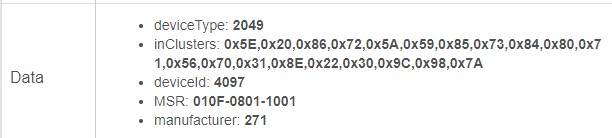
I'm just trying to work out what version mine are then maybe have a play.
Yes, this is basically correct.
Up to 2.8 is z-wave. And 3.2 and higher are z-wave plus.
This is from my 2.6 version:
Only motion is really working. Like you I also want Lux to report.
This is from my 3.2 version:
From the info you have just given me I have 2 devicetype 2048 and I have 3 devicetype 2049.
All mine are using the inbuilt Fibaro Motion ZW5 and all report motion and lux levels OK.
Comparing the "fingerprint" (if thats what they are called) I think the ones working for me are the same version as yours. Explains why I'm seeing the same results.
I'll get hold of the seller in that case as they were sold as ZWave Plus and as per the box - they were sealed so unsure? Beats me...Amazon Marketplace...
Thanks for the info both @bobbles and @aaiyar
Update: Oh, so you do have both types too....interesting...
What is also interesting is that your earlier sensors are showing the firmware version under data.
Mine do not show the firmware version for both types.
Do you think that could have been added to the "metadata" by the Basic ZWave Tool? But having said that, I did it with my other sensors and they don't have it displaying. There goes that theory
Interesting, so I've been tossing between drivers and refreshing/configuring. It seems the illuminance is updating each time the refresh/configuration is triggered. But it is not updating when place directly in front of a light source and doesn't update after a period of time.
I was using the generic ZWave motion driver and motion is working there. I've gone back to the "default" driver (ZW5) and motion is reporting fine there too, just no illuminance...I think I'll do a bit of trial and error and jot down some notes in the proces. Tried too many things now and haven't been very diligent in noting differences. eg. some drivers were updating parameters while others weren't etc.
I'll have a play and report back.
Your 2.6 version is zwave+. It has incluster 0x5E. You should check if it can be upgraded to 3.2
Sorry - that was your 3.2 version. My mistake.
I've received sealed items from Amazon Marketplace that had clearly been used.
Bit of an update from my side: Spent some time with Basic ZWave tool and sent all possible parameters to the device in question. Then this morning I changed the device driver to the default driver as per @bobbles experience with his devices. Took note of the device attributes at the time of the update and have left it for the morning. I've just checked now and it is reporting motion and illuminance now. I'll keep and eye on battery etc. but its looking promising. My theory is something screwed the parameters (ie. me!) - I don't know? Tamper doesn't work but I have no need for this feature for my specific scenario.
Anyway, big thanks for all the input and awesome to have the support of the community.
I can't seem to pair the ZW5 nor the FGDW-002 Door sensors at all...
Hello,
Wondering if this ever got sorted. I've seen several threads on here reporting the same behavior I'm experiencing with this unit (it reports motion, nothing else), but can't seem to find any definitive answers. Mine is a v2.7.
Any help would of course be greatly appreciated.
Just to close the loop from our DM, I decided to hook these up through Smartthings (which support the older firmware devices) and sync events through HubConnect. Works pretty well for my use cases. Unfortunately never got there in the end with a direct integration with HE 
What driver are you using on the ST ? Can you change any parameters?
I also have the old version and i spent a whole day trying to change parameters 60, 62 and 64. Temperature measuring and reporting is disabled by default. If you could change those values than you would get temperature readings in HE. There are other parameters that are worth changing like: disable the light for motion, illuminance reporting, etc)
I have tried changing them with Basic Z-Wave Tool, i managed to get the parameter list and change them, they look good in the logs, but when i load the driver i see the default values.
I wonder if i set the parameters with Fibaro HC, will they work? I don't have the HC so that is the last option.
On HE I'm using the built-in driver "Fibaro Motion Sensor ZW5" on both types of z-wave sensor.
Yes. I change the parameter the press the B button 3 times to get it into configuration mode and then press "configure" for the device in the UI.
It then takes the change.
Thank you for your reply, although i've made a mistake quoting your post. I was refering to the last post, hence the question about ST.
But, since you have the old version as well, do you get temperature readings ? And what is the refresh time?
I've managed to change the parameters from the native driver, it works for led color for ex, but i'm not getting any temperature updates. What values do you use? 60. Temperature report - threshold, 62. Temperature measuring - interval, 64. Temperature report - interval.
Thx
Download the Hubitat app