I have searched and went through several previous threads on the exact same failure state as mine.
Original Hub: C7 running 2.4.3.127
New Hub: C8 Pro running 2.4.3.127
The original C7 has Hub Protect and I did a new cloud backup after upgrading to 2.4.3.127. Verified the cloud back was migration ready and included both Zigbee and Zwave radios.
Powered down the C7, powered up the C8 Pro and run the cloud backup migration. C8 reboots and once back the Zigbee devices are fully loaded and working as normal. The Zwave devices are completely missing and no Zwave logs are being generated.
There is a red banner that appears momentarily on the hub home page that says the Zwave migration failed and attempt a new backup and migration again.
Powered off the C8, powered on the C7, completed a fresh cloud migration backup. Powered down the C7, powered up the C8 and did a new cloud backup migration. Did this two times, no change.
Tried switching the Zwave radio from US LR to just US, no change.
I have checked the original C7 hub for any Zwave ghosts or duplicate devices, the device list looks completely clean.
What else can I try, I am at the end of my road and definitely not wanting to start over with pairing all the Zwave devices.
Yup, that did indeed fix the issue. You may need to do a shutdown and unplug for a couple of minutes to make sure the Z-Wave radio reboots after the update if you see the Z-Wave details showing all nodes as having only 1 neighbor.
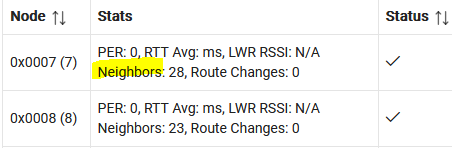
You'll be able to tell if there's an issue with the Z-Wave radio by going to Settings-->Z-Wave Details and looking at the Neighbors property:
In my case, once the migration finished, the Z-Wave details list was populated but none of my devices worked. Then I noticed that each device only had one neighbor. I believe that shutting down and unplugging effectively reboots the Z-Wave radio. I removed power for a couple of minutes but I'm guessing 30 seconds would have also done the trick.
All this is a long-winded way to say "it depends". If everything is working, then there's probably no need to shut down and unplug. If your Z-Wave devices aren't working and all of them show 1 neighbor, then yes, a shutdown and unplug will probably do the trick.
Thank you, my C8 Pro migration issues with Z-Wave were resolved with 2.4.3.133 release. I upgraded the C7, did a clean cloud backup, and then migrated to the C8 Pro from the cloud backup. The Zigbee and Z-Wave radios and their respective network of devices worked perfectly after migration.
FYI, I did run into a new issue post migration but it was addressed in this other thread which I contributed to.