Thanks for your reply, I get the error with all drivers, the Hubitat built in driver, 1.2.11, and 1.3.1, at the following link.
Yes, tried I triggered an intrusion with a motion sensor and a door sensor, same result, error. I think that you are on the right track HSM is sending a notification to the key pad, not sure it is making sense of it. The key pad has a strobe and siren that HSM can activate.
So the Unhandled log is usually not something to be too worried about, it just means the device sent something in that the driver is not sure what to do with (or has not been designed to handle).
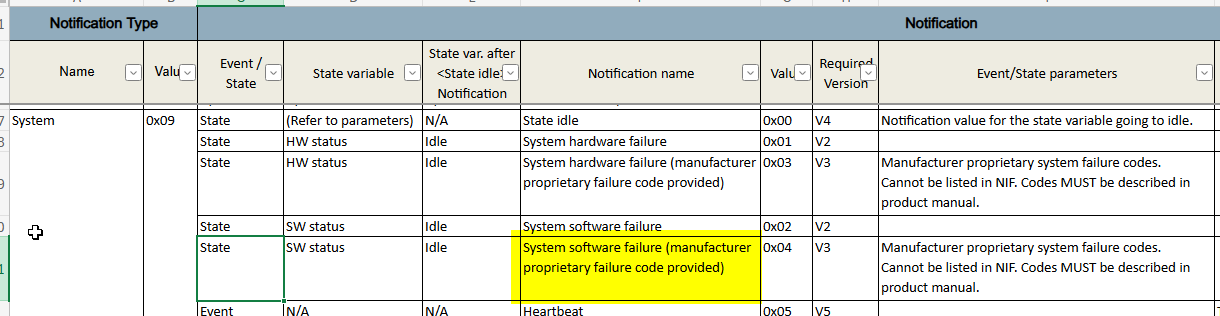
In this case, it is an error from the device itself. Here is what Notification 9, event 4 is. The parameter [85] would be the Manufacturers proprietary system failure code.
So you are correct in that the device has crashed apparently. Did you ever try just power cycling it (reboot it), to see if that brings it back?
@mavrrick58 do you know what commands HSM sends to the keypad when an intrusion alarm happens?
@mike.bass Otherwise you might be able to find it if you trigger the intrusion and then look at the event tab on the device page. It should show invoked commands in the history.
Might be able to do it with a "virtual" keypad device also, so it does not crash your keypad again.
I would need to test. If i was to guess based on Alarm devices i would think it is either on() or siren(). On would generally turn on all alarms finctions while siren would do just the siren alert.
It should be the same as any siren device i would expect.
Looks like this driver has pretty extensive debug logging, so if the issue was reproduced with debug logging enabled that would be helpful to see where the failure point is. I would want to see the debug logs (screenshot) and also the event list from the device page.
**tried to disable alarm from key pad, key pad not accepting code to unlock and zwave network indicator on permanently, key pad has now disconnected for the zwave network
dev:1582025-12-17 12:52:47.965debugIn entry (1.3.1) - delay: 0 initiated intrusion using motion sensor
dev:1582025-12-17 12:51:40.398debugIn armAway - securityKeypad already set to 'armed away', so skipping.keypad and HSM now in Arm Away Mode
dev:1582025-12-17 12:51:40.396debugIn armAway (1.3.1) - delay: 30
dev:1582025-12-17 12:51:40.339debugIn changeStatus (1.3.1) - data: set
dev:1582025-12-17 12:51:10.299debugIn exitDelay (1.3.1) - type: physical
dev:1582025-12-17 12:51:10.293debugIn exitDelay (1.3.1) - delay: 30
dev:1582025-12-17 12:51:10.291debugIn armAway (1.3.1) - delay: 30
dev:1582025-12-17 12:51:10.290debugIn case 5 - Passed - currentStatus: disarmed
dev:1582025-12-17 12:51:10.282debugIn case 5 - Away Mode Button
dev:1582025-12-17 12:51:10.281debugEntry control: [sequenceNumber:9, dataType:2, eventType:5] keycache: 2007
dev:1582025-12-17 12:51:10.278debugEntryControlNotification(sequenceNumber:9, dataType:2, eventType:5, eventData:[50, 48, 48, 55])
dev:1582025-12-17 12:51:10.275debugSupervision Get - SessionID: 14, CC: 111, Command: 1
dev:1582025-12-17 12:51:10.273debugparse - zw device: 97, command: 6C01, payload: 0E 0A 6F 01 09 02 05 04 32 30 30 37 , isMulticast: false
dev:1582025-12-17 12:51:08.433debugEntry control: [sequenceNumber:8, dataType:2, eventType:0] keycache:
dev:1582025-12-17 12:51:08.431debugEntryControlNotification(sequenceNumber:8, dataType:2, eventType:0, eventData:[])
dev:1582025-12-17 12:51:08.428debugSupervision Get - SessionID: 13, CC: 111, Command: 1
dev:1582025-12-17 12:51:08.425debugparse - zw device: 97, command: 6C01, payload: 0D 06 6F 01 08 02 00 00 , isMulticast: false Entered code on Keypad and initiated arm away mode
In HSM have disabled the siren and strobe on intrusion this did not make any difference.
Hub i am running is a C8 not C8 pro.
I am not confident on a fix, the key pad probably needs a firmware update, this can only be done whilst it is connected to a ring system which i do not have.
The device has built in rechargeable battery so not possible to repower, only option is soft reset or hard factory reset with a paper clip.
Yes proximity sensor is disabled, and taped over. i followed all the advice on this great forum on the subject including using smartstart for inclusion of the device.
After updating to the latest Hubitat system software, the Ring keypad went stupid....
So I restored from a very recent backup, and UPDATED the preferences tab of the keypad device, and voila, it works as it should...