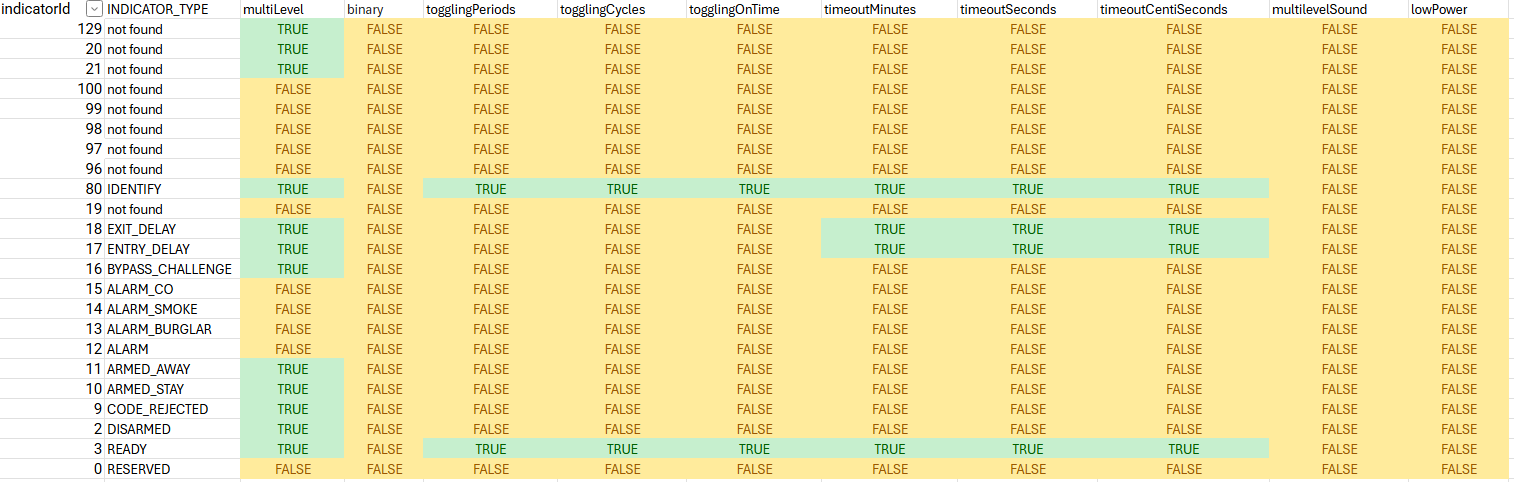
On a different note, thru the command classes, i was able to get the following :
Indicators to program in (some are done; "not found"s are manufacturer specific) :
Configurable Settings (28 total!):
{
	"1": {
		"input": {
			"defaultValue": "70",
			"name": "configParam1",
			"range": "1..70",
			"description": "# mins between heartbeats",
			"type": "number",
			"title": "Heartbeat Interval"
		},
		"parameterSize": 1
	},
	"2": {
		"input": {
			"defaultValue": "1",
			"name": "configParam2",
			"range": "0..5",
			"description": "# app-lvl tx retry if trnsprt-layr ACK / suprvisn rprts r missd",
			"type": "number",
			"title": "Application Retries"
		},
		"parameterSize": 1
	},
	"3": {
		"input": {
			"defaultValue": "5",
			"name": "configParam3",
			"range": "1..60",
			"description": "Base # secs used to calc delay between tx retries",
			"type": "number",
			"title": "Application Level Retry Base Wait Time Period"
		},
		"parameterSize": 1
	},
	"4": {
		"input": {
			"defaultValue": "7",
			"name": "configParam4",
			"range": "0..10",
			"description": "Adjusts the volume of the verbal audio prompts",
			"type": "number",
			"title": "Announcement Audio Volume"
		},
		"parameterSize": 1
	},
	"5": {
		"input": {
			"defaultValue": "6",
			"name": "configParam5",
			"range": "0..10",
			"description": "Adjusts the volume of the key press sound",
			"type": "number",
			"title": "Key Tone Volume"
		},
		"parameterSize": 1
	},
	"6": {
		"input": {
			"defaultValue": "10",
			"name": "configParam6",
			"range": "0..10",
			"description": "Adjusts the volume of the siren",
			"type": "number",
			"title": "Siren Volume"
		},
		"parameterSize": 1
	},
	"7": {
		"input": {
			"defaultValue": "3",
			"name": "configParam7",
			"range": "2..5",
			"description": "Duration 2 trig long-press event",
			"type": "number",
			"title": "Special Key Long Press Duration"
		},
		"parameterSize": 1
	},
	"8": {
		"input": {
			"defaultValue": "3",
			"name": "configParam8",
			"range": "2..5",
			"description": "Duration 2 trig long-press event w/ numpad key (sec)",
			"type": "number",
			"title": "Number Pad Key Long Press Duration"
		},
		"parameterSize": 1
	},
	"9": {
		"input": {
			"defaultValue": "5",
			"name": "configParam9",
			"range": "0..30",
			"description": "Input timeout after proximity detection (sec)",
			"type": "number",
			"title": "Proximity Display Timeout"
		},
		"parameterSize": 1
	},
	"10": {
		"input": {
			"defaultValue": "5",
			"name": "configParam10",
			"range": "0..30",
			"description": "Timeout after last button press w/ incomplete sequence (sec)",
			"type": "number",
			"title": "Button Press Display Timeout"
		},
		"parameterSize": 1
	},
	"11": {
		"input": {
			"defaultValue": "5",
			"name": "configParam11",
			"range": "1..30",
			"description": "Timeout when indicator set is received to change status (sec)",
			"type": "number",
			"title": "Status Change Display Timeout"
		},
		"parameterSize": 1
	},
	"12": {
		"input": {
			"defaultValue": "100",
			"name": "configParam12",
			"range": "0..100",
			"description": "Adjusts the brightness of the security mode buttons",
			"type": "number",
			"title": "Security Mode Brightness"
		},
		"parameterSize": 1
	},
	"13": {
		"input": {
			"defaultValue": "100",
			"name": "configParam13",
			"range": "0..100",
			"description": "Adjusts brightness of KP backlight. Key backlight LEDs only",
			"type": "number",
			"title": "Key Backlight Brightness"
		},
		"parameterSize": 1
	},
	"14": {
		"input": {
			"defaultValue": "20",
			"name": "configParam14",
			"range": "0..100",
			"description": "Light threshold where keypad will stop backlighting",
			"type": "number",
			"title": "Ambient Light Sensor Level"
		},
		"parameterSize": 1
	},
	"15": {
		"input": {
			"defaultValue": "1",
			"name": "configParam15",
			"range": "0..1",
			"description": "Turn On and Off the Proximity Detection",
			"type": "number",
			"title": "Proximity On/OFF"
		},
		"parameterSize": 1
	},
	"16": {
		"input": {
			"defaultValue": "50",
			"name": "configParam16",
			"range": "0..255",
			"description": "Ramp time (ms) to turn the LEDs on/off. Applies to all LEDs",
			"type": "number",
			"title": "Ramp Time Config"
		},
		"parameterSize": 1
	},
	"17": {
		"input": {
			"defaultValue": "30",
			"name": "configParam17",
			"range": "0..100",
			"description": "Percent lvl where display uses yellow battery indicator",
			"type": "number",
			"title": "Low Battery Threshold"
		},
		"parameterSize": 1
	},
	"18": {
		"input": {
			"defaultValue": "0",
			"name": "configParam18",
			"range": "0..31",
			"description": "Bit number in the languages supported bitmask to set",
			"type": "number",
			"title": "Languages Set"
		},
		"parameterSize": 1
	},
	"19": {
		"input": {
			"defaultValue": "10",
			"name": "configParam19",
			"range": "0..100",
			"description": "Percent lvl where display uses red battery indicator",
			"type": "number",
			"title": "Warn Battery Threshold"
		},
		"parameterSize": 1
	},
	"20": {
		"input": {
			"defaultValue": "2",
			"name": "configParam20",
			"range": "1..60",
			"description": "Blink dur. if sys sec mode display config is set periodic",
			"type": "number",
			"title": "System Security ionMode Blink Durat"
		},
		"parameterSize": 1
	},
	"21": {
		"input": {
			"defaultValue": "10000",
			"name": "configParam21",
			"range": "500..30000",
			"description": "Secs device waits for supervision report",
			"type": "number",
			"title": "Supervisory Report Timeout"
		},
		"parameterSize": 2
	},
	"22": {
		"input": {
			"defaultValue": "0",
			"name": "configParam22",
			"range": "0..601",
			"description": "601 = Always On, 1-600 = periodic, 0 = Activity-triggered only",
			"type": "number",
			"title": "System Security Mode Display"
		},
		"parameterSize": 2
	},
	"23": {
		"input": {
			"defaultValue": "37",
			"name": "configParam23",
			"range": "0..4294967295",
			"description": "Bitmask of languages. Bit == 1 => language supported",
			"type": "number",
			"title": "Languages Supported"
		},
		"parameterSize": 4
	},
	"24": {
		"input": {
			"defaultValue": "0",
			"name": "configParam24",
			"range": "0..1",
			"description": "Set to 1 to recalibrate the speaker impedance",
			"type": "number",
			"title": "Speaker Impedance Calibration"
		},
		"parameterSize": 1
	},
	"25": {
		"input": {
			"defaultValue": "10",
			"name": "configParam25",
			"range": "0..15",
			"description": "Secs FLiRS device stays awake after last comms",
			"type": "number",
			"title": "Z-Wave Sleep Timeout"
		},
		"parameterSize": 1
	},
	"26": {
		"input": {
			"defaultValue": "2",
			"name": "configParam26",
			"range": "0..60",
			"description": "# secs for motion detection to clear",
			"type": "number",
			"title": "Motion Dwell Time"
		},
		"parameterSize": 1
	},
	"27": {
		"input": {
			"defaultValue": "0",
			"name": "configParam27",
			"range": "0..255",
			"description": "Vol Reduction 0.5 dB steps",
			"type": "number",
			"title": "Vol Offset TFA9896"
		},
		"parameterSize": 1
	},
	"28": {
		"input": {
			"defaultValue": "0",
			"name": "configParam28",
			"range": "0..200",
			"description": "Vol Reduction 0.5 dB steps",
			"type": "number",
			"title": "Vol Offset AW8896"
		},
		"parameterSize": 1
	}
}