I am thinking about setting up Pi-hole but I'm worried I'll break too many things.
Remote access, WebCore, HPM, Owntracks etc. I don't know what internals want to resolve and where I can glean a list of Domain names to allow.
The few threads are 3-4 years old so that info has probably changed.
I'm sure someone is running this without any issues; just looking for the potholes in the road if I go ahead. 
Frankly, I think you have enough issues without introducing more!

3 Likes
I have run pihole for a few years and it's never had any affect on anything in my home automation world. I run 2 instances. I have them listed to use A then B for some subnets and B then A on others as DNS typically seems to use mostly the first one listed in Unifi system. My main subnet uses A then B and my IoT network uses B then A.
It’s probably possible to break one or more of these things by using pi-hole, but only if your DNS settings are misconfigured in some way, or you go out of your way to block domains (e.g. github.com) that are needed.
You can setup Pi-Hole and choose not to use it for certain things by manually setting the DNS settings on them. I do this in my network setup/configuration on my router. My IoT network uses different DNS than my primary network. I don't need to really block ads, etc. for IoT devices.
I'm more interested in dealing with all the crap that comes on my streaming devices and Google tracking. I pay for all these services so why do I have to put up with ads.
I see HE allows separate DNS config, haven't been in the setup for years since I set the static, so that's all I really need to leave alone then.
The beta is leaving me with no problems lately so I'm getting bored. 
Be careful what you wish for 
I’ve been using pihole for a couple years now without any issues. I use the standard blocking list. I just set my dns on my router to the pihole address, and left most device dns settings alone. Then if something breaks I can just change the dns back on the router (as opposed to everything that’s connected). I am also using the pihole switch driver in hubitat (thanks to @walksonair ), so my wife can tell Siri to shut off pihole if something gets unintentionally blocked.
1 Like
True, a fool's errand.
After much ado I figured out the Docker and Pi-hole install.
Up and running but it seems to do nothing.
I have my router set to my server addy that's running the Docker container.
All the DNS works still but no Queries blocked in the Pi Dashboard.
I flushed my DNS, there's a config somewhere....
Wascally Wabbit.
I think some people have said they're running the PiHole as the upstream DNS from their router. Did I misread that? I run my PiHoles (a name that never ceases to amuse my wife) downstream from the router, rather than upstream. The router does DHCP, giving the PiHole IPs to clients. The PiHoles in turn query the router (where local network names are resolved), and the router uses either Cloudflare or my VPN provider's DNS, depending on whether the traffic is being tunneled through the VPN or not.
While I have a switch on a dashboard to temporarily disable the PiHoles, we rarely need to do that. Usually if a site doesn't want to let me in because I'm using an ad blocker, I find another site.
What's much more common is to find sites that won't play with my VPN, so I also have a way to temporarily disable the VPN on any client that I have to use much more regularly.
Been running pi-hole for a long time as well.
Honestly the only thing it has been blocking for me are when my wife complains that something she saw on amazon isn't loading. As it was an add, not a real listing.
1 Like
Have you enabled any block lists?
Are you seeing ads while browsing?
Yes it's enabled.
I know it's how I have set it up.
It's running on my server under a Docker container.
The container advertises 2 eth port, one on 172.26.208.x and one on 172.18.112.x
PiHole shows it's on 192.168.65..x which is not my 192.168.1/24
I get this log error on boot so I think I need to find and change, what appears to be, a hard coded IP.
2025-11-20 21:46:06.626 UTC [194M] WARNING: dnsmasq: ignoring query from non-local network 192.168.65.1 (logged only once)
It's a matter of learning where the cfg files are and getting everyone on the proper network path.
I have a spare NUC so I can always blow that out and put PiHole there.
I was just trying to keep it on the same PC so I didn't have to remote in; I don't have a KVM and the last ting I need it another monitor and keyboard on my desk.
Rainy day fun.
On the hunt.
Where it's getting 192.168.65/24 from I don't know.
Must be from Windows Hyper-V.
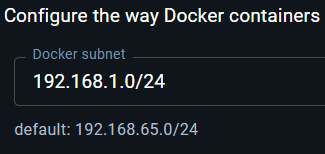
Edit: Found it, it's in the Docker setup | Network.
It's been a while since I've gone in cold to something newfangled.
Now on to the next problem as to why it doesn't function.
Where's the Cobol.
"Pi-hole now determines the appropriate interface IP automatically. No need to set it manually anymore."
Just logging my journey here for entertainment.
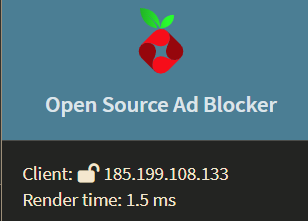
Fixed the network subnet of Docker, rebooted the container and now I get an other worldly address in the web UI.
One of the reasons why I commissioned an old Skylake pc to run Ubuntu. Everything like this just works, and my monitor has 2 video inputs, so I just switch over when I need to update.
Well I got it running, sort of, on WSL instead of Hyper-V.
Lots of queries but no blocking.
Not sure what goes on with the IP of Pi-Hole.
I have assigned Docker to my 192.168.1/24 but Pi-Hole client is 172.17.0.1.
I have my router resolving to my server 192.168.1.1 where Pi-Hole is in a Docker container. DNS works on my WiFI access points and PC as I get lots of Queries but no blocking.
I'm sure it's becasue Pi-Hole is on the wrong network.
More Googleing today before I give up and use a spate NUC or order a Pi.
Interesting, as I type this I actually got 4 blocks, after 500 Queries, but some look legit like googleapis.
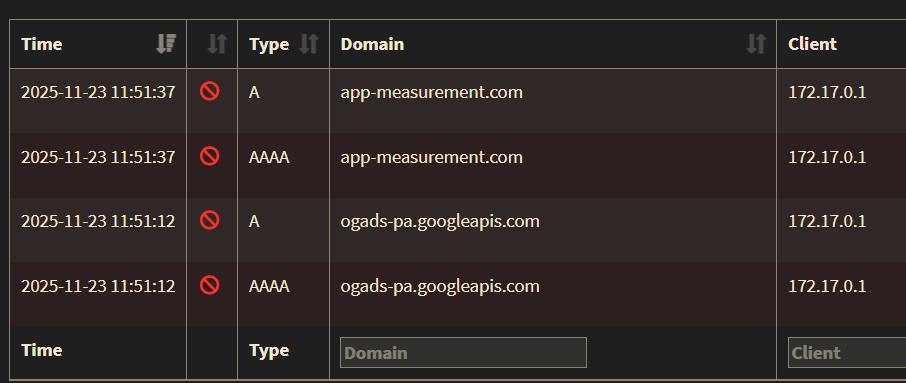
Even though I flushed my DNS it seems like it wasn't working.
A few hours later and she' populated.
I'm happy, I think, except the wife just turned on the Google Chromecast TV and the apps were all missing. I turned off the Pi-Hole and restarted the Chromecast and life, rhymes with wife, is good again.
I'll Reddit that one tomorrow.
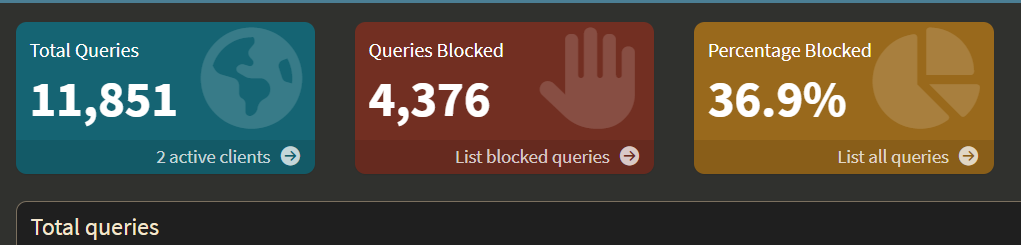
Added this to one of my Dashboards.
So far I only had to reboot one GoogleTV as it went offline initially.
Pi-hole v6 Multi-Instance Blocking Control Drivers Documentation
1 Like
Oh, interesting, thank you for sharing. I hadn't seen this project before.
I've been using the one by @walksonair that I've contributed to here that is a bit more simplified as just a device driver: Pi-hole Virtual Switch for Hubitat (Updated for v6 API & HPM)
Also, could you share a screenshots of your Dashboard @dnickel - Would love to see what that looks like
1 Like