How do you use the hub itself as a trigger device when connected to a UPS?
I saw in the other thread it looks like you may be using the Power Outage Manager app. Would it be possible at your convenience to see some screenshots of your app setup to kinda help guide through setting this up with my Ring Alarm V2. I saw your device was potentially different but the principles would apply.
My hub is also on a ups, but i have a seperate device i made the i plug into my main power, and has a zigbee contact. So when it looses power the contact still has power via the battery and sends a notification.
I had to make one for my deep freezers, as the outlet they are curently on are connected to a gfi and gets triped and last time we did not notice for three days. Now i know quickly.
I just ordered supplied to make some others for myself and a few friends. But if i can make the cookie cutter enough to make. I might sell them as there does not seem to be anything reliable except DIY stuff.
I has worked reliably now for a few years. Even a quick drop and restore seems to trigger it. The new ones i make i plan to have a 5 second delay before it reports power restored. (For weird power issuse my friend has. Should avoid lots of notification for him.
I will report back here if i make them for sale (but that is my plan to help others)
Here i have a pic where it shows power off when the one for my freezers looses power (custom driver just for my device)
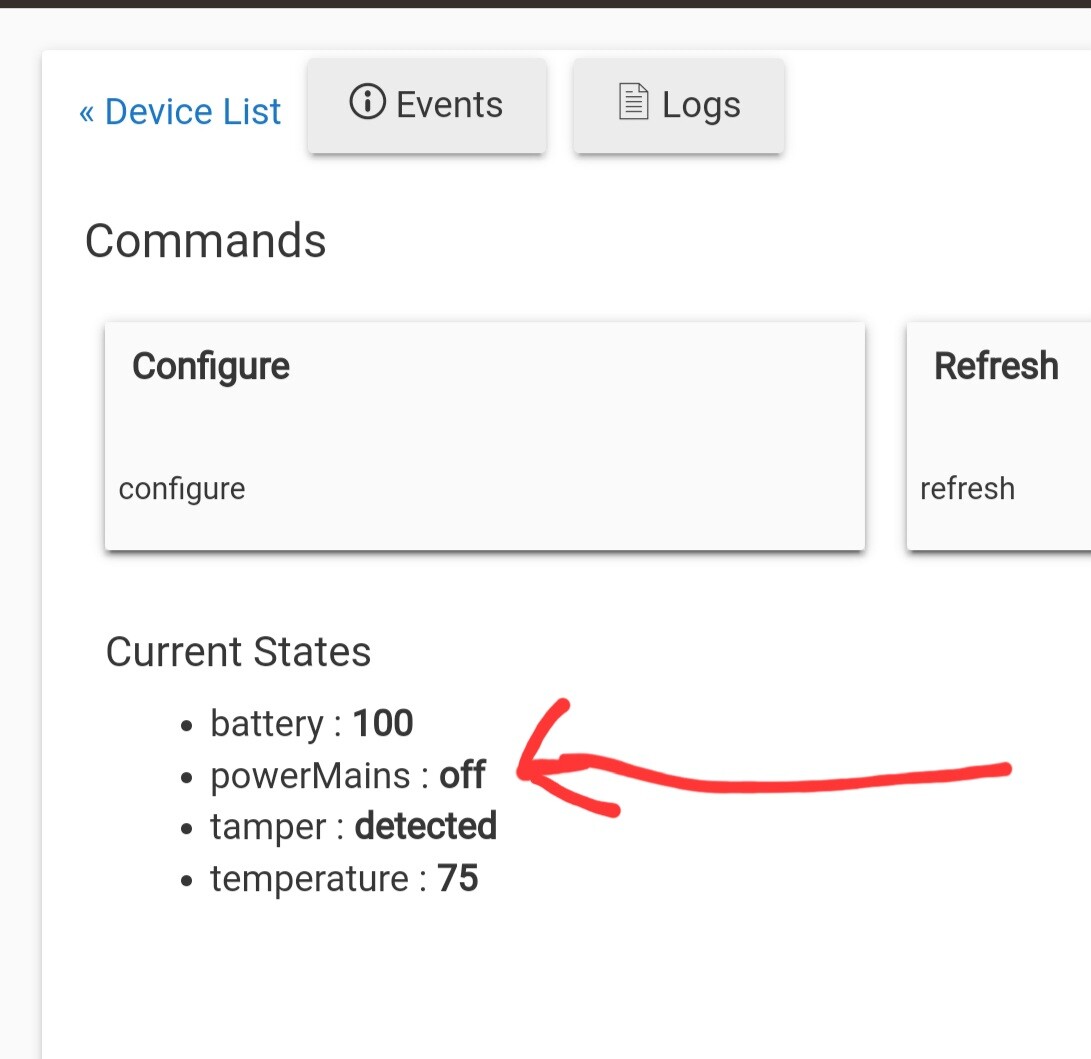
I was reading your post above and that sounds like a great idea as a way to make a trigger device. I understand the concept but not familiar enough with the internal workings of a contact sensor to say I could do it right off hand. I will have to do some research and figure this one out. Please post on here if you decide to make some.
Zooz used to sell this kit...
My Pwr Outage Mgr app setup is very simple -- it sends an alert if at least 4 of my 5 outage devices agree power is out for 10 minutes. Then it'll automatically shut down my hub after 3 hours
The app can do a ton more things too, but I just didn't need any of that additional stuff.
So with the hub on the UPS, and you bring the hub down upon an outage...is it all manual intervention to bring it back up?
Thinking out loud here...I could see wanting this all to self recover... but if the UPS never totally drains down before the power comes back then there's nothing that will fire up the hub again. UNLESS you had some independent smarts in the UPS that said, "oh, power is back and stable...I can re-power this outlet in my string of outlets." Hummm
EDIT: This has probably been talked about in numerous other threads. Sorry.
The getting everything back up & running thing is manual for me, and that's OK... The only time it would be a real pain is if we're away on vacation -- in that case, it just is what it is -- none of my hub automations are absolute must-haves anyway.
If power goes out, I'm likely in the local area somewhere -- if not at home, 3 hours would give me time to get home in most cases. Then I can assess the situation myself from there.
I've done it with a spare hub.
One way I've addressed the problem of repowering a hub is by plugging the hub into a wifi plug (I always favored Leviton for no particular reason), then plugging the wifi plug into the UPS, along with our modem and router. The hub could power itself down after a period of time, and the wifi plug would just die with the UPS. When the UPS came back up, so would the wifi plug. While "manual" intervention was still required to turn the wifi plug on (which would cause the hub to come back up), that could be done from anywhere with an internet connection. Worked when we lived 500 miles from a second home, which is now our primary residence.
I got mine setup basically the same as yours. However I had to shorten my outage time (first delay) to 1 minute. I need the notification quickly if the power is out due to oxygen equipment in the home. Hopefully the 1 minute will filter out any "flickering" of the power.
The second delay I have set for 80 minutes to then shut down the hub. What size UPS do you have and what is plugged in the battery side of it that you can get 3 hours? I set my time being conservative as I don't know exactly how long mine will last. Hoping your setup could help me get a ballpark.
Also, the ring range extender paired easily and works flawlessly.
I use one of these - Hubitat is the only thing plugged into it. It's on a z-wave plug that I cycle off for 2 hours every afternoon just to help exercise the battery a bit.
Thank you for the idea and reminder of cycling the battery. I will look into something similar to cycle the batter on my two UPS that I have.
May I ask how you arrived at that routine?
I had one go bad when I actually could have used it.
I was thinking of running it for a day or two, but have no idea.
Thanks.
Just seemed like a good idea to use the battery a bit on a regular basis. Every now & then, I check the bars remaining on the TalentCell near the end of the 2-hour window to verify it's not down to 1 or something like that.
When that happens, I'll know I should consider replacing it.
Thanks.
I just wonder what's ideal?
I'm trying 4am off/8am on, daily.
Adding to the power outage detection conversation, I just discovered the YoLink AC Power Outage Alert. I've had great success using YoLink water meter and water leak detectors with HA and then bridging with the Home Assistant Device Bridge after @ymerj added HADB valve support (thanks again!). I'm going to give this a try, and hopefully the detector reports as a switch, power device, or something else already supported. I'll report back on the results.
Edit: FYI, my use case is not for gracefully shutting down Hubitat. I just want to know if I had a power interruption however brief so that I can turn on some power outlets that default to coming up off.
Step-1 Put hub and router on ups with WIFI outlet on both the hub and the ups
Step-2 Install and pair Ring v2 Extender (has battery backup)
Step-3 Rule=If ring v2 extender is on battery exceeding 5 mins, send message "Power out, shutting down hub!, initiate shutdown of hub.
Step-4 Wait till you see your ups outlet back on line, initiate power cycle of wifi outlet on hub.
Step-4 Initiate message on boot stating that hub is back on line.
Step-5 go back to whatever you were doing.
This is essentially the "easiest" way to do things. Slightly cumbersome but better than being out of service 5 weeks.
Do you have this part automated in some way (IFTTT, etc.) or is it a manual operation?