[Deprecated] Xiaomi / Aqara ZigBee device drivers (possibly may no longer be maintained)

[UPDATE] v0.3.1b of Xiaomi Mi Cube Controller device driver for Hubitat

After more testing with the v0.3b update, I realized that the method to set the number of buttons according to the Cube Mode selected in preferences wasn't working correctly. Also, I saw that the cube occasionally sends catchall: messages which are of no use, but produce (harmless errors.) Those issues have been fixed. Finally, I re-did the fingerprint data used to match the driver to the cube during pairing, it's working perfectly (for me, at least.)

The updated device driver code can be grabbed from here.

PLEASE NOTE: This driver is still in beta, and its features and functionality may change.

Change List

  • Added conditional check for catchall: messages to avoid unwanted java exception errors
  • Removed unused EnrollResponse command and Actuator attribute
  • Edited fingerprint data to improve selection of driver during pairing
  • Fixed issues with setting the correct number of buttons according to the user-selected Cube Mode


With the above v0.3.1b update, I am unable to replicate your experience. Here's some log output to show repeat gestures working just fine with my cube (note the entries below are reversed from normal output order, so the first is on the top, last is on the bottom):

Sample cube log output (click arrow to reveal)
12:10:15.239 am [info] Mi Cube: Updating preference settings
12:10:15.249 am [info] Mi Cube: Number of buttons set to 36
12:10:15.251 am [info] Mi Cube: Info message logging enabled
12:11:40.574 am [info] Mi Cube: Rotated by 29°
12:11:40.619 am [error] java.lang.NullPointerException: Cannot execute null+19 on line 349 (parse)
12:13:08.174 am [info] Mi Cube: Stale face data, updating
12:13:08.179 am [info] Mi Cube: Flip to face #3 detected (button 4 pushed)
12:13:08.182 am [info] Mi Cube: Knock detected with face #3 up (button 16 pushed)
12:13:12.928 am [info] Mi Cube: Rotated by 34°
12:13:12.951 am [info] Mi Cube: Right rotation on face #3 (button 22 pushed)
12:13:18.361 am [info] Mi Cube: Rotated by 16°
12:13:18.370 am [info] Mi Cube: Right rotation on face #3 (button 22 pushed)
12:13:23.163 am [info] Mi Cube: Rotated by -24°
12:13:23.170 am [info] Mi Cube: Left rotation on face #3 (button 28 pushed)
12:13:25.559 am [info] Mi Cube: Rotated by -20°
12:13:25.585 am [info] Mi Cube: Left rotation on face #3 (button 28 pushed)
12:13:31.730 am [info] Mi Cube: Flip to face #5 detected (button 6 pushed)
12:13:36.770 am [info] Mi Cube: Flip to face #0 detected (button 1 pushed)
12:13:40.957 am [info] Mi Cube: Knock detected with face #0 up (button 13 pushed)
12:13:44.846 am [info] Mi Cube: Flip to face #1 detected (button 2 pushed)
12:13:47.355 am [info] Mi Cube: Knock detected with face #1 up (button 14 pushed)
12:13:52.053 am [info] Mi Cube: Shake detected with face #1 up (button 32 pushed)
12:13:54.699 am [info] Mi Cube: Shake detected with face #1 up (button 32 pushed)
12:13:57.767 am [info] Mi Cube: Shake detected with face #1 up (button 32 pushed)
12:14:03.625 am [info] Mi Cube: Stale face data, updating
12:14:03.630 am [info] Mi Cube: Flip to face #2 detected (button 3 pushed)
12:14:03.635 am [info] Mi Cube: Slide detected with face #2 up (button 9 pushed)
12:14:06.497 am [info] Mi Cube: Slide detected with face #2 up (button 9 pushed)

If you are concerned about the driver not acting on messages received from the cube, then enable debug message log output, then you'll see every message the driver receives from the cube. Look for entries that start with Parsing message:

What I see, with my cube at least, is that it doesn't send a message every time I interact with it. For example, I have to be deliberate when I flip it, rather than moving it gently, in order to generate a "flip" message.

Also, if using the Advanced or Combined Cube Mode, keep in mind that sometimes the driver loses track of which face is up if the cube is moved in some way without causing any message being sent. For example, I can rotate the cube around in mid-air, gently set it on a surface, and the driver won't know which face is up anymore. The original author wrote code to extrapolate that as best as can be done, but it's an imperfect science. I will be adding a much more complete post on this thread soon to explain how the driver works as it stands right now, along with all the caveats and limitations due to the way the hardware itself works.

You probably noticed there is a java exception error in my sample log output. This is because it's log output from right after I freshly paired the cube, and the driver doesn't have any way to know what face is up if the first thing you do is rotate it. That's something I need to fix, but it's resolved as soon as another type of gesture occurs which supplies face up data. I'll get to fixing it soon, but that error is not breaking anything, though.

EDIT: I just noticed that my cube is reporting it's battery voltage at 2.735 Volts, below the minimum Volts value, so the percentage is calculated at -110%! It's still working fine, so perhaps I need to consider a lower min Voltage threshold for this particular Xiaomi device. Regardless, I'm going to get a new CR2450 just in case the original battery is near the end of it's useful life. Any observations from other cube users on reported battery voltages would be greatly appreciated!


That's wonderful news! I am going to keep it as a beta until I hear from at least a couple other people with the smoke detector, and then I'll make it "final".

By the way, I de-selected the "Solution" tick-box, because this thread isn't really about trying solve a specific issue.

Thanks again for testing the fixed code and reporting back here, much appreciated!

I finally pulled the trigger and updated my HE Hub with it's latest firmware and updated all of my Xiaomi drivers along with it and everything looks good! All temp sensors are reporting correctly!! Nice work @veeceeoh!!

Thank you for taking your time to analyze my problem, I actually updated 1 of my 2 cubes and still not working properly, but I noticed the problem is with hub link app, I have 2 hubs, one is my regular hub with all devices and rules and the other hub is for Xiaomi and Tradfri, with the older driver the multiple pushes for the same button works fine but the last 2 drivers did not work, I can confirm the Xiaomi hub get the logs and see the multiple pushes of the same button, for example the right rotation, but only one push is transferred to the main hub, this is something that probably HE team should know how to fix it but I have no idea how or how to tell them. :pensive:

Maybe @bravenel or @mike.maxwell can help?

Here's the change I made that has led to this situation:

The isStateChange parameter is part of the event Map data that needs to be returned to the hub using the createEvent() method (or sent as part of a maps using the sendEvent() method) in order to generate an event.

If isStateChange is true then an event will be generated in addition to the value of the attribute being updated. However, if isStateChange is false then no event is generated and only the attribute is updated.

There's no official Hubitat documentation on createEvent() yet, so I have to fall back on SmartThing's documentation here.

Basically, if the isStateChange parameter is not specified in the event Map data, then createEvent() or sendEvent() will decide whether it should be true or false based on the current state of the attribute in question.

So for example, if the driver previously sent a createEvent() for the battery attribute with a (percentage) value of 70, and it then subsequently sends another createEvent() for battery with the same value of 70, no event will be generated for the second instance of a value of 70 if the isStateChange parameter is not included in the createEvent() event map. This makes sense, because the percentage hasn't changed and we don't need to clutter up the events list with redundant repeat values.

However, it appears that this same rule is applied to button pushed events. I find this behavior very strange, because in my opinion button events should not be considered a change in state, since buttons can - and usually do - act as a trigger. The only exception to this would be a button with hardware that sends a release message, which could then be considered a change in state. But many buttons only send a pushed message, and isStateChange needs to be true for every push to result in a new event being fired.

TL;DR: I needed to add isStateChange to ALL button pushed events generated by this driver in order for repeat gestures to work as expected. Here's the update:


[UPDATE] v0.3.1b of Xiaomi Mi Cube Controller device driver for Hubitat

Thanks to @vjv's feedback, I realized that the driver was not generating new events for repeated gestures. This has been fixed such that you should now be able to rotate the cube clockwise ten times in a row and get ten button 22 pushed events!!

The updated beta device driver code can be grabbed from here.

Change List

  • Added parameter isStateChange: true to ALL button - pushed events sent by the driver
  • removed all unnecessary instances of displayed: false parameter from all events sent by the driver

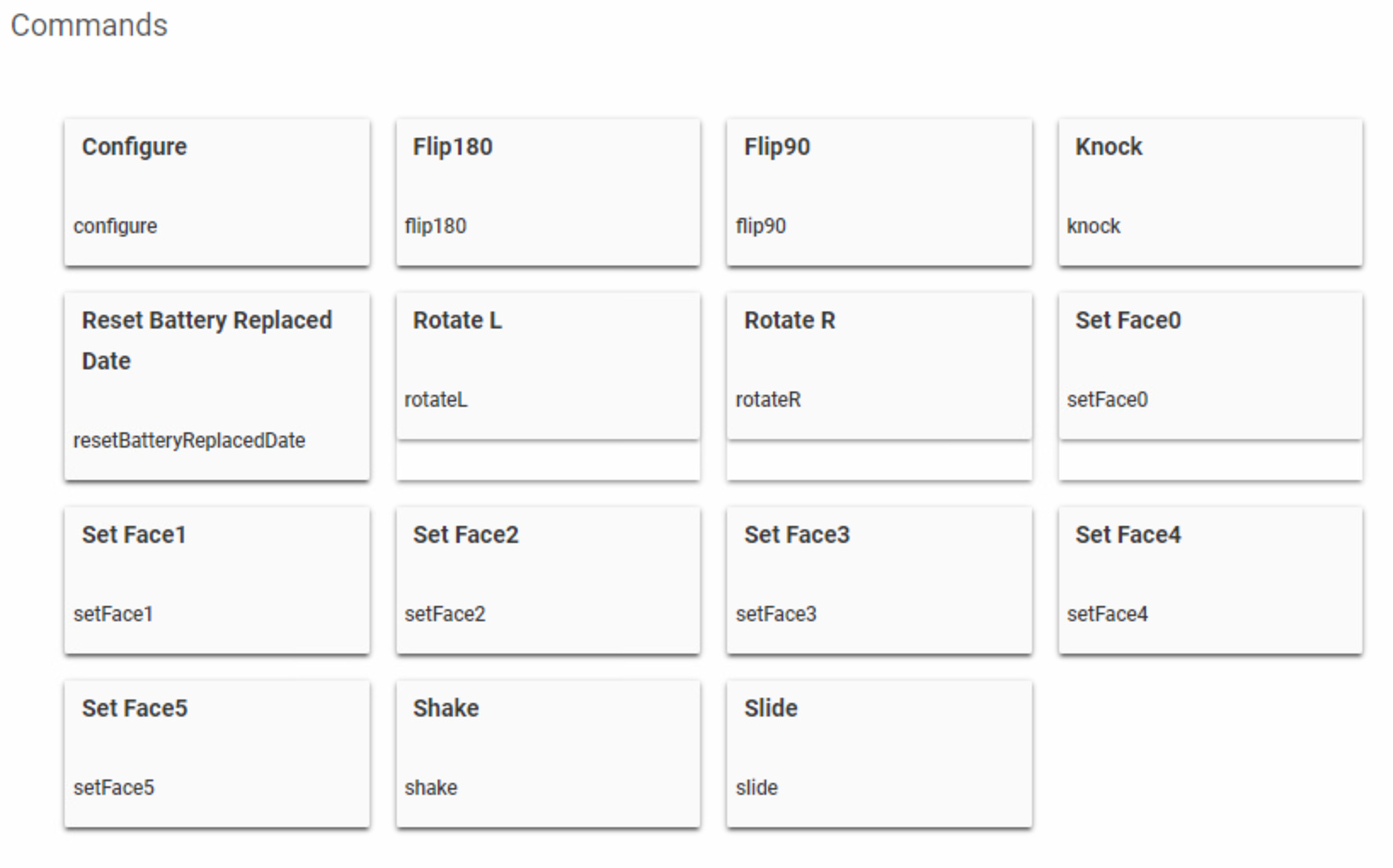
By the way, @vjv (and everyone else with a Xiaomi Cube), my plan is to remove all of the Commands (except for "Reset Battery Replaced Date" and "Configure") that appear as buttons in the device details page as seen here:

I can't see any reason for keeping them other than for testing purposes, honestly.

Please let me know if you can think of any good reasons to keep them, because there is an opportunity to significantly optimize the code if I can remove them all.

Works now beautifully. Thanks so much.

I used them to troubleshoot but not for anything else, so I think we will be fine without them.

Thanks again.

I finally have my Vibration Sensor working reliably, routed through a Trådfri plug. But, it's not quite sensitive enough. I thought you had recommended a technique - something like resetting and immediately sending the sensitivity command - but I see only the above. Is it possible?

What do the set face commands do? I don't currently use the faces, but if the face the driver thinks is up can get out of sync, it might be useful to be able to sync back up in the driver with those commands.

What do you think of the cube controller (those that have it)? I keep looking at it, thinking it may be interesting to mess with (for $20 it is pretty low risk).

Does it work fairly well?

I got 2 of them for $12 each.

They work, it's just something fancy for your wife, I have them in the bedroom, but I prefer my Aeon remote, simple.

Makes sense. It does seem sort of gimmicky.

But I am running out of things to play with. :smile:

What I should do instead is something constructive - like learn how to sniff zigbee and write zigbee drivers. I can write a driver for anything I need in zwave, but have avoided custom drivers in zigbee for a long time. That would be handy, though.

Lol, that's why I have 2, I wanted to play, the 36 button option is good but not always recognizes a face flip so you will get lost if you don't look it, then for some reason I must hit them hard on my wooden night tables to make the recognize the tap, so I ended using one face, shake and rotation to control my bedroom lamps.

I have 3 cubes, they are mostly just fun to play with. One cube I have set to turn on/off and change colors on some Hue bulbs, depending on what is done with it. The grandkids thought that was cool :grin:

The original author worked wrote code to use the current face up data that is sent when the cube is flipped, slid, or knocked. So only rotation or shake gestures may have incorrect face up data. In my opinion it is way easier and quicker to just knock the cube to set the correct face. I feel whole point of the controller is to not have to go to a computer's/mobile device and start fiddling with virtual buttons.

Either way, if concerned about the face up status being out of sync, I think the "basic" Cube Mode is just fine. That's already 7 gesture functions right there, and it's very consistent once you learn how to do the gestures correctly.

They are fun to use. My 8-year-old daughter loves using it.

I figured more than the 7 gestures would overload my brain so I only use the basic mode, but wondered about the face getting out of sync. Sounds like an easy solution to that--thanks for the info!

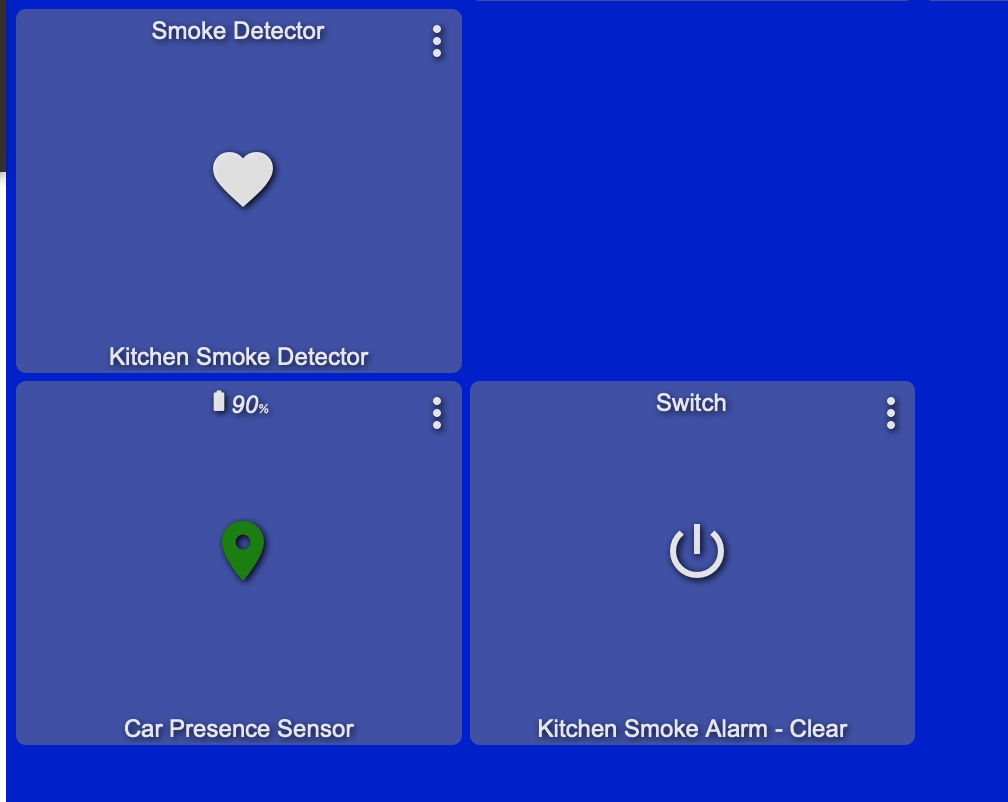
Does anyone know how to add a dashboard action item to silent Xiaomi smoke detector when it's triggered?

Continuing the discussion from [Release] Xiaomi / Aqara device drivers:

Answering my own question, here's how to disable the smoke detector when it's triggered.

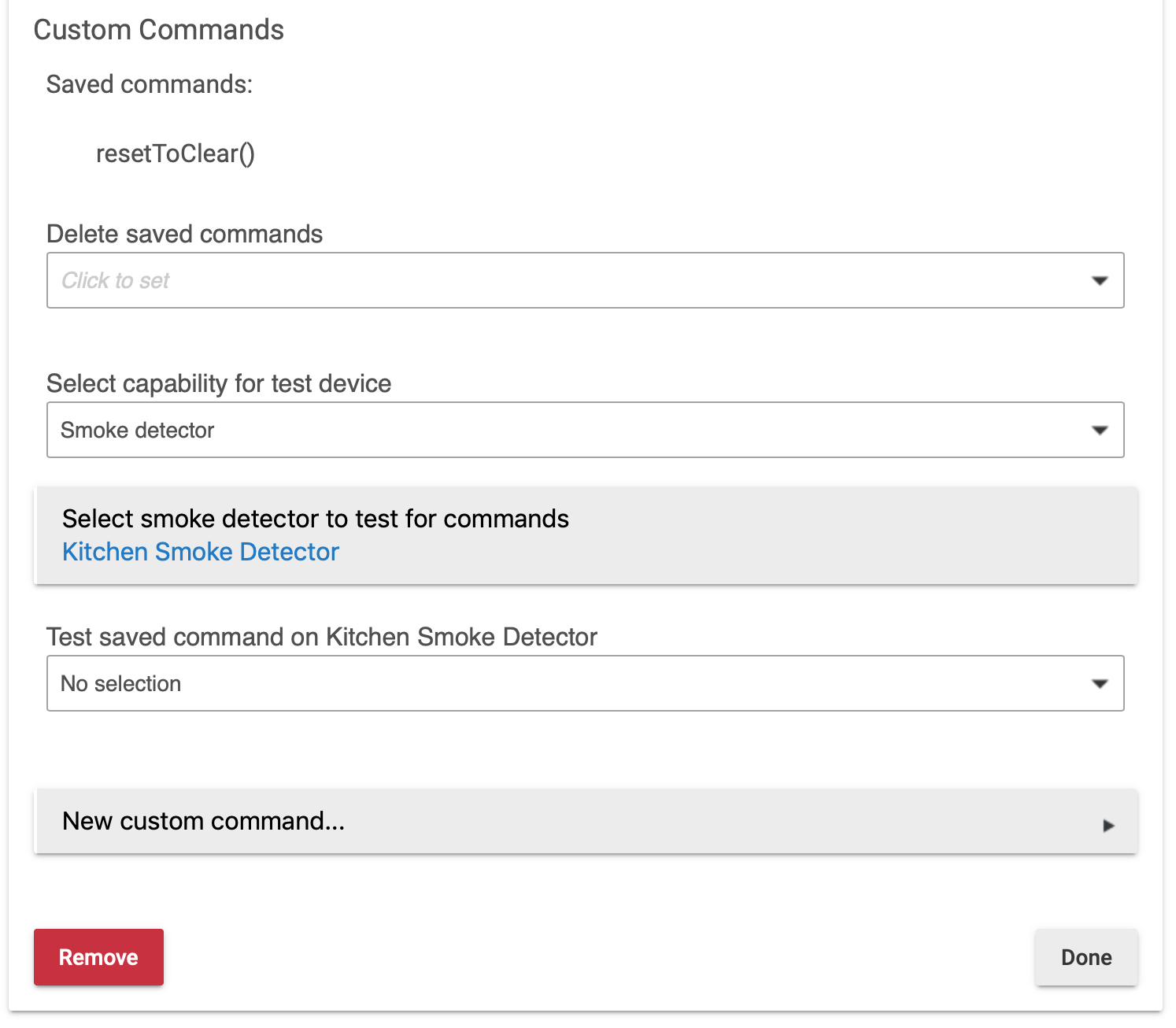
  1. in RM, create a custom command and link it to the smoke detector's command - resetToClear()

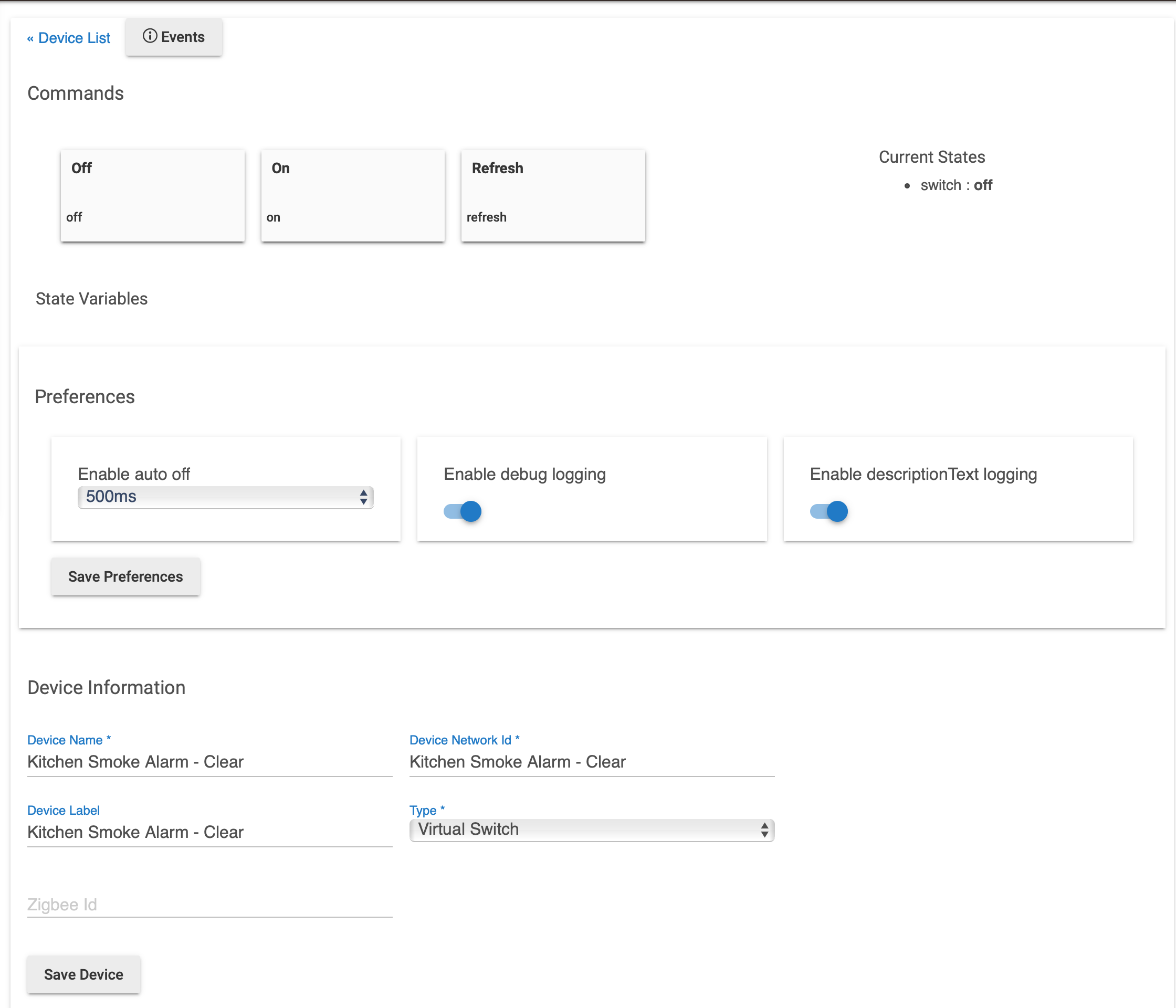
  2. In Devices, create a virtual momentary switch

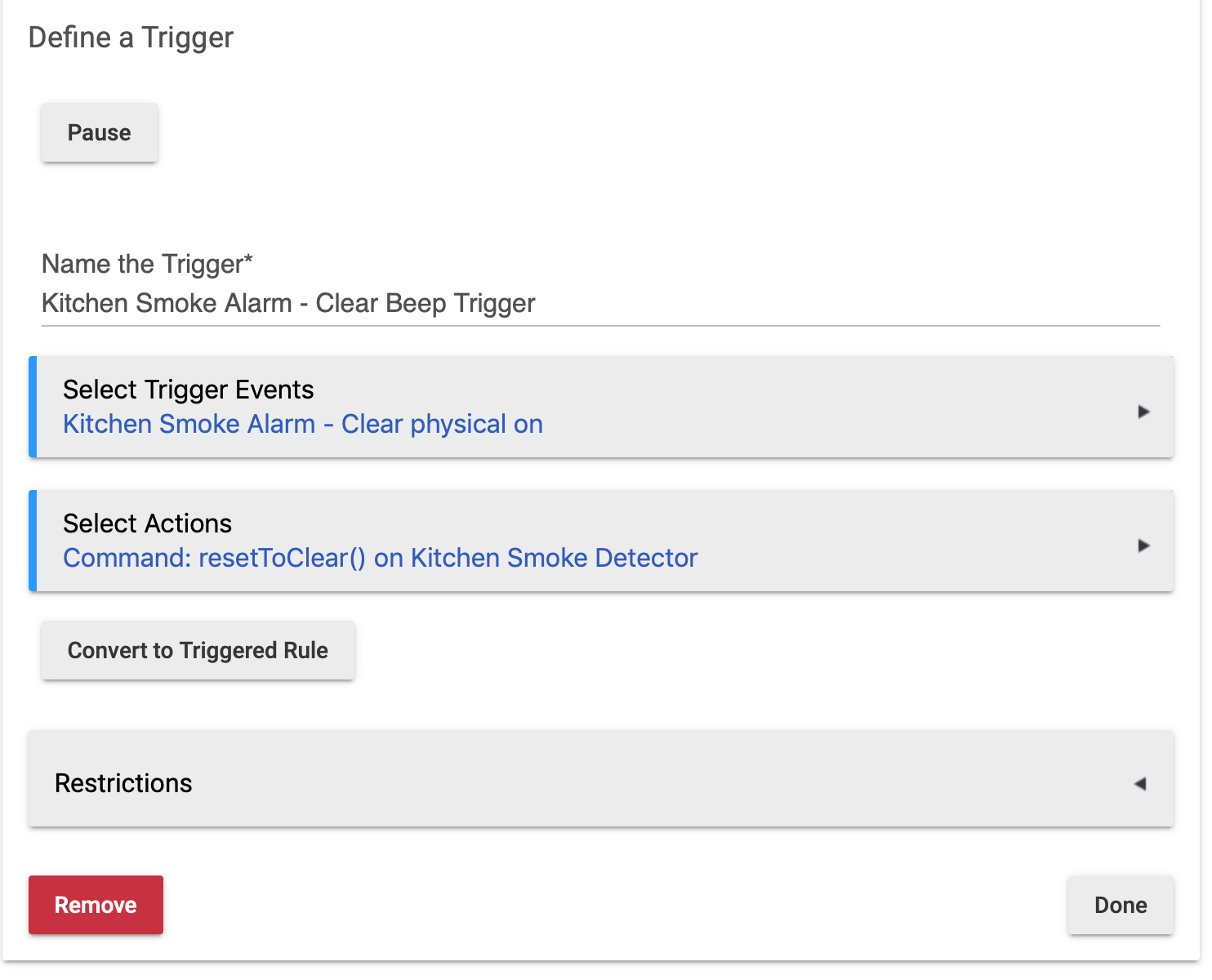
  3. In RM, create a trigger for the virtual momentary switch. When it is 'On', it will run the custom command created in step 1.

  4. In dashboard, add the virtual switch created in step 2.

When smoke detector is triggered, you can disable the siren through dashboard. :slight_smile:

Hi @guyeeba,

I have just moved my QBKG11LM and QBKG12LM switches (with neutral) to your upgraded driver. It's really cool that you can separate the button from the switch!

Whilst the separation works fine, when the buttons are physically pushed on the parent wall switch the DH does not record which button was pressed. The following is outputted in the logs:

Unknown button state 0100 for endpoint 5
Unknown button state 0100 for endpoint 6

Any ideas?

All the best,
Mark

Hi, Mark,

unfortunately I cannot try it it right now, but I think it is caused by the 2.0.6 upgrade...

Please revert the byte order in button handler ("0001" to "0100" and "0002" to "0200", line 94 and 107), and most probably it will work again. :slight_smile:

I'll try to update the source on github tomorrow...

Thanks, and sorry for the inconvenience,
guyeeba

I’ve placed a humidity offset but it doesn’t work… placing 10, -10, 20 or anything else, the humidity value is just the same…

Can you test one thing for me?
Can you placed it in the freezer for a few mins 2/3 and see if temp changes?