I have everything installed (3 kasa dimmer switch) and works through hubitat. However, Google integration is choppy. Every couple try it would say unable to reach hubitat or device not set up. I only have this problem with the kasa switch. Other zigbee devicea does not have this issue. Wanted to see if you can point me in the right direction to resolve this issue. Thank you
Sorry it’s been so long since my last response. I didn’t get a chance to try these things until a few days ago. I did the repair twice and noticed another device switched over to local. So then I kept doing it over and over. After 8-10 tries all the devices I have were back on local. So far they have maintained communication since that night. It’s the longest I’ve had a connection with them without any interruptions so perhaps my issue is resolved. The repair was the only step I have taken since my last post. I had not tried any steps or made any code modifications. Fingers crossed I’m on the other side of this problem.
I installed the latest version from HPM. But I am experiencing delay problem. I can turn on/off for any plugs on Dashboard. But if I physically turn on/off the plug by pressing the on/off button, the device detail or dashboard doesn't reflect the same status; hence it just remains in the previous state until I hit "refresh" button in the device detail. Then the Dashboard will reflect the correct state.
I tried to switch from local to cloud in the App setting. It's also still seeing the same problem. How can I make the device detail or Dashboard to detect and display the correct status?
That is a limitation of the product, you will have to turn on polling to get this working. I currently have it at 5 seconds for things that need to use the status of the light switch as an input (syncing under cabinet lights with overheads for example).
If you want something that can push it's status you will have to get another switch afaik.
There is a comand "setPollInterval". It sets how often the device is power polled (down to 5 seconds). Use sparingly and only when necessary to carry out subsequent actions. (Note: the Kasa system (phone app) only updates when the app is in your phone's focus window. When this is true, the device polls the devices every 3 seconds.)
I just tried what you suggested: setPollInterval". It allowed me to changed the Poll Interval. But, it only changed from 30 minutes to 1 minutes even I specifically set down to 5 seconds. And I tested it, it really took 1 minute to update the status. Is there any reason why it wouldn't set down to 5 seconds?
Never mind! I got it to 5 seconds saved now! Thanks for your help!
Just 1 question, it warms me that if I set to less than 1 minute it would degrade the hub performance. Would it really effect the performance of the hub? It really defeat the purpose of having the tile on the dashboard if I have to wait for 1 minute to see the real status.
It is a balancing act, if you have 100 switches all polling at 5 seconds, then yes it will affect your hub. It also depends on the current load on your hub which is a personal question. It is a warning in the truest sense of the word. I have all 3 of my dimmers set to 5 second polling without issue but YMMV of course.
The reason it is on the dashboard is to control the device via Hubitat. If controlled via Hubitat, the status updates very fast (usually within 0.5 seconds). If someone manually pushes the switch, then the poll interval comes into effect. Again, how fast you poll depends on what you do with the change. If nothing but display, then I would not worry about it or set polling to 1 or 5 minutes. If you are activating a rule or another device, then faster polling is appropriate (usually based on the time sensitivity of the action you are creating).
HUBITAT BETA TESTERS: Issue with Save Device on Beta Version 2.3.1.118.
If you do a save device on this Beta Version, it will erase the data area of the driver. Some recovery is available for the Kasa Devices:
LAN Bulbs, Switches, and single-outlet Plugs - Run Application and Install to update the required data.
LAN multi-outlet Plugs - Reinstall.
CLOUD devices - Reinstall.
Alternative to reinstall:
Update the Application method updateChildren, replacing with the code below. Then do the installation action.
Some Kasa Device Discovery Issues
I have finally pinpointed one issue with Kasa Devices not being discovered (after a lot of experimentation.
Issue: Some devices are not discovered on the first pass using the Kasa Integration App.
One reason: The newer Kasa devices chaged to a low-energy wifi configuration. These require a wake-up call to start operating. Apparently, the message that wakes up the device is ignored, so when you awaken the device, it requires a second call to ask for it's state.
Evidence:
Testing: I ran extensive discovery retries yesterday, waiting 5 minutes between retries. Consistently, some of my newer devices are not discovered. It gets better if I manually turn on the device before discovery and a lot better if I use the Kasa App first.
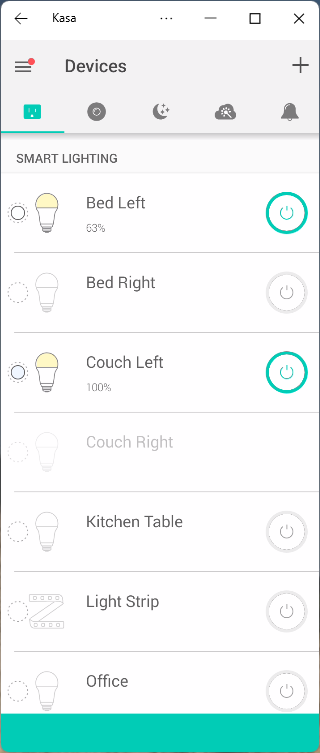
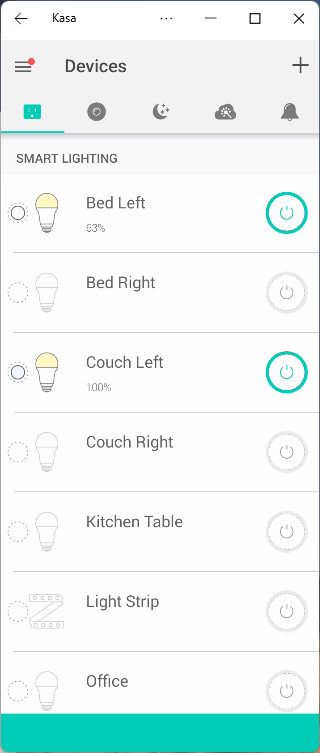
Kasa App: See the two pictures below. The first is after first starting the Kasa Phone App. Notice that "Couch Left" is out-of-focus and has no switch button. About 10 seconds later (2nd photo) it displays normal (indicating it is now communicating with the phone app).
New Install Procedure: Add to the installation procedure the following step:
Open your Kasa Phone App and exercise the device to be installed. DO NOT CLOSE THE APP untill the installation is complete.
Hope: This step will solve 95% of the problems I have been seeing on Install.
Future changes (sigh):
Modify installation procedures and notes within the app.
Add IP change preference to the driver.
Change error handling to retry messages once, even when error is indicated.
I am also considering a manual installation option for when all-else fails.
Probable reason: Changes in the Hubitat UDP processing in the new version. This is currently in BETA, therefore, a permanent fix is not being developed until all is final.
Impact: Errors while polling for devices within the IP segment during both initial installation and also on the fixLANIP functionality. These errors prevented the app from running properly.
Disabling App: Not necessary. To disable an app, go to the APPS page. in upper right hand of the page there is a red "X". Select that and a disable column appears on the left of the app names.
Devices: Not impacted.
Changes:
disable fixLanIP in APP temporarily. This automatically resets the IP 's on the devices if there were more than 4 consecutive errors from any one device. Work-around is to run the APP and installKasaDevices (does same thing.
Slow Down Discovery process. This had to be slowed down significantly due to the changes in the HUBITAT UPD protocol processing. (this was also the root cause of the first error).
Final Fix: after the new Hubitat version is out of Beta and stable.
Are there any updates on how to remove "Cloud Kasa Plugs, Switches, and Bulbs" from HPM. I know you said you were in the process of figuring that out, but did I miss the resolution or is it still in the works?
I have been unable to remove this remnant. However, the code that is there (for updates) is the same as the code for the LAN Version. Let me revisit tomorrow.
@djgutheinz while I was trying to track down some "comms Errors" I came across this section of code that seems backwards to me. Is this correct?
(if statement checks for 'false' condition but then sends a 'true' event)
def setCommsError() { // library marker davegut.kasaCommunications, line 237
	def message = "setCommsError: Four consecutive errors.  Setting commsError to true." // library marker davegut.kasaCommunications, line 238
	if (device.currentValue("commsError") == "***false***") { // library marker davegut.kasaCommunications, line 239
		sendEvent(name: "commsError", value: "***true***") // library marker davegut.kasaCommunications, line 240