Run the App and either Install or Application Utilities - Reset the Database. This will check and update IP addresses and run an updated (save preferences) on each device.
I am trying to think of a way to automate this. Luckily, it only occurs when there is a new feature added to a device type. This was the first case since 2020. I apologize.
Thanks for the awesome app and driver @djgutheinz!
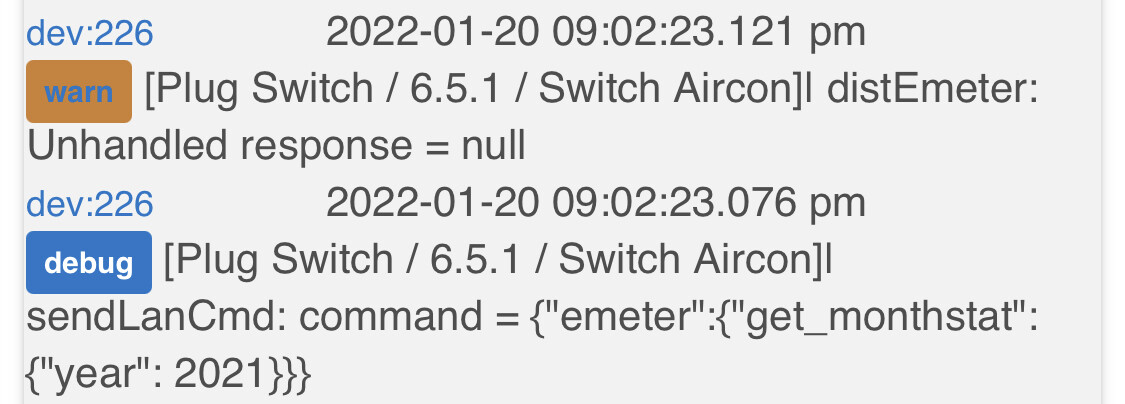
I’ve installed a few additional EM plugs last week and I’m getting these warnings on all of the new plugs. It looks like it’s trying to get data for 2021 but there is none. Not a big deal, but thought you may want to error handle it in the next update.
This is returning a null and I should debug log (vice log warn). I can test this using my test date code and set year to 2021/ month to Jan. So I will be able to verify the error due to the expected and not something else.
Next version finalizes the changes to Emeter for monthly statistics to run once a day (early AM) and previous monthly stats to run once a month (early AM).
Added: I am also going to add tools to check for version updates and display (1) in the App Name (like HPM), and as a state for each device. Along with this will be the adding of capability "configuration". Once the user activates the new driver (pressing Configure or entering and exiting app (no other action required)), configure will run nightly. No more running save preferences or attempting an install to activate the update.
Configure:
Checks the driver version matches the data value "driverVersion". If not a match:
verifies certain default values are set for new capabilities (usually only happens when a preference is added to a driver: example the dimmer configuration preferences for the Dimming Switch I added when finalizing the design (after I purchased on).
Updates the two driver versions to match.
Auto Update. The following commands will check driverVer() and the data value "driverVersion" and execute configure if not the same (note that POLLING and REFRESH are not on the list):
on/off
setLevel
setColor
These are plans. I am open to kind What the F*** aare you doing comments.
I have an HS105 plug that I am having trouble (it is the only 1 out of 4 giving me trouble). I was originally using the "Kasa Cloud Binding" for all my Kasa devices but found it was changing to "commserror: true" on all my devices every few days. So I swapped all my devices OFF that setting. However this one device is being stubborn. Under current state this one device still says "Connection: cloud". I have refreshed multiple times in addition to toggling the setting on and off a few times. Most recently I deleted the device through the Kasa Integration app, and then added it back. I am having the exact same issue with the device. Why is it jammed on "Cloud" and how do I get it off of that? I feel like I am missing something obvious however I had no trouble doing the other devices.
All of my devices are up to date with the firmware from TP-Link.
EDIT: After stumbling through the Integration app I happened to hit the "reset Device Database" option. It did not fix the issue, but instead kicked one of my Kasa Switches in to the same problem.
Next version will increase the frequency of obtaining the Kasa Token. I will also reverify the comms error processing for the cloud. For now, this can be fixed by updating the token in the APP.
Several possible reasons for being jammed on cloud. Device is not being found in the LAN discovery from the app or a code error. I need the following to start determination:
App and driver versions
App: at top of page on running app.
Driver: In data area on the device's edit page.
Run Reset the Database again.
Copy to me the list of devices with IP addresses.
Questions:
Did you change your router or your network configuration recently?
New Router?
Added range extender or mesh element?
Change any of the settings within the router configuration (any parameter)?
Can you control the devices from the Phone Kasa App?
List of devices:
192.168.1.216:9999: Lara���s Car Charger / Plug Switch / , Installed
CLOUD:CLOUD: Barbeque Lights / Plug Switch / , Installed
CLOUD:CLOUD: Play Room Heater / Plug Switch / , Installed
The original issue was just with "Play Room Heater" but after yesterday's first database reset the "Barbeque Lights" have been stuck in it as well.
I have not made any network adjustments that I recall in the last few days since this issue began. The router is an Asus and I have an AiMesh system setup with 2 extra routers but all of this hardware has been in place for close to a year. I'm racking my brain but can not think of any changes I did to my network configuration recently. I try not to mess with my network needlessly.
All of my Kasa devices are assigned static IPs from 192.168.1.210 to 192.168.1.216 (only 3 are connnected year round and the rest are seasonal which is why my shared log above only has 3)
I just looked extensively through all of my router's settings and the only setting I think I may have changed recently was my DNS servers to move from my ISP to a privacy one.
I can control all of the devices from my Kasa app on my phone. I tested both while on my home wifi (same network as the Kasa devices) and while on cellular to test control remotely.
EDIT: The three question marks in the one device name should be an appostrophe. "Lara's Car Charger"
Ping Test: The two devices are not being detected by your LAN Segment. One more test for one of the CLOUD devices:
Get the IP address (from the Kasa Phone App) for one of the "CLOUD" devices.
If it is not on the segment 192.168.1.nnn (like Laura's Car Charger)- that is your problem. Come back to me for further instructions.
Open the (Hubitat) Kasa Integration App: Application Utilities - IP Comms Test Tool.
Run that test using the IP address for the "CLOUD" device.
Return the results.
I have a driver update in-progress. I will look at modifying the drivers for Manual IP update. This does NOT help you today; but ....
ASUS Router. I have an ASUS (RT-AX3000) but I do not use a mesh system (small, post-retirement house). One user (non-ASUS router) had a firmware update tighten the security settings and kill some devices. Some settings to look at:
AI Mesh: generally, look for anything that protects one mesh from another. For testing purposes here, the goal is simplify.
AIiProtection: Anything other than "0 Protection", check and see if it reflects your Hubitat Hub or Hubitat Devices.
Parental Control: No relationship to Hubitat nor the devices.
Traffic Analyzer: Turn this on and in a day or two observe the results.
Wireless: You could try disabling 802.11ax / Wii 6 mode (mine is enabled - but my setup is not complex)
LAN: Verify that your device IPs are listed on the static ip list and the same as in the Kasa App.
Found an article on ASUS AX router and IOT Devices. Provides some guidance on changes to make for legacy IOT device compatibility on our ROUTER. This is from ASUS Support.
3. Go to [Wireless] > [General] page. Turn off [Enable Smart Connect] and select the [Band] for your network devices.
I am not on Wifi 6/AX router so I don’t have to worry about those settings. I have had some really busy days so I haven’t had the chance yet to follow your post before that to check those things but this weekend I hope to tackle those and get you the information requested.
For some reason I could not find a spot in the Kasa app to see the IP of the devices. I can see the wifi ssid, wifi strength, firmware version, mac address, etc but no IP.
I grabbed the IP of each from my Router device list. I have all of my Kasa devices on static IPs and confirmed the are the same segment.
Here is the result for "Play Room Heater":
Communications Testing Results for IP = 192.168.1.211, Version 6.5.1-R1
In my AiMesh settings I have no options whatsoever for any form of security or protection between the meshes. I have binded each device to it's closest router to see if that changes anything going forward.
In AiProtection I am showing 0 beside everything. I looked at the logs in each tab and none of the types of protection have logged an event in well over a year (and I've only been using Hubitat since December 2021)
I have never enabled the Parental Controls on our network.
I conveniently already had Traffic Analyzer on and have looked at both of the problematic devices. They both show data transmission, only KB of course but it looks like there is daily logs of it.
I do not have a 802.11ax/wifi 6 capable router (none of the routers in my system are)
I have verified the devices are all in static IP and are all sequential.
Any other thoughts on what I should do? At the moment I have had to set myself a calendar reminder for every evening to check my Kasa Integration and relogin to ensure I keep my token active.
Kasa Login. Should be good for a week; however, you could try every three days. The next version of the integration (in test now) will log in three times a week.
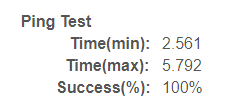
Ping time max of 217 seconds. This may indicate a root cause. The app would definitely not find the device. This test code is extremely simple.
Question 1: Are the two devices attached to the same mesh router?
Question 2: What is the model of your router / mesh devices?
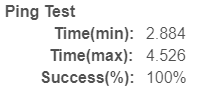
Action 1: Try the ping test again on the 192.168.1.212. if the times are still high, try one more time. (Note: see my ping results on a device below.(
Action 2: Try running the Integration App, rebuild the database twice in a row (immediately after each other).
Option: Note the app is set to a 10 second timeout. This is usually sufficient for non-faulty LANS (I used to use 3 ssconds w/o issue). You could try increasing the timeout in the Kasa Integration App by changing line 885:
From: timeout: 10,
To: timeout: 20,
Do a save and assure no errors at top. Then try the rebuild again. (I have previously used 20 seconds in testing w/o major issues - but certainly not fully tested.)
Is there a device limit on the number of devices that can be discovered / listed? I added 3 new EP10 plugs, and when I went to add them, I saw all three and added them. Then I noticed that one of my HS300 was no longer listed in the Kasa Integration App under Remove Kasa Devices, nor using Application Utilities - List All Devices by name or address.
Everything looks like it is working, just not in the Kasa App.
Slightly concerned on the device not listed as a child. That typically means that it was not discovered. However, this happens occasionally due to implementation of some routers.
To check, Open the app, do a data base repair. If the device is not there, do a second repair immediately. Tell me if the device appears.
I am updating the tools in the app. I will work to fix this issue by looking for missing children in the database, try to get the data for the device, then update accordingly.
Database repair x 2 doesn't change anything. Are there any other limits (total number of characters in the name, max number of devices, only works for one location?)
Wifi router is an Airport Time Capsule with Airport Expresses scattered around the house via ethernet. Wifi 6 - no. Hub is wired to the network via dumb switch. Problem IP addresses are 192.168.123.162 and 192.168.123.163. Hub is 192.168.123.66. Both are HS300. One of them (162) was added earlier, now missing from list. The other (163) is not found and was never added to HE.
No VLANS or routing.