@djgutheinz is the Synchronize Names setting intentionally just a one time sync, or is it supposed to be a persistent setting? Not sure if it was always this way or only recently but I noticed that if I change the setting to "Hubitat label master" and save, it does sync up the name and the setting appears to have stuck. But then if I refresh the device page the setting is back to "Dont Synchronize". I wasn't sure if this was intentional to be a one-time sync only, or is this a bug of some sort? This happens on all my devices, and they are all using the Kasa Plug Switch driver.
well....i spoke too soon lol. the kasa devices work perfect in hubitat and i can control them perfect. but....when i add the kasa dimmer switch to be turned on with the zigbee motion detector, it stops them all from functioning. if i remove the kasa dimmer, goes back to working. so weird....
When the dimmer is installed, are you seeing error logs on the Kasa Devices?
New response: The function is designed to be persistent. HOWEVER, in the past few months, Kasa has updated some of the BULBS to firmware version 1.8.11. None of these new versions update. My testing has shown failures on the following BULBS running 1.8.11 (while other devices work and do not run 1.8.11):
- LB120
- LB130
- KL130
As far as refreshing the page to get the setting to update: Maybe I need to do a pauseExecution(3000) vice runIn(3000, getSysinfo) at the end. But that has other ramifications.
Dave
i'm not sure, i did not really look at that. what i did was just create a rule to tie the kasa switch to an existing lamp...so that when it's turned on or off it will also do the same. that works for me and basically accomplishes the same thing was trying to do. odd that when it's included in the motion rule it breaks it..but it's working using the work around. 
I dont have any bulbs, I have a switch and a few plugs. They all have the same behavior. If I change the setting and save, it will sync the name and it appears the setting has stuck, but if I leave the device page and go back shortly after (or refresh it) the setting is back to its default. This leads me to think somewhere in the code the settings is being reset back to the default for some reason. Just tested it again with a KP115 to be sure.
Did you try just refreshing your browser page. That changes the setting on the display. What you are describing is the function updates the name on the kasa device, but the setting is not updating on the display page. Probably normal since I update the setting in an asynchronous call from the Update cycle - so the update cycle could update the display slightly (milliseconds) before the setting is updated.
I will play with a pauseExecution at the end of the update cycle. See if that resolves the nuisance.
dave
No, the setting is a dropdown menu, so it changes when I change the option in the menu. Then I hit save and the page reloads by itself, the setting is still selected how I had it. After that though, if I leave the device page and go back later, or just refresh it, the setting has reverted to the default. So this tells me there is some sort of delay in the code which is then reverting the setting back to its default. I have never seen a setting do this on its own but I know it could be done via code. I could make a short video of it if you are still not understanding.
We are saying the same thing from two different perspectives.
The way my code is written, I do not reset the setting back to default until the update with the device has completed and is verified by the return of an ansynchronous message from the device. This causes the condition that the setting has not yet changed when the undated method has completed and the Hubitat system refreshes the page. So the setting has not changed on first view. By the time a user can refresh the page, the setting has been set to default (this is what you are seeing).
Fix is to delay the end of updated (somehow). I believe a pauseExecution() may do this. But I will have to test. Fix in next release.
So... that was my original question, is it supposed to reset back to the default? Originally I thought you said no, it should be persistent, but now it sounds like you are saying it does in fact reset back to the default after the name is synced up by design. In that case it is working as intended. It is just not clear it is supposed to be a one-time sync so I thought it was possibly broken.
Hi, new to setting up my hubitat and most of my devices are Kasa. I just have a question that I do not see discussed anywhere. What do you mean by: * Caution: DO NOT USE "Cloud Kasa Plugs, Switches and Bulbs" ??
Thanks in advance,
Matt
I think it means some of Kasa's devices are cloud-only so you have to only use with the ones that allow local wifi access.
There are two Hubitat Package Manager (HPM) repositories. The "Cloud" now loads the same code as the other repository. However, I am trying to be able to delete the Cloud repository from HPM (it is deprecated and redundant) - therefore the warning. If using HPM and trying to load this repository, it will not identify the devices properly.
(Hubitat Package Manager is a community-developed application that automatically loads and manages (update, refresh, etc) code from various developers.)
In any case, be sure to read the instructions (link) as you install.
Hi everyone,
Updated to the latest Kasa integration yesterday.
Now all my rule machine routines failing to turn on Kasa dimmer switches.
Used to turn on when just calling "Set Dimmer level:100"
Without explicitly calling the switch to turn on. Now I have to modify each rule machine app to add a "turn on" line. Minor grievance but not sure if this is by design or some by product
I use Alexa and can still say simply "Alexa, set dimmer to (level)". Just tested.
What is your device version. In the Kasa App, what is the firmware version?
Mine (and tested-on device):
HS220
HW Ver: 3.0
Firmware Ver: 1.0.3
Finally, just did a test rule and it works when the trigger occurs. Started the device off with the previous level = 100%. Ran trigger. Device on (visual check) and level 50%.
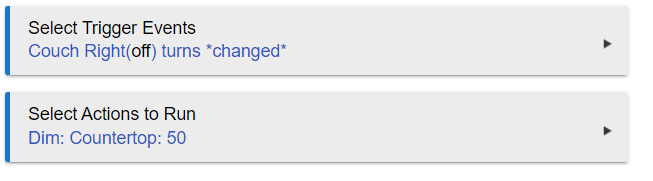
can I get you to set the device to debug logging (in preferences). Then:
Turn the device off.
Open a clean logging window
Do a setLevel(50) (no on command)
Do a setLevel(0) (will turn the device off)
Do a setLevel(100) (no on command)
Send me the results. With the HW and version differences, your device may act differently.
Dave
Here is with light starting off.
> 2022-01-16 12:20:48.448 pm errorjava.lang.NullPointerException: Cannot invoke method div() on null object on line 128 (method setLevel)
dev:1572022-01-16 12:20:48.433 pm info[Dimming Switch / 6.5.1 / Master Bedroom Lights]| setLevel: [switch:on, level:100]
dev:1572022-01-16 12:20:47.348 pm errorjava.lang.NullPointerException: Cannot invoke method div() on null object on line 128 (method setLevel)
dev:1572022-01-16 12:20:47.329 pm info[Dimming Switch / 6.5.1 / Master Bedroom Lights]| setLevel: [switch:on, level:0]
dev:1572022-01-16 12:20:46.254 pm errorjava.lang.NullPointerException: Cannot invoke method div() on null object on line 128 (method setLevel)
dev:1572022-01-16 12:20:46.235 pm info[Dimming Switch / 6.5.1 / Master Bedroom Lights]| setLevel: [switch:on, level:50]
Actually, after some playing around in the device page, seems setLevel doesn't work at all now. Only off/on works.
Try doing a Save Preferences after validating the values for Gentle On, Gentle Off, Fade On, and Fade Off are populated. Get back with me if it either working or not.
Clicking "save preferences" fixed it. Now i can setLevel. So I have to do this for each switch or is there a way to get them all at once?