lol, of course it does. Click the link in the first post look at the 3rd file down, Drivers.
When I click the github link it goes to a readme that doesn't mention catt 
When you Click this huge box that says 'GitHub bptworld/Hubitat' it takes you to the front page of my GitHub.
@bptworld, Thanks Brian. I was able to locate it. Everything is working great! I have my CATT running in an LXC container on my NAS. By the way, is there a way to get a web page to display longer than the max setting of 60 seconds?
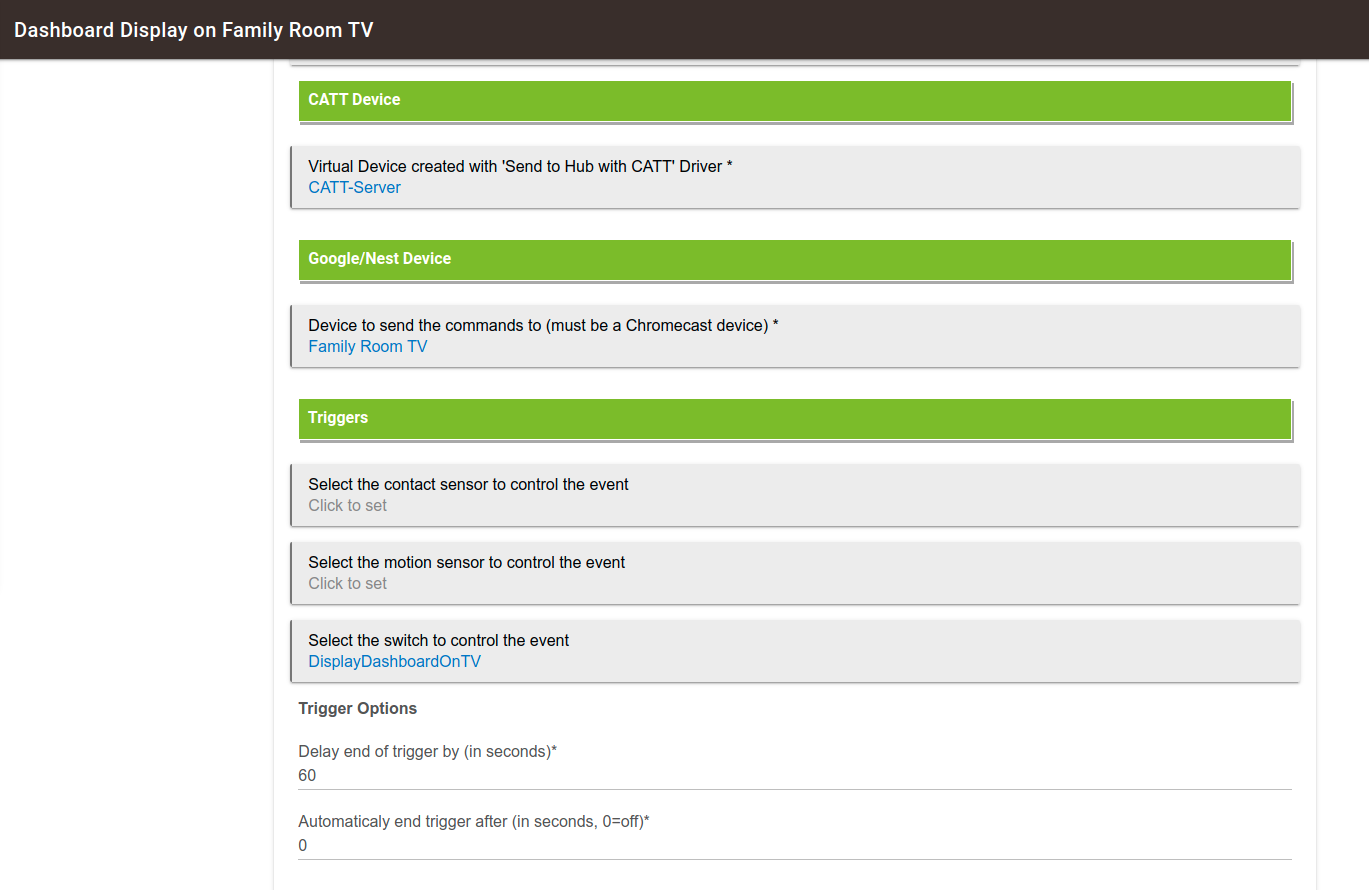
It's been so long since I wrote this I'm not sure why that is set to 60 seconds max. Try changing line 123 and see how it goes.
Kevin, I am loving CATT Director. One of my primary uses for it is to cast selected dashboards to my TV with Alexa Voice commands. This has been working great.
One of the things that I cast with it are dashboards with image tiles that have snapshots from my cameras. Suddenly, when I cast them with CATT, the dashboard is appearing normally but the images are just gray blocks. No broken graphic indicators, just gray tiles.
These same dashboards display on all my devices on and off network with the same URLs that I am passing to CAST which are basically just the cloud dashboard links.
Like I said, everything about the dashboard is fine except the images are gray. It's interesting that this started just today and I can't define any changes that I have made to apps or drivers. I rebooted my CATT server instance which is an LXC container and I restarted my HE.
I even created a new HE dashboard with a camera image and tried to cast it and the same gray block (no broken graphic which is a 404 indicator). I added another tile to the test dashboard and had it display an image from a WAN based web site. No issues. That worked.
Any ideas why suddenly my camera JPGs are doing this but ONLY when they are casted?
Ok, so after a few hours I discovered a very interesting caveat. I had developed multiple dashboards displaying screenshot images in tiles from my cameras. I found out that outside the house using the cloud links this was not working. So, I created domain names and used reverse proxies for the camera linkages as well as getting self signed SSL certifcates. The issue was that the cloud dashboard did not like the http only non-ssl cameras being displayed inside the cloud link to the dashboard. Browsing mixing http and http a big no no.
So, I created the SSL links and from outside the network all was well. As it turns out those links through my DNS names with the SSL certificates working on the dashboards inside my network too.
Well kinda... So a few of these dashboards get Casted to my TV with CATT Director and suddenly the images started showing up gray. Not a broken graphic bad link display, but gray. It turns out that something involving the SSL certifcate use is just fine inside the house on web browsers, tablets and phones but really ticks off the Chromecast Ultra.
The solution was that I created duplicate dashboards that have image links directly to the cameras with no SSL or domain names involved and CATT Director is displaying the tile images again. My theory is that I suspect i had a delayed effect wherein, the local dashboard caught on to the SSL camera link and it didn't like mixed http and https.
So, here's one of my dashboards. The moral of the story is: No mixa-da http and https content in the same dashboard.
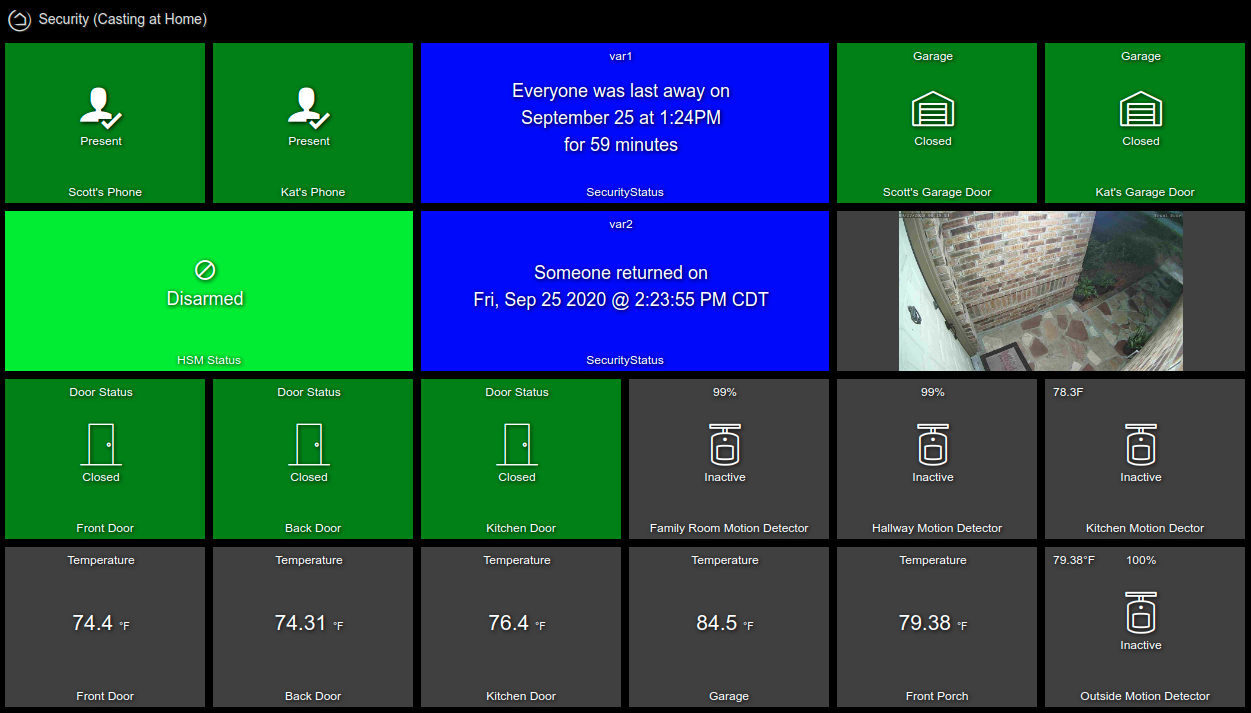
Just got CATT to stream camera feeds successfully via node-red, so now getting a dashboard ready to go on a nest hub with CATT director (thanks for the app/driver @bptworld!).
Is the 10 minute timeout sorted, otherwise what's the best way to keep the dash alive on screen indefinitely?
Seems to be a Google imposed limit, no way I see to have anything on screen indefinitely.
Bummer - I guess I could set up a virtual button to recast the screen via voice or just a physical button to do the same.
UPDATE: Now this is weird - initial testing of the driver timed out after 10 minutes ( a couple of times). My latest test cast has been going on for 30 minutes now and I have no idea why!
Just to be sure it wasn't a glitch, ran again and it's still up more than 10 mins later.
2 Likes
UPDATE 2: And now it timeouts again. I still have no idea what I did the last time to get it to stick unfortunately. 
Oh well, keep experimenting I suppose.
Update 3: I think I've got it figured out. Casting from the driver times out after 10 minutes. At this point swipe down on the hub and go to "view rooms" . Select the hub and the cast should restore without timing out (at least until you cast something else to the hub and have to start again).
1 Like
In the google device access api documentation I see there is a way to get a stream extension token. Maybe something like this would work but I have no idea how to implement it.
GenerateRtspStream response fields
| Field | Description | Data Type |
|---|---|---|
streamUrls |
Map of RTSP live stream URLs. | object |
streamExtensionToken |
Token to use to extend the streamToken for an RTSP live stream. |
string |
| Example: "CjY5Y3VKaTZwR3o4Y19YbTVfMF..." | ||
streamToken |
Token to use to access an RTSP live stream. | string |
| Example: "g.0.streamingToken" | ||
expiresAt |
Time at which both streamExtensionToken and streamToken expire, in RFC 3339 format. |
string |
| Example: "2018-01-04T18:30:00.000Z" |
That would be something for the new Nest API app
I didn't know we could stream RTSP before?
Well the image tile doesn't support it but we may be close to being able to pull nest Cams stream and reencode with the new API.
I wonder if some variant of Bryan's tilemaster app might allow us to show the stream that via iframes?
Follow up - what I proposed last time (update 3) doesn't work and yet on occasion I've been able get the cast to 'stick' and after doing something else on the hub recasting the dashboard will/can cause the timeouts to re-occur.
I can't seem to get speech output via the CATT driver button labelled "speak". Logs show this error
groovy.lang.MissingMethodException: No signature of method: user_driver_BPTWorld_Send_to_Hub_with_CATT_Driver_912.speak() is applicable for argument types: (java.lang.String) values: [test]
Possible solutions: clear(), play(), split(groovy.lang.Closure), sleep(long), save(), stop() (speak)Added to the list to look into. I don't have it installed right now.
1 Like