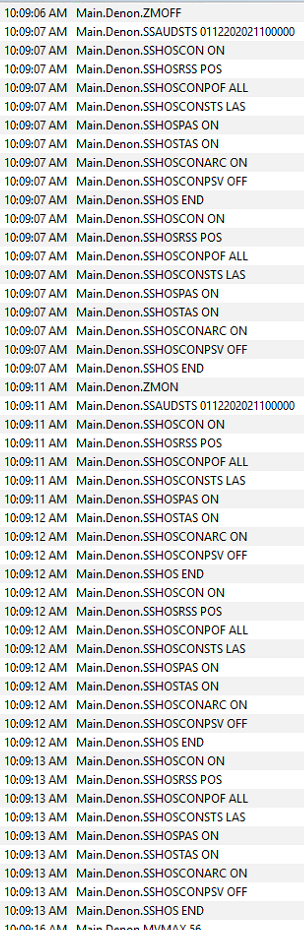
Something is wrong when I am copying it out of the code
I'll proofed it and it matches my code now.
Any requests for features are welcome.
Something is wrong when I am copying it out of the code
I'll proofed it and it matches my code now.
Any requests for features are welcome.
That fixed it, thanks.
I want to be able to control the Denon from Webcore, but it appears that none of the controls are able to be controlled. Can you add it?
Add it to webcore as an actuator and device
Sorry, I was used to seeing the things that I could control as State Variables. When I did not see them, I thought I could not control it. But I added the device in Webcore as you suggested and it looks like I can control all the variables that are in the GUI boxes from a Webcore piston.
Could you add some status to the Current State on the GUI screen to dynamically display the state of the receiver, like Power On/Off, volume, input, etc?
I'm not sure I understand you. All the states are there in the pull-down to select from. Can you describe what gui you aren't seeing them?
I am about to come out with a major driver update for this and I need to hear your input.
Toggle debug updates is taken care of.
Anything else is welcome.
Telnet overload has been known to stop the AVR from receiving commands from Telnet, altogether.
If you need anything in the API, I can put it in.
I haven't learned child drivers yet.
The release schedule will be beta to release candidate to release.
Until a Denon releases a new telnet protocol and I get that same amp, I don't see many other improvements.
An updated child driver will probably cost a donation though. 
So! Tell me what you want,and, it will be done.
This alone sounds pretty awesome 
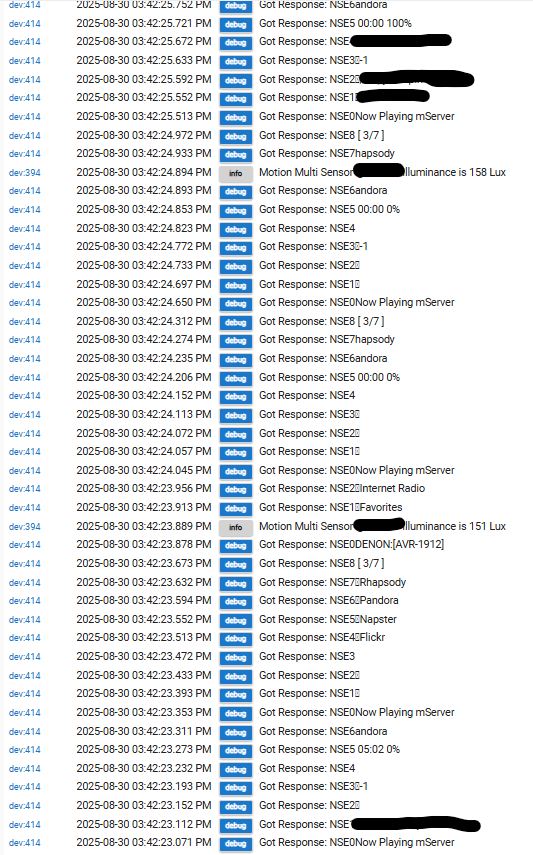
My Denon Receiver connected to Hubitat using this driver creates 18+ log entries per second when playing music. If there is a way to ID which version of the driver I have, please let me know how.
Today, for the first time ever, I happened to look at the logs while the receiver is playing and was shocked at the amount of activity the Hubitat is logging while the receiver plays. I presume I have something incorrectly configured, but since I barely got the thing connected, I'm now throughly beyond my expertise. What setting do I need to fix?
There does not seem to be a toggle for turning on or off debug, but even if there were, wouldn't that just mask all this traffic? I'd like to reduce this excessive traffic.
Setup:
Hubitat C-7, on 2.4.2.157
Denon AVR 1912, connected to my local network via ethernet. At the router it is not blocked from accessing the internet (maybe it should be??)
Hubitat Devices/ Device Details/ Type is "User" with "Denon AVR Master Device" selected from the dropdown, which I presume means the User (vs native) driver for Denon.
The way I play music is all the CD's are ripped to files copied to an SD card, which is in an old Android phone that takes SD cards. The phone has Kodi on it, which I use to send the music to the receiver.
Here is an image of the Log:
(All of the Debug entries are the AVR-1912; the blacked out entries are where the artist, album or song are reporting on the Hubitat log;
the only other entries are changing lux at a MultiSensor; blacked out part is part of name)
What makes you say the traffic is excessive?
There may be very frequent events coming from the AVR but that doesn’t mean it’s excessive if that’s how the Denon API is intended to work and things are working as expected.
However you as the user should have the option to turn off debug logging unless you need it to be active for troubleshooting purposes. That would be up to the driver developer to implement.
8+ events per second on the Hubitat, repeatedly every second, from the same device, when I've not set up the device to have such activity, seems excessive to me.
If the Denon API is intended to work that way, I'd like the Hubitat driver to have the ability to either turn that off or have the Hubitat ignore it because that is alot of processing.
However:
I presume I have something incorrectly configured, but since I barely got the thing connected, I'm now throughly beyond my expertise. What setting do I need to fix?
8 events per second is a lot for a human to process, but it’s not necessarily a problem for a computer.
I think you may be assuming there is some kind of problem here when none exists. It likely has nothing to do with how you personally configured the integration on your hub.
That said, you should be able to turn off debug logging if you don’t want to look at all those debug events in the hub log.
It appears as though @abuttino has already incorporated that change into a new version of the driver that hasn’t been released yet, based on his last post from just a few weeks ago.
ETA: in fact if you had just reviewed some of the prior posts in this thread since the beginning of this year you’d see that there’s already been a discussion of this.
The relevant discussion starts here:
My feature request is to add a comment section to the top of the driver code with information about licensing/re-using the code, as well as prior versions of the driver  .
.
Great plugin. Didn't work well with my AVR-X4800H under HTTP but then Telnet did fine! One request is that you put in a way to stop all the debug logs generated.
UPDATE: For whatever reason @Abuttino has been distracted from the update he mentioned last August about the debug logging. So as a temporary solution, I took the liberty of having AI take a look at the code. I installed the update that it created and it appears to work fine. The result is included below if anyone would like to give it a go. So far, it does the job for me.
Changes made:
import groovy.json.*;
import org.codehaus.groovy.runtime.metaclass.*;
def NAME = "Denon AVR Master Device";
def NAME_SPACE = "Denon AVR";
def TYPE = "Main";
metadata {
definition(name: NAME, namespace: NAME_SPACE, author: "Thomas Howard") {
capability "Refresh"
capability "Actuator"
capability "Initialize"
deviceSetup(TYPE);
if (device) {
updateDataValue("type", TYPE);
}
}
preferences {
input ("deviceIp", "text", title: "Denon AVR IP Address");
// --- MODIFIED: Added Debug Logging Toggle ---
input "logEnable", "bool", title: "Enable debug logging", defaultValue: true
input(name: "connectionType", type: "enum", title: "Connection Type:", description:
"This allows you to choose the connection type to execute commands on your Denon receiver. If you have had problems, use HTTP",
required: false, options: ["Telnet", "HTTP"])
getChildrenDevices(TYPE);
getOverrides(TYPE, "Input");
}
}
def getOverrides(type, command_){
deviceCommands = getDeviceCommands();
deviceCommands."${type}"."${command_}".commands.each{name_, input_->
var_name = "${command_}_${name_}_override";
input (var_name, "text", title: "Override Display Name for ${command_}: <b>${input_.name}</b>", defaultValue: "${input_.name}");
}
}
def getChildrenDevices(type){
deviceCommands = getDeviceCommands();
deviceCommands.each{ func, device_ ->
if (device_ instanceof Map){
if (device_.child_device){
input (device_.child_var, "bool", title: "Enable ${device_.child_type}", defaultValue: device_.child_var);
}
}
}
}
def deviceSetup(device_name){
command "executeCommand",["command"]
deviceCommands = getDeviceCommands();
// --- MODIFIED: Log Check ---
if (logEnable) log.debug("Device Setup");
deviceCommands."$device_name".each{ func, choices ->
if (choices instanceof Map){
def val = false;
//if a capability is defined, add it
if (choices.capability){
capability "${choices.capability}"
} else {
def list = choices.commands.collect{
key, element ->
if (element instanceof Map) {
if (element.val == true) val = true;
return element.name;
}
else return null;
}.findAll { e ->
return (boolean) e;
}
// --- MODIFIED: Log Check ---
if (logEnable) log.debug(list);
if (val){
params = [
[name: "${func}",
description: "Set the ${device} ${func}",
constraints: list,
type: "ENUM"
],
[name: "value",
description: "Set the ${device} ${func}",
type: "NUMBER"
]
];
} else {
params = [
[name: "${func}",
method: "blah",
description: "Set the ${device} ${func}",
constraints: list,
type: "ENUM"
]
];
}
//Set the command
command "Set${func}", params
attribute "${func}", "string"
}
}
}
}
def getDeviceCommands(){
command_refresh = [
refresh: [command: "", name: "Refresh", val: false, delay: 1, capability: "Refresh", capability_func: "refresh", capability_value: "refresh"],
]
command_level = [
auto: [command: "AUTO", name: "Auto", val: false, delay: 1],
low: [command: "LOW", name: "Low", val: false, delay: 1],
mid: [command: "MID", name: "Mid", val: false, delay: 1],
high: [command: "HI", name: "High", val: false, delay: 1],
off: [command: "OFF", name: "Off", val: false, delay: 1],
];
command_dim_level = [
bright: [command: "BRI", name: "Bright", val: false, delay: 1],
dim: [command: "DIM", name: "Dim", val: false, delay: 1],
dark: [command: "DAR", name: "Dark", val: false, delay: 1],
off_d: [command: "OFF", name: "Off", val: false, delay: 1],
];
command_on_standby = [
on: [command: "ON", name: "On", val: false, delay: 10, capability: "Switch", capability_func: "on", capability_value: "on"],
off: [command: "STANDBY", name: "Off", val: false, delay: 1, capability: "Switch", capability_func: "off", capability_value: "off"],
];
command_on_off = [
on: [command: "ON", name: "On", val: false, delay: 1, capability: "Switch", capability_func: "on", capability_value: "on"],
off: [command: "OFF", name: "Off", val: false, delay: 1, capability: "Switch", capability_func: "off", capability_value: "off"],
];
command_mute = [
on: [command: "ON", name: "On", val: false, delay: 1, capability: "AudioVolume", capability_func: "mute", capability_value: "muted"],
off: [command: "OFF", name: "Off", val: false, delay: 1, capability: "AudioVolume", capability_func: "unmute", capability_value: "unmuted"],
];
command_volume = [
up: [command: "UP", name: "Up", val: false, delay: 1, capability: "AudioVolume", capability_func: "volumeUp", capability_value: "volume"],
down: [command: "DOWN", name: "Down", val: false, delay: 1, capability: "AudioVolume", capability_func: "volumeDown", capability_value: "volume"],
set: [command: "", name: "Set", val: true, delay: 1, capability: "AudioVolume", capability_func: "setVolume", capability_value: "volume", capability_vars: 1],
];
command_up_down = [
up: [command: "UP", name: "Up", val: false, delay: 1],
down: [command: "DOWN", name: "Down", val: false, delay: 1],
set: [command: "", name: "Set", val: true, delay: 1],
];
command_input = [
tuner: [command: "TUNER", name: "Tuner", val: false, delay: 1],
dvd: [command: "DVD", name: "DVD", val: false, delay: 1],
blueray: [command: "BD", name: "Blu-ray/HTPC", val: false, delay: 1],
tv: [command: "TV", name: "TV", val: false, delay: 1],
sat_cbl: [command: "SAT/CBL", name: "Satellite/Cable/Fire", val: false, delay: 1],
mplay: [command: "MPLAY", name: "Media Player", val: false, delay: 1],
game: [command: "GAME", name: "Game", val: false, delay: 1],
aux: [command: "AUX1", name: "Auxilary", val: false, delay: 1],
network: [command: "NET", name: "Network", val: false, delay: 1],
];
video_select = [
off: [command: "OFF", name: "Off", val: false, delay: 1],
dvd: [command: "DVD", name: "DVD", val: false, delay: 1],
blueray: [command: "BD", name: "Blu-ray/HTPC", val: false, delay: 1],
tv: [command: "TV", name: "TV", val: false, delay: 1],
sat_cbl: [command: "SAT/CBL", name: "Satellite/Cable/Fire", val: false, delay: 1],
mplay: [command: "MPLAY", name: "Media Player", val: false, delay: 1],
game: [command: "GAME", name: "Game", val: false, delay: 1],
vaux: [command: "V.AUX", name: "Auxilary", val: false, delay: 1],
network: [command: "NET", name: "Network", val: false, delay: 1],
dock: [command: "DOCK", name: "Dock", val: false, delay: 1],
source: [command: "SOURCE", name: "Source", val: false, delay: 1],
];
command_mode = [
movie: [command: "MOVIE", name: "Movie", val: false, delay: 1],
music: [command: "MUSIC", name: "Music", val: false, delay: 1],
game: [command: "GAME", name: "Game", val: false, delay: 1],
direct: [command: "DIRECT", name: "Direct", val: false, delay: 1],
pure_direct: [command: "PURE DIRECT", name: "Pure Direct", val: false, delay: 1],
stereo: [command: "STEREO", name: "Stereo", val: false, delay: 1],
standard: [command: "STANDARD", name: "Standard", val: false, delay: 1],
dolby_digital:[command: "DOLBY DIGITAL", name: "Dolby Digital", val: false, delay: 1],
dolby_plus:[command: "DOLBY AUDIO\\-DD\\+ \\+DSUR", name: "Dolby Digital+ DSur", val: false, delay: 1],
dolby_nerual:[command: "DOLBY AUDIO\\-DD\\+ \\+NERUAL\\:X", name: "Dolby Digital+ NX", val: false, delay: 1],
dts_surround: [command: "DTS SUROUND", name: "DTS Surround Sound", val: false, delay: 1],
dts_neuralx: [command: "NEURAL\\:X", name: "DTS Neural:X", val: false, delay: 1],
mch_stero: [command: "MCH STEREO", name: "Multi-Channel Stereo", val: false, delay: 1],
dolby_Surround: [command: "DOLBY SURROUND", name: "Dolby Surround", val: false, delay: 1],
dolby_Surrounds: [command: "DOLBY AUDIO-DSUR", name: "Dolby Surround", val: false, delay: 1],
dolby_Atmos: [command: "DOLBY ATMOS", name: "Dolby Atmos", val: false, delay: 1],
mCh: [command: "MULTI CH IN", name: "Multi-Ch", val: false, delay: 1],
neural_x: [command: "M CH IN\\+NEURAL\\:X", name: "Multi-Ch+X", val: false, delay: 1],
mCh_DS: [command: "M CH IN\\+DS", name: "Multi-Ch+Dolby", val: false, delay: 1],
virtual_S: [command: "VIRTUAL", name: "Virtual Surround", val: false, delay: 1],
dts_px: [command: "DTS HD\\+NEURAL\\:X", name: "DTS-HD+X", val: false, delay: 1],
dts_dolby: [command: "DTS HD\\+DS", name: "DTS-HD+Dolby", val: false, delay: 1],
dts_hd_ma: [command: "DTS HD MSTR", name: "DTS-HD Master", val: false, delay: 1],
aurothree: [command: "AURO3D", name: "Auro-3D", val: false, delay: 1],
aurotwo: [command: "AURO2DSURR", name: "Auro-2D Surround", val: false, delay: 1],
dtsx: [command: "DTS:X MSTR", name: "DTS:X MA", val: false, delay: 1],
];
command_dynamicvolume = [
off: [command: "OFF", name: "Off", val: false, delay: 1],
lite: [command: "LIT", name: "Lite", val: false, delay: 1],
medium: [command: "MED", name: "Medium", val: false, delay: 1],
heavy: [command: "HEV", name: "Heavy", val: false, delay: 1],
];
command_audyssey = [
audyssey: [command: "AUDYSSEY", name: "On", val: false, delay: 1],
byp_lr: [command: "BYP.LR", name: "Bypass", val: false, delay: 1],
flat: [command: "FLAT", name: "Flat", val: false, delay: 1],
manual: [command: "MANUAL", name: "Manual", val: false, delay: 1],
off: [command: "OFF", name: "Off", val: false, delay: 1],
];
command_eco = [
on: [command: "ON", name: "On", val: false, delay: 1, capability: "Switch", capability_func: "on", capability_value: "on"],
off: [command: "OFF", name: "Off", val: false, delay: 1, capability: "Switch", capability_func: "off", capability_value: "off"],
];
command_quick = [
audyssey: [command: "1", name: "Quick Select 1", val: false, delay: 1],
byp_lr: [command: "2", name: "Quick Select 2", val: false, delay: 1],
flat: [command: "3", name: "Quick Select 3", val: false, delay: 1],
manual: [command: "4", name: "Quick Select 4", val: false, delay: 1],
off: [command: "5", name: "Quick Select 5", val: false, delay: 1],
];
requirements_tone = [
[var: "Tone", val: "On"],
[var: "AudioMode", not: "Direct"],
[var: "AudioMode", not: "Pure Direct"]
];
deviceCommands = [
Main:
[
name: "Main",
Power: [
name: "Power", prefix: "PW", status: true,
commands: command_on_standby,
capability: "Switch", capability_var: "switch"
],
Volume: [
name: "Volume", prefix: "MV", status: true,
commands: command_volume,
capability: "AudioVolume", capability_var: "volume"
],
FrontDim: [
name: "Front Display Dim Level", prefix: "DIM ", status: true,
commands: command_dim_level,
],
Mute: [
name: "Mute", prefix: "MU", status: true,
commands: command_mute,
capability: "AudioVolume", capability_var: "mute"
],
Input: [
name: "Input", prefix: "SI", status: true,
commands: command_input
],
QuickSelect: [
name: "Quick Select", prefix: "MSQUICK", status: true,
commands: command_quick
],
AudioMode: [
name: "Audio Mode", prefix: "MS", status: true,
commands: command_mode
],
Select: [
name: "Video Select", prefix: "SV", status: true,
commands: video_select
],
Tone: [
name: "Tone Control", prefix: "PSTONE CTRL ", status: true,
commands: command_on_off
],
Bass: [
name: "Bass", prefix: "PSBAS ", status: true,
commands: command_up_down,
requirements: requirements_tone
],
Treble: [
name: "Treble", prefix: "PSTRE ", status: true,
commands: command_up_down,
requirements: requirements_tone
],
CinemaEQ: [
name: "CinemaEQ", prefix: "PSCINEMA EQ. ", status: true,
commands: command_on_off
],
LowFrequencyEffect: [
name: "Low Frequency Effect", prefix: "PSLFE ", status: true,
commands: command_up_down
],
DynamicRangeCompression: [
name: "Dynamic Range Compression", prefix: "PSDRC ", status: true,
commands: command_level
],
AudysseyMode: [
name: "Audyssey", prefix: "PSMULTEQ:", status: true,
commands: command_audyssey
],
MainZone: [
name: "Main Zone", prefix: "ZM", status: true,
commands: command_on_off
],
Eco: [
name: "ECO", prefix: "ECO", status: true,
commands: command_eco
],
AllZoneStereo: [
name: "All-Zone Stereo", prefix: "MNZST ", status: true,
commands: command_on_off,
],
DynamicEqualizer: [
name: "Dynamic Equalizer", prefix: "PSDYNEQ ", status: true,
commands: command_on_off,
],
DynamicVolume: [
name: "Dynamic Volume", prefix: "PSDYNVOL ", status: true,
commands: command_dynamicvolume,
],
],
Zone2: [
name: "Zone 2", child_device: true, child_type: "Denon AVR Zone 2 Child Device", child_namespace: "Denon AVR", child_var: "zone2",
Power: [
name: "Power", prefix: "Z2", status: true,
commands: command_on_off,
capability: "Switch", capability_var: "switch"
],
Input: [
name: "Input", prefix: "Z2", status: false,
commands: command_input
],
Volume: [
name: "Volume", prefix: "Z2", status: true,
commands: command_volume,
capability: "AudioVolume", capability_var: "volume"
],
Mute: [
name: "Mute", prefix: "Z2MU", status: true,
commands: command_mute,
capability: "AudioVolume", capability_var: "mute"
],
],
Speakers: [
name: "Speakers", child_device: true, child_type: "Denon AVR Speakers Child Device", child_namespace: "Denon AVR", child_var: "speakers",
Front_Left: [name: "Front Left Speaker", prefix: "CVFL ", status: false, commands: command_up_down],
Front_Right: [name: "Front Right Speaker", prefix: "CVFR ", status: false, commands: command_up_down],
Center: [name: "Center Speaker", prefix: "CVC ", status: false, commands: command_up_down],
Subwoofer: [name: "Subwoofer", prefix: "CVSW ", status: false, commands: command_up_down],
Surround_Left: [name: "Surround Left Speaker", prefix: "CVSL ", status: false, commands: command_up_down],
Surround_Right: [name: "Surround Right Speaker", prefix: "CVSR ", status: false, commands: command_up_down],
Surround_Left_Back: [name: "Surround Left Back Speaker", prefix: "CVSBL ", status: false, commands: command_up_down],
Surround_Right_Back: [name: "Surround Right Back Speaker", prefix: "CVSBR ", status: false, commands: command_up_down],
],
];
return deviceCommands;
}
def getString(val){
if (val<10) return "0"+val.toString();
else return val.toString();
}
def getFunction (name, args, type) {
if (!device) return null
deviceCommands = getDeviceCommands();
def prefix_ = null;
def suffix_ = null;
def value_ = null;
//Set command
if (name.matches("Set(.*)")){
name = name-"Set";
function = deviceCommands."${type}"."${name}";
if (function){
try {
command = function.commands.find{key, val->
args[0] == val.name
}.value;
} catch (e) {
return null;
}
if (command){
prefix_ = function.prefix;
suffix_ = command.command;
if (command.val){
value_= getString(args[1]);
} else {
value_= "";
}
} else return null;
} else return null;
//Now deal with capability functions
} else {
try{
deviceCommands."${type}".each{ function, variables->
if (variables instanceof Map) {
if (variables.capability){
variables.commands.each {command, vars->
if (vars.capability_func == name){
prefix_ = variables.prefix;
suffix_ = vars.command;
//Is there an expected value?
if (vars.val){
value_= getString(args[0]);
} else {
value_= "";
}
throw new Exception("Found Answer");
}
}
}
}
}
} catch (e) {
//Do nothing here
}
if (prefix_ == null) return null;
}
//Execute the command
executeCommand("${prefix_}${suffix_}${value_}");
//Return Nothing.
return {};
}
def methodMissing(String name, Object args) {
if (device)
type = device.getDataValue("type")
//if (!function) {
//disconnect();
//};
function = getFunction(name, args, type);
if (function != null) {
return function;
} else {
//super
def method = this.class.metaClass.pickMethod("invokeMethod", [String, Object] as Class[]);
return method.invoke(this, name, args);
}
}
def setupChildDevices(){
deviceCommands = getDeviceCommands();
deviceCommands.each{ func, device_ ->
if (device_ instanceof Map){
if (device_.child_device && settings["${device_.child_var}"]==true){
def childNetworkID = "AVR_${func}_CHILD";
child = getChildDevice(childNetworkID);
if (!child){
child = addChildDevice(device_.child_namespace, device_.child_type, childNetworkID, [name: "${device.getLabel()} ${device_.name}", type: "${func}"])
}
}
}
}
/*
def zone2DeviceId = "AVR_ZONE2_ID";
//Setup Zone 2 Child Device
if (zone2child == true){
child = getChildDevice(zone2DeviceId);
if (!child){
child = addChildDevice("Denon AVR", "AVR Zone 2 Child Device", "AVR_ZONE2_ID", [name: "Denon Zone 2", type: "Zone2"])
}
child.updated();
}
*/
}
def setupInputs(){
}
def updated(){
// --- MODIFIED: Log Check & Auto-disable ---
if (logEnable) log.debug("Initializing Device to IP = $deviceIp");
if (logEnable) runIn(1800, logsOff)
init(deviceIp, "23");
setupChildDevices();
setupInputs();
}
// --- MODIFIED: Helper function to turn off logs ---
def logsOff() {
device.updateSetting("logEnable", [value: "false", type: "bool"])
log.warn "Debug logging disabled automatically."
}
def initialize(){
disconnect();
// --- MODIFIED: Log Check ---
if (logEnable) log.debug("Initialized");
updated();
}
def init(ip, port) {
disconnect();
// --- MODIFIED: Log Check ---
if (logEnable) log.debug("Connecting to ${ip}@${port}");
connect(ip, port);
}
def close() {
disconnect();
}
def connect(ip, port) {
switch (connectionType) {
case "Telnet":
// --- MODIFIED: Log Check ---
if (logEnable) log.debug("Connection Type: ${connectionType}");
telnetConnect([termChars:[13]], ip, port.toInteger(), null, null);
case "HTTP":
// --- MODIFIED: Log Check ---
if (logEnable) log.debug("Connection Type: ${connectionType}");
}
}
def disconnect() {
telnetClose();
}
//commands
def executeCommand(command) {
// --- MODIFIED: Log Check ---
if (logEnable) log.debug("Sending command: $command");
// command = command; // Redundant line removed
sendHubCommand(new hubitat.device.HubAction(command, hubitat.device.Protocol.TELNET))
}
def refresh(){
deviceCommands = getDeviceCommands()
devName = device.getDataValue("type")
//Setup the Class Methods
deviceCommands."${devName}".each{ func, choices ->
if (choices instanceof Map){
if (choices.status){
executeCommand("${choices.prefix}?");
}
}
}
}
def getNumbers(input){
return input.findAll("[0-9][0-9]")*.toInteger()
}
def parseResponse(resp){
data = device.getData();
parseResponseDev(this, data.type, resp);
deviceCommands = getDeviceCommands();
deviceCommands.each{ func, device_ ->
if (device_ instanceof Map){
if (device_.child_device){
def childNetworkID = "AVR_${func}_CHILD";
child = getChildDevice(childNetworkID);
if (child) parseResponseDev(child, func, resp);
}
}
}
}
def parseResponseDev(dev, name, resp){
deviceCommands = getDeviceCommands();
deviceCommands."$name".each{ func, choices ->
if (choices instanceof Map) {
if (resp.matches("${choices.prefix}(.*)")){
suffix = resp - choices.prefix;
choices.commands.each{cmd, data->
num = getNumbers(suffix);
if (num!=[] && data.val){
num = num[0];
if (num<10) suffix = suffix-("0"+num.toString());
else suffix = suffix-num.toString();
if (suffix.length() > 0 && suffix[suffix.length()-1]==" "){
suffix = suffix.substring(0, suffix.length()-1);
}
} else {
num = null;
}
if (suffix.matches("${data.command}")){
if (num != null) {
if (choices.capability && data.capability && choices.capability && data.capability && choices.capability_var)
dev.sendEvent(name: choices.capability_var, value: num);
else
dev.sendEvent(name: "${func}", value: num, description: "${data.name} recieved from AVR");
} else {
if (choices.capability && data.capability && choices.capability && data.capability && choices.capability_var)
dev.sendEvent(name: choices.capability_var, value: data.capability_value);
else {
if (settings["${func}_${cmd}_override"] != null && settings["${func}_${cmd}_override"] != data.name)
name = settings["${func}_${cmd}_override"]+" (${data.name})";
else
name = data.name;
dev.sendEvent(name: "${func}", value: name, description: "${data.name}::${name} recieved from AVR");
}
}
}
}
}
}
}
}
def parse(command) {
// --- MODIFIED: Log Check ---
if (logEnable) log.debug("Got Response: ${command}");
commandReceived = true;
parseResponse(command);
return null;
}
def refreshTimeout(){
// --- MODIFIED: Log Check ---
if (logEnable) log.debug("commandReceived = ${commandReceived}");
}
Seems like maybe I'm the only one still using this driver! I had some issues with the Denon not communicating with Hubitat, so I asked the gods at aistudio to take a look at it. Here's their interesting reply (seems to have worked for me!):
Denon network cards are notorious for "hanging" on the Telnet port while still responding to standard HTTP/App traffic.
- The fix: "Reboot" the AVR. Powering it off via the remote is just standby; you must physically unplug it from the wall for 30 seconds , then plug it back in. This flushes the network card and frees up the locked Telnet port.
Recommended Code Fix for your Script
While not the direct cause of the current outage, your Groovy script is missing break statements in the switch block, causing it to "fall through" and log incorrectly.
Find this block of code (around line 570):
def connect(ip, port) {
    switch (connectionType) {
        case "Telnet":
        // --- MODIFIED: Log Check ---
        if (logEnable) log.debug("Connection Type: ${connectionType}");
        telnetConnect([termChars:[13]], ip, port.toInteger(), null, null);
        case "HTTP":
        // --- MODIFIED: Log Check ---
        if (logEnable) log.debug("Connection Type: ${connectionType}");
     }
}
Change it to:
def connect(ip, port) {
    switch (connectionType) {
        case "Telnet":
            if (logEnable) log.debug("Connection Type: Telnet");
            telnetConnect([termChars:[13]], ip, port.toInteger(), null, null);
            break; // Added break
        case "HTTP":
            if (logEnable) log.debug("Connection Type: HTTP (Note: Not currently implemented for commands)");
            break; // Added break
     }
}
I'm still using this driver. I'll try it...
Thanks!
I'm using it as well. And yes I often have to unplug to get Telnet working again.
I used to use this custom driver and one I developed myself, but I cut over to the built-in driver sometime back, and it has been working perfectly for me for over a year.
I am posting this to this thread in case people weren't aware of how much the built-in driver has advanced.
Note that my AVR is a Marantz receiver, but the built-in driver works on both brands, as they are both made by the same company and use the same protocols.
Marc
What built-in driver are you referring too? I wasn't aware of this
Download the Hubitat app