Hi all, long time no post. I've been having an intermittent issue lately where local automations are intermittently delayed. This has been going on for probably a month, month and a half, something like that.
I'm running a C7 hub, platform version 2.4.3.133 (it was doing the same on a couple older releases too), Zigbee motion and contact sensors. Lutron integration and all Caseta switches and dimmers. C7 and Lutron hub are both hard wired into the same network switch. I recall this slowness happening with various Motion Lighting, Simple Automation, and Rule Machine rules, but I finally got enough logging turned on to catch one.
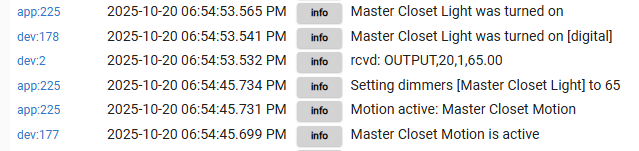
Here's the logs showing the interaction between the motion sensor in my closet, Motion Lighting app, and the Lutron switch. In this partiular case, there was about an 8 second delay from when the app was triggered to when the lights came on. Sometimes it's instant, sometimes it's a short delay, and occasionally it's 10-15 seconds (could be longer, usually I just give up and manually turn the lights on). Any known issues or things I should look for to see what's going on?
Here's the Motion Lighting app - getting some weird layout where the motion sensor selection isn't rendering correctly:
Caught another one this morning. 15 seconds from motion active to lights on. Does this indicate some delay with the Lutron hub? Seems like the commands are being sent and then there's a long delay before the confirmation from Lutron.
Probably worth noting that I have two Lutron hubs due to my high number of devices. My first post was with one, this is with the other, so appears that whatever is happening is impacting both. I just checked both for firmware updates and they both say they are up to date.
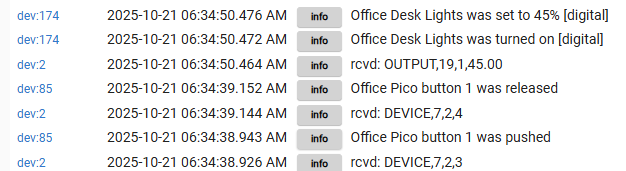
Here's a delay using Button Controller. I don't have app logs enabled, but in this case I push a pico button to turn on a plug in dimmer. 11 second delay from command sent to lights on.
Does support still monitor these threads? Been awhile since I've been on. @bobbyD do I need to enter a ticket or anything? Or is this something I need to contact Lutron about?
Also having an issue with delayed lights, though not with Lutron. I have a Third Reality Motion Sensor that I use to trigger a scene in my bathroom. It takes 1-2 seconds to for the scene to turn on during the day and evening mode on my hub and oddly enough, around 7-8 seconds during the night mode. I can’t seem to make sense of it either.
So here's the scoop:
Caseta bridges all use the same channel for their communication, unlike the RA2 repeater which can use a different channel.
The likely cause for this delay being the devices being controlled by the automation reside on different bridges, and when the action triggers commands are sent to both bridges at about the same time, the bridges themselves see the channel being utilized and back off until they see its clear to send.
I experienced the exact same issue when configuring automations between devices on my RA2 repeater and Caseta bridge in the same building. RA2 allows you to change the channel (and after doing this issues were gone), Caseta does not.
You could try adding metering for the devices, or move devices between bridges such that automations only trigger devices located on one of the two bridges
This is a recent change though, everything has been super stable for nearly 4 years since I moved into the house and set everything up. What would cause this to change just recently?
Also, the automations that are running that are action based instead of time (motion, contact, button, etc) run on a single Lutron bridge. I have two of them, but have the devices segregated into downstairs & garage on one, and upstairs & detached shop on the other. I could see time-based automations where devices on both bridges being activated at the same time causing issues, but the actions where I'm seeing delays are happening on a single bridge at a time.
As an example, these are the unfiltered logs from the time around the screenshot from my first post. I circled the event in question in red, and the only other changes happening with either Lutron bridge in green around this same time. The second bridge (dev 205) appears to be completely inactive during this time, and the first bridge (dev 2) only had two events that were a minute apart.
There literally haven't been any changes to the Lutron integration or telnet hub code in some time.
I've not seen any issues like you describe, not dismissing the problem...
What I'm running
pro bridge 53 devices: picos, dimmers, switches
RA2 repeater 55 devices: motion sensors, shades, garage controllers, thermostats, picos and keypads
The issue you describe as evidenced in the telnet logs specifically points to interference of some type, be that the pro bridges fighting for air time, or something else in that frequency band...
To eliminate the bridges fighting amongst them selves as a cause you could power off one of them and test an automation that's running on the other.
If things don't sort after that you may have to dig into other environmental changes
Hmmm we did have new neighbors move in a month or so ago, I wonder if they might have something that's interfering? Timelines roughly align, although I don't remember exactly when the issues started. Closest spot on their house (garage) is about 130 ft from my bridges, and closes spot that's actually indoors is 160 ft, according to distance measurements on Google maps. I don't have anything for an RF survey though.
Lutron clear connect type A (caseta and ra2) operate at 434Mhz, so a WiFi router isn't going to mess with this.
Did you try taking one of your bridges off line as I recommended?
Half of problem solving involves explicitly determining what isn't a problem...
Not yet. I started another telnet logging session to both bridges from my laptop earlier today and oddly enough I haven't had any delays. Probably just coincidence. I'll keep an eye on things and find a good time to disable one of the hubs soon and report back.
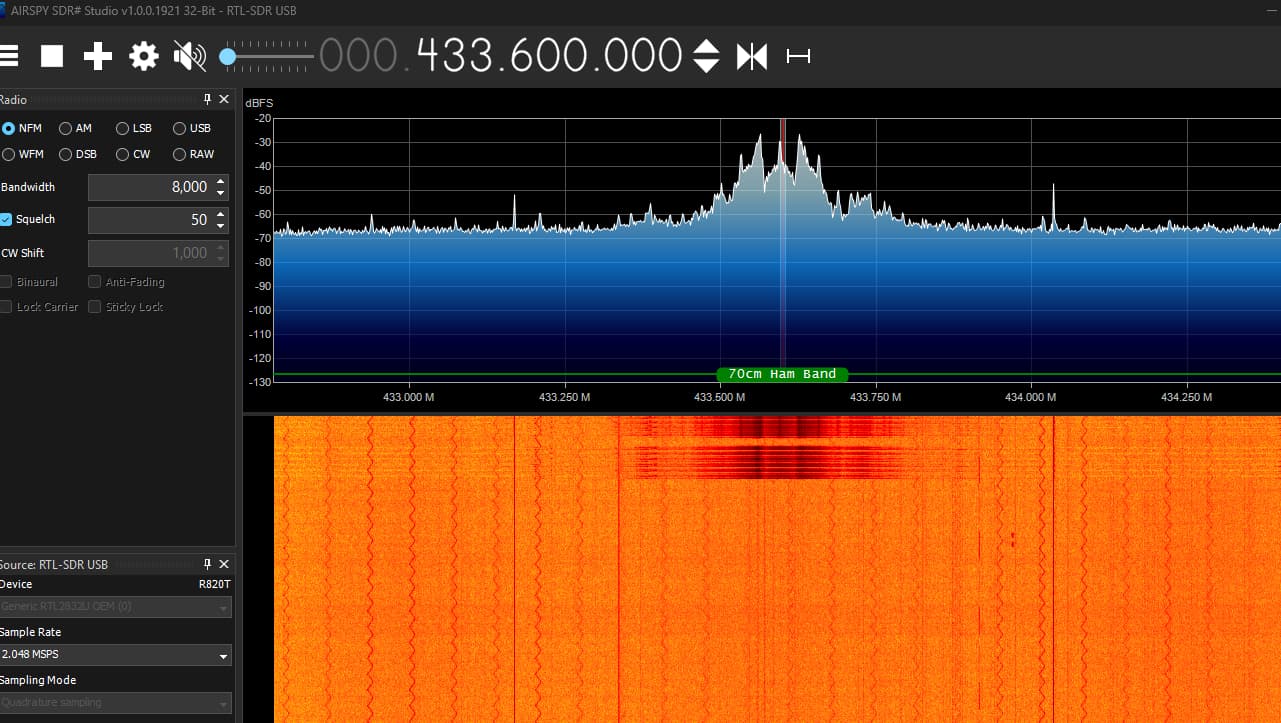
Still have not disabled a smart bridge, but I did buy an RF monitoring dongle. I just tried turning a light on directly from a Hubitat dashboard while monitoring the RF channel.
I pushed a dashboard button, local dashboard on my PC that's wired into the same network switch as Hubitat. The dashboard showed me the hourglass for 4 seconds. There was zero RF activity around this time on the 433.6mhz channel I found Lutron communicating on. As soon as the hourglass changed I saw the RF transmit activity and the light turned on, and the logs populated.
So the question is....what is happening in those several seconds between when I click the dashboard button and when the RF signal lights up and the lights actually turn on?
Coming back to this comment @mike.maxwell - are you saying that when a single light on one bridge is commanded "on" from Hubitat, it sends the telnet command to both bridges at the same time?
I only have one Lutron hub while experiencing similar issues. I would guess it's been the last 4-6 weeks. It seems like if I haven't used a pico in a while, it works immediately on 1st push, However, if I push a button then push another one within a couple seconds, the 2nd action is delayed.
Yeah based on what I'm seeing with the RF scanner it's not an interference issue...although I'm far from an expert
I have a support case open with Lutron as well, wondering if they can see anything on their end. Really if I could just confim when the request is sent from Hubitat to Lutron that would tell the story. I tried Wireshark but I can't see direct communication between any of my devices, I think due to my network switch.