Comfort Engine is a Hubitat app that creates a child thermostat and adjusts the real thermostat based on how the room feels, not just the raw temperature.
Description
Comfort Engine adds a comfort-focused thermostat layer to Hubitat.
It creates a child thermostat device that users, dashboards, and automations can control like a normal thermostat. When someone changes that child thermostat, the app treats it as the desired comfort target and then makes small adjustments to the real thermostat based on indoor temperature, humidity, and optional fan, outdoor temperature, and occupancy inputs.
Highlights
Creates a Generic Component Thermostat child device
Uses indoor temperature and humidity to estimate perceived comfort
Can optionally factor in fan state, outdoor temperature, and occupancy
Supports heat, cool, and auto
Limits how far it can adjust the real thermostat
Includes sensitivity and minimum-delay settings to reduce over-correction
Can optionally use a fan first for small warm discomfort
Why it exists
Sometimes a room feels too warm or too cool even when the measured temperature looks right. Comfort Engine helps smooth that out by adjusting the real thermostat around a user’s requested comfort target instead of reacting only to raw temperature.
This is going to fill a huge gap, resolve a major headache, and improve WAF.
The ability to factor in outside temperature is very useful on extreme cold/hot days, as well as transition seasons of spring and fall. So, all year long!
My setup has 4 virtual thermostats - one for each bedroom and one for the family room. Then there is rule which controls the actual HVAC thermostat and smart vents. Currently playing around with the family room.
One request, make this installable multiple times (and can also be renamed), just like Thermostat Scheduler and Thermostat Controller apps, um, er, automations. My house is zoned by these virtual thermostats. I know others have multiple physical thermostats/zones/HVAC units.
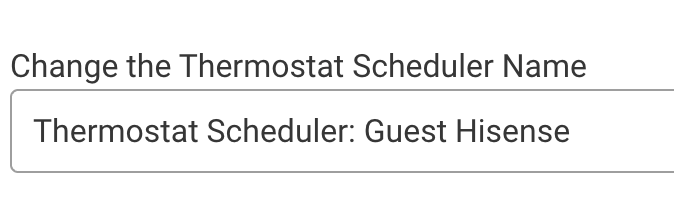
I would suggest that the name of the comfort engine and the device have the real thermostat's name tacked onto the end as the default. Just like Thermostat Scheduler:
I created a new Scheduler. Once I chose the thermostat, the name defaulted to this.
Find this concept very interesting and half of a problem I've been playing with - wondering if this added bit of data helps shape this any, so just putting it out there:
Is the outdoor temperature "better" or "worse" than the indoor temp? Should my windows be open or closed as it transitions?
Essentially been playing with rules that take into account the humidity and temp inside and doing the same outside. Multiple sensors need to poll outside to accomodate sunny vs shade. Same inside. And, then send an alert to go open the windows, or close the windows as the case may be. (I don't have a fancy self-opening setup, but I do understand there are some zwave devices that do this)
Not that it fits as well, but the last bits of my windows management of course is "does this window have to be shut because it's raining" (not all of mine do) and the LUX on that side of the house says lower the shades in the summer, or raise them in the winter to benefit. These latter things don't fit the thermostat intent, but do fit the "comfort engine" concept...
Love that. Yep, I'm a midwestern born who grew up with "open the windows" all my life, and now find myself in NC where the humidity makes any rules hell to manage. I am all about what you're saying... down to the point I close my shades on "sunrise +-" throughout the day just to try to keep the Aug cooling costs down. The remembering to open/close the windows is a part of it as an overnight pleasant becomes a morning hell.
Temp changes with humidity make a LOT of sense in any event. Thanks, I suspect this will change my rules for the better.
@bcopeland really interested in the concept here as we have the same issues in our house and the UK.
We only have heat here though and no fans as everything is done via RADs and TRVs. Basically every room has a multi sensor 6 and extra temperature sensor. There is one heating "zone" controlled from a tado matter thermostat via OPENtherm and in the bedrooms we have the tado matter TRV. So when the matter TRVs call for heat even if the thermostat is not calling it can still call for heat from the boiler due to the opentherm. This basically means we actually have 4 zones of heating.
However when any of them call as we still only have "one" zone the whole lot can warm up if any of the "dumb" TRVs are open.
So I think your app will help here but how do you think it should be set up?
Just curious - Have you considered replacing the 'dumb' TRVs with the Tado matter ones you have in the bedrooms? It seems as though you're half in, half out of a zoned setup. Before I had Hubitat or any hub setup I replaced all of my TRVs (except one in the hallway) with Honeywell HR92's and their EvoHome setup. Apart from the benefits of being able to have separate schedules per room, it has helped with balancing the temperature across rooms so that we're not relying on a single central thermostat.
I brought them on prime day last year to see if they were any good and how they would work. I hoped that they would be able to call for heat but at first they did not. That seemed to change recently. So in answer to the question, yes it is something I may now look at if I can get them on sale again. But also i still want to "bed" them in a bit more for things like how long they last and if they help balance as you mentioned before i get the rest.
Really loving this and noticed an immediate improvement in how comfortable I feel!
One request: I like that the app can be paused by presence as I change the thermostat set points when I’m away. But I don’t see a way to pause at other times. I also change the set points at night. Being able to either pause or change the comfort temperature when mode is asleep would be great.
Yes, I realize that. Really pausing in sleep mode would work better for me because I already have automated set points. But I’ll look into automating the comfort temp setting as well in the meantime I guess. I assume it’s available in RM.

 My house is zoned by these virtual thermostats. I know others have multiple physical thermostats/zones/HVAC units.