Hi all,
I'm running a C-4 hub and it mostly works fine but I have a sonoff water valve that is supposedly zigbee 3.0 and my hub really struggles to control it. I'm not sure what zigbee dongle I currently have but its a hubitat branded one that I bought second hand with the hub and my assumption is that its not 3.0. So, my thought was to just plug in a 3.0 dongle (I first got a cheap knock off one and then got the Sonoff zigbee 3.0 plus dongle). I followed the instructions for switching the dongle but each time my zigbee network is reported as offline. So my question is, is the c-4 hub in compatable with this type of dongle or is there some software fix I am missing?
The C3/C4 hubs only work with the original Hubitat provided Zigbee dongle. This radio is Zigbee HA1.2, not Zigbee 3.0.
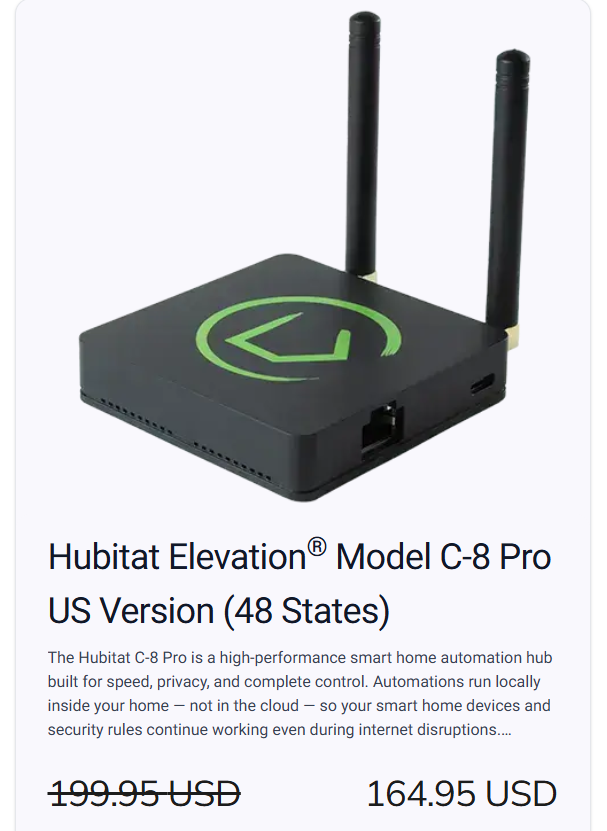
Hubitat's C8 and C8-Pro hubs have an integrated Zigbee 3.0 radio, as well as a multi-country Z-Wave 800 series radio.
Sonoff valves and most other zigbee 3.0 devices will fall back to ZHA 1.2 during pairing and should work with your C-4. I had Sonoff valves with my C-7 and they worked fine; the C-7 also only supported ZHA 1.2 like the C-4.
I would encourage you to consider other insufficiencies in your zigbee mesh. Since the valve works sporadically, the issue is unlikely to be one where there is an incompatibility with the C-4's zigbee dongle/radio. Rather, your zigbee mesh may not have a sufficient number of good zigbee repeaters. There are several threads on the Hubitat community indicating which line-powered devices work well as zigbee repeaters.
Thank for confirming. This is what I suspected.
What about the new MQTT integration? Could it work on a C-4 with Z2M? Asking for a friend 
It should.
This is a good upgrade. Might want to grab them at this price before Hubitat can’t bare the cost hike of the memory anymore.
Homey just announced they will need to raise the price of their pro hub by $100 USD. It was already too expensive and now they’re forced to price themselves out of range of most people.
This was my other concern but I've only got a very small house with about 10 devices (5 of which are connected through a hue bridge). The valvue is only about 3 to 4m away from the hub and pairs fine just wont be controlled by it. I've got a smart plug nearer to the valve set up as mesh enabled and it shows on the zigbee graph but the valve still seems to want to connect directly to the hub.
These 5 devices are irrelevant to your Hubitat zigbee mesh.
So that leaves you with 5 devices, presumably all zigbee, paired to Hubitat. Of those, we know one of them is a smart plug that can potentially repeat. However, the quality of individual repeaters varies substantially; without knowing the brand/model, I cannot comment on its function as a zigbee repeater.
Unfortunately, it would appear that your mesh is too small to support a stable connection to the valve. Zigbee is a mesh protocol whose reliability depends on multiple repeaters (line-powered devices) acting as intermediaries between end devices, like the valve, and the hub.
I would encourage you to read this document from the Hubitat Documentation.
https://docs2.hubitat.com/en/how-to/build-a-solid-zigbee-mesh
- What Zigbee channel is your Hubitat hub using?
- What Zigbee channel is your Philips Hue Bridge using?
- What 2.4GHz WiFi channel(s) is your router/wirless access point(s) using?
- What is the channel width used by your 2.4GHz WiFi?
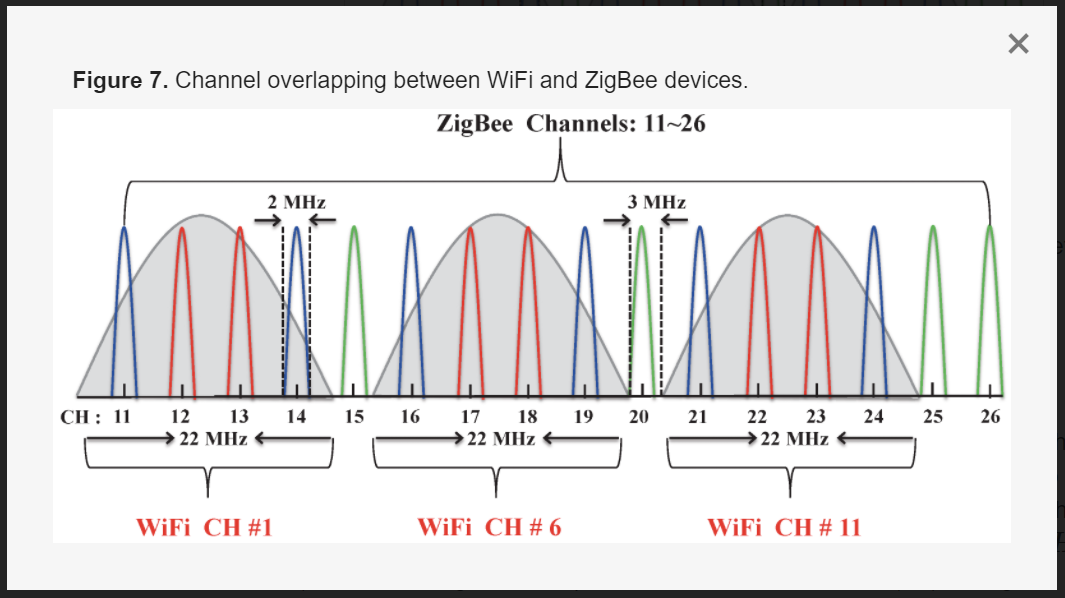
It is best to make sure the Hubitat Hub and the Philips Hue bridge are using different Zigbee channels. The best Zigbee channels to use to prevent conflicts with 2.4GHz WiFi are Zigbee channels 15, 20, or 25.
For your 2.4GHz WiFi, please make sure you are using channels 1, 6, or 11 with a 20MHz channel width.
Here is a graphical representation of the above. Hope this helps.
The plug is a cheap Tuya plug I got from Aliexpress so works fine as a plug but I guess probably not going to be great for a repeater. The other devices are all battery powered (2x buttons, 1 x door sensor). Having read the link you sent my 4 devices (inc water valve) are well within the 32 limit for the hub and it is far less than the 6-12 m away from the hub so I'm starting to think the issue may be with my management of the valve not my mesh or network. I'm using the Tuya Zigbee Valve driver, is that what you would recommend.
Hubitat channel is 15
Philips Hue channel is 20
Don't know what channel my WiFi router is but I have not adjusted that
When I scanned the channel there was something else at channel 25

The Zigbee channel scan will not show 2.4GHz WiFi interference.
I would recommend you take a look at your 2.4GHz WiFi settings on your router/access points and configure it as mentioned above to avoid the possibility of interference.
Zigbee devices use higher power during pairing, and then fall back to lower power to conserve battery use. 3 of your 4 devices are within range to communicate with the hub while using lower power. The fourth, the water valve, is not within range while using lower power.
Changing drivers won't fix this situation. It can only be remedied by making the zigbee mesh resilient with a sufficient number of repeaters.
Edit: BTW, you can test this hypothesis. Disconnect the valve from the spigot and re-pair it next to the hub. Then try controlling it while it is close to the hub. If it works, move it to its original location and repeat this test.
If you have access to an IKEA, they may still have some ZigBee products left at clearance prices.
If you can find them, the Tradfri and Tretakt plugs work great as repeaters.
You are absolutely right, move it closer and it works. I will get myself some repeaters. There is a plug on the inside of the wall the valve is connected to so hopefully putting one there will help.
I'll let you know how I get on when they arrive.
Thanks for the recommendation. I don't have easy access to an IKEA but found some on ebay :).
Nice!
Once you get them, make sure you check if you need to update the firmware, it makes a big difference on the IKEA stuff, especially the older Tradfri devices.
Hi All,
Just an update. I got the Ikea smart plug and since plugging a couple in and pairing (no firmware update needed so far) my valve has been working flawlessly.
Thanks so much for all you help.and patience explaining the solutions.