[BETA] Tuya Zigbee mmWave Sensors

Hi Petteri,

Try this custom device profile :

{
  "deviceProfiles": {
     "CUSTOM_TS0601_IHSENO_BATTERY": {
      "description": "iHseno 24G MmWave Radar on Battery",
      "device": { "powerSource": "battery" },
      "capabilities": { "MotionSensor": true, "IlluminanceMeasurement": false, "Battery": true },
      "preferences": { 
        "radarSensitivity": "9", 
        "fadingTime": "10"
      },
      "fingerprints": [
        { "profileId": "0104", "endpointId": "01", "inClusters": "0000,0004,0005,EF00", "outClusters": "0019,000A", "model": "TS0601", "manufacturer": "_TZE204_debczeci", "deviceJoinName": "iHseno 24G MmWave Radar on Battery" },
        { "profileId": "0104", "endpointId": "01", "inClusters": "0000,0004,0005,EF00", "outClusters": "0019,000A", "model": "TS0601", "manufacturer": "_TZE284_debczeci", "deviceJoinName": "iHseno 24G MmWave Radar on Battery" },
        { "profileId": "0104", "endpointId": "01", "inClusters": "0000,0004,0005,EF00", "outClusters": "0019,000A", "model": "TS0601", "manufacturer": "_TZE284_1lvln0x6", "deviceJoinName": "iHseno 24G MmWave Radar on Battery" }
      ],
      "tuyaDPs": [
        { "dp": 1, "name": "motion", "type": "enum", "dt": "0x10", "rw": "ro", "min": 0, "max": 1, "defVal": "0", "map": { "0": "inactive", "1": "active" }, "description": "Presence state" },
        { "dp": 4, "name": "battery", "type": "number", "rw": "ro", "scale": 1, "unit": "%", "description": "Battery percentage" },
        { "dp": 9, "name": "radarSensitivity", "type": "enum", "dt": "0x10", "rw": "rw", "min": 0, "max": 2, "map": { "0": "low", "1": "medium", "2": "high"  }, "defVal": "1", "title": "<b>Radar sensitivity</b>", "description": "<i>Select the radar sensitivity</i>" },
        { "dp": 10, "name": "fadingTime", "type": "enum", "rw": "rw", "dt": "0x10", "min": 0, "max": 2, "map": { "0": "15s", "1": "30s", "2": "60s"  }, "defVal": "1", "unit": "seconds", "title": "<b>Fading time</b>", "description": "<i>Motion keep time</i>" }
      ],
      "refresh": ["queryAllTuyaDP"],
      "configuration": { "battery": true },
      "comments": ["CUSTOM_TS0601_IHSENO_BATTERY",
        "https://community.hubitat.com/t/beta-tuya-zigbee-mmwave-sensors/137410/445?u=kkossev"
        ] 
    }
	
  },
  "version": "4.2.0",
  "timestamp": "2025-12-13 8:58 PM",
  "description": "CUSTOM Device profiles for Tuya Zigbee mmWave Sensor",
  "author": "kkossev"
}
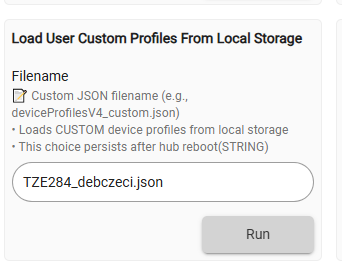
  • Save the JSON on your PC, name it as an example "TZE284_debczeci.json"

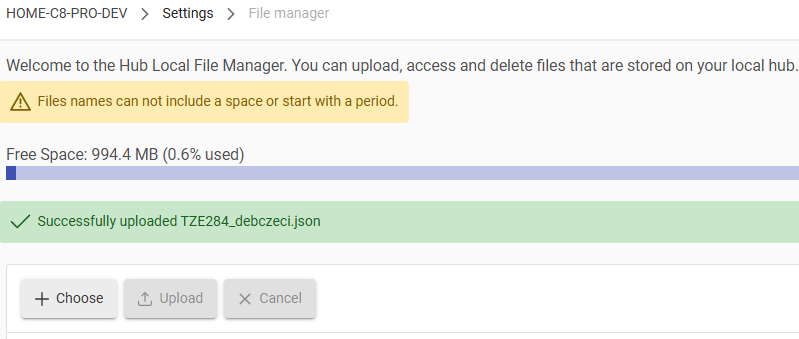
  • Use HE File Manager to upload it to HE local storage

  • Load the Custom Profile :

image

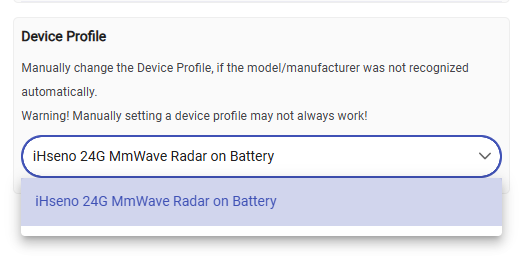
  • Select it as an active Device Profile :
    image

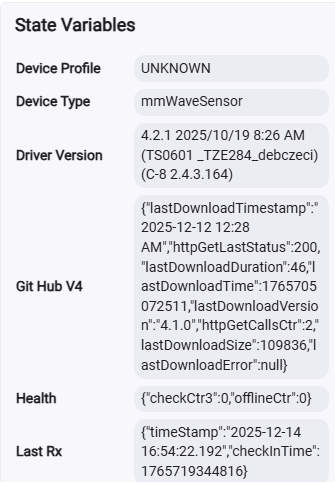
  • refresh the browser page and check whether the deviceProfile in the State Variables is the correct one :
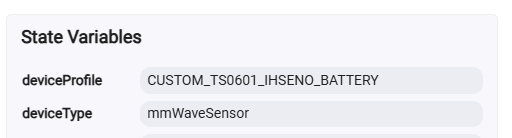
image

Let me know whether it works, including changing the radarSensitivity and the fadingTime.


P.S. It was a fun time reading the AliExpress seller warnings ... :slight_smile:


:slight_smile:

3 Likes

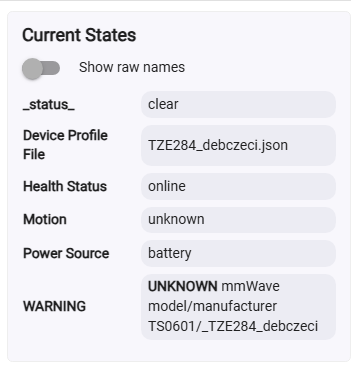
image
image
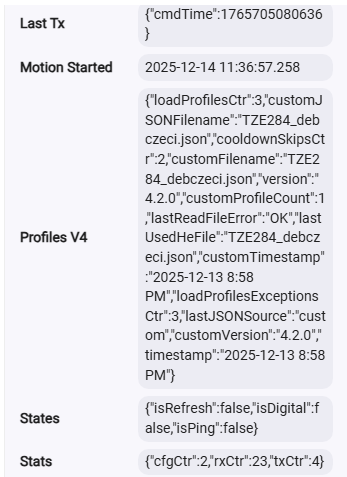
image

Did you go through these steps?

Selected again and now it looks better. Motion inactive but motion started shows correct time/date

1 Like

Forced to active and now it works, thanks a lot

1 Like

Please test whether the Preferences are working (changing the radarSensitivity and the fadingTime). If all is working OK, I will move this custom JSON 'device profile' into the standard profiles JSON.

Fading time has no effect I believe. If sensitivity is changed Motion stays for like 25 seconds, no matter the fading setting. Isn't this a presense sensor? It should stay active as long as don't leave the room. Have I understood things wrong?

What it is supposed to do and what it actually does can be very different things, especially with Tuya devices :sweat_smile:

Assuming it's not defective or has some kind of bad design issue, it will likely just take some patience and some trial-&-error with the various settings to get it performing like you want it to.

1 Like


Medium and 15seconds. States say 0 for both.

Can you copy and paste the Zigbee messages that the device sends when you remove the battery for 30 seconds and then power it back on?

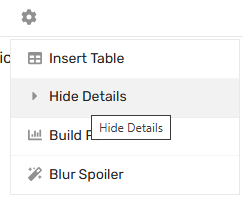
Use the 'Hide Details' from the cog wheel drop-down menu in the forum message editor:
image

Summary

dev:39342025-12-16 07:30:50.405

debug

Radar ZY-M100 MyRoom skipped illuminance 4, less than delta 10 (lastIllum=11)

dev:39342025-12-16 07:30:50.087

debug

Radar ZY-M100 MyRoom motion is active (raw:1) (no change)

dev:39342025-12-16 07:30:50.084

debug

Radar ZY-M100 MyRoom standardParseTuyaCluster: command=02 dp_id=4 dp=1 (0x01) fncmd=1 fncmd_len=1 (index=0)

dev:39342025-12-16 07:30:50.082

debug

Radar ZY-M100 MyRoom parse: descMap = [raw:catchall: 0104 EF00 01 01 0040 00 E03B 01 00 0000 02 01 009C0104000101, profileId:0104, clusterId:EF00, clusterInt:61184, sourceEndpoint:01, destinationEndpoint:01, options:0040, messageType:00, dni:E03B, isClusterSpecific:true, isManufacturerSpecific:false, manufacturerId:0000, command:02, direction:01, data:[00, 9C, 01, 04, 00, 01, 01]] description=catchall: 0104 EF00 01 01 0040 00 E03B 01 00 0000 02 01 009C0104000101

dev:39342025-12-16 07:30:48.198

debug

Radar ZY-M100 MyRoom Tuya check-in (AppVersion=1F)

dev:39342025-12-16 07:30:48.196

debug

Radar ZY-M100 MyRoom parse: descMap = [raw:E03B0100001801002046E2FF201FE4FF2000, dni:E03B, endpoint:01, cluster:0000, size:18, attrId:0001, encoding:20, command:0A, value:46, clusterInt:0, attrInt:1, additionalAttrs:[[value:1F, encoding:20, attrId:FFE2, consumedBytes:4, attrInt:65506], [value:00, encoding:20, attrId:FFE4, consumedBytes:4, attrInt:65508]]] description=read attr - raw: E03B0100001801002046E2FF201FE4FF2000, dni: E03B, endpoint: 01, cluster: 0000, size: 18, attrId: 0001, encoding: 20, command: 0A, value: 46E2FF201FE4FF2000

dev:39342025-12-16 07:30:46.548

debug

Radar ZY-M100 MyRoom zigbee private cluster 0xEF00 command 0x00 response: Success

dev:39342025-12-16 07:30:46.545

debug

Radar ZY-M100 MyRoom parse: descMap = [raw:catchall: 0104 EF00 01 01 0040 00 E03B 00 00 0000 0B 01 0000, profileId:0104, clusterId:EF00, clusterInt:61184, sourceEndpoint:01, destinationEndpoint:01, options:0040, messageType:00, dni:E03B, isClusterSpecific:false, isManufacturerSpecific:false, manufacturerId:0000, command:0B, direction:01, data:[00, 00]] description=catchall: 0104 EF00 01 01 0040 00 E03B 00 00 0000 0B 01 0000

dev:39342025-12-16 07:30:46.498

debug

Radar ZY-M100 MyRoom zigbee private cluster 0xEF00 command 0x00 response: Success

dev:39342025-12-16 07:30:46.495

debug

Radar ZY-M100 MyRoom parse: descMap = [raw:catchall: 0104 EF00 01 01 0040 00 E03B 00 00 0000 0B 01 0000, profileId:0104, clusterId:EF00, clusterInt:61184, sourceEndpoint:01, destinationEndpoint:01, options:0040, messageType:00, dni:E03B, isClusterSpecific:false, isManufacturerSpecific:false, manufacturerId:0000, command:0B, direction:01, data:[00, 00]] description=catchall: 0104 EF00 01 01 0040 00 E03B 00 00 0000 0B 01 0000

dev:39342025-12-16 07:30:46.484

debug

Radar ZY-M100 MyRoom zigbee private cluster 0xEF00 command 0x00 response: Success

dev:39342025-12-16 07:30:46.482

debug

Radar ZY-M100 MyRoom parse: descMap = [raw:catchall: 0104 EF00 01 01 0040 00 E03B 00 00 0000 0B 01 0000, profileId:0104, clusterId:EF00, clusterInt:61184, sourceEndpoint:01, destinationEndpoint:01, options:0040, messageType:00, dni:E03B, isClusterSpecific:false, isManufacturerSpecific:false, manufacturerId:0000, command:0B, direction:01, data:[00, 00]] description=catchall: 0104 EF00 01 01 0040 00 E03B 00 00 0000 0B 01 0000

dev:39342025-12-16 07:30:46.469

debug

Radar ZY-M100 MyRoom zigbee private cluster 0xEF00 command 0x00 response: Success

dev:39342025-12-16 07:30:46.466

debug

Radar ZY-M100 MyRoom parse: descMap = [raw:catchall: 0104 EF00 01 01 0040 00 E03B 00 00 0000 0B 01 0000, profileId:0104, clusterId:EF00, clusterInt:61184, sourceEndpoint:01, destinationEndpoint:01, options:0040, messageType:00, dni:E03B, isClusterSpecific:false, isManufacturerSpecific:false, manufacturerId:0000, command:0B, direction:01, data:[00, 00]] description=catchall: 0104 EF00 01 01 0040 00 E03B 00 00 0000 0B 01 0000

dev:39342025-12-16 07:30:46.443

debug

Radar ZY-M100 MyRoom zigbee private cluster 0xEF00 command 0x00 response: Success

dev:39342025-12-16 07:30:46.440

debug

Radar ZY-M100 MyRoom parse: descMap = [raw:catchall: 0104 EF00 01 01 0040 00 E03B 00 00 0000 0B 01 0000, profileId:0104, clusterId:EF00, clusterInt:61184, sourceEndpoint:01, destinationEndpoint:01, options:0040, messageType:00, dni:E03B, isClusterSpecific:false, isManufacturerSpecific:false, manufacturerId:0000, command:0B, direction:01, data:[00, 00]] description=catchall: 0104 EF00 01 01 0040 00 E03B 00 00 0000 0B 01 0000

Also, copy/paste the messages that follow saving the Preferences. Make sure the Debug logging was enabled.

Absolutely nothing after adding batteries, but when changed Sensitivity to High then there are debug messages as follows

Summary

dev:9132025-12-16 18:46:29.328debugLäsnäolotunnistin zigbee private cluster 0xEF00 command 0x00 response: Success
dev:9132025-12-16 18:46:29.323debugLäsnäolotunnistin parse: descMap = [raw:catchall: 0104 EF00 01 01 0040 00 24D1 00 00 0000 0B 01 0000, profileId:0104, clusterId:EF00, clusterInt:61184, sourceEndpoint:01, destinationEndpoint:01, options:0040, messageType:00, dni:24D1, isClusterSpecific:false, isManufacturerSpecific:false, manufacturerId:0000, command:0B, direction:01, data:[00, 00]] description=catchall: 0104 EF00 01 01 0040 00 24D1 00 00 0000 0B 01 0000
dev:9132025-12-16 18:46:29.308debugLäsnäolotunnistin zigbee private cluster 0xEF00 command 0x00 response: Success
dev:9132025-12-16 18:46:29.300debugLäsnäolotunnistin parse: descMap = [raw:catchall: 0104 EF00 01 01 0040 00 24D1 00 00 0000 0B 01 0000, profileId:0104, clusterId:EF00, clusterInt:61184, sourceEndpoint:01, destinationEndpoint:01, options:0040, messageType:00, dni:24D1, isClusterSpecific:false, isManufacturerSpecific:false, manufacturerId:0000, command:0B, direction:01, data:[00, 00]] description=catchall: 0104 EF00 01 01 0040 00 24D1 00 00 0000 0B 01 0000
dev:9132025-12-16 18:46:24.592debugLäsnäolotunnistin getDeviceProfilesSource: using CUSTOM profiles for device 24D1
dev:9132025-12-16 18:46:24.361infoLäsnäolotunnistin updated
dev:9132025-12-16 18:46:24.360debugLäsnäolotunnistin sendZigbeeCommands: sent cmd=[he cmd 0x24D1 0x01 0xEF00 0x00 {0C32090x10000102} {}, delay 201]
dev:9132025-12-16 18:46:24.354infoLäsnäolotunnistin setPar: (2) sending parameter radarSensitivity (2 (scaledValue=2))
dev:9132025-12-16 18:46:24.352debugLäsnäolotunnistin Läsnäolotunnistin getTuyaCommand (dp=09 fncmd=02 dp_type=0x10) = [he cmd 0x24D1 0x01 0xEF00 0x00 {0C32090x10000102} {}, delay 201]
dev:9132025-12-16 18:46:24.347debugLäsnäolotunnistin sendTuyaParameter: sending parameter radarSensitivity dpValHex 02 (raw=2) Tuya dp=09 dpType=0x10
dev:9132025-12-16 18:46:24.340debugLäsnäolotunnistin setPar(radarSensitivity, 2)
dev:9132025-12-16 18:46:24.337debugLäsnäolotunnistin updateAllPreferences: foundMap = [defVal:1, description:Select the radar sensitivity, dp:9, dt:0x10, map:[0:low, 1:medium, 2:high], max:2, min:0, name:radarSensitivity, rw:rw, title:Radar sensitivity, type:enum]
dev:9132025-12-16 18:46:24.331debugLäsnäolotunnistin sendZigbeeCommands: sent cmd=[he cmd 0x24D1 0x01 0xEF00 0x00 {9C020A0x10000100} {}, delay 201]
dev:9132025-12-16 18:46:24.320infoLäsnäolotunnistin setPar: (2) sending parameter fadingTime (0 (scaledValue=0))
dev:9132025-12-16 18:46:24.318debugLäsnäolotunnistin Läsnäolotunnistin getTuyaCommand (dp=0A fncmd=00 dp_type=0x10) = [he cmd 0x24D1 0x01 0xEF00 0x00 {9C020A0x10000100} {}, delay 201]
dev:9132025-12-16 18:46:24.308debugLäsnäolotunnistin sendTuyaParameter: sending parameter fadingTime dpValHex 00 (raw=0) Tuya dp=0A dpType=0x10
dev:9132025-12-16 18:46:24.295debugLäsnäolotunnistin setPar(fadingTime, 0)
dev:9132025-12-16 18:46:24.292debugLäsnäolotunnistin updateAllPreferences: foundMap = [defVal:1, description:Motion keep time, dp:10, dt:0x10, map:[0:15s, 1:30s, 2:60s], max:2, min:0, name:fadingTime, rw:rw, title:Fading time, type:enum, unit:seconds]
dev:9132025-12-16 18:46:24.284debugLäsnäolotunnistin updateAllPreferences: preferences=[fadingTime:10, radarSensitivity:9]
dev:9132025-12-16 18:46:24.281debugLäsnäolotunnistin getDeviceProfilesSource: using CUSTOM profiles for device 24D1
dev:9132025-12-16 18:46:24.279debugLäsnäolotunnistin current state.deviceProfile=CUSTOM_TS0601_IHSENO_BATTERY, settings.forcedProfile=iHseno 24G MmWave Radar on Battery, getProfileKey()=CUSTOM_TS0601_IHSENO_BATTERY
dev:9132025-12-16 18:46:24.275debugLäsnäolotunnistin getDeviceProfilesSource: using CUSTOM profiles for device 24D1
dev:9132025-12-16 18:46:24.269debugLäsnäolotunnistin customUpdated()
dev:9132025-12-16 18:46:24.267debugLäsnäolotunnistin deviceHealthCheck is scheduled every 60 minutes
dev:9132025-12-16 18:46:24.196infoscheduling health check every 60 minutes by Activity check method
dev:9132025-12-16 18:46:24.133infoLäsnäolotunnistin driver version 4.2.1 2025/10/19 8:26 AM (TS0601 _TZE284_debczeci) (C-8 2.4.3.171)
dev:9132025-12-16 18:46:24.129infoLäsnäolotunnistin updated()...
dev:9132025-12-16 18:43:27.401infoLäsnäolotunnistin is now online!
dev:9132025-12-16 18:43:27.400infoLäsnäolotunnistin healthStatus changed to online

Hi Jann,

I am responding in this thread because the Sonoff SNZB-06P is an mmWave sensor and is supported by the Tuya Zigbee mmWave Sensors driver. The Tuya Zigbee 4 In 1 driver is only for PIR sensors.

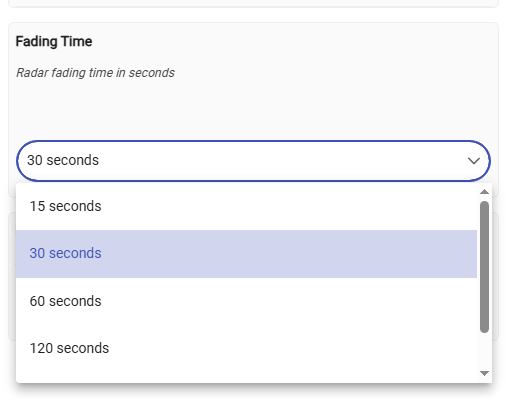
In this driver, the relevant preference is called 'Fading Time.', also known as a 'Cooldown time'. Its default value is set to 30 seconds, which indicates how long the mmWave sensor should wait after it stops detecting a human 'presence' before switching the HE standard 'motion' attribute to an inactive state.
image

No, do not attempt to set the keep time or fading time to zero (this driver should prevent it!) or to a value that is too low to maintain stable presence detection. A default setting of 30 seconds is a good starting point. If the mmWave sensor loses track of a person and the lighting turns off, you can consider increasing this parameter. The larger the 'keep time,' the more stable the mmWave detector will operate.

1 Like

Ahhh... I'll try that driver. For some reason I thought I'd read the "Tuya Zigbee mmWave Sensors driver" is now the multi-sensor 4-in-1 driver.

Thanks!

*EDIT: I ended up returning the Sonoff devices. They're A: too iffy for me sensor-wise. and B: They're not battery. They're USB-C only and I don't want that. (The amazon desc actually says they're battery...which is why I bought them.) I'm gonna try for the Tuya or IHSENO ones since others here have them working with this driver. Thanks again!

1 Like

Hi @kkossev
My TS0601 _TZE204_ya4ft0w4 had been running with driver 3.4.0 issue-free until I decided to update driver.

I figured out that there is no 'preproc' defined for 'humamMotionState' dp in deviceProfilesV4_mmWave.json. I created a local copy and added preproc poining to 'motionOrNotYA4FT0W4' and 'motion' is properly updated but it seems that local deviceProfiles has to be loaded every time radar/hubitat is restarted.
Is it something that can be fixes in official deviceProfilesV4_mmWave.json?

Hi Lukaszbet,

Yes, there may be bugs after the major refactoring of the deviceProfilesV3 versions ... : (

It will be best to fix the problem in the current version. If you feel comfortable with GitHub, you can post a PR to merge your changes, or simply copy/paste your changes here in a blockquote section. I will make the merge in the next few days.

No, it shouldn't work this way - the local copy of the "deviceProfilesV4_mmWave.json" on Hubitat Storage should not be automatically overwritten on the hub restart. The driver shoud only read the JSON file from the local storage on every hub reboot.

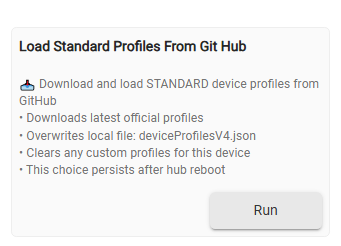
However, accidentaly clicking on this button will owerwrite your local copy :
image


As an emergency restore option - the latest 'hardcoded' device profiles V3 version is 3.5.2, it can be installed from this Google Drive archive link: (old version 3.5.2 link).

1 Like

I modified dp1

"TS0601_YA4FT0W4_RADAR": {
  "description": "Tuya Human Presence Detector YA4FT0W4",
  "device": { "powerSource": "dc" },
  "capabilities": { "MotionSensor": true, "IlluminanceMeasurement": true, "DistanceMeasurement": true, "HumanMotionState": true },
  "preferences": { "radarSensitivity": "2", "staticDetectionSensitivity": "102", "fadingTime": "105", "minimumDistance": "3", "maximumDistance": "4", "distanceReporting": "101" },
  "commands": { "resetStats": "" },
  "fingerprints": [
    { "profileId": "0104", "endpointId": "01", "inClusters": "0004,0005,EF00,0000", "outClusters": "0019,000A", "model": "TS0601", "manufacturer": "_TZE204_ya4ft0w4", "deviceJoinName": "Tuya Human Presence Detector YA4FT0W4 ZY-M100-24GV372" },
    { "profileId": "0104", "endpointId": "01", "inClusters": "0004,0005,EF00,0000", "outClusters": "0019,000A", "model": "TS0601", "manufacturer": "_TZE204_gkfbdvyx", "deviceJoinName": "Tuya Human Presence Detector ZY-M100-24GV3.1" }
  ],
  "tuyaDPs": [
    { "dp": 1, "name": "humanMotionState", "preProc": "motionOrNotYA4FT0W4", "type": "enum", "rw": "ro", "map": { "0": "none", "1": "present", "2": "moving", "3": "none" }, "description": "Presence state" },
    { "dp": 2, "name": "radarSensitivity", "type": "number", "rw": "rw", "min": 1, "max": 10, "defVal": 5, "title": "<b>Motion sensitivity</b>", "description": "Radar motion sensitivity" },
    { "dp": 3, "name": "minimumDistance", "type": "decimal", "rw": "rw", "min": 0.0, "max": 8.25, "defVal": 0.75, "step": 75, "scale": 100, "unit": "meters", "title": "<b>Minimum distance</b>", "description": "Shield range of the radar" },
    { "dp": 4, "name": "maximumDistance", "type": "decimal", "rw": "rw", "min": 0.75, "max": 9.00, "defVal": 6.00, "step": 75, "scale": 100, "unit": "meters", "title": "<b>Maximum distance</b>", "description": "Detection range of the radar" },
    { "dp": 9, "name": "distance", "type": "decimal", "rw": "ro", "min": 0.0, "max": 10.0, "scale": 10, "unit": "meters", "description": "Target distance" },
    { "dp": 101, "name": "distanceReporting", "type": "enum", "rw": "rw", "min": 0, "max": 1, "defVal": "0", "map": { "0": "disabled", "1": "enabled" }, "title": "<b>Distance Reports</b>", "description": "Effectively disable the spammy distance reporting!<br>The recommended default value is <b>disabled</b>" },
    { "dp": 102, "name": "staticDetectionSensitivity", "type": "decimal", "rw": "rw", "min": 0.0, "max": 10.0, "defVal": 5.0, "scale": 1, "title": "<b>Static detection sensitivity</b>", "description": "Presence sensitivity" },
    { "dp": 103, "name": "illuminance", "type": "number", "rw": "ro", "unit": "lx", "description": "illuminance" },
    { "dp": 105, "name": "fadingTime", "type": "decimal", "rw": "rw", "min": 5, "max": 15000, "defVal": 15, "unit": "seconds", "title": "<b>Delay time</b>", "description": "Delay (fading) time" },
    { "dp": 255, "name": "unknownDp255", "type": "enum", "rw": "ro", "description": "unknownDp255" }
  ],
  "refresh": ["queryAllTuyaDP"],
  "spammyDPsToIgnore": [9],
  "spammyDPsToNotTrace": [9],
  "comments": [
    "https://github.com/wzwenzhi/Wenzhi-ZigBee2mqtt/blob/main/M100-ya4ft0-V3-20240907.js",
    "https://github.com/wzwenzhi/Wenzhi-ZigBee2mqtt/blob/main/ms.zy24g3.js",
    "distanceReporting DP101 to disable spammy distance reports"
  ]
},
1 Like

Load the Standard Profiles from GitHub again :

1 Like

Hi @kkossev,

Which profile should I use for _TZE204_fwondbzy?

What is the procedure after changing the profile?

Driver version 4.2.1

Thanks.

TS0601 _TZE204_fwondbzy should be recognized automatically when paired as a new device.... Did you have this driver already installed when you paired the device for the first time?

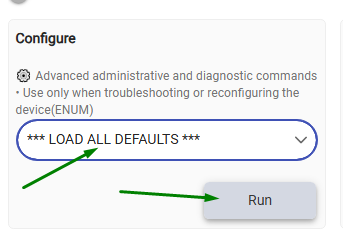
Select 'Load All Defaults' from the Configure drop-down menu and click on the Run button :

image

I had older version.
I just updated to the new version.