It worked. Thank you so much!
Btw do you recommend any mmWave sensor with humidity sensor already included for a bathroom?
In fact I noticed a bug. I receive the motion detected but never the motion inactive by the sensor (just the timeout of the driver - Motion reset to inactive after 629s):

I tried to set the FadingTime to 30 sec but the driver still says 60 sec:
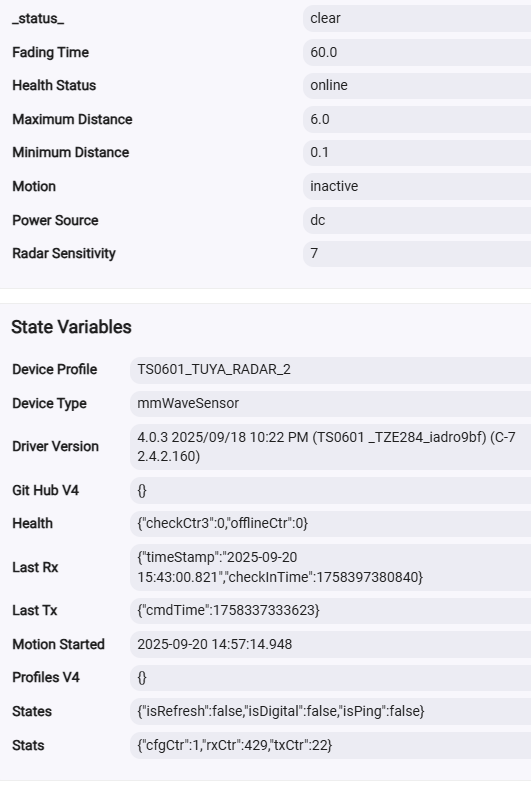
Do you have an ideia what is happening?
The ‘Motion reset to Inactivate’ log is correct, it follows shortly the received message from the the device (Tuya DataPoint 1, value 1).
Can you set the fadingTtime to another, bigger value -for example 120’seconds?
1 Like
Thanks for tagging me, that's really helpful. This kind of thing is not my area of strength by a long way so your help is very much appreciated.
1 Like
@kkossev is the Custom Json function still W.I.P.? Tried to paste a custom json, both hub URL and the json itself but not working.
I also tried to add a custom device to the local hub json downloaded from github but it looks like it is ignoring the new section... Any way i can try a new tuya mmWave HPS?
Thanks!
Ciao Adnrea!
I was quite busy the last two weeks at work, but this weekend I plan to prepare more detailed documentation on how to add new mmWave devices to this driver.
Are you trying to add the ZG-204ZV mmWave device?
Ciao Krassimir,
No, that sensor is working just right with your previous addition.
This time i'm trying to add a 220V mains ceiling mmWave sensor, this one particularily:

Those are the Device Data:
Device Data
Application: 4A
Endpoint Id: 01
In Clusters: 0004,0005,EF00,0000
Manufacturer: _TZE204_1youk3hj
Model: TS0601
Out Clusters: 0019,000A
Software Build: null
Tuya Version: 1.0.10
Done some research and even this is the same form factor and brand, it's not the same sensor: Haozee Zigbee Millimeter Wave Smart Human Presence Detector,Anyone try this device?
The only reference for datapoints i've found is this one:
Even if i tried to make a custom json, or edit the one downloaded from github it doesn't seem to recognize it, for sure i'm doing something wrong.
For completeness i am adding the json i've made:
	"TS0601_HPS": {
      "description": "Haozee Human Presence Sensor Light Switch",
      "device": { "powerSource": "dc" },
      "capabilities": { "MotionSensor": true, "HumanMotionState": true, "DistanceMeasurement": true, "IlluminanceMeasurement": true, "Switch": true },
      "preferences": { "radarSensitivity": "15", "maximumDistance": "13", "smallMotionDetectionSensitivity": "16", "fadingTime": "12", "ledIndicator": "105", "switch": "101", "switchOnTime": "103" },
      "commands": { "resetStats": "" },
      "fingerprints": [
        { "profileId": "0104", "endpointId": "01", "inClusters": "0004,0005,EF00,0000", "outClusters": "0019,000A", "model": "TS0601", "manufacturer": "_TZE204_1youk3hj", "deviceJoinName": "Haozee Human Presence Sensor Light Switch" }
      ],
      "tuyaDPs": [
        { "dp": 1, "name": "presence", "type": "enum", "rw": "ro", "min": 0, "max": 1, "defVal": "0", "map": { "0": "inactive", "1": "active" }, "description": "Presence state" },
        { "dp": 11, "name": "humanMotionState", "type": "enum", "rw": "ro",  "min": 0, "max": 2, "defVal": "0", "map": { "0": "none", "1": "small", "2": "large" }, "description": "Human Motion State" },
		{ "dp": 12, "name": "fadingTime", "type": "number", "rw": "rw", "min": 3, "max": 1799, "defVal": 30, "scale": 1, "unit": "seconds", "title": "<b>Fading time</b>", "description": "<i>Presence timeout</i>" },
		{ "dp": 13, "name": "maximumDistance", "type": "decimal", "rw": "rw", "min": 1.5, "max": 6.0, "defVal": 6.0, "step": 1, "scale": 1, "unit": "meters", "title": "<b>Detection distance</b>", "description": "<i>Detection distance</i>" },
		{ "dp": 15, "name": "radarSensitivity", "type": "number", "rw": "rw", "min": 1, "max": 7, "defVal": 6, "scale": 1, "unit": "", "title": "<b>Motion Detection Sensitivity</b>", "description": "<i>Motion Sensitivity</i>" },
        { "dp": 16, "name": "smallMotionDetectionSensitivity", "type": "number", "rw": "rw", "min": 0, "max": 9, "defVal": 7, "scale": 1, "unit": "", "title": "<b>Motionless Detection Sensitivity</b>", "description": "<i>Presence sensitivity</i>" },
        { "dp": 19, "name": "distance", "type": "decimal", "rw": "ro", "min": 0.0, "max": 6.0, "defVal": 0.0, "scale": 100, "unit": "meters", "description": "Distance to target" },
        { "dp": 101, "name": "switch", "type": "enum", "rw": "rw", "map": { "0": "manual", "1": "auto" }, "defVal": "1", "title": "<b>Switch Work Mode</b>", "description": "<i>Switch Work Mode</i>" },
		{ "dp": 102, "name": "illuminance", "type": "number", "rw": "ro", "min": 0, "max": 2000, "defVal": 0, "scale": 1, "unit": "lx", "title": "<b>illuminance</b>", "description": "<i>illuminance</i>" },
		{ "dp": 103, "name": "switchOnTime", "type": "number", "rw": "rw", "min": 10, "max": 1799, "defVal": 30, "scale": 1, "unit": "seconds", "title": "<b>Switch ON time</b>", "description": "<i>Switch On timeout</i>" },
		{ "dp": 104, "name": "switchState", "type": "enum", "rw": "ro",  "min": 0, "max": 1, "defVal": "0", "map": { "0": "OFF", "1": "ON" }, "defVal": "1", "title": "<b>Switch</b>", "description": "<i>Switch state</i>" },
		{ "dp": 105, "name": "ledIndicator", "type": "enum", "rw": "rw", "map": { "0": "OFF", "1": "ON" }, "defVal": "1", "title": "<b>LED indicator</b>", "description": "<i>Power LED indicator</i>" }
      ],
      "refresh": ["queryAllTuyaDP"],
      "spammyDPsToIgnore": [19],
      "spammyDPsToNotTrace": [19]
    }
1 Like
Give me the Zigbee Model and Manufacturer, I will use it as an example.
Edited my previous message, hit enter before finishing writing! 
I need a coffee...
1 Like
There are errors in your JSON, I am now trying to find a good online tool to easily find and fix the errors.
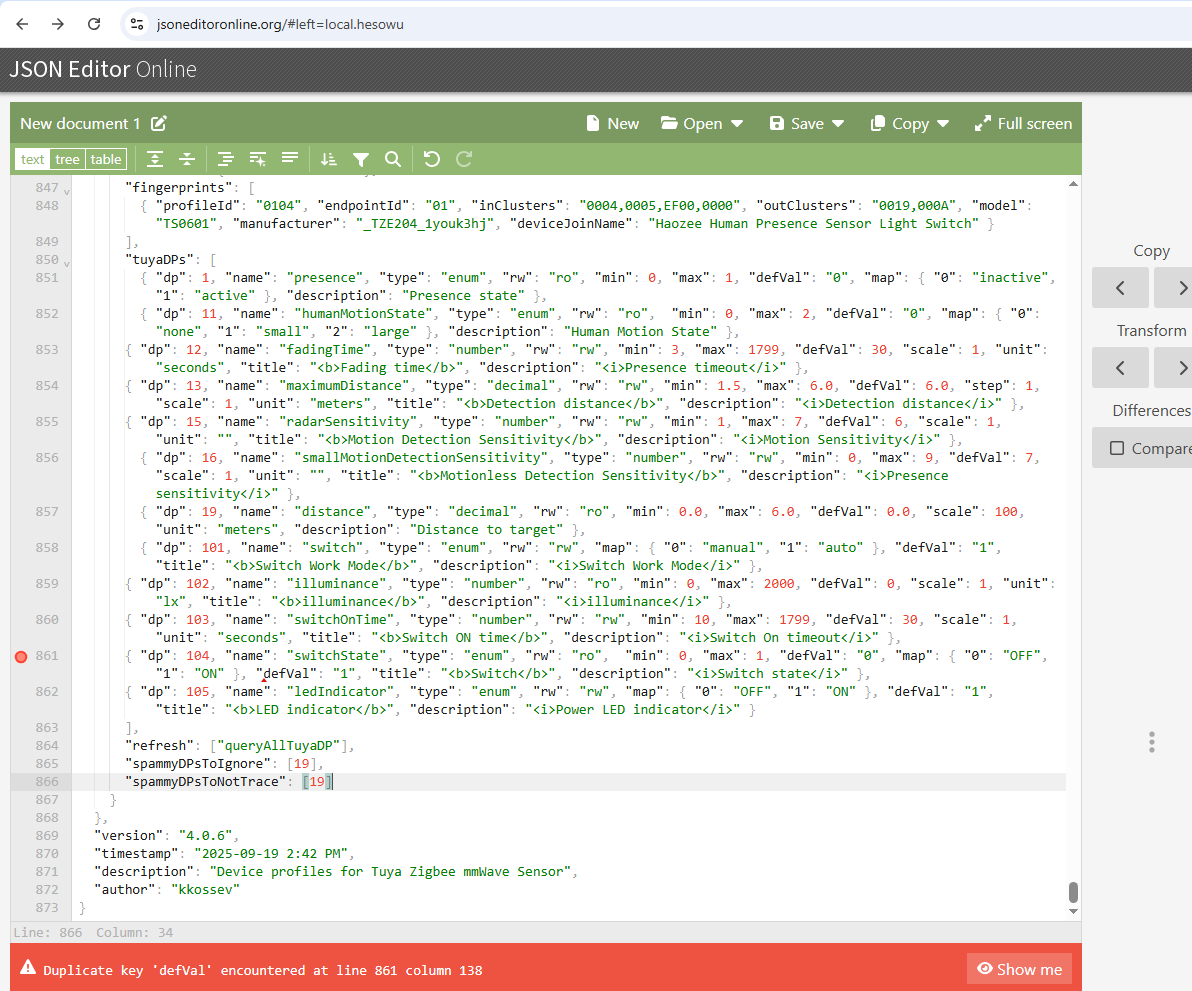
I see now where the problem is - even if you fix the duplicated 'defVal' key in the detault 'deviceProfilesV4_mmWave.json' file on your hub local storage, there is no way to reload the JSON file from the hub local storage .. 
The only workaround is to reboot the hub after editing the JSON file - then the new device profile will show up :


... adding a new device should not require rebooting the hub, of course...
I will notify you when this is fixed in the new version.
1 Like
Hi Andrea, I also have this Human Sensor and I've been using the TS0601_AKPVNNLK_RADAR driver which works nicely for human detection but illumination reporting is missing.
If you don't require illumination detection, this might work for you.
Actually, I'm now following this thread, in the hope that full functionality can be provided.
1 Like
Andrea’s new TS0601_HPS device profile should provide full functionality, the problem is that the process of adding and troubleshooting new devices is still too complicated…  I am thinking how to make it easier and safer.
1 Like
Please update the driver to the new version 4.1.0 "2025/10/11 1:02 PM" (development branch) :
- changed the default URLs to the development branch;
- added 'Update From Local Storage' command,
- show the JSON version and timestamp in the sendInfoEvent;
I am preparing the driver to be updated from HPM (as in the previous v.3), so the direct (manual) update URL is back to the old one - please use this URL from now on :
The driver can be also updated from HPM - use the 'Repair' function :

I have added a new button 'Update From Local Storage'

After adding the new device profile JSON to the 'standard' "deviceProfilesV4_mmWave.json" file on your hub local storage, click on the new 'Update From Local Storage' button. You should see this info message in the Curent States (also in the live logs) :
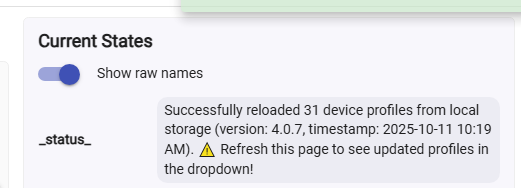
Refreshing the HE device page in the browser is very important, I lost 30 minutes trying to understand why the new TS0601_HPS device profile is not visible ..
The JSON parser in HE does not complain about the duplicated key here :
{ "dp": 104, "name": "switchState", "type": "enum", "rw": "ro", "min": 0, "max": 1, "defVal": "0", "map": { "0": "OFF", "1": "ON" }, "defVal": "1", "title": "<b>Switch</b>", "description": "<i>Switch state</i>" },
but it may be a good idea to fix it and use an online JSON validator/linter before changing the JSON file in your HE File Manager.
Note, that the "deviceProfilesV4_mmWave.json" is common for all diferent mmWave devices on the same hub that use this driver. So, if an error in the JSON file will affect all other devices.... However, you can always click on the 'Update From Git Hub' panic button and reload the last known good configuration! 
Please let me know how it works for you.
In the next version I will probably disable the Advanced option 'Custom Device Profiles JSON', as it is not working as intended at the moment. My last idea here is this to become custom/experimental JSON for a single device profile, that will be added to the 'standard' list of stable and tested device profiles. So whatever errors happen during the testing and troubleshooting of a new device profile, these should affect only the device that you are experimenting with. All other mmWave sensors that use the standard/default JSON file should continue to operate normally, as the custom JSON will be added to the current device only. The implementation of this behaviour is not easy to be done however, so for today lets test the workflow of adding a new device profile to the standard JSON file on your local storage.
1 Like
I updated the driver and added the corrected JSON to the driver, loaded from local storage and it is working as expected (had to reload the page to see the added device).
Now i just have to experiment a bit with the datapoints, to me it seems that it is ignoring both motion and motionless sensitivity settings (though the default parameters look to be okay as far as true/false detections) , the inboard switch settings, the led ON/OFF settings and it looks like lux isn't being reported in debug logging...
As far as presence detection is very precise, really close to the Linptech ES1 but with a bit more range.
3 Likes
After a bit of experimenting with the beta driver i will say that it definitely works.
I'm just experiencing a kinda strange behaviour in the sense that settings are not applied until i see the value set in the Current States tab.
As example: I previously set the current detection distance to 150cm. Reset all current states, set to 300cm and it is still detecting in the 150cm range.
The led turned off, it was previously turned on - until i reset the states it didn't apply settings to the device.
Not sure if it's this device only behaviour, going to try with a yet to configure device from a different manufacturer.
2 Likes
This is great news!
For troubleshooting a specific preference/parameter, you can use the setPar command.
Click on the Run button for a list of the settable parameters :

Then, try changing the preferences one by one, as example :
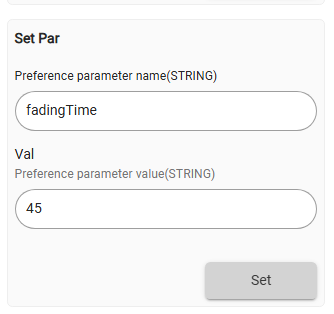
... I was testing this setPar() command with a Linptech/Moes radar and I see now a strange behaviour too... The device should report back the changed parameter, but it doesn't ... 
I am after this issue now, although I already started some big changes in the code to add customJSON file processing, so the fix may may be delayed a bit.
2 Likes
That's the exact behaviour, it looks like parameters are not always set and the device is reporting the previously set one until, for some unknown reason to me cause i couldn't reproduce effectively the behaviour, preferences are set and the device is behaving as expected.
Refreshing from the device page also pulls currently set parameters, so it looks it is something bound to the setPar() function.
Glad you already tracked down the issue, i'll keep on trying things hoping i can help debugging.
All other sensors using this driver are working correctly since the parameters are already correctly set for the environment.
1 Like
For a test, I reverted the driver back to the latest 'hardcoded' version 3.5.2 from the Google Drive archive: (old version 3.5.2 link)
The bad news is that this stable driver version from June is not working either!

Instead of reporing back the changed attribite, the device is sending a generic acknowledgment - and in the wierd Tuya's world, a response code: Success actually means failure!

I propose you to hold on for a while with further testing, until I find the reason for this problem.



