We're looking at you, Ring cameras... 
The Roku app sends a QR code to the phone which the camera has to read to pair. Needless to say, it's not an exact science. 
Another IP address question...this time for my APs.
As w/the connected devices on the Client Device tab, looks like setting a DHCP reservation for APs and switches is also only done from the Unifi Device page, and also uses the same Static IP setting:
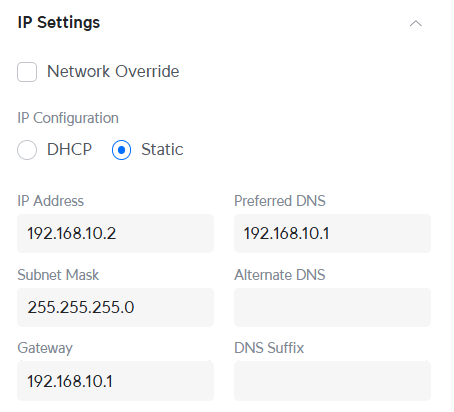
Before I hit apply on above settings, wanted to make sure that this is the best/only way to set an IP for APs & switches. Using "Static" just feels weird to me after using DHCP reservations on every other router I've owned up to and including the ER12.
Settings question: For my static IP DNS settings above, should I just point at the UCG Ultra for DNS? Or better to put something like 1.1.1.1 in DNS and 8.8.8.8 in Alternate DNS?
And...update, just found this, but it's from an older post on the UI board...has anyone set a DHCP reservation for a Unifi device this way?
- Alternatively you can copy the AP's MAC, go to the clients section -> add client and add it there. This will tell USG to provide a stable IP to your AP via DHCP.
You can set up DHCP for the UniFi devices. Go to client devices, make sure all are showing (you may need to refresh the page). Sort by IP address. Any without an address should be there at the end of the list. The 'add client' with MAC address should work too.
Thanks...my Unifi APs and switches don't show up on the Client Devices page, that's normal as I understand it, as they do appear on the Unifi Devices page. Sorting by IP on the Client Devices page, I have one Ubiquiti device at the bottom but it's MAC doesn't match any of my Unifi Devices listed on my Unifi Device page...and when I searched for the MAC addresses of several of my Unifi Devices on the Client Devices page, they are not found (as expected).

So I don't see any way to set a DHCP reservation for the Unifi on the CLient Devices page other than via Add Device, but that feels odd to add a new device using one of my AP's MAC address when the AP already exists in the Unifi Devices page. Below is the Add Device dialog:
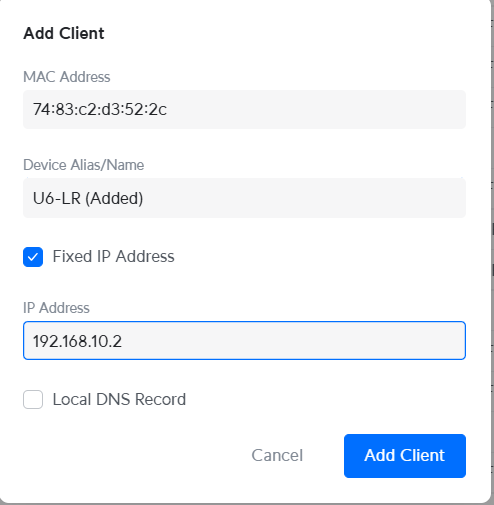
Sorry, but I feel like I'm misunderstanding your point...it sounded like you were saying there are two ways to set an IP reservation on the Client Devices page, the "Add Device" method and another way. Can you elaborate a little more about the option to set a DHCP reservation for my Unifi devices on the Client Devices page, without using the Add Device option?
Sorry, mine was in my list as it was still in a previously connected state. I removed it from that list and it didn't come back. So, the way to do it is just via the 'add client' functionality on the client device page. Once you do it the devices will be in the list, but they'll be in light gray font with no useful stats other than IP address.

Thanks for confirming...I just completed this for one "test" switch in case it blew anything up, did not cause problems of course as you note.
Client Device page "Ghost" (dare I call it that here?!)  w/reservation setting:

Unifi Device page w/actual device - rebooted the switch and it picked up the reserved IP perfectly.

This is an odd user experience, but if that's how Unifi wants it, I'm fine. It does provide a way to have a nice quick list of my Unifi DHCP reservations.
Thanks very much for your help! 
[Some time later...]
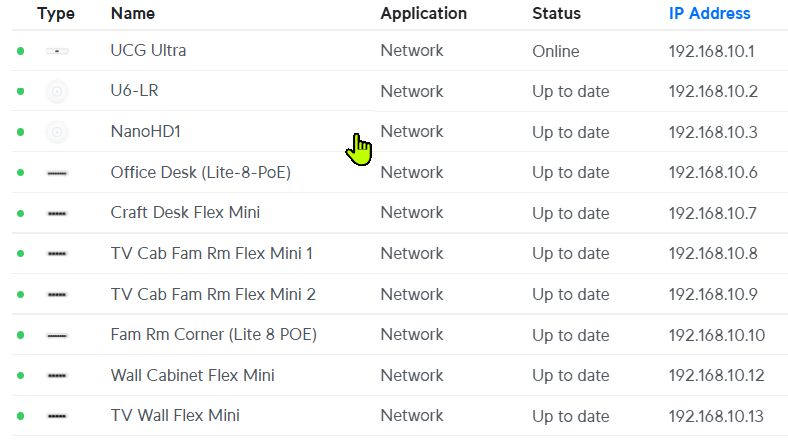
IP address OCD sorted!! IPs 4 & 5 are held by NAS devices, too many dependencies on those IPs to mess with so they always get to keep those and sit in the middle of my Unifi gear. I kept a "spare" IP at 192.168.10.11 where I may be adding/changing something later.
3 Likes
Only one spare IP for more gear? Oh... you are definitely underestimating the addiction...
2 Likes
One spare in that range. I set aside 50 reserved spaces out of my DHCP range.


Made what seemed like a couple of minor changes this AM, disabling Minimum Data Rate Control settings I had put into place a couple years when troubleshooting an issue I don't even remember (I think there was an issue w/a FW version that I was working around, maybe...) Anyway, I set it back to Auto on my networks:

After the change one of my APs (U6-LR) went offline and wouldn't come back until I restarted the both switches in the chain back to the UCG. Rebooting the AP (twice) didn't help, rebooting the switch the AP was directly connected to didn't help. Finally rebooted the switch between the UCG and the switch the AP is connected to, and the AP came back online.
Unifi is offering a ProofPoint CyberSecure (can't they just buy a space for their product names!?) for $99/month. [EDIT: That's $99/year!!] I'm seeing conflicting responses regarding usefulness/effectiveness of it.
Reddit topic here w/particularly dismissive comments on it, including this:
Don't forget that the vast majority of internet traffic is encrypted and hence, this Proofpoint thing has zero chance to actually inspect that traffic. You are wasting your money.
Appreciate any opinions. Seems like this is likely a "nice to have" that might help in a pretty limited number of cases, but this stuff is not an area I'm an expert in at all.
I think that is $99 per year, right? No way I’d consider paying $1200 a year for this. 
As for its value…I’m not seeing it. I only have one open port on my router, and that is for my WireGuard VPN server running on my UDMSE. So, I am already very well protected from external threats. No kids in the house any longer, so the risk from within is pretty low as well.
On an entirely different topic…I did set up Cloudflare as my new dynamic dns provider this weekend. This was not super hard, but not trivial either. If you decide to go down that particular rabbit hole, let me know as I took some notes so I could reproduce the solution some day in the future. The issue is that Cloudflare does not really want to make it easy to update a DNS entry (I.e. they don’t advertise themselves as a dynamic DNS company like DynDNS, NoIP, etc…)
Yeah, yearly! Oops!
Thanks, seemed that way to me as well, I'm also 100% locked down aside from Wireguard.
This is very interesting... No idea they did dynamic DNS. Currently using DuckDNS. Can you share a few details about why you switched from whatever you were using? What improvements you expect using Cloudflare rather than a service like DuckDNS or whatever you are using?
Of course your post sent me down a little bit of a Google rabbit hole... If setting it up involves all of something like this, I'll probably pass on trying it... Though still very interested in the reasons for doing it 
Yes that is correct they advertise a full featured DNS service which you can use their API to control IP addresses for DNS names. I do this for some services in my home lab. A secondary feature by having API access is that LetEncrypt certs can be wildcard if you setup the API connection to LetsEncrypt to issues certs.
1 Like
Not expecting any improvements whatsoever. I have never been a DuckDNS fan - not exactly sure why, just always felt like it wasn't for me for some reason. I am also not willing to pay the big bucks to folks like DynDNS. Once they changed their pricing model, I stopped using them. I used to use Asus routers, and I liked using the free Asus dynamic DNS solution. However, I lost that when I switched to UniFi.
So, I wanted my own domain name, and Cloudflare makes that very easy to do. Just be careful to not buy the cheapest TLD (top level domain) as most of those are country based, like ".us". Unfortunately, the ".us" TLD does not allow for redacting your personal information from a WHOIS query. I didn't like that, so I unregistered the .us domain and created a ".org" one instead. So, for about $10 a year, I now have my own private domain name.
It is then pretty easy to add a DNS entry for your private domain name, using the IP address of your current WAN connection. This is a manual process via a web front end in your Cloudflare account. So, if your home's IP address ever changes, you'd need to manually update this. However, As @ronv42 mentioned, Cloudflare does have an API that can be used to update a DNS entry.
Unfortunately, there is no built-in option in Ubiquiti UniFi to make use of the Cloudflare API to update a DNS entry. Thus, creative people have come up with some creative solutions. I did not want to mess with my UDMSE outside of the built-in GUI. So this led me to use DNS-O-Matic, which is an option built-into the UniFi dynamic DNS tool. I first had to set up DNS-O-Matic to be able to access my Cloudflare account's DNS entry, and then set up UniFi to send the update to DNS-O-Matic.
It is working and I am happy with the result. I will need to pay Cloudflare ~$10 a year to retain my private domain name, which I am fine with.
So, in summary - if you have DuckDNS running and you are pleased, don't bother going down the rabbit hole that I fell into!
3 Likes
Thanks for all the details...
How can you not love a duck?! It's the only DDNS service I've ever used, so not like I can say it's better or worse than any other, but have to admit I was initially attracted to it in part because of the logo. To each his own (duck).
Did not know that, thanks for the heads-up.
I think I'll hold w/what I've got a the moment. Still haven't completely finished my migration to the UCG/Unifi switches, and my wife (newly retired) has an amazing number of "urgent" tasks that she keeps adding to my to-do list.
1 Like
I hopped back over to the DuckDNS website to see if I could recall my reasoning for not wanting to use the service... I immediately recalled that DuckDNS does not allow logins without using a third-party service like Google, GitHub, etc... to perform the login. I have never been a fan of using my other accounts as a login method for a third-party site. That was the extent of my 'hangup' with DuckDNS.
1 Like
Funny - me too. I don't like using my other accounts to login if I can help it, but darned if I can offer a really good reason for feeling that way. 
2 Likes
Looking at my support file (downloaded it to see what it was logging) and seeing this error once or more a day. Everything is working fine...all connected devices and routers/switches are humming along as far as I can see.
> 2025-01-27T19:30:00.656-08:00 - error: [systemd] Unable to get HTTP status for unifi: http://127.0.0.1:8081/api/ucore/status returned status code of 503
> Error: http://127.0.0.1:8081/api/ucore/status returned status code of 503
>     at file:///usr/share/unifi-core/app/service.js:177:49941
>     at processTicksAndRejections (node:internal/process/task_queues:95:5)
>     at sG.maxWait (file:///usr/share/unifi-core/app/service.js:177:40151)
503:
The HTTP 503 Service Unavailable server error response status code indicates that the server is not ready to handle the request . Common causes are that a server is down for maintenance or overloaded.
Did some googling on the error text and didn't see anything very helpful. Any suggestions (e.g., ignore it, OMG call the cyber-security police...) appreciated.
If you are concerned about it i would open a support case with them or post it on their forums. It looks like it is just pulling status info though.
Are you running the latest version of their network software?
1 Like

