As far as the AP's go themselves, I am very satisfied with them. They look nice with the stand ubiquity provides and they seem to function pretty well. I did see somewhere the radio signal dispersion showed a lower signal to directly behind them. The key with that statement is lower but not non existent. In my case that isn't a issue but that may simply be because of how I to them positioned. One is litterly only a few inches from a outside wall on my desk while the other one only has one room directly behind it. The one in my living room seems to cover anything that is behind the plane of the antenna's pretty well
I am really impressed with the 6ghz radio on these. I have my AP's transmit power turned way down and the 6ghz band reaches through my walls fine and in many cases has better signal then the 5Ghz band since it is set just one value lower.
Something else to consider is that there are a bunch of things you can 3d print to be stands as well if you want to.
The key TL;DRs of that wonderful topic about splitters were
"... My opinion is that Z-Wave on the C8 appears to be very sensitive to voltage fluctuations..."
and that you can use splitters w/the C8/C8-Pro, but:
"That said, my opinion is that the splitters that work are ones that have isolated switch-mode power supplies (SMPS) with good voltage regulators. This makes them heavier, and generally more expensive, but they work reliably. I'm sure that there are other splitters of this ilk that can be found, but I've come to the end of my project for now. YMMV"
I'm using one of the recommended Procet splitters w/my C8-Pro, have been since that topic was posted and I ordered the Procet, and have had zero issues. Works perfectly.
That said, the POE topic includes a "YMMV" note from @dennypage, and I think we've all seen enough general HA results variability in this forum that we're aware of that general caveat.
Yea. I am very much aware of the potential for issues with Hubitat. That is why right now i am testing with one of my extra hubs. I still haven't taken the plunge on putting my C8 Pro on it. It is currently connected to a regular C8 that the Pro version replace. The one i got is the PT-PTC-AT which is seems to be the best one based on that thread.
I was really asking though about folks using POE to power other usb type devices beyond the Hubitat.
I'm powering a couple of RPIs using splitters, and also powering my Lutron hub w/a splitter. No issues.
I'm going to move my Hue bridge to a splitter as well at some point to reduce the wall plug clutter under one of my desks where I have ethernet running to my C8-Pro, Lutron, and Hue bridge.
Getting more interested in the in-wall APs. Never really considered them before, but one might work well in one spot in my house where I want to drive the Wi-Fi signal farther out into the front yard (Govee-related) and something a little bit directional would fit my needs better than a typical ceiling mount going equally in all directions. Doing some "Hmmmmm..." here.
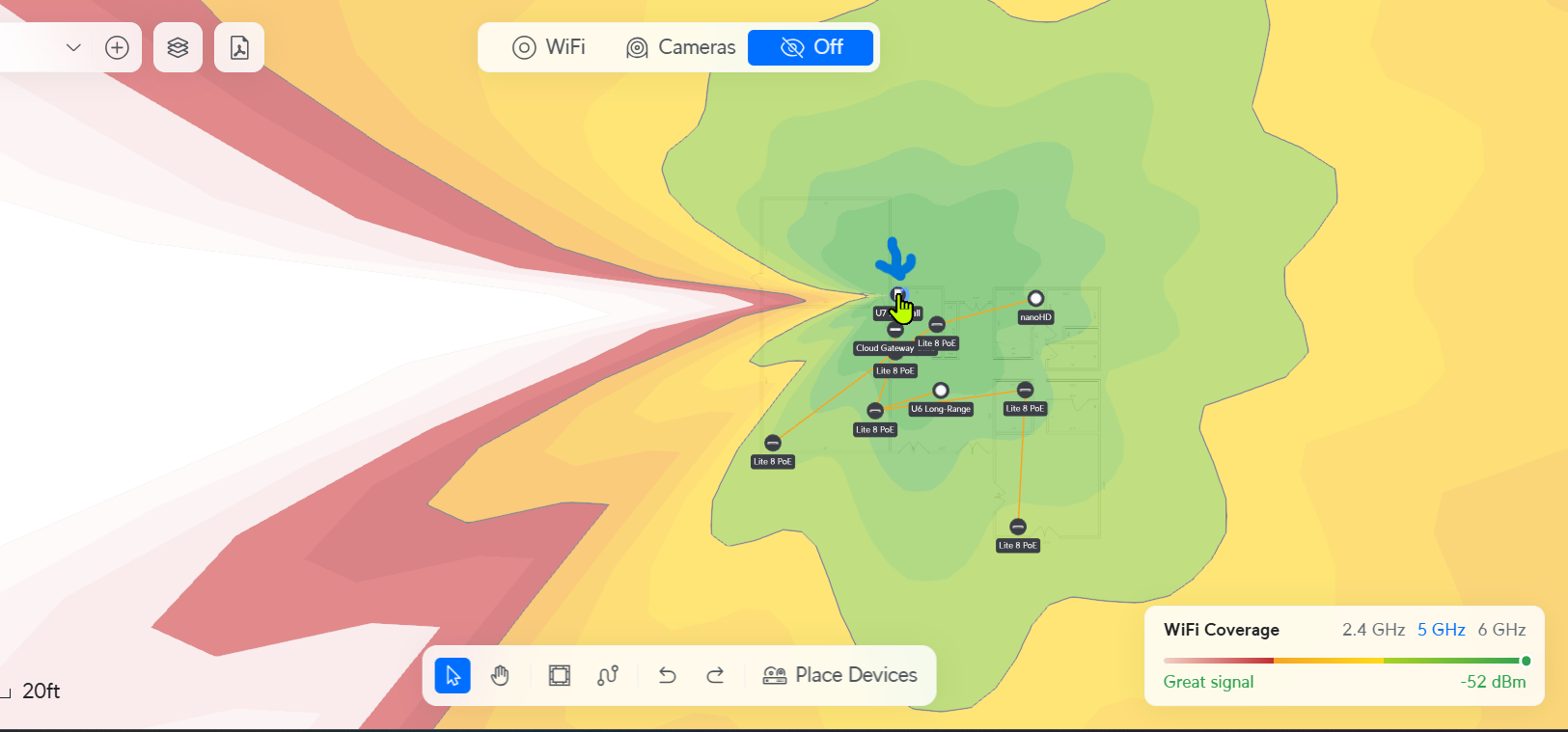
Did a quick placment of a U7-Pro Wall, and this is what Unifi shows as its expected signal pattern in their Design Center...so def a directional signal, and could help reduce intereference if you have multiple APs in your home if they were facing away from each other. Arrow points to AP, it's facing right.
I currently have 2 of the U6 Mesh. One sits on a table in my living room and covers my entire 1st floor. The other sits on a desk in my home office and covers my entire 2nd floor.
They are no different than any other AP other than the size and design.
With this type of AP, I never have to worry about running cable to a location on a wall or ceiling.
That is nice...would likely have higher WAF for my son if it can just sit on the desk, and the coverage map looks good, broad and in all directions. A U6-Mesh or U7-Mesh may be the way to go.
Gotta stop spending time here, my son might end up with five APs in a 1300 sq ft home.
I love the form factor of the Flex HD (WiFi 5) and U6 Mesh (WiFi 6). I have one on the first floor in the family room. Another second floor on a table in the hallway and one in the basement mounted on a wall. When I walk the house with the WiFi Man app on 5 GHz I get mostly green a few feet from the AP and then yellow. On 2.4 GHz it's overlapping green between the three.
I have 3 Flex HD'S in inventory and getting ready to mount two of them outdoor on the corners of the back of the house to cover the back yard. No reason to put WiFi 6 outdoors right now.
If you are looking for an AP to sit on the desk, I’d highly recommend looking at the new Express 7. The UX7 can be a wired (or wireless) AP and would provide a port to use on the desk. This would give both WiFI 7 and a 6Ghz band in the room compared to the U6 Mesh. I’m pretty sure they both cost the same (or close enough) that it might work better for your son.
It can be a slippery slope as one falls down into the UniFi rabbit hole! I recently added some 2.5GbE functionality to my home, as a I built an UnRaid server recently. It really is nice how easy it is to manage all of these UniFi devices from a single UI.
The issue I have with that device is that it is not POE. So that means that instead of a single Ethernet cable, I would need to run the power cord and have an additional rather large power brick plugged in somewhere.
 Lounge - Hubitat