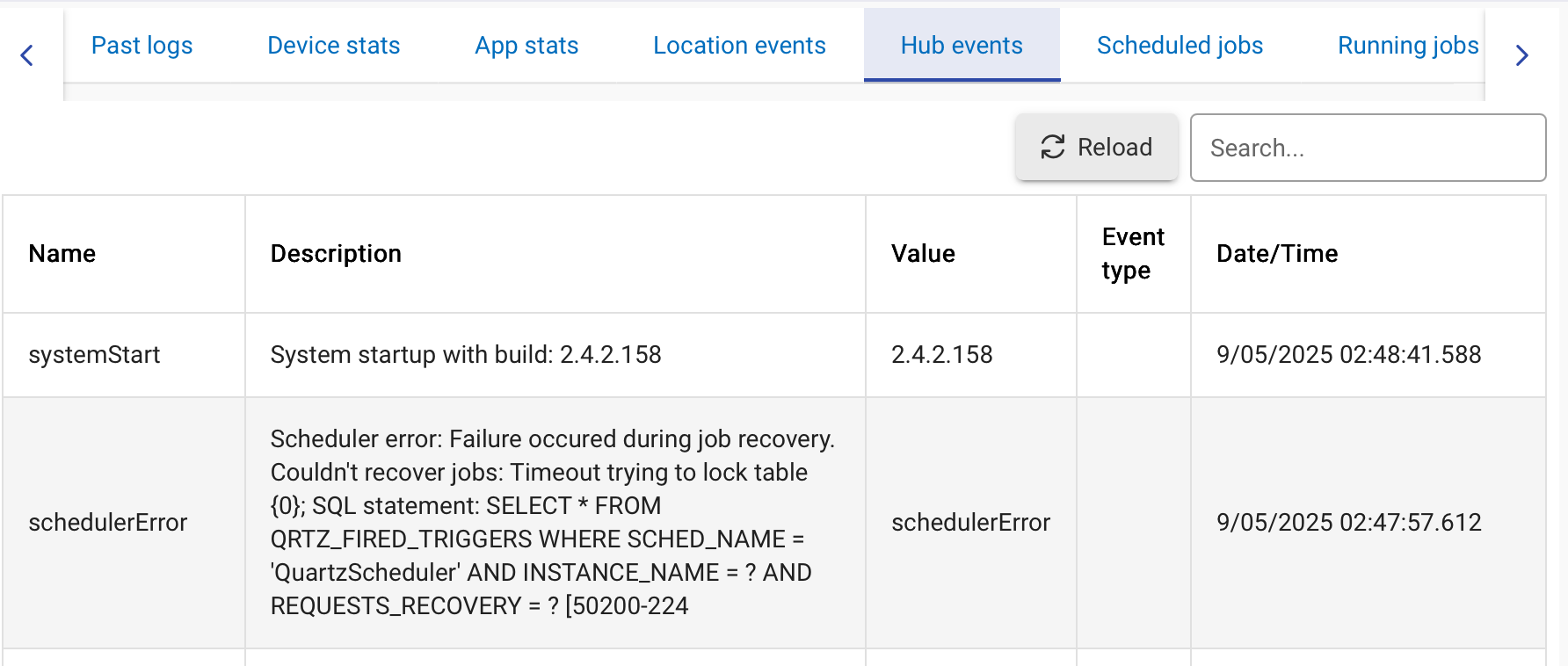
C8-Pro, 2.4.2.157. After the last upgrade none of my motion triggered automations work properly. They turn on switches when motion is activated but do not turn off switches when inactive triggered. All worked flawlessly for several years, now no lights turn off. I tried Rules, Simple Rules, etc. Nothing can get the lights to turn off after waiting for a fixed time or for motion detecting no activity. I've temporarily moved the motion automations to Home Assistant and they work fine with the HA algorithm. So it is not the devices.
Please share more information, including at least one specific app you were using, plus is configuration and logs from that app (with all logging enabled) and possibly logs from the device (with descriptionText logging enabled).
For more about the kind of information it would be helpful to share, as well as some things you can try on your own, see:
Are you sharing the devices directly between the two platforms, or did you re-pair/etc.? From the limited information above, you haven't ruled out a problem with the device on Hubitat (not necessarily the device itself, possibly the configuration or driver, but the general idea is that you need to narrow it down to the app or device to know where to start).
2 Likes
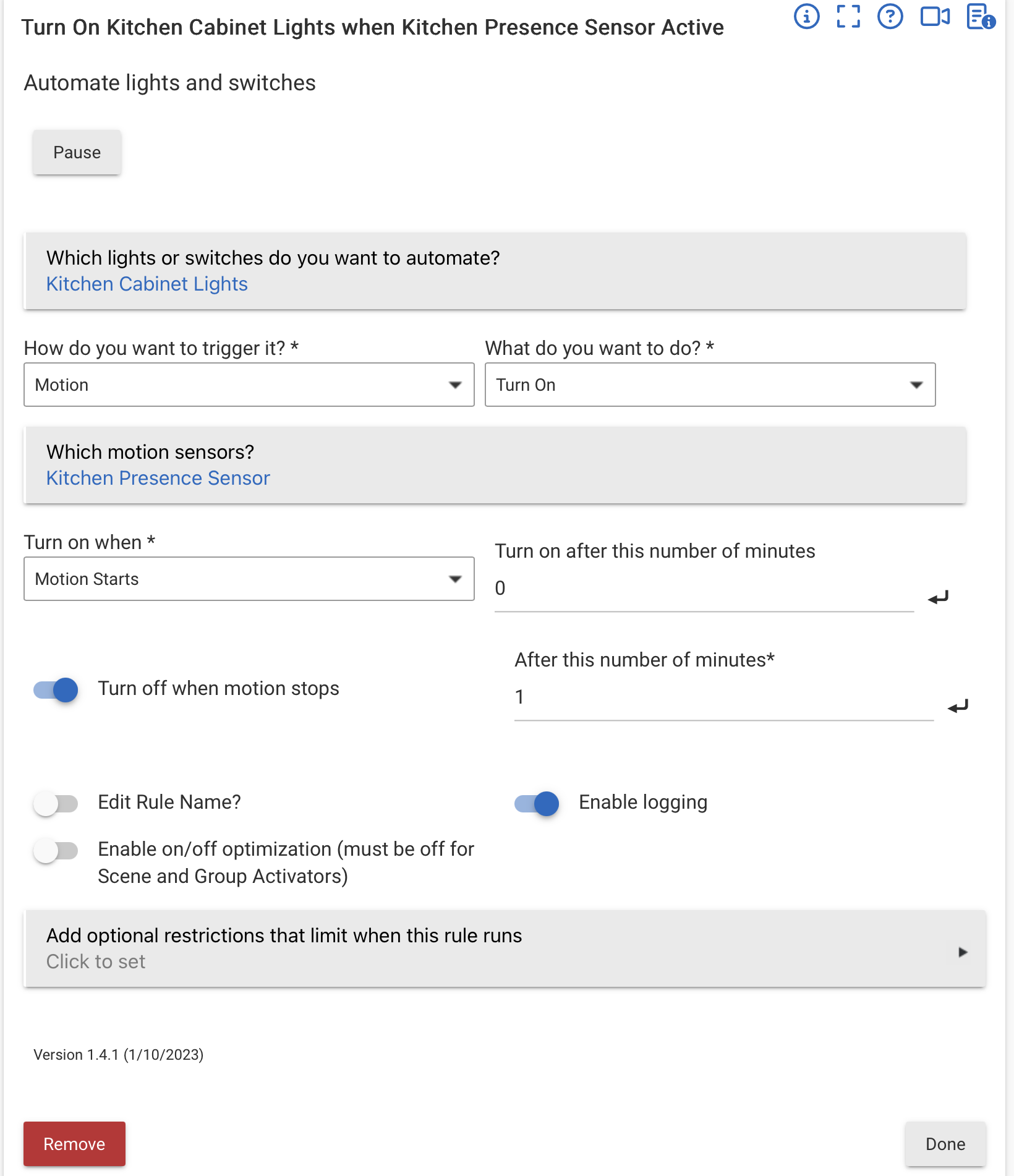
I will recreate an automation and get the log. I deleted them all and rewrote them on HA. I had about 15 automations - motion detector turning lights on when motion detected then turning them off after delay when motion no longer detected. All stopped turning lights off with the latest software update of the C8-Pro. Logs showed them turning on, but never showed them turning off. I will post the automation and the logs once I recreate one of them.
Screenshot of the automation:
Logs of the app:
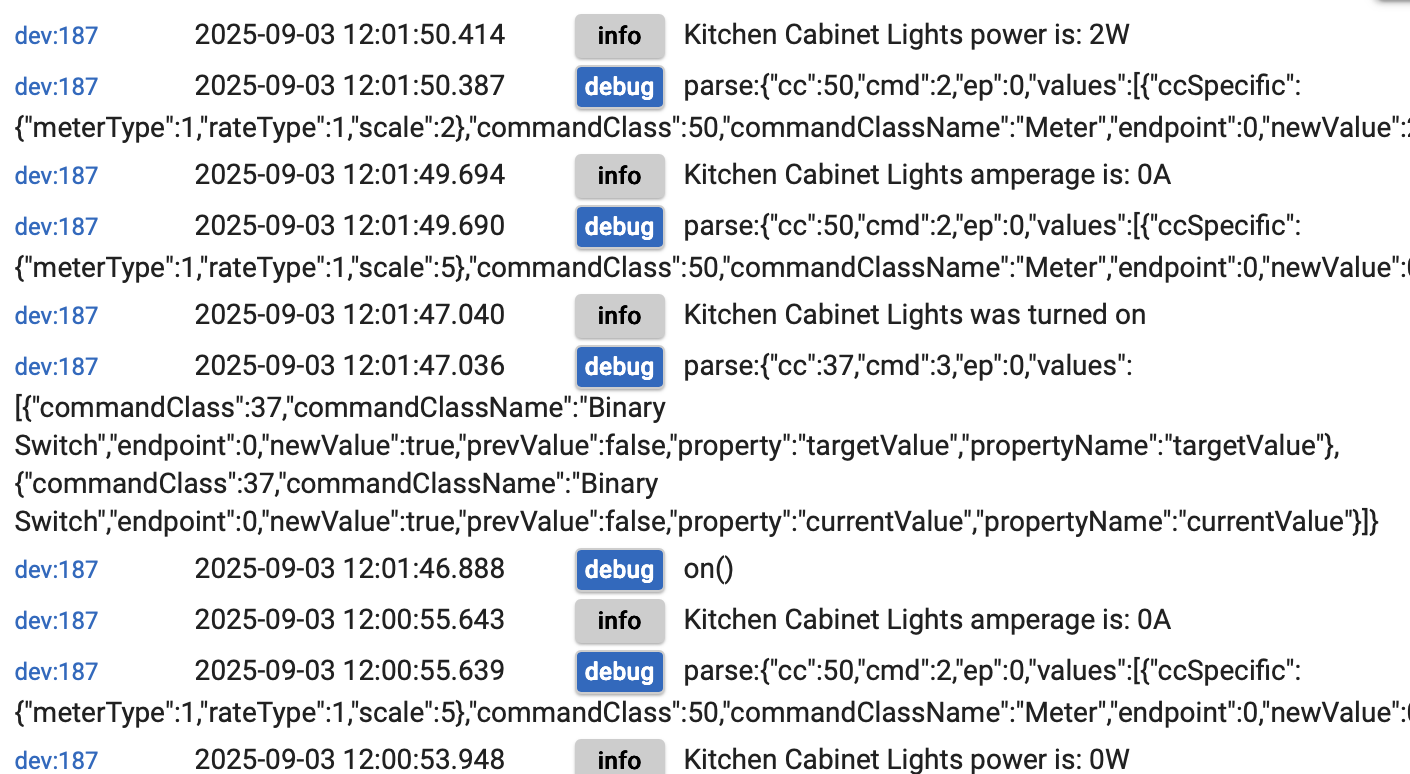
Lights turn on but never received a command to turn off:

Log of the device turns on with motion but does not turn off:
How about logs for the Kitchen Presence Sensor (presumably mmW?) -- is it actually going Inactive when it should?
mmW sensors can be rather notorious for getting stuck in Active.
1 Like
It is a zigbee Aeotec motion sensor and log shows it is working and going inactive. I use HE for all automations, zwave, and zigbee.All Habitat device information is sent to HA via Maker API. If I set up automation in HA it works well, meaning the devices are all working and sending the proper information to HA via HE and Hubitat is controlling them properly. Pretty much isolates the issue to the Habitat automation having a problem sending the proper signal when the sensor becomes inactive.
I also switched to ZwaveJS and back to legacy and the problem remains. Since the switches are zwave. Probably an unnecessary test since the log shows no command to turn them off was sent from HE.
I've tried Simple Automation Rules, Basic Rules, Rule Machine. The motion sensor shows it is sending the correct inactive signal, but the automations do not turn the lights off in response. All 15 automations involving motion sensors worked before the last update. I re-wrote all the automations in Home Assistant and controlled the zigbee and zwave devices via Hubitat and they work fine. So I am confident the motion sensors and switches are working and Hubitat is getting the sending the correct responses to devices. The conclusion is automations have a bug and they stopped responding when a motion sensor becomes inactive.
At this point I have decided to move all automations to Home Assistant since I discovered its response seems snappier and consistent. If this gets resolved I may try HE automations again. I assumed HE should be more responsive with devices and automations both within HE.
It would be interesting to know if Webcore still works for you with these motion automations. Then you have the test of using an HE automation app besides Rule Machine on the hub itself.
It would prove it is RM and not the hub if Webcore works. I've never liked, or used, RM, past playing with it to see what it can do. I used only Webcore for years before I started just writing my automations into Groovy apps.
It seems strange HA automations would be faster, given it uses the API vs direct hub access by RM. Interesting observation though.
Have you tried controlled shutdown/remove power from hub for 30 seconds/repower hub?
I tried in Webcore simple algorithm to turn a light on wait 30 seconds and turn it off. The light turned on quickly but never turned off.
I tried turning off for 30 seconds, rebooting, several times. At this point RM, Basic Rules, Webore will not turn off switches when they go inactive, or wait for a fixed delay once they are turned on as a result of a motion sensor. Automation in HA works fine using HE as a zigbee/zwave controller.
That makes it seem more like a hub issue, then, not something tied specifically to RM. So you can turn off the device on the device page, and on dashboards, and with APIs, but other apps cannot?
Both RM and Maker API are built in apps that have full device object access... I could see if it was only user apps having the issue, but it is strange that one built-in app has this issue (RM) but not the others (Maker API, Dashboards).
How about installing the latest hub update? Perhaps just the installation process will get it working again.
I think it would help if you could please confirm the exact version you started running when the issue started occuring. You mentioned in the original post:
Are you saying that the issues started happening when moving to .157, to the most recent public release (2.4.2.158), or onto a more recent beta release?
While not complete absolution, the release notes for 2.4.2 around this version doesn't appear to offer any possibilities.... even with the Z-Wave updates.
For all you have described, I would say it does sound odd and like there is something not right somewhere. I am likely to not have read everything closely enough, but have you mentioned what driver you are using for the motion sensor? Given a variety of HE apps are not firing I am wondering if it is something to do with how the driver is raising the events within HE that is causing HE apps to respond differently to HA automations.
The issue occurred after updating to 2.4.2.158. The mobile app used to connect to HE still gives status as platform version 2.4.2.157 before connecting and does not seem to update regularly so I apologize for posting the wrong version. It may be a coincidence that it occurred after updating to 2.4.2.158. The devices seem to work fine and can be controlled through the HE dashboards and with HomeKit or HA automations, but not HE automations. All the devices are all connected using HE zwave/zigbee. HE logs show that HE automations are not logging a change when the motion sensors go inactive when though the motion sensor's log shows it going inactive. This happened to all 15 automations - some in RM, some in Simple Automation, and some were in Basic Automation that had been working for many months. Some automations used zigbee sensors and some used zwave however that does not seem to be important since the sensors are all reporting properly to HE.
No worries re what you posted, I just wanted to make sure we had the right info. I certainly know about getting so far down trying to solve an issue that I can lose track of what was happening when the issue started.
It feels like it is worth starting from the basics of confirming the devices involved work within HE as expected, then look at them working together. I'm not likely to have a clear explanation of that right now, but that is where I would head, and unfortunately is where you have already focused your efforts with assistance from others here.
I created a time based automation in HE to turn a switch on and then off after 1 minute. The switch never came on. Same automation in HA turned the switch on and off properly. I can turn it on and off in HE dashboards. At this point HE automations do not work on my C8 pro with latest software. I may try to reload a back up version. I have already moved all automations to HA and HomeKit for the time being.
Could it be the HE radio database? If you have cloud backup service, maybe restore a version from there?