I have this strange, unsolvable issue, with 12/13 motions.
Contacted the dev who did the Aqara P1 Motion Sensor @kkossev driver and we're both stumped.
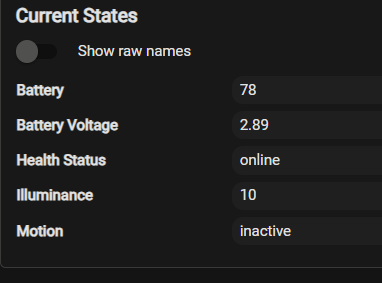
All the motions now report 2.89 VDC and 78% battery.
A while ago (not sure what firmware) they reported 100% and 3.05+; I usually look at Health Status.
Driver hasn't changed and I can't imagine how a beta build could do this.
I have changed some batteries with load tested new cells and I get the same data.
ZB log data seems useless for data payloads.
dev:1062025-11-09 17:14:14.236infoprofileId:0104, clusterId:0000, sourceEndpoint:01, destinationEndpoint:01 , groupId:0000, lastHopLqi:100, lastHopRssi:-75
Just to double check, but are you saying you are running beta Aqara P1 Motion Sensor firmware on multipule sensors that are all exhibiting the same unexpected behavior?
I am assuming your sensors are powered by lithium coin cells. These cells have a nominal voltage of 3 volts, but when new, the cells should have a voltage near 3.2 volts. When the voltage drops to 2.7 volts, the battery is dead.
If your batteries are now at 2.89V, then they might well be 78% life. If the voltage is below 3.0 volts, the batteries are definitely not new, unless you purchased poor quality batteries. The OEM batteries that come with most sensors are cheap, low quality. You are better off with brand name batteries like DuraCell and Panasonic.
Pull a few of the batteries and measure their voltage using a voltmeter. It’s the only way to know for sure if the batteries are truly low or if the sensor is just reporting them as low.
I think the general theme here over the years for battery measurement and reporting of 'measure the activity, not the battery stats' does have merit. I still use battery reporting to give me a general heads-up, but generally wait for a lack of activity to bring me to action. (Locks are a notable exception here, but -for my locks- bad things happen when the batteries get too low.)
As a data point, the temp sensor in my freezer has shown 14% for months. Understandable, given the temperature/voltage curve, but replacing it, even with a known-good battery, would do me no good as far as the reporting is concerned. It would just go down to a lower level. I'll get the alert when it finally dies and replace it then.
Other than that, I agree with the above posts. Use quality brands from reputable suppliers, and if you're really curious, pull one or a few of the existing batteries out and check them with a meter. (Even if just for the data logging.) I replace all OEM alkalines before installation, but I'll let OEM lithiums go until death, if they're in a decently accessible location. You could obtain some 'good' batteries, and replace just one, to compare while observing the units over time.
I have used the same Li cells for years without issue.
I tried Panasonic once and they all were poor in longevity.
As stated earlier I have measured and load tested each battery while looking at this issue.
I am an Elec Technologist and IT admin so very familiar with physical resolution processes. I'm retired now but I don't think I forgot everything.
I changed drivers a little while ago to get Health Status working properly.
I am now going back to my old drivers and noting their battery calculation.
So far there is a difference from oh-lalabs. One of my previous drivers reports 2.89 VDC but the battery state says 96% not 78% so he is using a different calc from @kkossev .
My whole reason for monitoring battery as well as Health Status was to be be proactive in changing the batteries. Health Status can get stuck, it seems, "Online" if the battery fails. That status is only for communication issues and not a true sign of the battery death.
Testing continues on one other driver I was using from @chirpy
Thanks for all the suggestions.
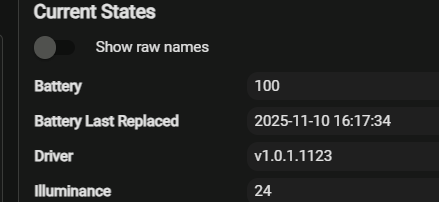
New battery (3.2 VDC) on 3 different drivers.
I guess when I went to one specific set that reports Health Status properly
it also did the percentage calc differently hence the 78% all around.
Too bad I don't get a voltage on the last one, curious if it's says over 3VDC like the first.
Conclusion here is I live with 78% as I want the Health Status.
It is confusing how 2 drivers, which I assume get the same data from the device about battery level, have different values.
I get that the percentage is calculated in the driver so it could be different.
I can only deduce that the battery voltage is also calculated differently from the raw data.
batteryVoltage 2.89 V Battery voltage is 2.89 V physical Work Room Motion 11/10/2025 15:45:26.857
battery 78 % Battery level is 78 % physical Work Room Motion 11/10/2025 15:45:26.859
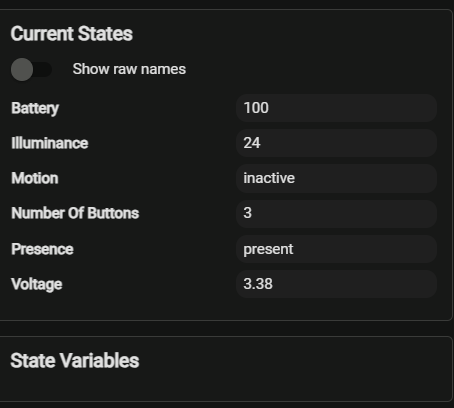
voltage 3.38 volts Work Room Motion 11/10/2025 13:57:44.048
battery 100 % Work Room Motion 11/10/2025 13:57:44.047
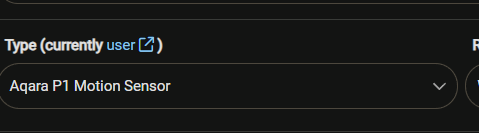
I propose you to stick to one driver only - my recommendation is the "Aqara P1 Motion Sensor" as this is the one that I am currently supporting with new models and new features :
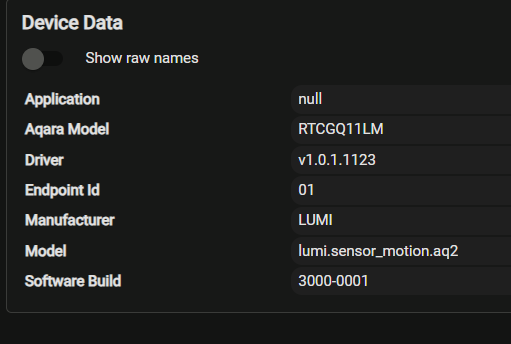
Note, that there are at least four different Aqara motion sensors that look (almost) the same, so the first step would be to identify one of your devices (only one!), and go to the bottom of any issues that you have with it.
Yes I plan on sticking with yours.
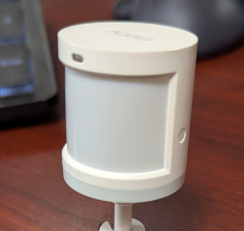
These are the little guys but I can't see a part number.
I see the newest ones on the web site look a bit different.
From web:
The Aqara P1 motion sensor is an upgraded version of the older model, featuring Zigbee 3.0, a configurable timeout, adjustable sensitivity, and double the battery life due to using two CR2450 batteries instead of one. The button to initiate pairing was moved to the back and made easier to press. It also has a larger and heavier design compared to the original sensor.
@dnickel I am currently unsure why these reports indicate a constant battery voltage of 2.890. I will investigate this over the next few days and will keep you updated on what I discover. Thank you for reporting this weird issue!
The Aqara P1 RTCGQ14LM (lumi.motion.ac02) is a significantly different device compared to the Aqara RTCGQ11LM (lumi.sensor_motion.aq2). They are different generations.