New C8 pro
Added a ZOOZ ZSE70 motion detector.
This device includes two child devices temp and luminosity. How do I get those to show up as individual devices - or show up anywhere?
Are you sure? What driver are you using? With the stock driver, these show up as attributes on the "parent" (only) device. This would be under "Current States" on the device detail page.
If you just added the device and don't see anything for this yet, it's possible it just hasn't sent in a report yet. If nothing is working (you should also see motion there, and that should be easy to test, or you can look at "Events" to see what's been generated recently), then you might have a problem that could be solved by excluding and re-including the device -- but knowing more about what's happening for you would be the best way to get more specifically advice if the above isn't it.
2 Likes
Child devices are not needed for a multi-sensor device. All values will show on the main device page once data is reported from the actual device.
If you want them as separate devices you would have to create virtual device and mirror the values from the main device.
3 Likes
Well jpt1018, if you are right, that's unfortunate. It doesn't seem to me that devices with children aren't fully integrated if the children don't appear automatically as they do other hubs and then have the option to delete.
bertabcd1234, how do I know what driver I'm using? Seems to me that if a device is advertised as being compatible I shouldn't have to try to investigate drivers. I've switched to the Hubitat hub to avoid these kind of issues.
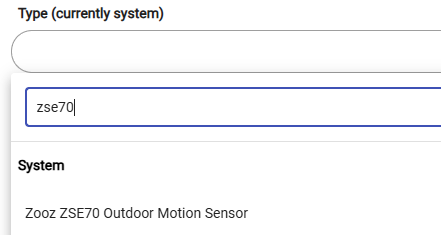
You shouldn't; that's why I'm curious if something is wrong. You can check the driver currently in use by following the instructions on this page and just looking, stopping before you actually change or save anything: How to Change the Driver Used by a Device | Hubitat Documentation
I still think you might be caught up the idea of "child devices" -- you don't need one, as all attributes will be exposed on the main device with no need for attribute-specific child devices (generally only something you'd run into when there would be a conflict, like a power strip where you can't put everything in the parent using standard attributes and commands without some other solution). You might be confusing this with something from another hub.
So my questions are to figure out if the device is actually working for you or you're just looking for the wrong thing. One important one remains unanswered, by the way -- what does "Current States" look like?
1 Like
They do when they are needed, this device does not need any child devices. You just need the correct driver selected for it.
2 Likes
Why would you delete a child device? You can just ignore the stuff you don't use, it doesn't hurt anything to just sit there.
I know the device is working. I've seen evidence in the log: motion, liminance and reports of temperature changes.
I'm not implying that child devices should be deleted -I'm just trying to get them to show up.
This is from a ZSE70. Go to the device page. What do you have there?
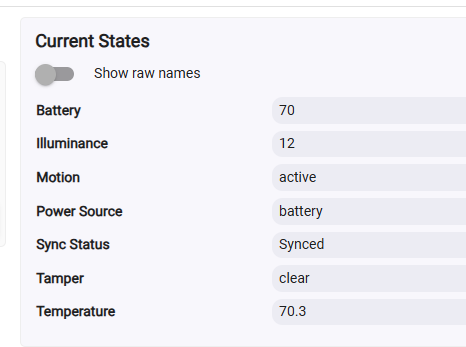
Also check on Device Info, what is the "Type" set to. See the screenshot on my prior post.
2 Likes
Ok, then where is the problem? You don't need child devices. As mentioned above, everything should be availabile on the (only) device itself. Again, I suspect you might be trying to transfer knowledge of how one hub behaves to another that works differently.
Maybe look at this from another angle: what are you trying to do, and where are you getting stuck? Screenshots may also help describe.
3 Likes
The devices are there, why not use them? They appeared along with the motion sensor - as separate devices in my pevious hub. I may have use for the illumination data.
Assuming your device and driver are working properly, those things are there, and you can use them... They're just not in the form of child devices.
Motion, temp, and lux are simply capabilities of this Zooz sensor device -- those 3 capabilities can be (seperately or in any combination) called upon / leveraged in any automations. They don't have to be child devices in order to be used.
3 Likes
Well obviously this hub is a little different than whatever you used before.
Do you actually have an issue or are you just here to argue and complain?
If you have an issue please clearly state what you are trying to do and we can help.
1 Like
Sorry if Ive stepped on someone's toes. I do have an issue - I think it's stated clearly in the thread. I thought my search for help was pretty clear and not an some obscure idea. To summarize the responses: why do you want that, you don't need that. OK, consider the case closed.
It is actually an obscure idea for Hubitat, having child devices when they are not needed.
If you want to create your own custom driver for the ZSE70 you could, and have child devices for every attribute. But, it is not needed with Hubitat to do so.
If you explain what you are trying to do or why you want the child devices then maybe we will better understand what you are trying to accomplish and be able to provide better information.
So for your original question:
No, actually, it does not. It simply includes those measurements and they are reported on endpoint 0 (main device). Hubitat does not split every measurement into child devices.
Mirror the values to virtual devices with rules or create your own custom driver
They should be showing up on the device page, under Current States. Screenshot provided above.
3 Likes
I think the issue is that you have refused to provide most of the information that has been asked of you, and that is making it difficult to determine if there actually is a problem or you are just expecting things to appear in a different way (nothing wrong with that -- but without knowing what's happening for you, it's hard to know where to start). Here are a few examples of such information:
-
a screenshot of "Current States" from your device detail page
something @jtp10181 demonstrated and is working correctly for him (and was also wondering about for you):
-
what driver you are using (presumably the built-one, as it should by default, but custom drivers can affect this):
-
what you are actually trying to do and where you are running into problems:
As is, we can only take your word that the device is working correctly. If it is, all of the data you're asking for you should be attributes in the "parent"/only device, and you can use them in any app as @hydro311 mentioned above. If it's not, something is wrong, but the solution does not involve child devices (which I again suspect is mis-transfer of knowledge from another hub or perhaps just not understanding what the term means on Hubitat), just some issue with the device itself, perhaps the driver, an inclusion issue, or something else that would become clearer only with some answers to the above.
Without that, there isn't much more others can do to help.
Good luck!
2 Likes
To try to clear up what I'd like: I'd like to be able to see these child - or embedded if you will, as individual devices (recognizing that they actually are not) and show them perhaps in a dashboard. Also I'd like to easily refer to them in rules that I may create. If what I'd like seems unreasonable, so be it. It may already be possible to refer to a particular undisplayed device state.
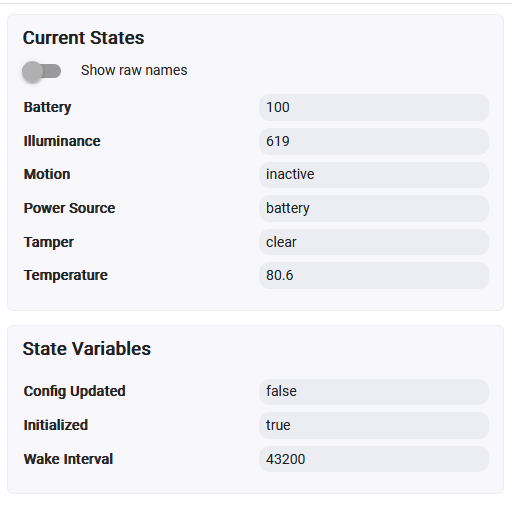
Here is the current state of the motion sensor:
1 Like
Correct, you can use those values in rules or dashboards already, as is. You do not need to break them out as separate child devices.
Here is an example with EZ Dashboard, you can have a larger combined tile with all 3 values, or you can make separate tiles for each state.
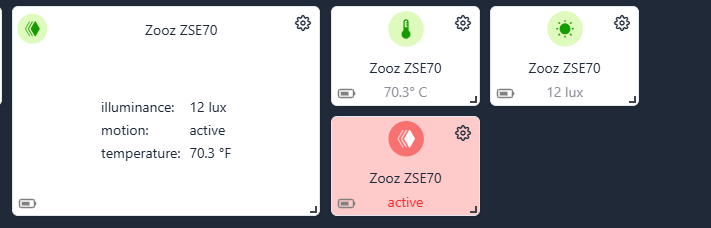
Not sure how to show an example in rules, but it is very simple in any of the rule engines. You usually pick the capability first (like motion sensor), then the next menu will list all motion sensor devices to pick from. If you pick temperature or illuminance this device will also show in the list for those.
If you still want to break the values out into separate devices, it is possible but you will have to create a virtual device and then a rule to keep the values in sync.
4 Likes

